Category: AI CRM Tools

  • HubSpot Breeze vs Salesforce Agentforce: Which AI CRM Fits Your Business?

    HubSpot Breeze vs Salesforce Agentforce: Which AI CRM Fits Your Business?

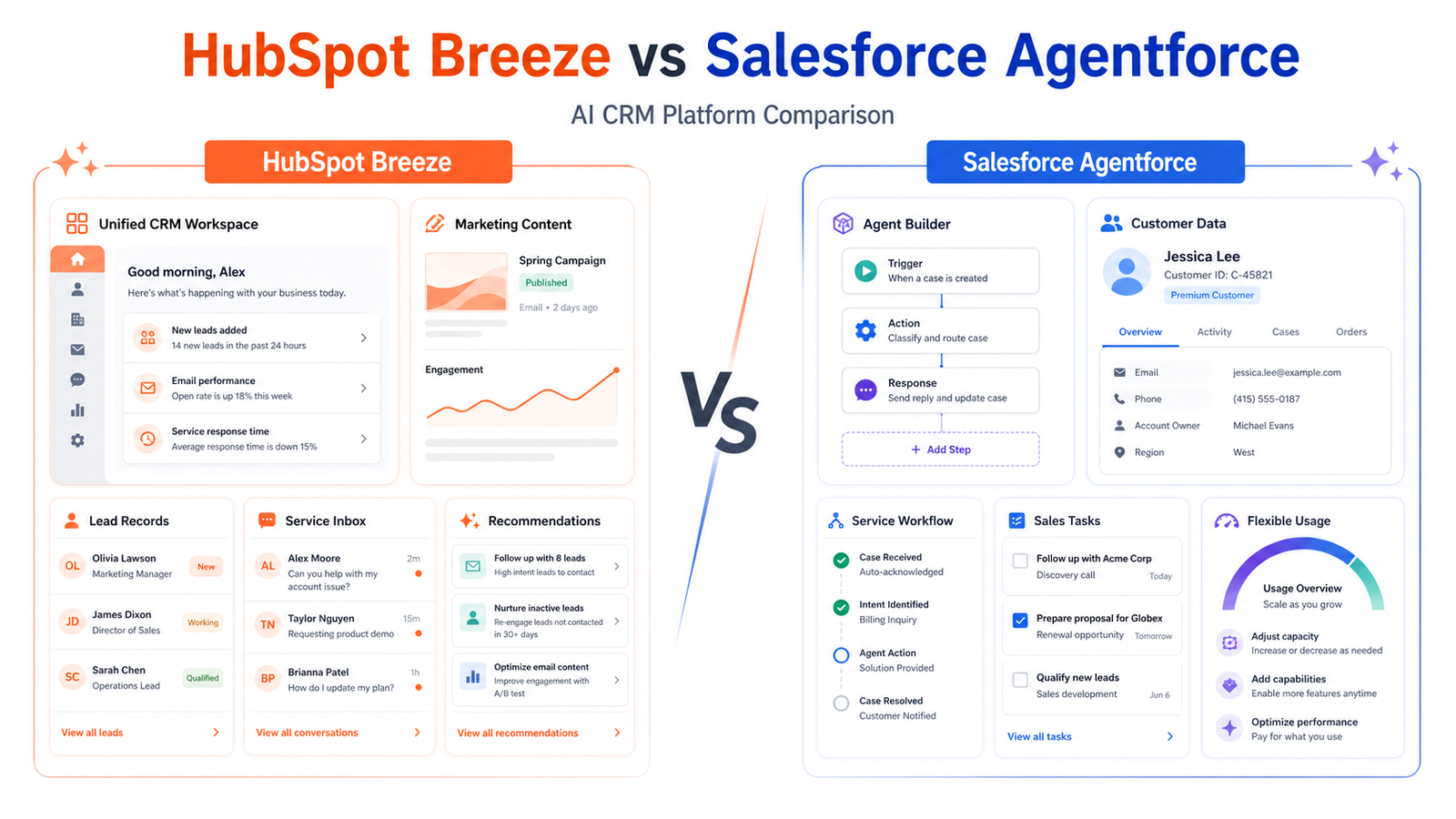
    HubSpot Breeze and Salesforce Agentforce both bring AI agents and assistance into CRM work, but they serve different operating environments. HubSpot emphasizes a unified customer platform that many small and midsize teams can adopt incrementally. Salesforce Agentforce is designed for flexible, deeply configurable enterprise agent deployments across the Salesforce ecosystem.

    Quick Verdict

    Choose HubSpot Breeze when the business values a comparatively unified marketing, sales, service, content, and operations experience and wants AI close to HubSpot records. Choose Salesforce Agentforce when the organization already runs Salesforce, needs extensive customization and governance, and can manage consumption-based or licensed agent deployment. The existing CRM is usually the strongest decision factor.

    Best For

    • CRM buyers evaluating AI inside an existing platform.
    • Service teams considering customer agents.
    • Sales and marketing teams connecting AI to customer records.
    • Organizations prepared to model credits, actions, conversations, seats, and implementation.

    Not Best For

    • Businesses without clean CRM data or process ownership.
    • Teams seeking a standalone general chatbot.
    • Buyers comparing only a demo answer or headline price.
    • Organizations not ready for permissions, monitoring, testing, and escalation design.

    What This Article Evaluates

    This comparison evaluates platform fit, CRM context, agent use cases, pricing logic, implementation, governance, and alternatives. It does not claim autonomous accuracy, guaranteed savings, or a universal winner. Official pricing and product documentation can change and should be reviewed for the exact edition.

    Our Evaluation Criteria

    Existing CRM fit

    Migration cost, data model, integrations, user habits, and administrator skill often outweigh isolated AI features.

    Agent design

    Teams need to understand triggers, actions, knowledge sources, permissions, escalation, and monitoring.

    Customer data

    Reliable identity, lifecycle, consent, and case data are necessary for useful and safe automation.

    Pricing model

    HubSpot Credits and Salesforce Flex Credits, conversations, or licenses require workflow-specific cost modeling.

    Implementation

    A customer agent needs knowledge preparation, integration, testing, analytics, and an accountable operating team.

    Governance

    The platform should support access control, auditability, human handoff, change management, and risk review.

    Key Features And Capabilities

    HubSpot Breeze

    Breeze capabilities sit inside HubSpot's customer platform and can support marketing, sales, service, content, data, and customer-agent workflows depending on the subscribed products.

    HubSpot Credits

    HubSpot uses credits for certain AI and usage-based features. Official materials describe included monthly credits for eligible subscriptions and additional capacity purchases.

    Salesforce Agentforce

    Agentforce supports agents that use Salesforce data, actions, flows, and platform controls. It suits organizations prepared for a more configurable implementation.

    Salesforce pricing choices

    Salesforce offers consumption through Flex Credits or conversations and also describes per-user licensing options. The appropriate model depends on where and how agents operate.

    Human escalation

    Both platforms require a designed handoff when an agent lacks confidence, encounters sensitive requests, or reaches an action that needs human approval.

    Real Use Cases

    Customer service

    An agent can answer approved FAQs, gather context, and route complex billing, account, safety, or exception cases to a person.

    Lead qualification

    AI can collect needs and update records, while qualification rules and outreach claims remain controlled by the business.

    Sales assistance

    Representatives can summarize account context and prepare follow-up, then verify facts and commitments before sending.

    Marketing operations

    Teams can draft, segment, and automate around reliable CRM data, consent, and lifecycle definitions.

    Internal service

    Organizations can use agents for approved employee or partner questions when knowledge, access, and escalation are maintained.

    Comparison Table

    Option Best For Main Strength Important Limitation
    HubSpot Breeze Unified SMB and midmarket customer platform Close HubSpot workflow integration Credits and hub tiers require modeling
    Salesforce Agentforce Configurable enterprise CRM agents Platform depth and flexibility Implementation and pricing complexity
    Microsoft Copilot Studio Microsoft ecosystem agents Microsoft data and workflow fit Separate platform evaluation
    Standalone support AI Focused support automation Narrow implementation Less broad CRM context

    Pricing

    HubSpot states that eligible Professional and Enterprise subscriptions receive monthly HubSpot Credits and that additional credits can be purchased; its official materials should be used to confirm current allowances and feature consumption. Salesforce's official Agentforce pricing offers Flex Credits, conversations, and per-user options. Salesforce announced Flex Credits at $500 per 100,000 credits, with a standard Agentforce action consuming 20 credits, or $0.10. These models are not directly comparable without a real workflow estimate.

    Pricing last checked on June 25, 2026. Pricing may vary by billing period, region, usage, seat count, credits, or add-ons. The official pricing pages linked in this article are the authority for a purchase decision.

    Pros

    • Both connect AI to CRM context.
    • Agents can reduce repetitive service and operations work.
    • Multiple departments can share customer data.
    • Both vendors provide enterprise-oriented administration paths.

    Cons And Limitations

    • Poor CRM data creates poor agent outcomes.
    • Usage pricing requires monitoring.
    • Implementation is more than enabling a feature.
    • Customer-facing mistakes can have high impact.

    Alternatives

    Microsoft Copilot Studio may fit Microsoft-centered organizations. A standalone support automation product can be easier when the use case is only a help center and ticket handoff. Smaller teams may get more value by improving CRM hygiene, routing, templates, and knowledge management before deploying an agent.

    A Practical Evaluation Workflow

    Step 1: Choose one real workflow

    Do not evaluate software with a vague demo. Select one recurring workflow with a clear owner, real inputs, a defined output, and a known review step. A narrow pilot exposes whether the product fits daily work better than a long feature tour.

    Step 2: Record the current baseline

    Before introducing the tool, record how long the workflow takes, where handoffs fail, which work is repeated, and what quality checks already exist. The baseline prevents a team from confusing novelty with measurable improvement.

    Step 3: Use approved, low-risk data

    Start with public, synthetic, or appropriately approved information. Confirm data retention, access controls, and account permissions before using confidential customer, employee, financial, legal, or product information.

    Step 4: Review every output

    Assign a human reviewer. Check factual accuracy, tone, completeness, permissions, links, calculations, and whether the result actually satisfies the original task. AI assistance should shorten work without removing accountability.

    Step 5: Measure the full cost

    Include subscription fees, seats, credits, setup, training, integrations, review time, and the cost of correcting errors. A lower advertised price can be less economical when the workflow requires more manual cleanup.

    Step 6: Decide with written criteria

    At the end of the pilot, score workflow fit, output quality, ease of adoption, administration, pricing clarity, integration effort, and risk. Keep the decision record so the team can review it when plans or requirements change.

    Security, Governance, And Quality Control

    Start with least-privilege access, approved source data, named owners, and a written human-review rule. Confirm retention, training-data, export, deletion, and administrator controls from current vendor documentation. Never paste confidential data into a tool merely because the interface is convenient.

    How To Measure Value

    Measure completion time, editing time, handoff errors, adoption, administrator work, and the cost of corrections. Record the baseline before the pilot. A useful product should improve a real workflow without creating an unmanageable review or credit burden.

    Common Buying Mistakes

    • Choosing from a feature list without testing the real workflow.
    • Ignoring permissions, data quality, and human review.
    • Comparing prices without seats, credits, add-ons, and implementation.
    • Treating generated output as verified fact.
    • Rolling out to the whole company before a controlled pilot.

    Detailed Decision Checklist

    Before selecting HubSpot Breeze vs Salesforce Agentforce: Which AI CRM Fits Your Business?, write down the exact workflow that needs improvement. Name the person who starts the work, the information the tool receives, the output it should produce, the person who reviews that output, and the system where the approved result is stored. This prevents a purchase from becoming an open-ended experiment with no owner.

    Check data readiness next. List the documents, CRM records, meeting content, contact data, task history, writing samples, or knowledge sources the workflow depends on. Mark which information is public, internal, confidential, regulated, outdated, duplicated, or missing. AI features cannot compensate for contradictory records or unclear permission boundaries. Cleaning the source material may create more value than adding another subscription.

    Review the human handoff in detail. Define which actions the software may assist with, which actions need explicit approval, and which requests must always go to a qualified person. Customer complaints, employment matters, legal interpretations, financial commitments, security incidents, account exceptions, and public claims normally need a clear escalation route. A useful workflow makes that route visible instead of hiding uncertainty behind a confident answer.

    Model the full cost for twelve months. Include the base subscription, members, contact or usage growth, credits, recordings, storage, integrations, implementation, training, administrator time, and periodic quality review. Add a reasonable allowance for correcting mistakes and maintaining documentation. Compare that number with the value of time saved, errors avoided, faster response, or work that becomes possible. Do not assume every automated action creates equal value.

    Finally, confirm exit options. Determine how the team can export content, contacts, transcripts, tasks, documents, or configuration if the product no longer fits. Record who owns the account and billing relationship. A responsible software decision includes both adoption and a practical way to leave.

    30-Day Rollout Plan

    Week 1: Prepare

    Choose a bounded use case and collect the approved inputs. Document current steps, time, common errors, and escalation points. Configure the smallest necessary group of users. Review authentication, roles, integrations, retention, and billing controls. Create a short acceptance checklist that defines what a usable output looks like.

    Week 2: Run In Parallel

    Use the new workflow alongside the existing process. Do not remove the old control before the team understands failure modes. Review every output and label the type of correction required: factual, contextual, formatting, tone, permission, missing information, or incorrect action. This produces evidence that is more useful than a general opinion about whether the AI feels impressive.

    Week 3: Improve The System

    Update source documents, templates, prompts, routing rules, naming conventions, or permissions based on observed problems. Remove steps that add no value. If users are bypassing the workflow, ask why before adding enforcement. The cause may be poor fit, unclear training, slow performance, missing integration, or a review process that is heavier than the original task.

    Week 4: Decide

    Compare the pilot with the baseline. Review time saved, correction rate, adoption, user confidence, administrator workload, and expected annual cost. Decide whether to expand, keep the workflow limited, change configuration, test an alternative, or stop. Write down the decision and assumptions. Revisit it when pricing, product capabilities, data requirements, or business volume changes.

    Quality Review Questions

    Use these questions during the pilot:

    • Does the output answer the real task, or only produce plausible language?
    • Can a reviewer trace important claims to an approved source?
    • Are names, dates, prices, links, assignments, and calculations correct?
    • Does the workflow expose uncertainty and provide a human escalation path?
    • Can administrators see who has access and what the tool is doing?
    • Are users saving time after review, or only moving work to a different step?
    • Does the pricing model remain predictable at the expected volume?
    • Can the result be exported and used in the team's system of record?

    If the team cannot answer these questions, it is too early for a broad rollout. A smaller scope with clearer controls is usually more productive than adding more features.

    Final Recommendation

    Stay close to the CRM your company can govern. HubSpot Breeze is the practical first comparison for HubSpot-centered small and midsize teams. Salesforce Agentforce is stronger for Salesforce enterprises that need configurable agents and can support implementation. Pilot one bounded service or internal workflow and calculate cost from observed actions or conversations.

    Frequently Asked Questions

    Is HubSpot Breeze the same as Agentforce?

    No. They are AI capabilities in different CRM ecosystems with different products, administration, and pricing models.

    Which is better for small business?

    HubSpot may be easier for a small business already using its customer platform. Requirements and total cost still need validation.

    Which is better for enterprise?

    Agentforce can suit complex Salesforce environments, while HubSpot Enterprise can fit organizations standardized on HubSpot.

    How is HubSpot AI priced?

    Certain features consume HubSpot Credits. Included and additional credits depend on current products and terms.

    How is Agentforce priced?

    Salesforce offers Flex Credits, conversations, and per-user options. Use the official pricing page for the deployment model.

    Can either platform replace support staff?

    They can handle bounded tasks, but human escalation, exceptions, empathy, accountability, and quality control remain necessary.

    Related Dailytimespro Guides

    See best AI CRM tools for small business, AI customer support workflow, and AI sales follow-up workflow.
  • How to Build an AI Sales Follow-Up Workflow for Small Business

    How to Build an AI Sales Follow-Up Workflow for Small Business

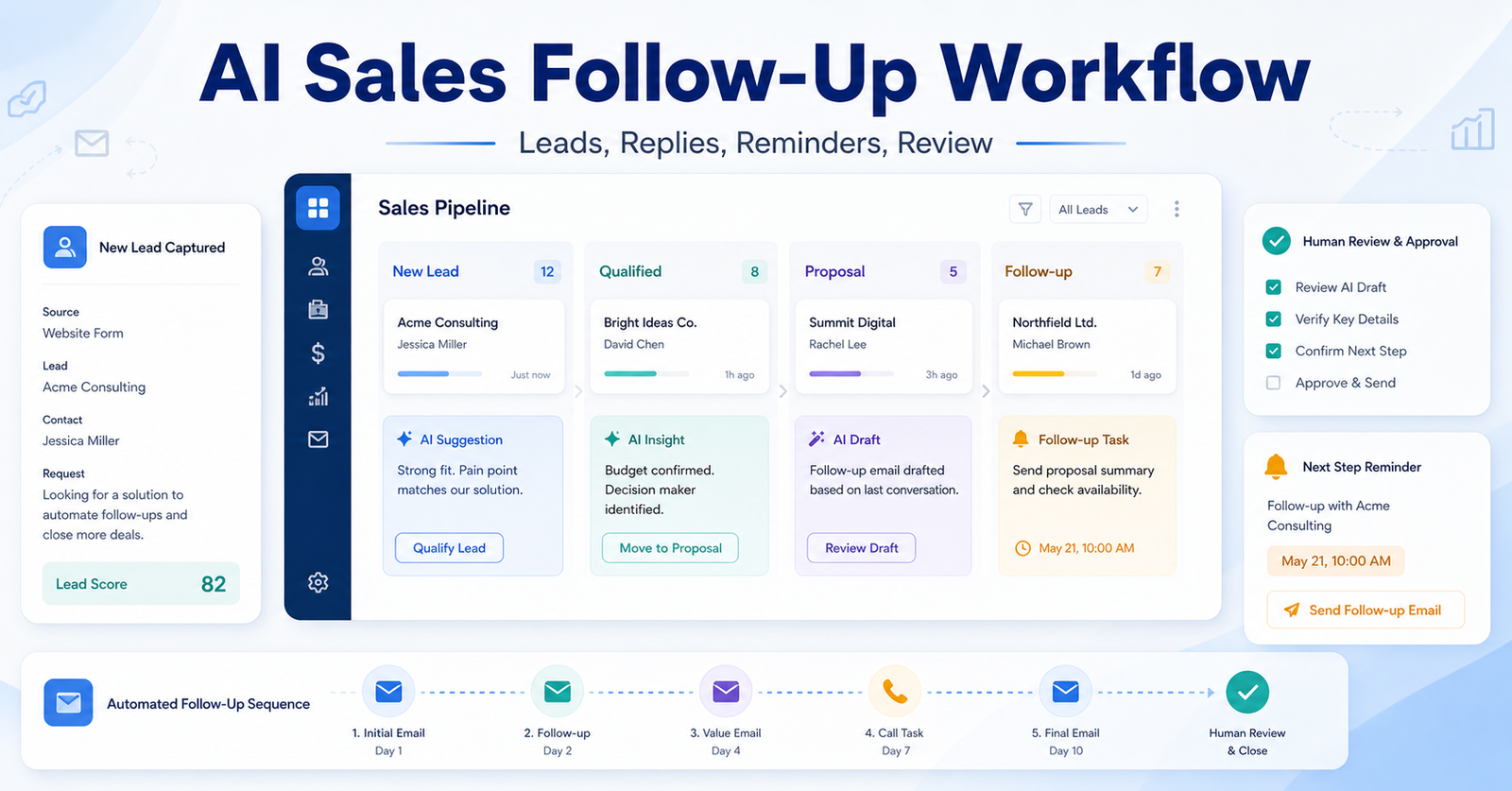
    Most small businesses do not lose sales because they lack ambition. They lose sales because follow-up is inconsistent. A lead fills out a form, someone replies late, the call notes stay in one person’s head, and the next message starts from scratch. An AI sales follow-up workflow fixes that by giving your CRM a clearer rhythm: capture the lead, summarize the context, recommend the next action, draft the response, and remind the owner before the opportunity goes cold.

    Modern CRM platforms are adding AI directly into sales work. HubSpot Breeze brings AI into HubSpot’s customer platform. Pipedrive AI Sales Assistant focuses on recommendations and sales guidance inside the pipeline. Zoho CRM Zia supports CRM assistance, predictions, and productivity features. The workflow below is tool-agnostic, but those products show the kind of AI tasks small teams can now use without building a custom system.

    The Follow-Up Workflow

    Stage What AI does What the sales owner does
    Lead capture Summarizes source, company, and request Confirms the lead is real
    Qualification Suggests likely need and urgency Accepts, edits, or rejects qualification
    First response Drafts a short reply Personalizes and sends
    Next step Creates a reminder or task Chooses timing and channel
    Review Flags stale opportunities Decides whether to revive or close

    Define Your Lead Stages First

    AI cannot fix a confusing pipeline. Before adding AI, define the stages a lead can move through. A simple small-business setup might use new lead, contacted, qualified, proposal sent, negotiation, won, lost, and nurture. Each stage should have one owner and one next action.

    This matters because AI works best with structured context. If every rep uses different names for the same stage, the AI assistant cannot reliably summarize progress or recommend what comes next. If the pipeline is clean, AI can become useful very quickly.

    The best starting point is your current CRM. Do not create a new spreadsheet unless the CRM is unusable. The follow-up workflow should live where customer history already lives.

    Use AI For The Repetitive Parts

    AI is strongest at summarizing calls, drafting follow-up notes, turning a meeting outcome into a task, and spotting stalled deals. It should not decide whether to pressure a customer, promise a discount, or make claims about delivery timelines without review.

    A practical setup is to let AI draft three things after each meaningful interaction: a CRM note, a customer-facing follow-up, and the next internal task. The sales owner then reviews all three. This saves time without turning your outreach into generic automation.

    After a discovery call, AI can summarize the buyer’s pain points, list open questions, and draft a message that says what was discussed and what happens next. The rep should then add relationship details: the buyer’s wording, timeline, constraints, and any promise made on the call.

    Create Follow-Up Rules By Lead Type

    Not every lead deserves the same cadence. A warm referral should not receive the same message as a cold form submission. Group leads into simple types: inbound demo request, referral, existing customer expansion, abandoned proposal, and long-term nurture.

    For each type, define the first response window, default channel, next task, and maximum number of follow-ups. AI can draft the content, but your rules set the boundaries.

    A good small-business cadence might look like this: same-day response for high-intent leads, two follow-ups in the first week, one value-based follow-up the next week, then a polite close-the-loop message. The exact cadence depends on your market, but the principle is universal: AI should support a clear sales process, not create endless noise.

    Keep The Human Voice

    The easiest way to make AI follow-up perform badly is to send messages that sound polished but empty. Small businesses win when communication feels specific. Before sending any AI-assisted reply, check whether it mentions the actual problem, the real next step, and the buyer’s context.

    Avoid long emails. Most follow-up should be short, useful, and easy to answer. If a prospect asked about implementation timing, answer that question first. If they asked for a comparison, send the comparison. If they asked for a proposal, do not bury the proposal under paragraphs of AI enthusiasm.

    For related CRM selection, see best AI CRM tools for small business. For broader automation planning, see AI marketing workflow for small business.

    Measure The Workflow

    Track response time, follow-up completion rate, stale opportunities, booked calls, proposal acceptance, and closed-won rate. If the AI workflow increases activity but lowers quality, tighten the review process. If it improves consistency but creates repetitive copy, create better prompt templates.

    The strongest signal is not how many messages AI drafts. It is whether good leads receive timely, relevant follow-up and whether the team has better visibility into the pipeline.

    FAQ

    What is an AI sales follow-up workflow?

    It is a structured process that uses AI to summarize lead context, draft follow-up messages, create tasks, and flag stale opportunities while humans approve important sales decisions.

    Is this only for large sales teams?

    No. Small businesses often benefit more because a few missed follow-ups can have a large revenue impact.

    Can AI send follow-up messages automatically?

    It can in some systems, but human approval is safer for relationship-sensitive sales conversations.

    What should AI never decide alone?

    AI should not approve discounts, make delivery promises, change contract terms, or handle sensitive customer objections without a human.

    Which CRM AI tool should I use?

    Start with the CRM you already use. HubSpot, Pipedrive, and Zoho all offer AI features, but the right choice depends on your existing pipeline.

    How many follow-ups should a lead receive?

    Use a cadence that fits the buyer’s intent. High-intent leads deserve fast follow-up; low-intent leads may move into nurture sooner.

    Should I mention that AI helped draft the email?

    Usually the important issue is accuracy and respect. Make sure the message is truthful, specific, and reviewed by a human.

    How do I keep messages from sounding generic?

    Require every message to mention the buyer’s stated problem, the actual next step, and one piece of specific context.

    What metrics matter most?

    Response time, completed follow-ups, meeting bookings, proposal movement, stale deals, and closed-won rate matter more than message volume.

    What is the main limitation?

    AI can summarize incomplete CRM data poorly. If reps do not log useful notes, AI follow-up quality drops.

    Final Decision

    Use this workflow if your team already has the core business process in place and wants AI to remove drafting, summarizing, sorting, and follow-up friction. Do not use it as a substitute for human review, legal approval, customer-sensitive judgment, or final publishing decisions. The best setup is simple: one source of truth, one review owner, a short list of approved prompts, and a weekly check of what the AI helped create.

  • Best AI CRM Tools for Small Business: A Practical Buyer’s Guide

    Best AI CRM Tools for Small Business: A Practical Buyer’s Guide

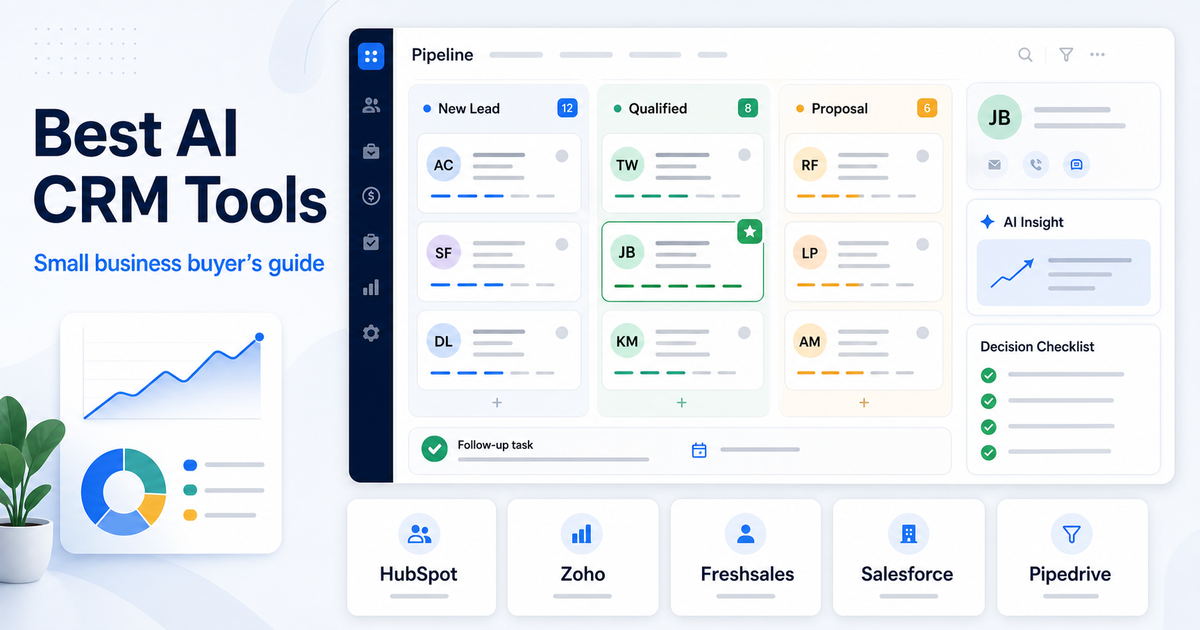
    The best AI CRM tool for a small business is the one that helps your team manage leads, follow up faster, and understand customer activity without adding a heavy admin layer. For most small teams, HubSpot is the safest starting point because its free CRM is strong and its Breeze AI features sit inside a broader customer platform. Zoho CRM is better when you want more customization and a lower-cost CRM ecosystem. Freshsales is useful when sales and support teams want built-in communication tools. Salesforce Starter makes sense when you expect to grow into the Salesforce ecosystem.

    This guide focuses on practical fit, not feature count. A small business CRM should make daily follow-up easier, keep customer data clean, and give your team useful AI help without forcing a complicated rollout. Pricing notes below use official product or pricing pages where a clear public fact was available.

    If you are still building the process around support and follow-up, our AI customer support workflow is a useful companion. If you need automation after choosing a CRM, the Zapier vs Make comparison can help you decide how to connect forms, emails, tasks, and CRM records.

    Quick Answer

    Choose HubSpot if you want the easiest free CRM starting point with AI features across a customer platform. Choose Zoho CRM if you want a customizable CRM that can grow with sales operations and Zia AI. Choose Freshsales if your team needs CRM, email, phone, live chat, and Freddy AI features in one sales workspace. Choose Salesforce Starter if you want a small-business entry point into Salesforce with AI plus sales, marketing, and service tools.

    Do not choose an AI CRM just because it promises automation. Pick the CRM that your team will keep updated every day. AI only helps when the underlying contact, deal, and activity data is accurate.

    Best AI CRM Tools For Small Business

    CRM Best For AI Angle Verified Pricing Note
    HubSpot CRM Small businesses that want a free, approachable CRM Breeze supports content generation, summarization, enrichment, and personalization inside HubSpot tools HubSpot describes its CRM as 100% free with no expiration date
    Zoho CRM Small teams that want customization and a broad business app ecosystem Zia supports generative AI, record summaries, report creation, workflow creation, and other CRM tasks Zoho CRM Free Edition is free forever for 3 users
    Freshsales Sales teams that want built-in communication and CRM workflow Freshsales uses Freddy AI for sales workflows, forecasting insights, and add-on AI agent sessions Freshsales lists a free plan for 3 users and paid plans starting from $9 USD
    Salesforce Starter Teams that may grow into Salesforce Starter Suite is positioned as AI + CRM for small businesses across sales, marketing, and service Starter Suite starts at $25 USD/user/month; Pro Suite starts at $100 USD/user/month
    Pipedrive Sales teams that care most about pipeline visibility Pipedrive's Sales Assistant surfaces AI insights, deal summaries, prompts, and win-probability guidance Pipedrive publishes CRM pricing plans for its sales CRM

    How To Choose An AI CRM

    Start with the sales process, not the AI feature list. A CRM should answer four questions quickly:

    • Which leads need follow-up?
    • Which deals are stuck?
    • Which customers need attention?
    • What should the team do next?

    AI features are useful when they support those questions. Summaries, lead insights, email help, workflow suggestions, forecasting, and deal alerts can save time. But if the CRM is messy, AI can summarize messy data. That is why small businesses should prioritize simple adoption, clean fields, repeatable pipeline stages, and clear ownership.

    The best buyer decision is usually not "which CRM has the most AI?" It is "which CRM will our team actually keep current?"

    1. HubSpot CRM

    HubSpot CRM is the strongest default choice for many small businesses because the free CRM is approachable and the platform can expand into marketing, sales, service, content, and operations.

    HubSpot says its free CRM has no expiration date, which makes it a low-risk starting point for teams moving away from spreadsheets. HubSpot's Breeze AI features are embedded across HubSpot tools and support tasks such as content generation, summarization, enrichment, and personalization.

    Best For

    HubSpot is best for small businesses that want one customer platform instead of separate tools for contacts, forms, email, deals, chat, marketing, and service. It is also a good choice when the team has limited technical resources and needs an easier onboarding path.

    Not The Right Choice If

    HubSpot may not be the right choice if your business wants deep customization from day one or if you expect advanced paid features to become expensive as the team grows. The free CRM is useful, but teams should map which paid hubs and seats they may need later.

    Practical Buying Note

    Use HubSpot first if your main problem is scattered customer data. Add more advanced tools only after your team is consistently logging contacts, deals, and follow-ups.

    2. Zoho CRM

    Zoho CRM is a strong option for small businesses that want a customizable CRM inside a larger business software ecosystem. Zoho's Zia AI supports CRM tasks such as generative AI, module creation, workflow creation, report creation, and record summaries.

    Zoho's official pricing page lists a Free Edition for 3 users. That makes it attractive for small teams that want to test CRM discipline before committing to a larger stack.

    Best For

    Zoho CRM is best for small teams that want flexibility, customization, and room to build more structured sales operations. It can fit businesses that expect to use multiple Zoho apps around CRM, campaigns, forms, surveys, finance, or support.

    Not The Right Choice If

    Zoho may not be the best first CRM for teams that want the simplest possible interface. Its flexibility is useful, but flexibility also means the setup can become more complex if the team does not define fields, stages, and ownership clearly.

    Practical Buying Note

    Choose Zoho when you want a CRM you can shape around your sales process. Avoid over-customizing early. Start with contacts, companies, deals, activities, and one clean pipeline before adding heavier automation.

    3. Freshsales

    Freshsales is designed for sales teams that want CRM records, communication, and pipeline work in one place. Freshworks describes Freshsales as a sales CRM that helps capture, qualify, route, and track leads with Freddy AI.

    Freshworks' pricing page lists a free plan for 3 users, and the page also describes Freddy AI Agent session packs as an add-on for customer-facing AI bot interactions. It also shows forecasting insights by Freddy AI in higher-plan context.

    Best For

    Freshsales is best for teams that want built-in sales communication, lead tracking, and CRM workflow without stitching together too many separate products. It can be a practical fit for small sales teams that need phone, chat, email, lead routing, and deal tracking close together.

    Not The Right Choice If

    Freshsales may not be ideal if your team already uses another CRM ecosystem deeply or if your main need is a lightweight free contact database. It is stronger when sales activity and communication are central to the workflow.

    Practical Buying Note

    Choose Freshsales when your sales process depends on fast communication and follow-up. Before upgrading, check which Freddy AI features are included in the plan you are considering and which require add-ons.

    4. Salesforce Starter

    Salesforce Starter Suite is Salesforce's small-business CRM entry point. Salesforce positions Starter Suite as AI + CRM for small businesses across sales, marketing, and service.

    The official Starter page lists Starter Suite at $25 USD per user per month and Pro Suite at $100 USD per user per month. Starter includes Assistive AI with Employee Agent, built-in sales flows and lead routing, dynamic email marketing, forms, analytics, and other small-business features.

    Best For

    Salesforce Starter is best for small businesses that expect to scale into Salesforce or want a known CRM ecosystem from the beginning. It can fit teams that need sales, marketing, service, and commerce-style features under one vendor.

    Not The Right Choice If

    Salesforce Starter may be too much if your team only needs a simple contact database and basic follow-up reminders. It also deserves more setup discipline than a lightweight CRM because the long-term value comes from using the system consistently.

    Practical Buying Note

    Choose Salesforce Starter when the Salesforce ecosystem is part of your growth plan. If your team just needs a simple CRM this month, compare it carefully against HubSpot, Zoho, and Freshsales before committing.

    5. Pipedrive

    Pipedrive is a sales-focused CRM built around pipeline visibility. Its AI Sales Assistant is designed to surface insights from sales data, summarize deals, analyze team performance, highlight metrics, recommend next actions, and help teams understand pipeline patterns.

    Pipedrive is especially relevant for small businesses that already think in stages, activities, follow-ups, and deal movement. Its AI value is strongest when there is enough sales activity in the system to analyze.

    Best For

    Pipedrive is best for sales teams that want a pipeline-first CRM. If your team needs to know which deals are active, which deals are stuck, and what sales actions should happen next, Pipedrive is worth evaluating.

    Not The Right Choice If

    Pipedrive may not be the best fit if you need an all-in-one marketing, service, and content platform. It is strongest as a sales CRM, not as a full customer platform for every department.

    Practical Buying Note

    Choose Pipedrive when your main CRM problem is sales pipeline discipline. Make sure your team will log activities and deal updates consistently, because AI insights depend on the quality of CRM data.

    Decision Framework

    Use this simple decision path:

    1. If you need the easiest free CRM starting point, choose HubSpot. 2. If you want more customization and a broad business app ecosystem, choose Zoho CRM. 3. If your sales team wants built-in communication and CRM workflow, choose Freshsales. 4. If you expect to grow into Salesforce, choose Salesforce Starter. 5. If your sales process is pipeline-heavy, choose Pipedrive.

    The wrong way to choose is to chase every AI feature. The right way is to map the CRM to one repeatable business process: lead capture, qualification, follow-up, deal movement, customer handoff, or support escalation.

    Common Mistakes Small Businesses Make With AI CRMs

    The first mistake is buying before defining the sales process. A CRM cannot fix unclear ownership, inconsistent follow-up, or a messy pipeline.

    The second mistake is giving AI poor data. If contacts are duplicated, deals are outdated, and activities are missing, AI summaries and recommendations become less useful.

    The third mistake is over-automating too early. A simple CRM with clean habits is better than a complex automated system nobody trusts.

    Before you add AI workflows, define:

    • Lead sources
    • Pipeline stages
    • Required contact fields
    • Follow-up rules
    • Deal ownership
    • Handoff points between sales and support
    • Reporting needs

    If your CRM later needs workflow automation, pair it with a tool such as Zapier or Make after the process is stable.

    Final Recommendation

    HubSpot is the best first AI CRM for many small businesses because it is easy to start, has a free CRM, and gives teams room to grow into AI-supported sales, marketing, service, and content workflows. Zoho CRM is the better choice for teams that want customization and a broader business app ecosystem. Freshsales is a strong pick for sales teams that need built-in communication and Freddy AI features. Salesforce Starter fits teams that want a small-business path into Salesforce. Pipedrive is best when pipeline visibility and sales activity discipline matter most.

    Choose the CRM your team will update every day. AI is useful only when the customer data underneath it is clean, current, and connected to real follow-up work.

    FAQs

    What is the best AI CRM for small business?

    HubSpot is the safest first choice for many small businesses because its free CRM is easy to adopt and its Breeze AI features are built into a larger customer platform. Zoho, Freshsales, Salesforce Starter, and Pipedrive can be better when customization, sales communication, Salesforce growth, or pipeline management matters more.

    Which AI CRM has a free plan?

    HubSpot describes its CRM as free with no expiration date. Zoho CRM lists a Free Edition for 3 users. Freshsales lists a free plan for 3 users. Free plans are useful for testing CRM habits before committing to paid features.

    Is an AI CRM worth it for a small business?

    An AI CRM is worth it when the business already has enough customer activity to organize. AI can help with summaries, insights, follow-up, content, forecasting, and prioritization, but it cannot replace a clear sales process or clean customer data.

    Should I choose HubSpot or Zoho CRM?

    Choose HubSpot if you want an easier starting point and a broader customer platform. Choose Zoho CRM if you want more customization and a wider business app ecosystem. HubSpot is usually simpler at the start; Zoho can be stronger when you want to shape the system around your process.

    Is Salesforce Starter good for small businesses?

    Salesforce Starter can be good for small businesses that expect to grow into Salesforce or want sales, marketing, service, and AI capabilities under one vendor. It may be more than needed for a team that only wants a simple contact and deal tracker.

    What should I check before buying an AI CRM?

    Check whether the CRM matches your pipeline, lead sources, follow-up process, team size, budget, integrations, reporting needs, and data cleanup habits. Also review which AI features are included in the plan and which require add-ons or higher tiers.

    Can AI CRM tools replace salespeople?

    No. AI CRM tools can summarize data, suggest next actions, help draft messages, and surface patterns, but relationship-building, negotiation, judgment, and customer trust still require people.

    Which CRM is best for sales pipeline management?

    Pipedrive is a strong choice for pipeline-focused sales teams. HubSpot, Zoho, Freshsales, and Salesforce also support pipeline management, but Pipedrive is especially focused on deal movement and sales activity visibility.

    How many CRM tools should a small business compare?

    Compare three to five tools at most. Build one sample pipeline, import a small set of contacts, test follow-up tasks, and ask the same team members to use each CRM for a realistic sales workflow.

    What is the biggest AI CRM mistake?

    The biggest mistake is expecting AI to fix poor CRM discipline. If the team does not update contacts, activities, and deals, AI recommendations will be weaker. Start with clean data and a simple process before adding advanced AI workflows.