Category: AI Writing Tools

  • Grammarly Pricing Explained: Free vs Pro vs Enterprise

    Grammarly Pricing Explained: Free vs Pro vs Enterprise

    Grammarly now presents a simpler public plan structure: Free, Pro, and Enterprise. The difficult part is not remembering the plan names. It is deciding whether daily writing volume, rewriting needs, team consistency, security, and administration justify moving beyond Free.

    Quick Verdict

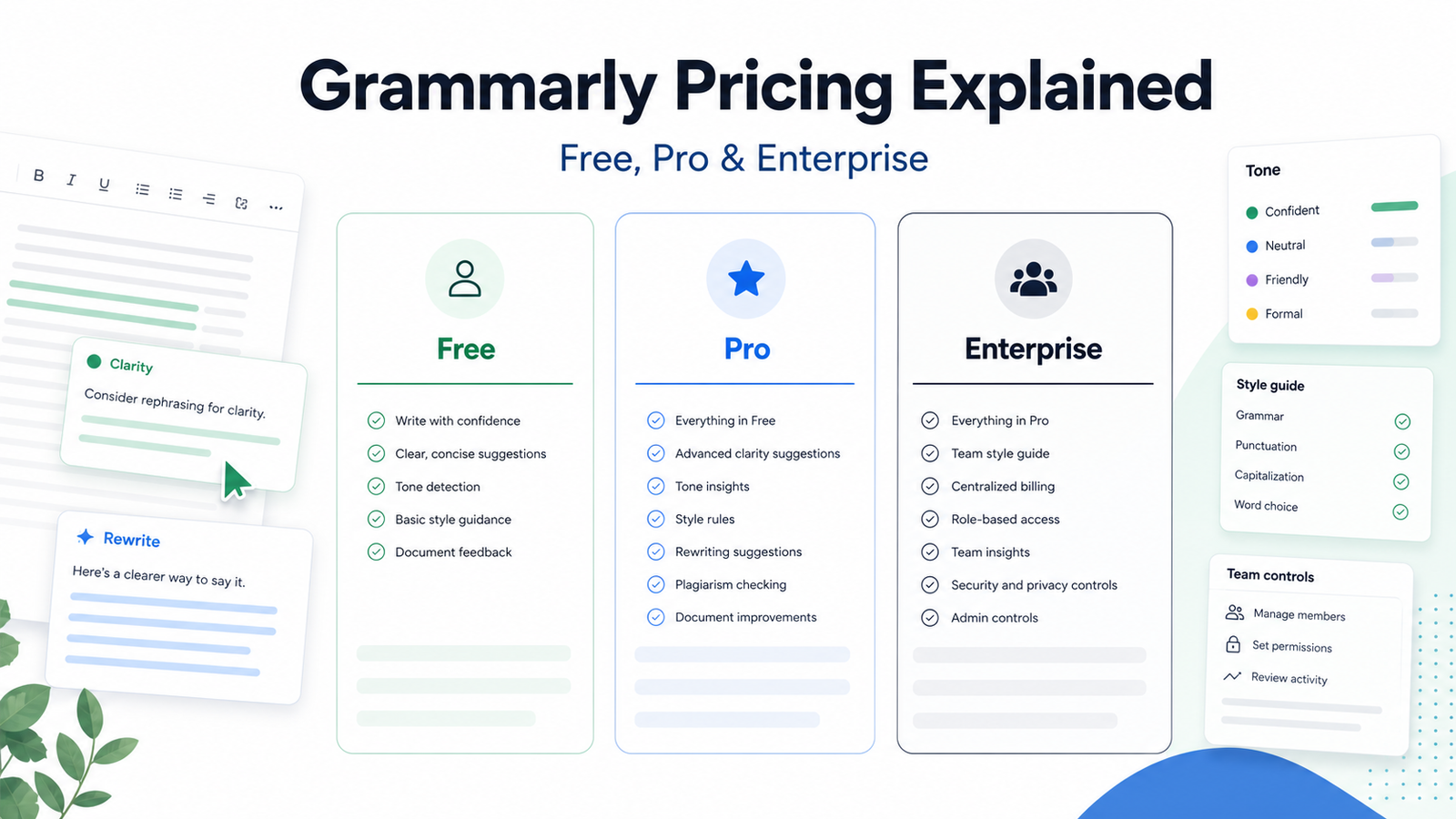
    Free is enough for basic writing assistance and limited AI use. Pro is the practical choice for individuals and smaller teams that write frequently and need rewriting, tone, fluency, broader suggestions, and more AI prompts. Enterprise is for larger organizations that need sales-assisted security, permissions, support, and organizational controls.

    Best For

    • People who write email, documents, marketing copy, and reports regularly.
    • Teams that need consistent writing guidance.
    • Organizations evaluating enterprise security and administration.
    • Buyers comparing the value of assistance against editing time.

    Not Best For

    • People who only need occasional spelling checks.
    • Teams expecting automatic factual verification.
    • Organizations that have not reviewed data and security requirements.
    • Buyers choosing only from the number of AI prompts.

    What This Article Evaluates

    This guide uses Grammarly's official plan and support pages. It explains list pricing and plan fit without inventing discounts, regional prices, or testing claims. Grammarly states that it is part of the Superhuman suite, and plan presentation can change.

    Our Evaluation Criteria

    Writing volume

    Daily professional writing creates a stronger case for paid assistance than occasional personal use.

    Editing needs

    Evaluate whether full-sentence rewrites, tone adjustment, fluency, and advanced suggestions reduce meaningful editing work.

    AI usage

    Prompt allowances matter only if the team has approved use cases and reviews generated text.

    Team consistency

    Brand guidance, shared controls, and administration matter more as the number of writers grows.

    Security

    Enterprise buyers should validate current encryption, permissions, data controls, support, and procurement requirements.

    Total cost

    Compare monthly, quarterly, annual, member, implementation, and review costs rather than one advertised number.

    Key Features And Capabilities

    Free

    Grammarly lists Free at $0 per month with mistake correction, tone visibility, and 100 AI prompts. It is useful for validating the core writing experience.

    Pro

    Grammarly lists Pro with full-sentence rewrites, tone adjustment, fluency support, personalized suggestions, plagiarism and AI-generated text detection, and 2,000 AI prompts.

    Enterprise

    Grammarly directs Enterprise buyers to contact sales and lists organizational capabilities such as dedicated support, roles and permissions, encryption options, data loss prevention, and cost visibility.

    Cross-workflow assistance

    The value depends on where the organization writes and whether the approved deployment works in those applications.

    Human review

    Grammarly can improve expression, but it does not establish whether a business, medical, legal, financial, or product claim is true.

    Real Use Cases

    Business email

    A user can improve clarity and tone while checking names, dates, links, commitments, and claims manually.

    Marketing copy

    A team can create variations and maintain voice guidance, but legal and product claims need accountable review.

    Reports and proposals

    Writers can reduce sentence-level editing while keeping evidence, calculations, and recommendations under human control.

    Customer support

    Agents can improve consistency and empathy without pasting restricted customer data into an unapproved workflow.

    Team standards

    A larger organization can evaluate shared permissions and controls where individual subscriptions are not sufficient.

    Comparison Table

    Option Best For Main Strength Important Limitation
    Free Basic individual assistance $0 and core suggestions Limited AI prompts and advanced help
    Pro Frequent writers and smaller teams Rewriting and broader assistance Paid member cost
    Enterprise Larger governed organizations Security, roles, and support Custom sales process
    Microsoft Editor or Copilot Microsoft-centered work Office integration Different licensing and scope
    LanguageTool or ProWritingAid Alternative editing workflows Different style and pricing Fit varies by application

    Pricing

    Grammarly's official support page lists Pro at $30 per member per month, $60 per member for three months, or $144 per member per year, which averages $12 per member per month. The official plan page lists Free at $0 and Enterprise through Contact Sales. The public Pro page lists 100 AI prompts for Free and 2,000 for Pro. Enterprise terms are organization-specific.

    Pricing last checked on June 25, 2026. Pricing may vary by billing period, region, usage, seat count, credits, or add-ons. The official pricing pages linked in this article are the authority for a purchase decision.

    Pros

    • Clear free entry point.
    • Pro offers multiple billing periods.
    • Useful across common professional writing.
    • Enterprise addresses organizational requirements.

    Cons And Limitations

    • It does not verify factual accuracy.
    • Monthly Pro pricing is much higher than annual average.
    • Enterprise cost is not public.
    • AI and detection features require careful interpretation.

    Alternatives

    Microsoft Editor or Copilot may fit Microsoft-centered organizations. Google Workspace users should compare native assistance available in their edition. LanguageTool and ProWritingAid offer different editing approaches. A human editor is still appropriate for high-stakes publication, legal text, brand campaigns, or material where nuance and evidence matter.

    A Practical Evaluation Workflow

    Step 1: Choose one real workflow

    Do not evaluate software with a vague demo. Select one recurring workflow with a clear owner, real inputs, a defined output, and a known review step. A narrow pilot exposes whether the product fits daily work better than a long feature tour.

    Step 2: Record the current baseline

    Before introducing the tool, record how long the workflow takes, where handoffs fail, which work is repeated, and what quality checks already exist. The baseline prevents a team from confusing novelty with measurable improvement.

    Step 3: Use approved, low-risk data

    Start with public, synthetic, or appropriately approved information. Confirm data retention, access controls, and account permissions before using confidential customer, employee, financial, legal, or product information.

    Step 4: Review every output

    Assign a human reviewer. Check factual accuracy, tone, completeness, permissions, links, calculations, and whether the result actually satisfies the original task. AI assistance should shorten work without removing accountability.

    Step 5: Measure the full cost

    Include subscription fees, seats, credits, setup, training, integrations, review time, and the cost of correcting errors. A lower advertised price can be less economical when the workflow requires more manual cleanup.

    Step 6: Decide with written criteria

    At the end of the pilot, score workflow fit, output quality, ease of adoption, administration, pricing clarity, integration effort, and risk. Keep the decision record so the team can review it when plans or requirements change.

    Security, Governance, And Quality Control

    Start with least-privilege access, approved source data, named owners, and a written human-review rule. Confirm retention, training-data, export, deletion, and administrator controls from current vendor documentation. Never paste confidential data into a tool merely because the interface is convenient.

    How To Measure Value

    Measure completion time, editing time, handoff errors, adoption, administrator work, and the cost of corrections. Record the baseline before the pilot. A useful product should improve a real workflow without creating an unmanageable review or credit burden.

    Common Buying Mistakes

    • Choosing from a feature list without testing the real workflow.
    • Ignoring permissions, data quality, and human review.
    • Comparing prices without seats, credits, add-ons, and implementation.
    • Treating generated output as verified fact.
    • Rolling out to the whole company before a controlled pilot.

    Detailed Decision Checklist

    Before selecting Grammarly Pricing Explained: Free vs Pro vs Enterprise, write down the exact workflow that needs improvement. Name the person who starts the work, the information the tool receives, the output it should produce, the person who reviews that output, and the system where the approved result is stored. This prevents a purchase from becoming an open-ended experiment with no owner.

    Check data readiness next. List the documents, CRM records, meeting content, contact data, task history, writing samples, or knowledge sources the workflow depends on. Mark which information is public, internal, confidential, regulated, outdated, duplicated, or missing. AI features cannot compensate for contradictory records or unclear permission boundaries. Cleaning the source material may create more value than adding another subscription.

    Review the human handoff in detail. Define which actions the software may assist with, which actions need explicit approval, and which requests must always go to a qualified person. Customer complaints, employment matters, legal interpretations, financial commitments, security incidents, account exceptions, and public claims normally need a clear escalation route. A useful workflow makes that route visible instead of hiding uncertainty behind a confident answer.

    Model the full cost for twelve months. Include the base subscription, members, contact or usage growth, credits, recordings, storage, integrations, implementation, training, administrator time, and periodic quality review. Add a reasonable allowance for correcting mistakes and maintaining documentation. Compare that number with the value of time saved, errors avoided, faster response, or work that becomes possible. Do not assume every automated action creates equal value.

    Finally, confirm exit options. Determine how the team can export content, contacts, transcripts, tasks, documents, or configuration if the product no longer fits. Record who owns the account and billing relationship. A responsible software decision includes both adoption and a practical way to leave.

    30-Day Rollout Plan

    Week 1: Prepare

    Choose a bounded use case and collect the approved inputs. Document current steps, time, common errors, and escalation points. Configure the smallest necessary group of users. Review authentication, roles, integrations, retention, and billing controls. Create a short acceptance checklist that defines what a usable output looks like.

    Week 2: Run In Parallel

    Use the new workflow alongside the existing process. Do not remove the old control before the team understands failure modes. Review every output and label the type of correction required: factual, contextual, formatting, tone, permission, missing information, or incorrect action. This produces evidence that is more useful than a general opinion about whether the AI feels impressive.

    Week 3: Improve The System

    Update source documents, templates, prompts, routing rules, naming conventions, or permissions based on observed problems. Remove steps that add no value. If users are bypassing the workflow, ask why before adding enforcement. The cause may be poor fit, unclear training, slow performance, missing integration, or a review process that is heavier than the original task.

    Week 4: Decide

    Compare the pilot with the baseline. Review time saved, correction rate, adoption, user confidence, administrator workload, and expected annual cost. Decide whether to expand, keep the workflow limited, change configuration, test an alternative, or stop. Write down the decision and assumptions. Revisit it when pricing, product capabilities, data requirements, or business volume changes.

    Quality Review Questions

    Use these questions during the pilot:

    • Does the output answer the real task, or only produce plausible language?
    • Can a reviewer trace important claims to an approved source?
    • Are names, dates, prices, links, assignments, and calculations correct?
    • Does the workflow expose uncertainty and provide a human escalation path?
    • Can administrators see who has access and what the tool is doing?
    • Are users saving time after review, or only moving work to a different step?
    • Does the pricing model remain predictable at the expected volume?
    • Can the result be exported and used in the team's system of record?

    If the team cannot answer these questions, it is too early for a broad rollout. A smaller scope with clearer controls is usually more productive than adding more features.

    Final Recommendation

    Start with Free if the goal is basic assistance. Choose Pro when frequent rewriting, tone work, and editing savings justify the subscription. Evaluate Enterprise when centralized permissions, security, support, and procurement matter. Annual billing has a lower monthly average, but only commit after a real writing pilot.

    Frequently Asked Questions

    How much is Grammarly Pro?

    Official support lists $30 monthly, $60 quarterly, or $144 annually per member.

    Is Grammarly Free really free?

    The official plan page lists Free at $0 with core assistance and a limited AI prompt allowance.

    What happened to Grammarly Business?

    The current public plan structure emphasizes Free, Pro, and Enterprise. Existing accounts should review their own billing terms.

    How many AI prompts are included?

    Grammarly's Pro page lists 100 for Free and 2,000 for Pro.

    Is annual billing cheaper?

    The official annual price averages $12 per member per month, compared with $30 on monthly billing.

    Does Grammarly check facts?

    No. It assists writing, but factual claims, sources, calculations, and decisions need independent review.

    Related Dailytimespro Guides

    Compare Grammarly vs QuillBot, best AI writing tools for marketing teams, and Copy.ai vs Jasper AI.
  • Best AI Writing Tools for Marketing Teams: A Practical Buyer’s Guide

    Best AI Writing Tools for Marketing Teams: A Practical Buyer’s Guide

    Quick Answer

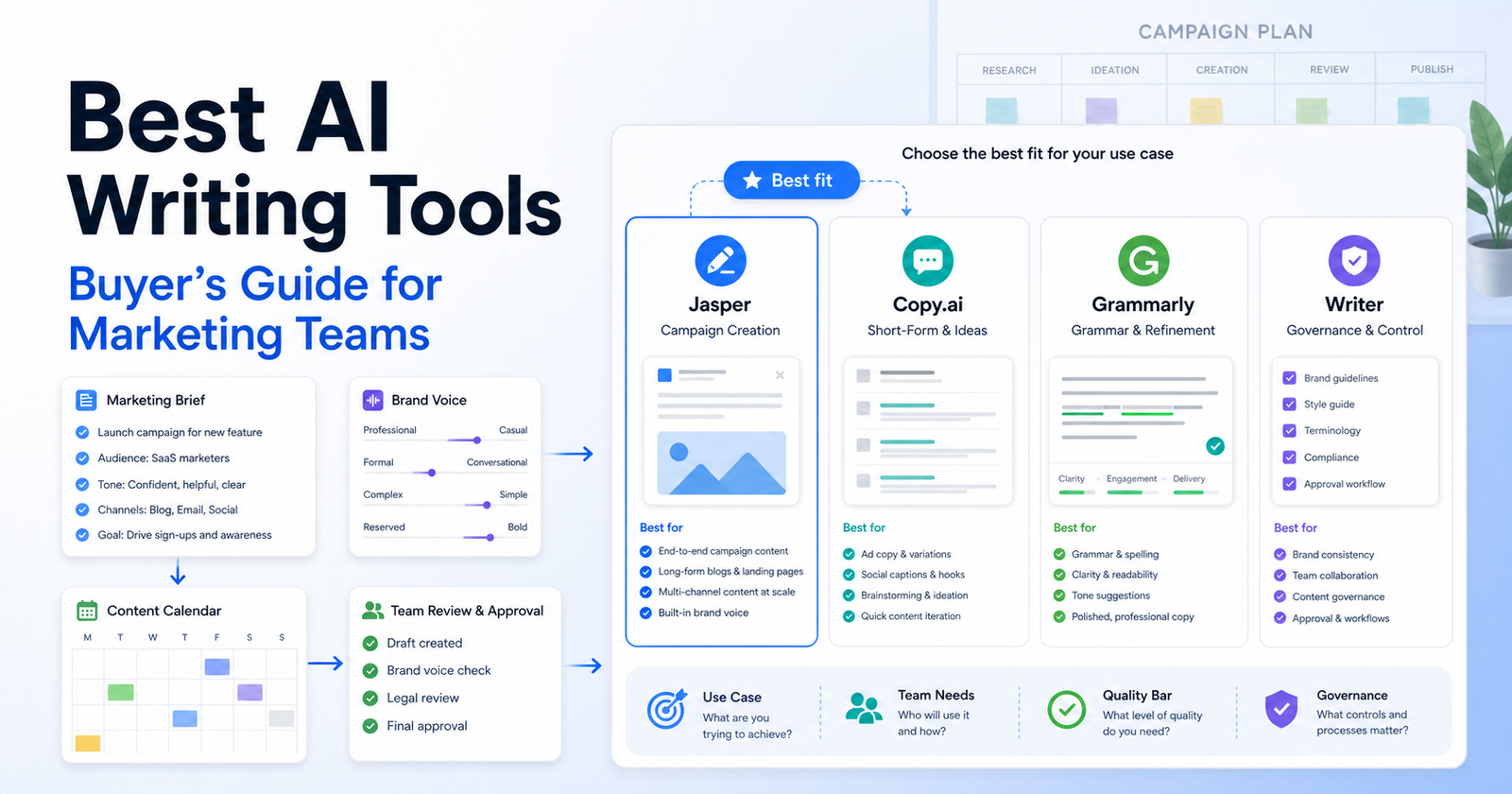
    The best AI writing tool for a marketing team depends on the workflow. Choose Jasper if your team needs brand voice, campaign content, marketing-specific apps, and governance. Choose Copy.ai if your go-to-market team needs workflow automation across sales, marketing, and operations. Choose Grammarly if your team mostly needs writing quality, tone, rewriting, AI prompts, plagiarism detection, and organization-wide consistency.

    This is not a list of generic writing apps. Marketing teams need different things from solo writers: brand consistency, approvals, reusable briefs, team access, security controls, campaign repurposing, and a clear way to keep AI output from sounding generic.

    If you are choosing between two popular writing platforms, our Copy AI vs Jasper AI comparison covers that decision in more detail. If your main need is editing and rewriting, the Grammarly vs QuillBot comparison is a useful companion.

    Best Choices by Use Case

    Use Case Best Fit Why
    Brand-led campaign writing Jasper Strong brand voice, knowledge assets, audiences, marketing apps, and campaign workflows
    GTM workflow automation Copy.ai Built around workflows, actions, tables, sales/marketing/operations use cases, and larger automation plans
    Writing quality and consistency Grammarly Strong editing, tone, rewriting, AI prompts, plagiarism and AI detection, and enterprise security options
    Small team starting out Grammarly or Copy.ai Chat Lower-friction starting point depending on whether you need editing or chat/workflows
    Marketing ops team Copy.ai Better fit when the writing process touches CRM, enrichment, and repeatable GTM operations
    Enterprise brand governance Jasper or Grammarly Enterprise Jasper for campaign creation systems; Grammarly for broad communication controls

    Selection Criteria

    A marketing team should evaluate AI writing tools on seven criteria:

    1. Brand voice and style control. 2. Campaign workflow support. 3. Collaboration and review process. 4. Knowledge grounding. 5. Channel coverage. 6. Pricing model and seat limits. 7. Governance, security, and admin controls.

    The common mistake is buying the tool that writes the best first draft. First drafts are not the bottleneck in most marketing teams. The bottleneck is turning a brief into consistent campaign assets that can be reviewed, reused, approved, and improved.

    Pricing Snapshot

    Pricing sources checked: 2026-06-15. Sources: Jasper official pricing page, Copy.ai official pricing page, and Grammarly official plans page.

    Tool Public Plans and Pricing Signals Useful Limits or Notes
    Jasper Pro is listed at $69 per seat/month monthly or $59 per seat/month yearly; Business uses custom pricing Pro includes 1 seat, Canvas, Essential Agents, 2 Brand Voices, 5 Knowledge assets, and 3 Audiences; Business adds advanced agents, API, governance, support, and unlimited customization
    Copy.ai Chat is $29/month monthly or $24/month annually; Growth is $1,000/month annually; Expansion is $2,000/month annually; Scale is $3,000/month annually; Enterprise is custom/demo Chat lists 5 seats and unlimited words in chat; Growth lists 75 seats and 20K workflow credits/month; larger plans increase seats and workflow credits
    Grammarly Free, Pro, and Enterprise plans are listed; Pro offers a free trial path and Enterprise is contact sales Free lists 100 AI prompts/month; Pro lists 2,000 AI prompts/member/month; Enterprise lists unlimited prompts/member/month and added security/admin features

    Jasper: Best for Brand-Led Campaign Creation

    Jasper is the strongest fit when the marketing team cares about branded campaign creation more than simple AI chat. Its official pricing page highlights Canvas, Essential Agents, Brand Voices, Knowledge assets, Audiences, marketing apps, custom agents, Jasper Grid, API access, governance, groups, support, and secure deployment options across plans.

    That matters when multiple marketers need to produce related assets from the same brief. A campaign manager might create a launch brief, then ask the team to adapt it into email, paid social, landing-page copy, and sales enablement content. Jasper is a better fit when that work needs brand voice and shared context.

    Jasper is not the right choice if your team only needs grammar help, short rewrites, or occasional social captions. It may be more platform than a small team needs.

    Copy.ai: Best for GTM Workflow Automation

    Copy.ai is better for teams that think in workflows, not just documents. Its official pricing page and navigation emphasize GTM AI, workflows, actions, tables, sales, marketing, operations, prospecting, inbound lead processing, content creation, translation, localization, CRM enrichment, and GTM systems integrations.

    That makes Copy.ai attractive for marketing operations teams that want repeatable processes. For example, a team might turn a webinar transcript into follow-up emails, sales snippets, account notes, and localized content. Copy.ai is more compelling when the work touches data and operations.

    Copy.ai is not the right choice if you want a simple writing assistant for every employee. Its higher-tier workflow plans are designed for teams with enough process maturity to use credits, seats, and automations well.

    Grammarly: Best for Writing Quality and Team Consistency

    Grammarly is not just a spell checker anymore, but its best use case is still writing quality at scale. Its official plans page lists Free, Pro, and Enterprise options, with features such as tone, rewriting, English fluency, plagiarism detection, AI-generated text detection, AI prompts, style guide, brand tones, snippets, analytics, roles, SAML SSO, SCIM, managed mode, and data loss prevention by plan.

    That makes Grammarly a good fit when many people write externally: marketers, sales reps, support teams, recruiters, executives, and customer success managers. It helps reduce inconsistency across emails, docs, proposals, and website drafts.

    Grammarly is not the right choice if your main need is campaign orchestration or GTM automation. It improves writing quality, but it is not a full marketing workflow platform.

    Decision Framework

    Choose Jasper if your team asks, "How do we create more on-brand campaign assets from fewer briefs?"

    Choose Copy.ai if your team asks, "How do we automate repeatable GTM writing and research workflows?"

    Choose Grammarly if your team asks, "How do we improve writing quality and consistency everywhere our team communicates?"

    Avoid choosing any AI writing tool until you know who owns the prompt library, brand rules, review process, and final approval. Without those, every tool becomes a faster way to create inconsistent drafts.

    Common Mistakes

    The first mistake is letting every marketer use AI differently. That creates uneven tone and duplicated prompts. Create shared briefs, examples, and review rules.

    The second mistake is treating AI output as final copy. AI can draft, remix, summarize, and rewrite, but humans still need to check positioning, claims, brand voice, legal risk, and offer accuracy.

    The third mistake is buying an enterprise workflow platform for a team that only needs editing help. Match the tool to the workflow, not the most impressive feature list.

    Final Recommendation

    For most marketing teams, Jasper is the best choice when brand-led campaign creation is the priority. Copy.ai is the better choice when marketing work is part of a larger go-to-market automation process. Grammarly is the best choice when the team needs writing quality, tone, and consistency across many channels.

    If you are unsure, start with the bottleneck. If drafts are off-brand, test Jasper. If workflows are manual and repetitive, test Copy.ai. If writing quality varies across the organization, test Grammarly.

    FAQs

    What is the best AI writing tool for marketing teams?

    Jasper is best for campaign and brand-led marketing content, Copy.ai is best for GTM workflow automation, and Grammarly is best for writing quality and consistency across teams. The best choice depends on the workflow you need to improve.

    Is Jasper better than Copy.ai?

    Jasper is better when your team needs branded campaign creation, knowledge assets, audiences, and marketing apps. Copy.ai is better when your team wants workflows across sales, marketing, and operations.

    Is Grammarly enough for marketing teams?

    Grammarly can be enough when the main problem is writing quality, tone, editing, and consistency. It is not a replacement for campaign planning, content operations, or GTM workflow automation.

    Which tool is best for small marketing teams?

    Small teams should usually start with the narrowest bottleneck. Use Grammarly for editing quality, Jasper for branded campaign drafts, or Copy.ai Chat if the team wants a lower-friction AI workspace with workflow growth potential.

    Which tool is best for agencies?

    Agencies often need brand consistency across clients, so Jasper can be strong when client voice and reusable knowledge matter. Copy.ai can fit agencies that build repeatable GTM processes. Grammarly helps with review quality across all client-facing writing.

    Should marketing teams use AI for final copy?

    AI should assist with drafts, variations, outlines, repurposing, and editing. Final copy still needs human review for positioning, claims, brand tone, offer accuracy, legal risk, and audience fit.

    What matters more than the AI model?

    The workflow matters more: briefs, brand rules, source material, approvals, examples, and review standards. Without those, the output can sound polished but still miss the campaign strategy.

    Are AI writing tools safe for confidential campaigns?

    Safety depends on the vendor, plan, settings, and your company policies. Review each tool's security, privacy, admin, and enterprise controls before uploading confidential product plans, customer data, or unreleased campaign details.

  • Grammarly vs QuillBot: Which AI Writing Tool Should You Choose?

    Grammarly vs QuillBot: Which AI Writing Tool Should You Choose?

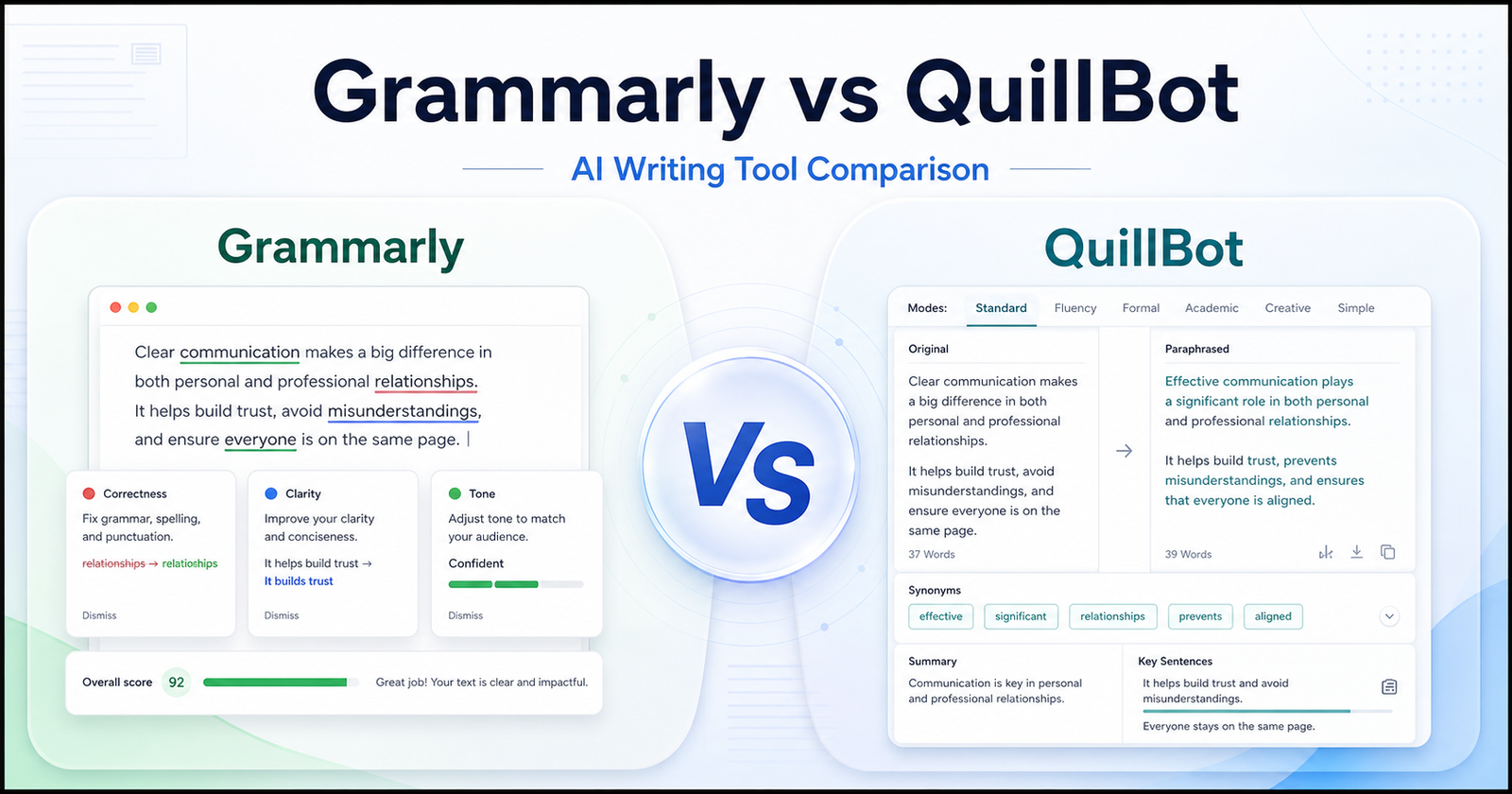
    Grammarly vs QuillBot is a practical comparison for writers, students, marketers, and teams choosing between writing correction and rewriting support. Both tools help improve written content, but they solve different problems. Grammarly is stronger when you want grammar, clarity, tone, plagiarism, AI detection, and team writing support in one writing assistant. QuillBot is stronger when you want paraphrasing, rewriting modes, summarizing, translation, citations, and fast sentence alternatives.

    This article uses official product and pricing sources as the safest source of truth. You can review Grammarly official website and QuillBot official website for the core product details.

    Quick Verdict

    Choose Grammarly if your main goal is cleaner, more polished writing across emails, documents, business content, school work, and team communication. It is the better fit when correctness, tone, style, consistency, and writing confidence matter more than rewriting lots of sentence variations.

    Choose QuillBot if your main goal is paraphrasing, rewriting, summarizing, translating, and quickly creating alternative ways to say the same thing. It is the better fit when you already have a draft and want help reshaping it.

    Do not choose only by feature count. Choose by the writing task you repeat most often. If your daily problem is fixing and polishing writing, start with Grammarly. If your daily problem is rewriting existing text, start with QuillBot.

    Grammarly vs QuillBot: Quick Comparison

    Comparison Point Grammarly QuillBot
    Best for Grammar, clarity, tone, style, correctness, plagiarism checks, and team writing support. Paraphrasing, rewriting, summarizing, citations, translation, and alternative phrasing.
    Main workflow Write normally, then use suggestions to improve correctness and tone. Paste or write text, choose a rewriting mode, then compare rewritten alternatives.
    Best audience Professionals, students, marketers, support teams, and business writers. Students, bloggers, content creators, researchers, and anyone reshaping drafts.
    Grammar help Core strength. Grammarly is built around writing improvement and correctness. Includes grammar checking, but paraphrasing and rewriting are more central.
    Paraphrasing Available as part of Grammarly writing tools, but not the main product identity. Core strength. QuillBot is widely positioned around paraphrasing and rewriting.
    Tone support Stronger fit for tone adjustment, clarity, and professional writing. Useful for changing phrasing, but less focused on business tone governance.
    Long-form editing Better for polishing documents, emails, reports, and business writing. Better for rewriting sections, shortening text, and generating phrasing options.
    Team use Better fit for teams that need writing consistency and controls. Better fit for individual writers or teams focused on rewriting and research help.
    Research support Not a research tool, though it can help polish research writing. Useful for summarizing, citations, and rewriting source notes, but facts still need checking.
    Main limitation It may be more tool than you need if you only want paraphrasing. It may not replace a full writing quality assistant for professional tone and consistency.
    Best decision rule Choose Grammarly when the final quality of your writing matters most. Choose QuillBot when rewriting and rephrasing are the repeated bottleneck.

    What Is Grammarly?

    Grammarly is an AI writing assistant focused on helping people write more clearly and correctly. Its official site presents Grammarly as a writing tool for grammar, tone, clarity, AI writing support, plagiarism checking, AI detection, citations, and business writing workflows.

    The key point is that Grammarly sits close to the act of writing. You can use it while drafting emails, documents, browser text, academic writing, marketing copy, and workplace messages. Its value is not only that it can rewrite text. Its stronger value is that it can catch issues while you write and help you make the final version clearer.

    That makes Grammarly a strong choice for people who care about polish. If your writing is customer-facing, client-facing, academic, or tied to your professional reputation, Grammarly is usually the safer first test.

    What Is QuillBot?

    QuillBot is a writing and rewriting platform with tools such as paraphrasing, grammar checking, summarizing, citation generation, translation, AI detection, plagiarism checking, AI chat, and other writing utilities.

    QuillBot is especially useful when you already have words on the page and need a better version. Maybe a paragraph is too wordy. Maybe a sentence sounds awkward. Maybe you need a shorter summary. Maybe you want alternative phrasing before choosing the best version yourself.

    That makes QuillBot a strong fit for students, bloggers, researchers, and content creators who spend a lot of time reshaping existing drafts. It can help you get unstuck when the idea is there but the wording is not working yet.

    Writing Quality And Correction

    Grammarly is the stronger tool when the main problem is writing quality. Its workflow is built around checking grammar, spelling, punctuation, tone, clarity, and consistency. That matters for business writers because the final output often needs to be clear, professional, and low-risk.

    QuillBot also includes writing tools, but its strongest identity is rewriting. If you want a system that behaves more like an editor sitting beside your writing, Grammarly is the better match. If you want a system that gives you several ways to rephrase a sentence or paragraph, QuillBot is often more useful.

    A practical way to decide is to look at your last ten writing tasks. If most of them involved correcting, polishing, and sending final text, Grammarly fits better. If most involved rewording, summarizing, or changing phrasing, QuillBot fits better.

    Paraphrasing And Rewriting

    QuillBot has the clearer advantage for paraphrasing. Its workflow is designed around taking existing text and creating a new version. That is useful when you want to simplify a sentence, rewrite an awkward paragraph, make a draft more concise, or explore different ways to express the same idea.

    Grammarly can also help rewrite sentences, but it is not only a paraphrasing product. Its rewriting support sits inside a broader writing improvement workflow. That is helpful when you want to improve final quality, but it may feel less direct if your only goal is to generate phrasing alternatives.

    For academic and content work, this difference matters. QuillBot can help with drafts and paraphrasing, but users still need to avoid careless rewriting that changes meaning or creates citation problems. Grammarly can help polish the final text, but it will not replace proper research, source review, or original thinking.

    AI Writing And Productivity Workflow

    Both tools now live in the wider AI writing category, but they support different productivity habits. Grammarly is best when writing happens across many places: browser forms, emails, documents, work messages, and business content. Its value increases when you want writing support to follow you across your day.

    QuillBot is best when you deliberately open a writing utility to transform text. That can be more focused. You bring the paragraph, choose the type of change, review the result, and decide what to keep. For many students and creators, that is exactly the workflow they need.

    Neither tool should be treated as a fact-checker. If a tool rewrites a claim, the claim still needs verification. If a tool improves grammar, the argument still needs to be accurate. Human review is still part of the workflow.

    Pricing Comparison

    Grammarly and QuillBot use different public pricing structures, so the clearest comparison is to look at each product’s verified plans separately.

    Grammarly Pricing

    Grammarly’s official pricing page showed these plans during research:

    Grammarly Plan Verified Price Billing / Access Key Included Details
    Free INR 0 / month Free account Writing without spelling and grammar mistakes, tone visibility, and 100 AI prompts per month.
    Plus INR 392 / member / month Billed annually Full-sentence rewrites, tone adjustment, English fluency support, unlimited personalized suggestions, plagiarism and AI-generated text detection, and 2,000 AI prompts per member per month.
    Plus monthly billing INR 1,000 / member / month Billed monthly Same Plus tier positioned for users who prefer monthly billing.
    Enterprise Contact Sales Custom enterprise plan Proactive AI, dedicated support, BYOK encryption, custom roles and permissions, data loss prevention, and organization-level controls.

    Grammarly is easier to justify when writing quality is a daily workflow, especially for users who need grammar correction, tone improvements, full-sentence rewrites, plagiarism checks, AI detection, and team writing controls.

    QuillBot Pricing

    QuillBot’s official pricing FAQ listed these Premium subscription options during research:

    QuillBot Plan Verified Price Billing / Access Key Included Details
    Monthly Premium $19.95 Billed monthly Premium access with month-to-month flexibility.
    Semi-annual Premium $13.31 / month $39.95 billed every 3 months Discounted multi-month Premium access for users who want lower monthly equivalent pricing.
    Annual Premium $8.33 / month $99.95 billed every 12 months Lowest listed monthly equivalent among the official Premium options.

    QuillBot is easier to justify when rewriting, paraphrasing, summarizing, and sentence alternatives are the repeated need. The annual Premium plan has the lowest listed monthly equivalent, while the monthly plan gives the most flexibility.

    Pricing Takeaway

    Grammarly has a clearer free-to-enterprise structure for users and teams that need writing quality support across daily communication. QuillBot’s Premium pricing is simpler for individual users who mainly want paraphrasing and rewriting tools. If your work depends on final polish, Grammarly’s Plus or Enterprise path is more relevant. If your work depends on reshaping drafts quickly, QuillBot Premium is the more direct pricing comparison.

    Best Use Cases For Grammarly

    Grammarly is a better fit when you want to improve final writing quality. It works well for emails, reports, proposals, social posts, support replies, job applications, school writing, and marketing drafts that need to sound polished.

    Choose Grammarly if you care about:

    • Grammar, spelling, punctuation, and clarity checks.
    • Tone suggestions for professional communication.
    • Sentence rewrites inside a broader editing workflow.
    • Plagiarism and AI detection features where available in your plan.
    • Team writing consistency and business communication quality.
    • A writing assistant that supports many daily writing surfaces.

    Grammarly is also better when mistakes are costly. If your writing goes to clients, customers, teachers, managers, or public audiences, the extra polish can matter.

    Best Use Cases For QuillBot

    QuillBot is a better fit when you need rewriting help more than writing governance. It is useful for paraphrasing paragraphs, finding alternative wording, summarizing longer text, creating citations, translating text, and quickly moving from rough wording to cleaner wording.

    Choose QuillBot if you care about:

    • Paraphrasing existing text.
    • Rewriting sentences in different styles.
    • Summarizing longer notes or articles.
    • Citation generation and student writing support.
    • Translation and language utility workflows.
    • Fast alternatives when a sentence does not sound right.

    QuillBot is especially useful when the draft already exists. It can help you reshape text faster, but the final version still needs human judgment.

    Pros And Cons

    Grammarly Pros

    • Strong fit for grammar, clarity, tone, and professional writing quality.
    • Helpful across many everyday writing contexts.
    • Better option for teams that need consistency and writing standards.
    • Useful for polishing final drafts before sending or publishing.
    • Official product pages include writing tools, AI assistant, plagiarism, AI detection, and business-focused features.

    Grammarly Cons

    • May be more than you need if your only goal is paraphrasing.
    • Some advanced features depend on paid plans.
    • The best value depends on whether you write often enough to use it daily.
    • It does not replace fact checking or human editing judgment.

    QuillBot Pros

    • Strong fit for paraphrasing and rewriting existing text.
    • Useful for students, bloggers, researchers, and creators who need phrasing options.
    • Includes multiple writing utilities beyond paraphrasing.
    • Helps move from awkward wording to a cleaner draft faster.
    • Good when you want a focused text transformation workflow.

    QuillBot Cons

    • May not be as strong as Grammarly for full writing quality control.
    • Rewritten text still needs review for meaning and originality.
    • Team and business writing governance may be less central to the product fit.

    Which One Should You Choose?

    Choose Grammarly if your writing needs to be correct, clear, professional, and consistent. It is the better first choice for professionals, students, marketers, support teams, and businesses that care about final quality.

    Choose QuillBot if your biggest bottleneck is rewriting. It is the better first choice for users who need paraphrases, summaries, alternative wording, and fast ways to reshape existing text.

    If you are unsure, test both tools with the same writing task. Take one rough paragraph, one email, one long note, and one final draft. See which tool saves more usable time after you review the result. The better tool is the one that improves your actual workflow, not the one that looks better in a feature list.

    For marketing copy generation, compare this with our Copy AI vs Jasper AI comparison guide; for content teams focused on search performance, Surfer SEO vs Frase comparison is the better follow-up.

    Final Verdict

    Grammarly and QuillBot are both useful AI writing tools, but they are not interchangeable. Grammarly is more about improving writing quality and confidence. QuillBot is more about rewriting, paraphrasing, and transforming text.

    For most professionals and teams, Grammarly is the safer first choice. For students, bloggers, and creators who often need paraphrasing and summaries, QuillBot may be the better daily companion. The smartest decision is to match the tool to the writing problem you repeat most often.

    FAQs

    Is Grammarly better than QuillBot?

    Grammarly is better if your priority is grammar, clarity, tone, polish, and professional writing quality. It is especially useful for emails, documents, business communication, and final drafts. QuillBot can be better if your priority is paraphrasing, rewriting, summarizing, and generating alternative phrasing.

    Is QuillBot better than Grammarly?

    QuillBot is better for paraphrasing and rewriting workflows. If you often start with existing text and need cleaner alternatives, QuillBot can save time. Grammarly is better when you want a writing assistant that checks correctness, clarity, tone, and consistency while you write.

    Which tool is better for students?

    Students may prefer QuillBot for paraphrasing, summarizing, citations, and study-note rewriting. Grammarly may be better for polishing essays, checking grammar, improving clarity, and reviewing final drafts. The best choice depends on whether the student needs rewriting help or final writing quality support.

    Which tool is better for professional writing?

    Grammarly is usually the stronger choice for professional writing because it focuses on correctness, clarity, tone, and consistency. That matters for emails, reports, proposals, customer communication, and public content. QuillBot can still help professionals rewrite awkward sections or summarize drafts.

    Can Grammarly paraphrase text?

    Grammarly includes rewriting and paraphrasing-related writing tools, but its main strength is broader writing improvement. If your main task is only paraphrasing, QuillBot may feel more direct. If you want paraphrasing plus grammar, tone, clarity, and final polish, Grammarly deserves a closer look.

    Can QuillBot check grammar?

    QuillBot offers grammar checking among its writing tools, but many users choose it for paraphrasing and rewriting. If grammar and tone correction are the main need, compare QuillBot with Grammarly using the same sample text and judge the final quality after review.

    Which tool is better for teams?

    Grammarly is usually a better fit for teams that need consistent, professional writing across business communication. QuillBot can help teams rewrite and summarize text, but Grammarly is more naturally positioned around writing quality, team consistency, and workplace communication workflows.

    Which tool is better for bloggers?

    Bloggers may use both. QuillBot is helpful for rewriting rough paragraphs, summarizing notes, and finding alternative phrasing. Grammarly is helpful for cleaning up the final article, catching grammar issues, improving tone, and making the post easier to read.

    Should I use both Grammarly and QuillBot?

    Using both can make sense if you write often. QuillBot can help reshape rough text, then Grammarly can help polish the final version. The risk is paying for overlapping features, so test both with real writing tasks before keeping both subscriptions.

    Do Grammarly and QuillBot replace human editing?

    No. Both tools can improve writing, but they do not replace human judgment. You still need to check meaning, accuracy, originality, citations, and whether the final text fits your audience. Treat them as writing assistants, not final decision-makers.

  • Copy AI vs Jasper AI: Which AI Writing Tool Is Better for Marketing?

    Copy AI vs Jasper AI: Which AI Writing Tool Is Better for Marketing?

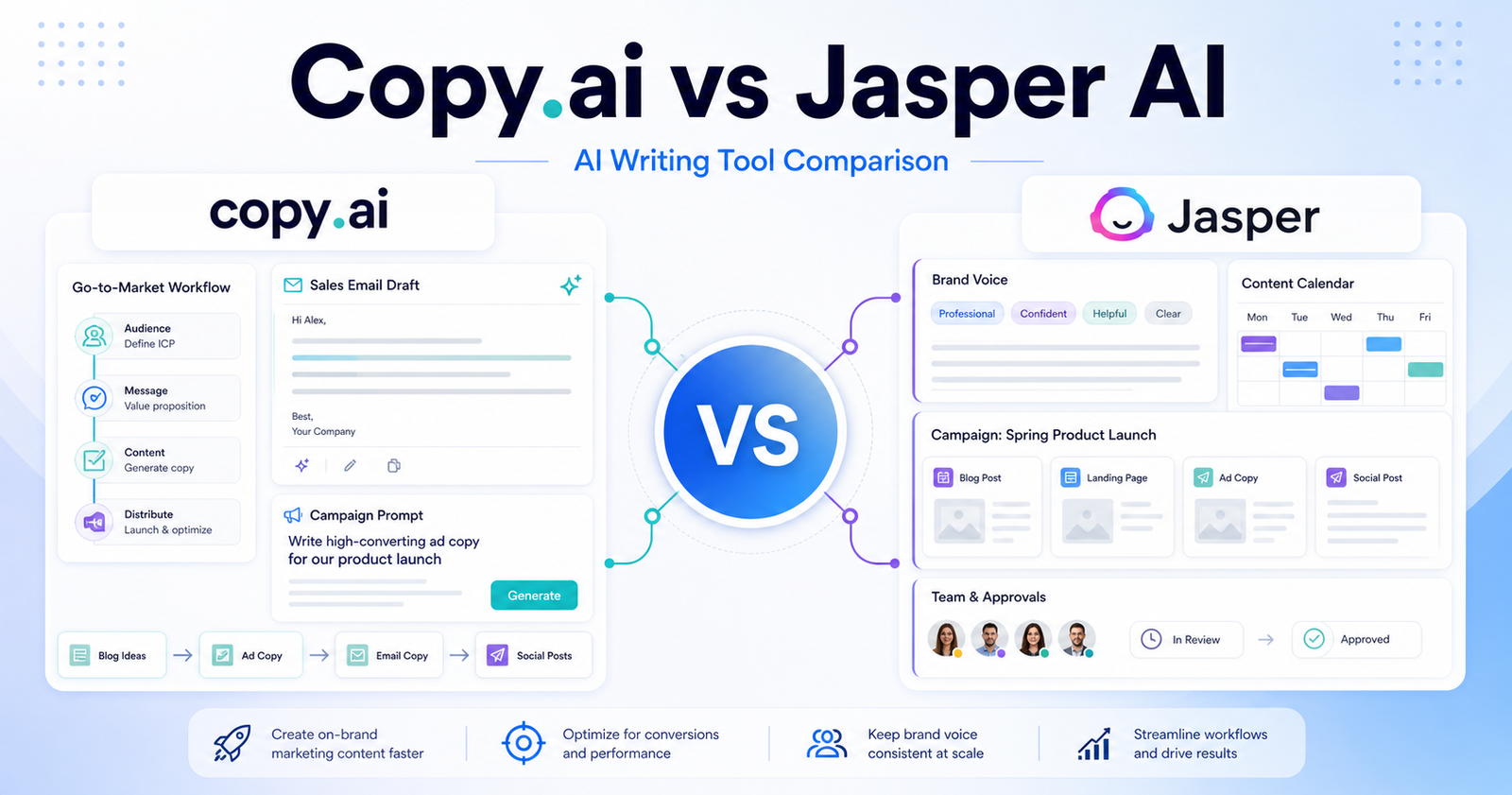
    Copy AI vs Jasper AI is a practical comparison for marketers who need help with campaigns, copywriting, sales content, brand messaging, and repeatable content workflows. The right tool depends less on which AI can write a paragraph and more on which product fits your marketing process. This article focuses on verified product positioning, official website links, official pricing pages, and practical buyer questions. It does not claim hands-on testing.

    You can review Copy.ai and Jasper AI from their official websites before making a final decision.

    Quick Answer by Marketing Need

    Choose Copy.ai if your team cares most about go-to-market content, sales copy, and fast marketing workflow support. Choose Jasper AI if brand consistency, campaign content, team controls, and marketing content operations are the bigger priority.

    The fastest way to decide is to map each product to one real task. If the tool makes that task easier without adding heavy cleanup, it may be the better choice. If the output still needs too much manual review, the stronger feature list may not matter.

    Copy.ai vs Jasper AI: Quick Comparison

    Copy.ai focuses on go-to-market and AI writing workflows for teams that need sales, marketing, and content generation support.

    Jasper AI focuses on AI-assisted marketing content, brand voice, campaign creation, and enterprise-friendly content workflows.

    The difference matters because buyers often compare tools only by feature names. A better comparison asks where each product sits in the workflow, who reviews the output, how pricing limits affect regular use, and whether the tool fits solo work, team workflows, or agency delivery.

    Pricing Comparison

    Copy.ai and Jasper now price around different buyer profiles. Copy.ai is positioned around GTM AI workflows, seats, and workflow credits. Jasper is positioned around marketing content workflows, seats, brand controls, and business features.

    Pricing Point Copy.ai Jasper AI
    Free plan No free plan was shown in the captured official pricing table. No free plan was shown in the captured official pricing table.
    Free trial Not listed in the captured pricing details. 7-day free trial for Pro.
    Cheapest paid plan Chat plan at $29/month, or $24/month billed annually. Pro at $69/month per seat, or $59/month per seat billed yearly.
    Monthly pricing Chat $29/month, Growth $1,000/month, Expansion $2,000/month, Scale $3,000/month. Pro $69/month per seat; Business uses custom pricing.
    Annual pricing Chat $24/month billed $288/year; Growth $12,000/year, Expansion $24,000/year, Scale $36,000/year. Pro $59/month per seat billed yearly; Business is custom.
    Annual discount Chat shows 20% annual savings. Pro shows about 20% annual savings.
    Entry plan seats Chat includes 5 seats. Pro includes 1 user, with additional users handled through Business/custom sales.
    Usage limits Chat includes unlimited words in chat and unlimited chat projects. Pro includes Jasper’s marketing content platform and essential agents.
    Workflow credits Growth includes 20K workflow credits/month, Expansion 45K, Scale 75K. No workflow-credit model listed for Pro in the captured pricing details.
    Team or business plan Growth starts at $1,000/month with 75 seats and 20K workflow credits/month. Business is custom pricing for teams needing personalized AI, security, training, and tech support.
    Enterprise/custom pricing Expansion and Scale are enterprise plans with account-team contact options. Business is custom pricing.
    Official pricing page Copy.ai pricing Jasper pricing

    Plan-by-Plan Pricing

    Tool Plan Monthly Price Annual Price Best For Key Limits
    Copy.ai Chat $29/month $24/month billed $288/year Small teams starting with AI chat and projects 5 seats, unlimited words in chat, unlimited chat projects
    Copy.ai Growth $1,000/month $12,000/year Businesses scaling GTM AI workflows 75 seats, 20K workflow credits/month
    Copy.ai Expansion $2,000/month $24,000/year Enterprises expanding AI automations 150 seats, 45K workflow credits/month
    Copy.ai Scale $3,000/month $36,000/year Organizations deploying generative AI at scale 200 seats, 75K workflow credits/month
    Jasper Pro $69/month per seat $59/month per seat billed yearly Marketing users needing brand-safe content creation Includes 1 seat, Canvas platform, essential agents, brand controls
    Jasper Business Custom pricing Custom pricing Teams needing security, training, support, and custom AI features Custom agents, SSO, custom style guide, API access, enterprise support

    Copy.ai is priced more like a GTM automation platform once teams move beyond the Chat plan. Jasper has a simpler self-serve Pro tier, then moves larger teams into custom Business pricing.

    Pricing last checked: June 12, 2026. For the latest details, visit the Copy.ai official pricing page and Jasper official pricing page.

    Best for Solo Marketers

    Comparison Point Copy.ai Jasper AI
    Main category Copy.ai is used for ai writing tools workflows. Jasper AI is used for ai writing tools workflows.
    Best fit Choose Copy. ai if your team cares most about go-to-market content, sales copy, and fast marketing workflow support.
    Primary workflow Copy.ai focuses on go-to-market and AI writing workflows for teams that need sales, marketing, and content generation support. Jasper AI focuses on AI-assisted marketing content, brand voice, campaign creation, and enterprise-friendly content workflows.
    Beginner fit Good when the user follows the product workflow and checks official guidance. Good when the user follows the product workflow and checks official guidance.
    Team fit Teams should evaluate collaboration, brand voice, workflow controls, governance, and review needs. Teams should evaluate collaboration, brand voice, workflow controls, governance, and review needs.
    Agency fit Agencies should evaluate client workspaces, repeatable campaign formats, approval flow, and brand separation before buying. Agencies should evaluate client workspaces, repeatable campaign formats, approval flow, and brand separation before buying.
    Pricing transparency Official pricing URL is provided; exact plan data is not included in this draft. Official pricing URL is provided; exact plan data is not included in this draft.
    Free access Not included because free-plan status was not captured as table-safe pricing data. Not included because free-plan status was not captured as table-safe pricing data.
    Setup effort Depends on account setup, workflow complexity, and team requirements. Depends on account setup, workflow complexity, and team requirements.
    Best evaluation method Run one realistic project and measure cleanup time. Run one realistic project and measure cleanup time.
    Main risk Buying before checking current limits and workflow fit. Buying before checking current limits and workflow fit.
    Support/documentation Use official docs, help center, and pricing page for current details. Use official docs, help center, and pricing page for current details.
    Solo users Solo marketers should evaluate which workflow gets them from idea to usable copy with the least review time. Solo marketers should evaluate which workflow gets them from idea to usable copy with the least review time.
    Businesses Agencies should evaluate client workspaces, repeatable campaign formats, approval flow, and brand separation before buying. Agencies should evaluate client workspaces, repeatable campaign formats, approval flow, and brand separation before buying.
    Final recommendation Choose Copy.ai if your team cares most about go-to-market content, sales copy, and fast marketing workflow support. Choose Jasper AI if brand consistency, campaign content, team controls, and marketing content operations are the bigger priority. Choose Copy.ai if your team cares most about go-to-market content, sales copy, and fast marketing workflow support. Choose Jasper AI if brand consistency, campaign content, team controls, and marketing content operations are the bigger priority.

    Solo Marketer Fit

    Copy.ai may appeal to solo marketers who need fast campaign and copy ideas without building a large content operation. Jasper AI may be better if the solo marketer cares more about brand voice and polished marketing content systems.

    A good evaluation project should be small but realistic. Use the same brief, same audience, same constraints, and same quality bar in both tools. Then compare setup time, editing time, final quality, and whether the paid plan would remove enough friction to be worth it.

    Best for Content Teams

    Teams should compare how Copy.ai and Jasper AI handle reusable prompts, brand consistency, approvals, and workflow handoff. The better tool is the one that reduces rewrites and keeps messaging consistent across campaigns.

    A good evaluation project should be small but realistic. Use the same brief, same audience, same constraints, and same quality bar in both tools. Then compare setup time, editing time, final quality, and whether the paid plan would remove enough friction to be worth it.

    Best for Agencies and GTM Teams

    Agencies and go-to-market teams should check client separation, collaboration, plan limits, and repeatable campaign workflows. Copy.ai and Jasper AI can both support marketing work, but the strongest fit depends on the content operation behind the tool.

    A good evaluation project should be small but realistic. Use the same brief, same audience, same constraints, and same quality bar in both tools. Then compare setup time, editing time, final quality, and whether the paid plan would remove enough friction to be worth it.

    Best Choice by User Type

    Choose Copy.ai If

    • You prefer the workflow described by the official Copy.ai product pages.
    • Your main use case matches the strongest reasons to choose Copy.ai.
    • You have checked the official pricing page and plan limits.
    • You can review the output before using it in public-facing work.

    Choose Jasper AI If

    • You prefer the workflow described by the official Jasper AI product pages.
    • Your team needs the kind of output and controls Jasper AI is built around.
    • The current pricing page fits your usage volume.
    • You want a tool that better matches your team, client, or content process.

    Consider Alternatives If

    Consider alternatives if neither tool clearly fits your budget, output quality requirements, workflow, or governance needs. A cheaper tool can become expensive if it creates more review work. A more expensive tool can be worthwhile if it saves time across repeated projects.

    Final Recommendation

    Choose Copy.ai if your team cares most about go-to-market content, sales copy, and fast marketing workflow support. Choose Jasper AI if brand consistency, campaign content, team controls, and marketing content operations are the bigger priority.

    For most buyers, the best next step is not to read another feature list. It is to choose one real project, run the same brief through both tools, compare cleanup time, and check current official pricing. The better tool is the one that gives you a usable result with fewer corrections, clearer limits, and a plan that matches your real usage.

    FAQs

    Is Copy.ai better than Jasper AI?

    Copy.ai is better if its workflow matches your main use case and pricing limits. Jasper AI is better if its workflow fits your team, output needs, and budget more closely.

    Is Jasper AI better than Copy.ai?

    Jasper AI can be better for users who need its specific strengths. The safest answer is to test both with the same realistic project and compare final quality, cleanup time, and current plan limits.

    Which tool is cheaper?

    Do not rely on old pricing screenshots or third-party summaries. Check the official Copy.ai pricing page and official Jasper AI pricing page before choosing because plan limits and prices can change.

    Does either tool have a free plan?

    Free access should be confirmed on the official pricing pages. If a free plan, trial, or limited account exists, check what features, exports, seats, and usage limits are included.

    Which tool is better for solo users?

    Solo marketers should evaluate which workflow gets them from idea to usable copy with the least review time.

    Which tool is better for teams?

    Teams should evaluate collaboration, brand voice, workflow controls, governance, and review needs.

    Which tool is better for agencies?

    Agencies should evaluate client workspaces, repeatable campaign formats, approval flow, and brand separation before buying.

    What should I check before buying?

    Review the current plan price, usage limits, seats, export options, collaboration features, security terms, and whether Copy.ai or Jasper AI supports your real workflow.

    Can I use both tools together?

    Yes, but only if each tool handles a different job. Paying for both Copy.ai and Jasper AI makes sense only when the combined workflow saves more time than it costs.

    If your writing stack includes editing and rewriting, our Grammarly vs QuillBot comparison comparison is a natural next read; SEO-focused teams should also compare Surfer SEO vs Frase comparison.

    Which tool should I choose first?

    Start with the tool that solves your biggest bottleneck. Choose Copy.ai if your team cares most about go-to-market content, sales copy, and fast marketing workflow support. Choose Jasper AI if brand consistency, campaign content, team controls, and marketing content operations are the bigger priority.

    Brand Voice and Campaign Workflow

    Brand voice matters more in marketing tools than it does in a casual writing assistant. A team may generate dozens of social posts, email variations, landing page sections, ad concepts, and sales messages from one campaign idea. If the AI writing tool does not keep the message consistent, the team spends the saved time rewriting everything.

    For Copy.ai, the buyer should look at how well the workflow supports go-to-market content, repeated sales messaging, and campaign variations. For Jasper AI, the buyer should look at how well the workflow supports brand voice, campaign structure, and team content operations. Both products can be useful, but the more valuable tool is the one that reduces review time across repeated marketing tasks.

    A good test is to prepare one campaign brief with audience, offer, tone, objections, and channel requirements. Ask both tools to create a landing page section, email sequence, ad copy variations, and social captions from the same brief. Then compare which output stays closer to the brand, which needs fewer rewrites, and which workflow is easier for the team to repeat.