Tag: AI Tools

  • How to Build an AI SEO Content Brief Workflow

    How to Build an AI SEO Content Brief Workflow

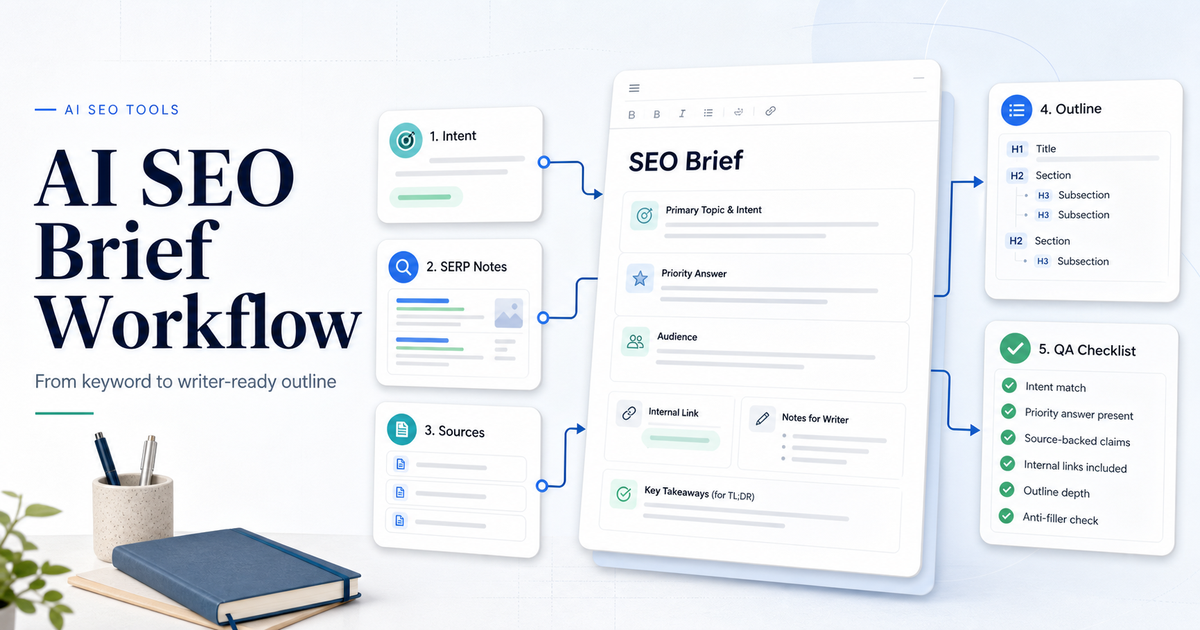
    An AI SEO content brief workflow helps a team move from keyword idea to writer-ready brief without turning SEO into a checklist of random keywords. The goal is to define search intent, gather source-backed requirements, outline the answer the article must provide, check competitor patterns, add internal-link opportunities, and give the writer enough direction to create a useful article.

    The best workflow uses AI to speed up research and structure, but it keeps editorial judgment in the loop. AI can suggest headings, questions, entities, and draft outlines. It should not decide the final angle alone. A strong SEO brief still needs a human to check intent, verify facts, remove filler, and decide what the reader needs first.

    If your team is comparing SEO tools first, our Surfer SEO vs Frase comparison is the right next read. If the brief is part of a larger research process, see our AI research workflow for teams.

    Quick Workflow Summary

    Step Purpose Output
    1. Confirm the keyword Make sure the topic is worth briefing Primary keyword and search intent
    2. Read the SERP Understand what Google is rewarding Content pattern notes
    3. Define the reader task Clarify what the article must answer Priority answer
    4. Collect source facts Avoid unsupported claims Source-backed notes
    5. Build the outline Give the writer a useful path H2 and H3 structure
    6. Add internal links Connect related site content naturally Link suggestions
    7. Create quality checks Prevent generic AI content Editorial checklist
    8. Review after draft Improve the brief based on output Updated process

    1. Confirm The Keyword And Intent

    Start by confirming the keyword, not by writing headings. A keyword such as “AI SEO content brief workflow” implies a process-led article. The reader wants to know how to build the workflow, what steps belong in it, which tools help, and how to avoid weak AI-generated briefs.

    Classify the intent before opening an AI tool:

    • Tutorial or workflow
    • Comparison
    • Review
    • Buyer guide
    • Pricing
    • Alternatives
    • Troubleshooting

    This matters because a workflow article should start with process and outcome. A comparison should start with verdict and tradeoffs. A buyer guide should start with recommendations. If the brief format does not match intent, the article feels wrong even if the keywords are present.

    2. Read The SERP Without Copying It

    An SEO brief should learn from top-ranking pages without copying their structure blindly. Look for repeated patterns:

    • What problem does each page solve?
    • What sections appear near the top?
    • What questions are repeated?
    • What examples or tables help the reader?
    • What information is missing?
    • Where do pages become thin or generic?

    Google’s SEO Starter Guide emphasizes making content easier for search engines to crawl, index, and understand. A content brief should support that goal by making the article clear, structured, and useful for the reader.

    Do not treat the SERP as a template library. The job is to understand expectations and find a better angle.

    3. Define The Priority Answer

    Every SEO brief should tell the writer what answer belongs near the top. This is where many AI-generated briefs fail. They list headings before defining the reader’s main job.

    For a workflow article, the priority answer might be:

    “An AI SEO content brief workflow should confirm search intent, analyze the SERP, collect source-backed facts, create a writer-ready outline, add internal links, and include quality checks before drafting begins.”

    That answer should appear early in the article. The rest of the brief supports it.

    4. Use SEO Tools For Research And Structure

    Surfer’s Content Editor is designed to help with content research, outline creation, recommended entities and facts, and optimization progress. Surfer’s documentation also describes a Content Editor workflow that includes competitor exploration, questions, notes, outline work, and writing/optimization.

    Frase positions itself as an SEO and GEO platform that researches markets, creates optimized content, tracks visibility across Google and AI search engines, and supports competitive research and content creation.

    Semrush Content Toolkit combines AI writing capabilities with Semrush SEO data for content work. Semrush’s knowledge base also describes content workflows that move from idea to publication.

    Use these tools to speed up research, but do not let any tool decide the article without review. SEO tools can reveal patterns. Editors decide what belongs in the final brief.

    5. Build The Writer-Ready Outline

    A writer-ready outline should include more than headings. Each section should explain what the writer must accomplish.

    Good brief format:

    • H2 title
    • Purpose of the section
    • Key points to cover
    • Source notes
    • Internal link opportunity
    • Example or table idea
    • What to avoid

    For example:

    Section Purpose Writer Notes
    Quick Workflow Summary Answer the intent early Include the full process in a table
    Confirm Keyword And Intent Prevent wrong article format Explain intent types and priority answer
    SERP Review Use competitors responsibly Learn patterns without copying
    Source Facts Keep claims safe Use official sources for tools and SEO guidance
    Quality Checks Prevent generic AI output Include human review and anti-filler checks

    This gives the writer direction without forcing a rigid template.

    6. Add Source Requirements

    AI can produce confident but unsupported claims. The brief should name which claims need sources before writing begins.

    Source requirements may include:

    • Official tool pages for features
    • Official pricing pages if pricing is discussed
    • Official documentation for platform limits
    • Google Search Central for SEO principles
    • Company help centers for product workflows
    • Existing internal articles for related context

    Do not ask writers to “add sources later.” The brief should identify source needs early so unsupported claims do not enter the draft.

    7. Add Internal Link Opportunities

    Internal links should be chosen before drafting, then inserted naturally where they help the reader. Do not add random internal links just to increase link count. A good internal link gives the reader a useful next step. It should fit the paragraph naturally, use a clean slug URL, and avoid repeated anchors.

    8. Include An Anti-Filler Checklist

    AI SEO briefs often become bloated. Add checks that prevent weak content:

    • Does the article answer intent in the first 150 to 250 words?
    • Does each section have a job?
    • Are there unsupported tool claims?
    • Are pricing claims verified or omitted?
    • Are examples realistic without fake statistics?
    • Are FAQs distinct?
    • Is the conclusion specific?
    • Are internal links natural?
    • Are external links official where needed?

    This checklist protects article quality before the draft reaches QA.

    9. Draft, Review, And Improve The Brief

    The brief should improve after the first draft. If the writer gets stuck, the brief may be too vague. If the draft repeats generic sections, the brief may need stronger section purposes. If the article misses the priority answer, the brief did not make the answer clear enough.

    Review the draft against the brief:

    • Did the writer answer the main intent early?
    • Did the article use source-backed claims?
    • Did the outline fit the topic?
    • Did the article avoid generic AI phrasing?
    • Did internal links fit naturally?
    • Did the conclusion give a clear recommendation?

    Then update the brief template so the next article is easier to write.

    AI SEO Content Brief Template

    Use this template:

    1. Topic title 2. Primary keyword 3. Search intent 4. Priority answer 5. Target reader 6. Required sources 7. Tools mentioned 8. Suggested internal links 9. Recommended structure 10. Section-by-section notes 11. Examples or tables needed 12. Claims to avoid 13. FAQ candidates 14. Final recommendation angle 15. QA checklist

    This is enough structure to guide the writer without turning every article into the same template.

    Final Recommendation

    Use AI and SEO tools to speed up content brief research, but keep the final brief editorial. The strongest AI SEO content brief workflow confirms intent, studies the SERP, defines the priority answer, gathers sources, creates a section-by-section outline, adds natural internal links, and includes quality checks before drafting begins.

    If your team only does one thing, make the priority answer mandatory. It keeps the article useful from the beginning and prevents generic introductions.

    FAQs

    What is an AI SEO content brief?

    An AI SEO content brief is a writer-ready plan that uses AI and SEO research to define search intent, outline structure, source needs, internal links, examples, FAQs, and quality checks before drafting.

    Which tools can help create SEO content briefs?

    Surfer, Frase, Semrush Content Toolkit, and general AI assistants can help with research, outlines, questions, entities, and draft structure. A human editor should still approve the final brief.

    Should AI write the whole SEO brief?

    AI can draft a brief, but it should not be the only reviewer. Editors need to check intent, source quality, internal links, section usefulness, and unsupported claims.

    What should every SEO brief include?

    Every SEO brief should include a primary keyword, search intent, priority answer, target reader, outline, source requirements, internal link opportunities, FAQ candidates, and quality checklist.

    How long should an SEO content brief be?

    The brief should be long enough to guide the writer but not so long that it becomes harder than the article. A practical brief usually fits into a few structured pages or a concise project document.

    How do internal links fit into a content brief?

    Internal links should be planned before drafting and inserted only where they help the reader. Use clean final URLs and natural anchor text.

    Can SEO tools replace human keyword judgment?

    No. SEO tools can surface patterns, questions, entities, and optimization suggestions, but humans still need to judge intent, usefulness, and brand fit.

    What is the biggest mistake in AI SEO briefs?

    The biggest mistake is generating a long outline without defining the priority answer. The writer needs to know what the article must answer first.

    Should pricing be included in an SEO brief?

    Only include pricing when official pricing sources are available and pricing matters to search intent. Otherwise, do not force pricing into the article.

    How do you prevent generic AI SEO content?

    Use specific search intent, source requirements, practical examples, internal links, clear section purposes, and a human review checklist before publishing.
  • How to Build an AI Marketing Workflow for Small Business

    How to Build an AI Marketing Workflow for Small Business

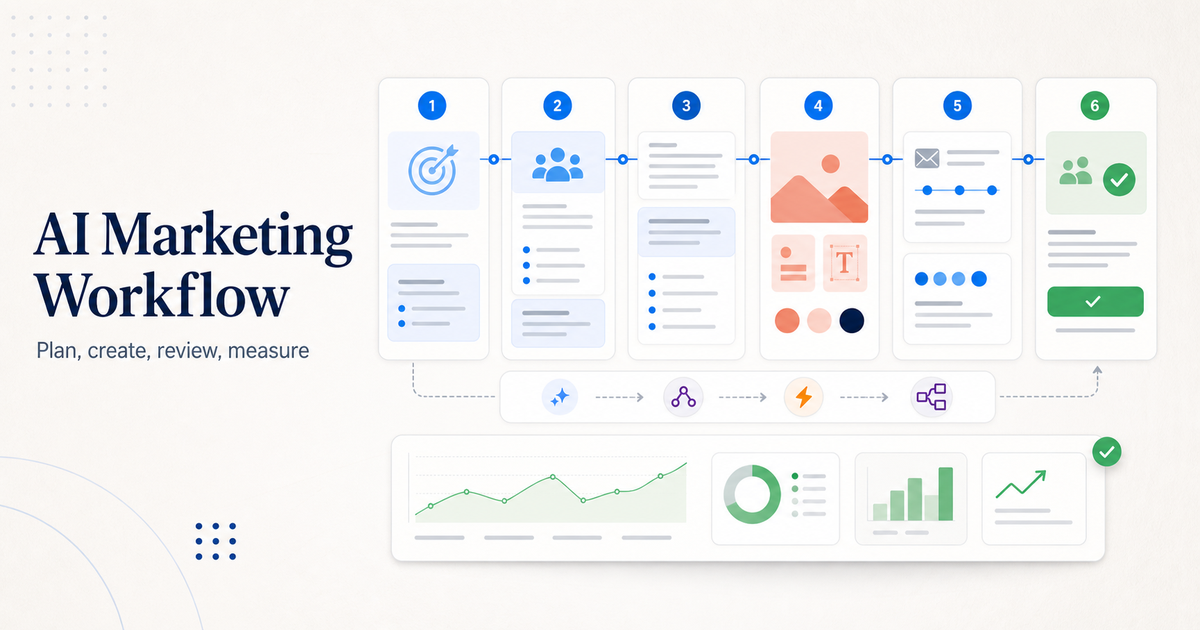
    An AI marketing workflow helps a small business turn one idea into a usable campaign without losing control of the message. The workflow should not be "ask AI for content and publish whatever comes out." A better process starts with a goal, gathers customer context, creates campaign assets, reviews everything against the brand, schedules the work, measures performance, and improves the next cycle.

    The simplest strong workflow uses five roles: ChatGPT for planning and draft support, Canva AI for visual assets, Mailchimp or another email platform for campaigns, Buffer for social scheduling, and an automation tool such as Zapier or Make when handoffs become repetitive. You do not need all of those tools on day one. You need a repeatable process that makes marketing easier without creating low-quality AI content.

    If your marketing workflow connects to customer follow-up, our best AI CRM tools for small business guide can help you choose where leads and contacts should live. If your team also needs support workflows, read the AI customer support workflow.

    Quick Workflow Summary

    Step Purpose Recommended Tool Role
    1. Define campaign goal Decide what the campaign must achieve Planning doc or ChatGPT
    2. Collect customer context Gather audience, offer, objections, and proof CRM, notes, research docs
    3. Draft message angles Create several possible campaign directions ChatGPT for ideation
    4. Create visual assets Turn approved direction into usable designs Canva AI
    5. Build email flow Create launch, nurture, or follow-up emails Mailchimp with Intuit AI features
    6. Schedule social posts Repurpose campaign ideas into channel posts Buffer AI Assistant
    7. Review and approve Check accuracy, brand voice, and claims Human editor
    8. Measure and improve Compare performance and update next cycle Analytics, CRM, campaign reports

    1. Start With One Campaign Goal

    The workflow starts by choosing one campaign goal. That goal might be more demo bookings, more email signups, more product trials, more local appointments, or more repeat purchases. If the goal is vague, AI output becomes vague.

    Write the goal in one sentence:

    • Get more demo requests from small business owners.
    • Bring past customers back with a seasonal offer.
    • Turn website visitors into email subscribers.
    • Promote a new service to existing customers.
    • Reuse one webinar into email and social content.

    This sounds basic, but it prevents the biggest AI marketing mistake: generating random content before deciding what the content needs to accomplish.

    2. Collect Customer Context Before Prompting AI

    AI tools work better when they have context. Before writing prompts, collect the useful facts:

    • Target audience
    • Main offer
    • Customer pain points
    • Objections
    • Proof points
    • Brand tone
    • Products or services included
    • Deadline or campaign window
    • Channels to use
    • Follow-up action

    Do not give AI private customer data unless your tools, permissions, and policies allow it. Use summarized, non-sensitive context where possible. A small business can usually get strong results from customer personas, offer details, and approved examples without uploading sensitive records.

    3. Use ChatGPT For Planning And Draft Options

    ChatGPT for Business is useful for campaign planning, message angles, draft outlines, customer objections, and content repurposing. OpenAI describes business plans as giving teams access to advanced models, tools, and capabilities, including agents and shared workflows.

    Use ChatGPT to create options, not final truth. Ask for three campaign angles, then review them like a marketer:

    • Which angle is clearest?
    • Which claim is safest?
    • Which idea matches the customer problem?
    • Which version sounds most like the brand?
    • Which call to action is specific?

    Avoid asking for "a full campaign" in one prompt. Break the work into planning, positioning, draft copy, email subject lines, social variations, and review checks.

    4. Create Visual Assets With Canva AI

    Canva AI can help small teams turn ideas into visual assets. Canva describes its AI assistant as a way to visualize ideas, generate text, and produce designs in one place.

    Use Canva AI after the message direction is approved. That order matters. If you create designs before the offer and angle are clear, the team may waste time editing visuals that do not support the campaign.

    Good Canva AI tasks include:

    • Drafting social graphics from a campaign theme
    • Creating variations for different platforms
    • Turning a text offer into a visual layout
    • Adapting an existing brand template
    • Generating simple supporting visuals for blog or email assets

    Keep a human review step for brand consistency, legal claims, offer details, spelling, and accessibility.

    5. Build The Email Flow In Mailchimp

    Mailchimp's Intuit AI flow templates can help teams start marketing automation flows with designed, on-brand emails. Mailchimp describes these templates as using pre-selected triggers, steps, and branches for specific marketing goals.

    For a small business, email automation should stay simple at first:

    1. Welcome email 2. Offer or education email 3. Proof or objection-handling email 4. Reminder email 5. Follow-up based on click or signup behavior

    Do not create ten-email sequences just because AI can draft them quickly. More messages are not automatically better. The workflow should match the buying cycle and the audience's tolerance for follow-up.

    6. Repurpose The Campaign With Buffer

    Buffer AI Assistant helps brainstorm ideas, rewrite content, and create platform-specific posts. Buffer's official page positions it as a social media sidekick for content creation and refinement.

    Use Buffer after the main offer and email flow are clear. The social content should support the same campaign, not introduce a separate message.

    A practical repurposing flow:

    • Turn the campaign goal into one announcement post.
    • Turn the customer problem into one educational post.
    • Turn the proof point into one trust-building post.
    • Turn the offer into one deadline or call-to-action post.
    • Turn a common objection into one FAQ-style post.

    Review every post for platform fit. LinkedIn, Instagram, X, Facebook, and TikTok do not need identical wording.

    7. Add Automation Only After The Workflow Works Manually

    Automation is useful after the manual workflow is clear. If your team is still changing the process every week, automating it too early can create confusion.

    Use automation when the handoff is repetitive:

    • Website form to CRM
    • CRM lead to email segment
    • Webinar signup to reminder sequence
    • Published post to social queue
    • Customer support tag to follow-up campaign
    • New lead to sales notification

    For automation platform choice, see our Zapier vs Make comparison. Zapier is often easier for straightforward app-to-app workflows, while Make can suit more visual, multi-step operations.

    8. Create A Human Review Gate

    Every AI marketing workflow needs a human review gate. This is where the team checks:

    • The offer is accurate
    • The copy matches the brand
    • The claims are supported
    • The design is readable
    • The email links work
    • The call to action is clear
    • The content does not sound generic
    • The audience data is handled properly

    This review step protects quality. AI can help produce more options, but the business is still responsible for what gets published.

    Common Mistakes To Avoid

    The first mistake is publishing AI output too quickly. Fast content that weakens trust is not a win.

    The second mistake is using too many tools before the workflow is stable. A small business does not need a complex stack to create useful campaigns.

    The third mistake is letting every channel say something different. Email, social, website, and CRM follow-up should point toward the same offer and customer action.

    The fourth mistake is forgetting measurement. If you do not review opens, clicks, replies, bookings, signups, or sales conversations, the next AI campaign will not be smarter than the last one.

    AI Marketing Workflow Template

    Use this template for a simple campaign:

    1. Write the campaign goal. 2. List the target audience and offer. 3. Collect customer objections and proof points. 4. Ask ChatGPT for 3 campaign angles. 5. Choose one angle and revise it manually. 6. Create email copy and social post drafts. 7. Build visuals in Canva AI. 8. Build the email journey in Mailchimp. 9. Schedule social posts in Buffer. 10. Review everything before publishing. 11. Track results. 12. Save lessons for the next campaign.

    The workflow becomes stronger each time because the team improves prompts, templates, and review criteria.

    Final Recommendation

    Use AI to speed up campaign planning, drafting, design, and repurposing, but keep strategy and approval human. Start with ChatGPT for planning, Canva AI for visuals, Mailchimp for email automation, Buffer for social scheduling, and Zapier or Make only when the handoff is clear enough to automate.

    The best AI marketing workflow is not the one with the most tools. It is the one that helps a small team publish clearer campaigns, follow up consistently, and learn from each launch.

    FAQs

    What is an AI marketing workflow?

    An AI marketing workflow is a repeatable process for using AI tools to plan campaigns, draft copy, create visuals, build email flows, schedule social posts, review content, and measure results.

    Which AI tool is best for small business marketing?

    There is no single best tool for every task. ChatGPT is useful for planning and drafts, Canva AI for visual assets, Mailchimp for email campaigns, Buffer for social content, and Zapier or Make for automation.

    Can AI replace a marketing team?

    No. AI can speed up planning, writing, design, and repurposing, but humans still need to set strategy, approve claims, understand customers, and judge what should be published.

    Should small businesses use AI for email marketing?

    Yes, when there is a clear offer, audience, and review process. AI can help draft emails and automation flows, but the business should check accuracy, tone, links, and compliance before sending.

    How do I avoid generic AI marketing content?

    Use specific customer context, real objections, approved proof points, brand examples, and clear campaign goals. Then edit the output manually instead of publishing the first draft.

    Which tasks should not be fully automated?

    Do not fully automate legal claims, pricing promises, customer-sensitive messages, crisis communication, or final approval. These need human judgment.

    How many AI marketing tools should I use?

    Start with two or three tools. Add more only when there is a clear workflow gap. Too many tools can slow a small team down.

    Can AI help with social media?

    Yes. AI can help brainstorm ideas, rewrite posts, adapt content for different platforms, and create variations. A human should still review tone, accuracy, and timing.

    What should I measure in an AI marketing workflow?

    Measure the result tied to the campaign goal: signups, bookings, replies, clicks, purchases, demo requests, or qualified leads. Do not measure only content output volume.

    What is the biggest mistake with AI marketing?

    The biggest mistake is treating AI as a publishing shortcut instead of a workflow assistant. AI should help the team think, draft, design, and review faster, not remove quality control.