Tag: Grammarly

  • Best AI Writing Tools for Marketing Teams: A Practical Buyer’s Guide

    Best AI Writing Tools for Marketing Teams: A Practical Buyer’s Guide

    Quick Answer

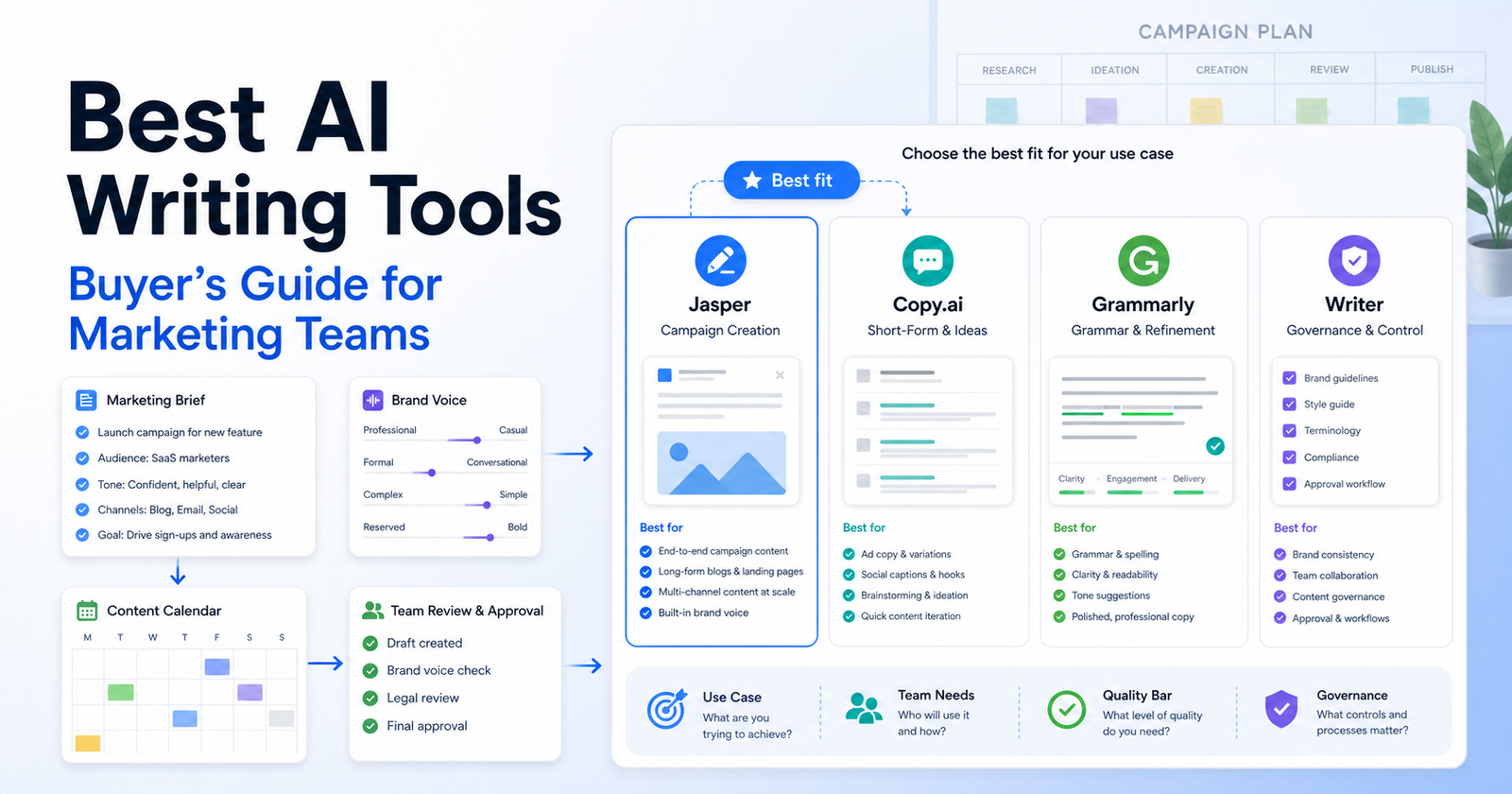
    The best AI writing tool for a marketing team depends on the workflow. Choose Jasper if your team needs brand voice, campaign content, marketing-specific apps, and governance. Choose Copy.ai if your go-to-market team needs workflow automation across sales, marketing, and operations. Choose Grammarly if your team mostly needs writing quality, tone, rewriting, AI prompts, plagiarism detection, and organization-wide consistency.

    This is not a list of generic writing apps. Marketing teams need different things from solo writers: brand consistency, approvals, reusable briefs, team access, security controls, campaign repurposing, and a clear way to keep AI output from sounding generic.

    If you are choosing between two popular writing platforms, our Copy AI vs Jasper AI comparison covers that decision in more detail. If your main need is editing and rewriting, the Grammarly vs QuillBot comparison is a useful companion.

    Best Choices by Use Case

    Use Case Best Fit Why
    Brand-led campaign writing Jasper Strong brand voice, knowledge assets, audiences, marketing apps, and campaign workflows
    GTM workflow automation Copy.ai Built around workflows, actions, tables, sales/marketing/operations use cases, and larger automation plans
    Writing quality and consistency Grammarly Strong editing, tone, rewriting, AI prompts, plagiarism and AI detection, and enterprise security options
    Small team starting out Grammarly or Copy.ai Chat Lower-friction starting point depending on whether you need editing or chat/workflows
    Marketing ops team Copy.ai Better fit when the writing process touches CRM, enrichment, and repeatable GTM operations
    Enterprise brand governance Jasper or Grammarly Enterprise Jasper for campaign creation systems; Grammarly for broad communication controls

    Selection Criteria

    A marketing team should evaluate AI writing tools on seven criteria:

    1. Brand voice and style control. 2. Campaign workflow support. 3. Collaboration and review process. 4. Knowledge grounding. 5. Channel coverage. 6. Pricing model and seat limits. 7. Governance, security, and admin controls.

    The common mistake is buying the tool that writes the best first draft. First drafts are not the bottleneck in most marketing teams. The bottleneck is turning a brief into consistent campaign assets that can be reviewed, reused, approved, and improved.

    Pricing Snapshot

    Pricing sources checked: 2026-06-15. Sources: Jasper official pricing page, Copy.ai official pricing page, and Grammarly official plans page.

    Tool Public Plans and Pricing Signals Useful Limits or Notes
    Jasper Pro is listed at $69 per seat/month monthly or $59 per seat/month yearly; Business uses custom pricing Pro includes 1 seat, Canvas, Essential Agents, 2 Brand Voices, 5 Knowledge assets, and 3 Audiences; Business adds advanced agents, API, governance, support, and unlimited customization
    Copy.ai Chat is $29/month monthly or $24/month annually; Growth is $1,000/month annually; Expansion is $2,000/month annually; Scale is $3,000/month annually; Enterprise is custom/demo Chat lists 5 seats and unlimited words in chat; Growth lists 75 seats and 20K workflow credits/month; larger plans increase seats and workflow credits
    Grammarly Free, Pro, and Enterprise plans are listed; Pro offers a free trial path and Enterprise is contact sales Free lists 100 AI prompts/month; Pro lists 2,000 AI prompts/member/month; Enterprise lists unlimited prompts/member/month and added security/admin features

    Jasper: Best for Brand-Led Campaign Creation

    Jasper is the strongest fit when the marketing team cares about branded campaign creation more than simple AI chat. Its official pricing page highlights Canvas, Essential Agents, Brand Voices, Knowledge assets, Audiences, marketing apps, custom agents, Jasper Grid, API access, governance, groups, support, and secure deployment options across plans.

    That matters when multiple marketers need to produce related assets from the same brief. A campaign manager might create a launch brief, then ask the team to adapt it into email, paid social, landing-page copy, and sales enablement content. Jasper is a better fit when that work needs brand voice and shared context.

    Jasper is not the right choice if your team only needs grammar help, short rewrites, or occasional social captions. It may be more platform than a small team needs.

    Copy.ai: Best for GTM Workflow Automation

    Copy.ai is better for teams that think in workflows, not just documents. Its official pricing page and navigation emphasize GTM AI, workflows, actions, tables, sales, marketing, operations, prospecting, inbound lead processing, content creation, translation, localization, CRM enrichment, and GTM systems integrations.

    That makes Copy.ai attractive for marketing operations teams that want repeatable processes. For example, a team might turn a webinar transcript into follow-up emails, sales snippets, account notes, and localized content. Copy.ai is more compelling when the work touches data and operations.

    Copy.ai is not the right choice if you want a simple writing assistant for every employee. Its higher-tier workflow plans are designed for teams with enough process maturity to use credits, seats, and automations well.

    Grammarly: Best for Writing Quality and Team Consistency

    Grammarly is not just a spell checker anymore, but its best use case is still writing quality at scale. Its official plans page lists Free, Pro, and Enterprise options, with features such as tone, rewriting, English fluency, plagiarism detection, AI-generated text detection, AI prompts, style guide, brand tones, snippets, analytics, roles, SAML SSO, SCIM, managed mode, and data loss prevention by plan.

    That makes Grammarly a good fit when many people write externally: marketers, sales reps, support teams, recruiters, executives, and customer success managers. It helps reduce inconsistency across emails, docs, proposals, and website drafts.

    Grammarly is not the right choice if your main need is campaign orchestration or GTM automation. It improves writing quality, but it is not a full marketing workflow platform.

    Decision Framework

    Choose Jasper if your team asks, "How do we create more on-brand campaign assets from fewer briefs?"

    Choose Copy.ai if your team asks, "How do we automate repeatable GTM writing and research workflows?"

    Choose Grammarly if your team asks, "How do we improve writing quality and consistency everywhere our team communicates?"

    Avoid choosing any AI writing tool until you know who owns the prompt library, brand rules, review process, and final approval. Without those, every tool becomes a faster way to create inconsistent drafts.

    Common Mistakes

    The first mistake is letting every marketer use AI differently. That creates uneven tone and duplicated prompts. Create shared briefs, examples, and review rules.

    The second mistake is treating AI output as final copy. AI can draft, remix, summarize, and rewrite, but humans still need to check positioning, claims, brand voice, legal risk, and offer accuracy.

    The third mistake is buying an enterprise workflow platform for a team that only needs editing help. Match the tool to the workflow, not the most impressive feature list.

    Final Recommendation

    For most marketing teams, Jasper is the best choice when brand-led campaign creation is the priority. Copy.ai is the better choice when marketing work is part of a larger go-to-market automation process. Grammarly is the best choice when the team needs writing quality, tone, and consistency across many channels.

    If you are unsure, start with the bottleneck. If drafts are off-brand, test Jasper. If workflows are manual and repetitive, test Copy.ai. If writing quality varies across the organization, test Grammarly.

    FAQs

    What is the best AI writing tool for marketing teams?

    Jasper is best for campaign and brand-led marketing content, Copy.ai is best for GTM workflow automation, and Grammarly is best for writing quality and consistency across teams. The best choice depends on the workflow you need to improve.

    Is Jasper better than Copy.ai?

    Jasper is better when your team needs branded campaign creation, knowledge assets, audiences, and marketing apps. Copy.ai is better when your team wants workflows across sales, marketing, and operations.

    Is Grammarly enough for marketing teams?

    Grammarly can be enough when the main problem is writing quality, tone, editing, and consistency. It is not a replacement for campaign planning, content operations, or GTM workflow automation.

    Which tool is best for small marketing teams?

    Small teams should usually start with the narrowest bottleneck. Use Grammarly for editing quality, Jasper for branded campaign drafts, or Copy.ai Chat if the team wants a lower-friction AI workspace with workflow growth potential.

    Which tool is best for agencies?

    Agencies often need brand consistency across clients, so Jasper can be strong when client voice and reusable knowledge matter. Copy.ai can fit agencies that build repeatable GTM processes. Grammarly helps with review quality across all client-facing writing.

    Should marketing teams use AI for final copy?

    AI should assist with drafts, variations, outlines, repurposing, and editing. Final copy still needs human review for positioning, claims, brand tone, offer accuracy, legal risk, and audience fit.

    What matters more than the AI model?

    The workflow matters more: briefs, brand rules, source material, approvals, examples, and review standards. Without those, the output can sound polished but still miss the campaign strategy.

    Are AI writing tools safe for confidential campaigns?

    Safety depends on the vendor, plan, settings, and your company policies. Review each tool's security, privacy, admin, and enterprise controls before uploading confidential product plans, customer data, or unreleased campaign details.
  • Grammarly vs QuillBot: Which AI Writing Tool Should You Choose?

    Grammarly vs QuillBot: Which AI Writing Tool Should You Choose?

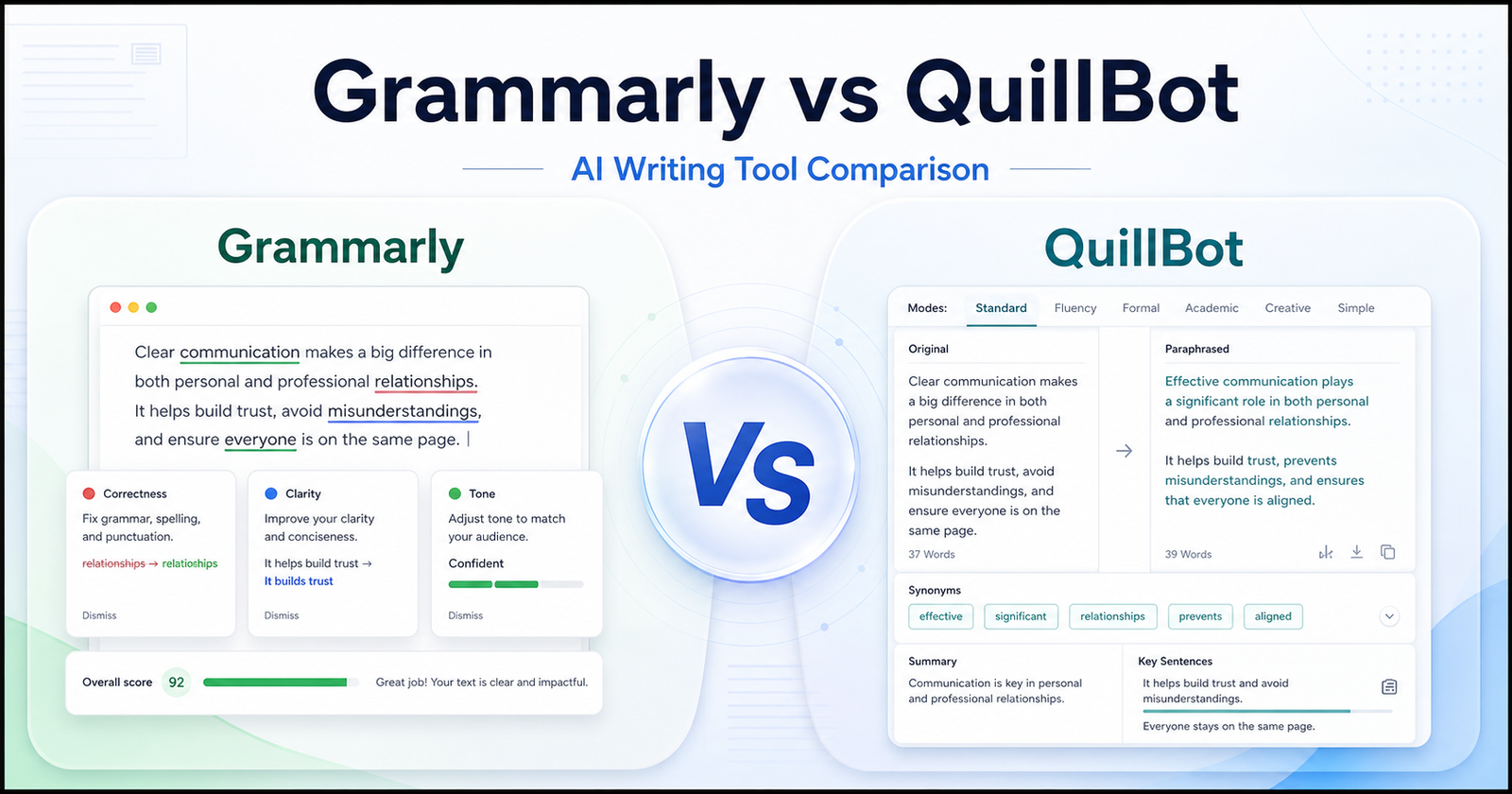
    Grammarly vs QuillBot is a practical comparison for writers, students, marketers, and teams choosing between writing correction and rewriting support. Both tools help improve written content, but they solve different problems. Grammarly is stronger when you want grammar, clarity, tone, plagiarism, AI detection, and team writing support in one writing assistant. QuillBot is stronger when you want paraphrasing, rewriting modes, summarizing, translation, citations, and fast sentence alternatives.

    This article uses official product and pricing sources as the safest source of truth. You can review Grammarly official website and QuillBot official website for the core product details.

    Quick Verdict

    Choose Grammarly if your main goal is cleaner, more polished writing across emails, documents, business content, school work, and team communication. It is the better fit when correctness, tone, style, consistency, and writing confidence matter more than rewriting lots of sentence variations.

    Choose QuillBot if your main goal is paraphrasing, rewriting, summarizing, translating, and quickly creating alternative ways to say the same thing. It is the better fit when you already have a draft and want help reshaping it.

    Do not choose only by feature count. Choose by the writing task you repeat most often. If your daily problem is fixing and polishing writing, start with Grammarly. If your daily problem is rewriting existing text, start with QuillBot.

    Grammarly vs QuillBot: Quick Comparison

    Comparison Point Grammarly QuillBot
    Best for Grammar, clarity, tone, style, correctness, plagiarism checks, and team writing support. Paraphrasing, rewriting, summarizing, citations, translation, and alternative phrasing.
    Main workflow Write normally, then use suggestions to improve correctness and tone. Paste or write text, choose a rewriting mode, then compare rewritten alternatives.
    Best audience Professionals, students, marketers, support teams, and business writers. Students, bloggers, content creators, researchers, and anyone reshaping drafts.
    Grammar help Core strength. Grammarly is built around writing improvement and correctness. Includes grammar checking, but paraphrasing and rewriting are more central.
    Paraphrasing Available as part of Grammarly writing tools, but not the main product identity. Core strength. QuillBot is widely positioned around paraphrasing and rewriting.
    Tone support Stronger fit for tone adjustment, clarity, and professional writing. Useful for changing phrasing, but less focused on business tone governance.
    Long-form editing Better for polishing documents, emails, reports, and business writing. Better for rewriting sections, shortening text, and generating phrasing options.
    Team use Better fit for teams that need writing consistency and controls. Better fit for individual writers or teams focused on rewriting and research help.
    Research support Not a research tool, though it can help polish research writing. Useful for summarizing, citations, and rewriting source notes, but facts still need checking.
    Main limitation It may be more tool than you need if you only want paraphrasing. It may not replace a full writing quality assistant for professional tone and consistency.
    Best decision rule Choose Grammarly when the final quality of your writing matters most. Choose QuillBot when rewriting and rephrasing are the repeated bottleneck.

    What Is Grammarly?

    Grammarly is an AI writing assistant focused on helping people write more clearly and correctly. Its official site presents Grammarly as a writing tool for grammar, tone, clarity, AI writing support, plagiarism checking, AI detection, citations, and business writing workflows.

    The key point is that Grammarly sits close to the act of writing. You can use it while drafting emails, documents, browser text, academic writing, marketing copy, and workplace messages. Its value is not only that it can rewrite text. Its stronger value is that it can catch issues while you write and help you make the final version clearer.

    That makes Grammarly a strong choice for people who care about polish. If your writing is customer-facing, client-facing, academic, or tied to your professional reputation, Grammarly is usually the safer first test.

    What Is QuillBot?

    QuillBot is a writing and rewriting platform with tools such as paraphrasing, grammar checking, summarizing, citation generation, translation, AI detection, plagiarism checking, AI chat, and other writing utilities.

    QuillBot is especially useful when you already have words on the page and need a better version. Maybe a paragraph is too wordy. Maybe a sentence sounds awkward. Maybe you need a shorter summary. Maybe you want alternative phrasing before choosing the best version yourself.

    That makes QuillBot a strong fit for students, bloggers, researchers, and content creators who spend a lot of time reshaping existing drafts. It can help you get unstuck when the idea is there but the wording is not working yet.

    Writing Quality And Correction

    Grammarly is the stronger tool when the main problem is writing quality. Its workflow is built around checking grammar, spelling, punctuation, tone, clarity, and consistency. That matters for business writers because the final output often needs to be clear, professional, and low-risk.

    QuillBot also includes writing tools, but its strongest identity is rewriting. If you want a system that behaves more like an editor sitting beside your writing, Grammarly is the better match. If you want a system that gives you several ways to rephrase a sentence or paragraph, QuillBot is often more useful.

    A practical way to decide is to look at your last ten writing tasks. If most of them involved correcting, polishing, and sending final text, Grammarly fits better. If most involved rewording, summarizing, or changing phrasing, QuillBot fits better.

    Paraphrasing And Rewriting

    QuillBot has the clearer advantage for paraphrasing. Its workflow is designed around taking existing text and creating a new version. That is useful when you want to simplify a sentence, rewrite an awkward paragraph, make a draft more concise, or explore different ways to express the same idea.

    Grammarly can also help rewrite sentences, but it is not only a paraphrasing product. Its rewriting support sits inside a broader writing improvement workflow. That is helpful when you want to improve final quality, but it may feel less direct if your only goal is to generate phrasing alternatives.

    For academic and content work, this difference matters. QuillBot can help with drafts and paraphrasing, but users still need to avoid careless rewriting that changes meaning or creates citation problems. Grammarly can help polish the final text, but it will not replace proper research, source review, or original thinking.

    AI Writing And Productivity Workflow

    Both tools now live in the wider AI writing category, but they support different productivity habits. Grammarly is best when writing happens across many places: browser forms, emails, documents, work messages, and business content. Its value increases when you want writing support to follow you across your day.

    QuillBot is best when you deliberately open a writing utility to transform text. That can be more focused. You bring the paragraph, choose the type of change, review the result, and decide what to keep. For many students and creators, that is exactly the workflow they need.

    Neither tool should be treated as a fact-checker. If a tool rewrites a claim, the claim still needs verification. If a tool improves grammar, the argument still needs to be accurate. Human review is still part of the workflow.

    Pricing Comparison

    Grammarly and QuillBot use different public pricing structures, so the clearest comparison is to look at each product’s verified plans separately.

    Grammarly Pricing

    Grammarly’s official pricing page showed these plans during research:

    Grammarly Plan Verified Price Billing / Access Key Included Details
    Free INR 0 / month Free account Writing without spelling and grammar mistakes, tone visibility, and 100 AI prompts per month.
    Plus INR 392 / member / month Billed annually Full-sentence rewrites, tone adjustment, English fluency support, unlimited personalized suggestions, plagiarism and AI-generated text detection, and 2,000 AI prompts per member per month.
    Plus monthly billing INR 1,000 / member / month Billed monthly Same Plus tier positioned for users who prefer monthly billing.
    Enterprise Contact Sales Custom enterprise plan Proactive AI, dedicated support, BYOK encryption, custom roles and permissions, data loss prevention, and organization-level controls.

    Grammarly is easier to justify when writing quality is a daily workflow, especially for users who need grammar correction, tone improvements, full-sentence rewrites, plagiarism checks, AI detection, and team writing controls.

    QuillBot Pricing

    QuillBot’s official pricing FAQ listed these Premium subscription options during research:

    QuillBot Plan Verified Price Billing / Access Key Included Details
    Monthly Premium $19.95 Billed monthly Premium access with month-to-month flexibility.
    Semi-annual Premium $13.31 / month $39.95 billed every 3 months Discounted multi-month Premium access for users who want lower monthly equivalent pricing.
    Annual Premium $8.33 / month $99.95 billed every 12 months Lowest listed monthly equivalent among the official Premium options.

    QuillBot is easier to justify when rewriting, paraphrasing, summarizing, and sentence alternatives are the repeated need. The annual Premium plan has the lowest listed monthly equivalent, while the monthly plan gives the most flexibility.

    Pricing Takeaway

    Grammarly has a clearer free-to-enterprise structure for users and teams that need writing quality support across daily communication. QuillBot’s Premium pricing is simpler for individual users who mainly want paraphrasing and rewriting tools. If your work depends on final polish, Grammarly’s Plus or Enterprise path is more relevant. If your work depends on reshaping drafts quickly, QuillBot Premium is the more direct pricing comparison.

    Best Use Cases For Grammarly

    Grammarly is a better fit when you want to improve final writing quality. It works well for emails, reports, proposals, social posts, support replies, job applications, school writing, and marketing drafts that need to sound polished.

    Choose Grammarly if you care about:

    • Grammar, spelling, punctuation, and clarity checks.
    • Tone suggestions for professional communication.
    • Sentence rewrites inside a broader editing workflow.
    • Plagiarism and AI detection features where available in your plan.
    • Team writing consistency and business communication quality.
    • A writing assistant that supports many daily writing surfaces.

    Grammarly is also better when mistakes are costly. If your writing goes to clients, customers, teachers, managers, or public audiences, the extra polish can matter.

    Best Use Cases For QuillBot

    QuillBot is a better fit when you need rewriting help more than writing governance. It is useful for paraphrasing paragraphs, finding alternative wording, summarizing longer text, creating citations, translating text, and quickly moving from rough wording to cleaner wording.

    Choose QuillBot if you care about:

    • Paraphrasing existing text.
    • Rewriting sentences in different styles.
    • Summarizing longer notes or articles.
    • Citation generation and student writing support.
    • Translation and language utility workflows.
    • Fast alternatives when a sentence does not sound right.

    QuillBot is especially useful when the draft already exists. It can help you reshape text faster, but the final version still needs human judgment.

    Pros And Cons

    Grammarly Pros

    • Strong fit for grammar, clarity, tone, and professional writing quality.
    • Helpful across many everyday writing contexts.
    • Better option for teams that need consistency and writing standards.
    • Useful for polishing final drafts before sending or publishing.
    • Official product pages include writing tools, AI assistant, plagiarism, AI detection, and business-focused features.

    Grammarly Cons

    • May be more than you need if your only goal is paraphrasing.
    • Some advanced features depend on paid plans.
    • The best value depends on whether you write often enough to use it daily.
    • It does not replace fact checking or human editing judgment.

    QuillBot Pros

    • Strong fit for paraphrasing and rewriting existing text.
    • Useful for students, bloggers, researchers, and creators who need phrasing options.
    • Includes multiple writing utilities beyond paraphrasing.
    • Helps move from awkward wording to a cleaner draft faster.
    • Good when you want a focused text transformation workflow.

    QuillBot Cons

    • May not be as strong as Grammarly for full writing quality control.
    • Rewritten text still needs review for meaning and originality.
    • Team and business writing governance may be less central to the product fit.

    Which One Should You Choose?

    Choose Grammarly if your writing needs to be correct, clear, professional, and consistent. It is the better first choice for professionals, students, marketers, support teams, and businesses that care about final quality.

    Choose QuillBot if your biggest bottleneck is rewriting. It is the better first choice for users who need paraphrases, summaries, alternative wording, and fast ways to reshape existing text.

    If you are unsure, test both tools with the same writing task. Take one rough paragraph, one email, one long note, and one final draft. See which tool saves more usable time after you review the result. The better tool is the one that improves your actual workflow, not the one that looks better in a feature list.

    For marketing copy generation, compare this with our Copy AI vs Jasper AI comparison guide; for content teams focused on search performance, Surfer SEO vs Frase comparison is the better follow-up.

    Final Verdict

    Grammarly and QuillBot are both useful AI writing tools, but they are not interchangeable. Grammarly is more about improving writing quality and confidence. QuillBot is more about rewriting, paraphrasing, and transforming text.

    For most professionals and teams, Grammarly is the safer first choice. For students, bloggers, and creators who often need paraphrasing and summaries, QuillBot may be the better daily companion. The smartest decision is to match the tool to the writing problem you repeat most often.

    FAQs

    Is Grammarly better than QuillBot?

    Grammarly is better if your priority is grammar, clarity, tone, polish, and professional writing quality. It is especially useful for emails, documents, business communication, and final drafts. QuillBot can be better if your priority is paraphrasing, rewriting, summarizing, and generating alternative phrasing.

    Is QuillBot better than Grammarly?

    QuillBot is better for paraphrasing and rewriting workflows. If you often start with existing text and need cleaner alternatives, QuillBot can save time. Grammarly is better when you want a writing assistant that checks correctness, clarity, tone, and consistency while you write.

    Which tool is better for students?

    Students may prefer QuillBot for paraphrasing, summarizing, citations, and study-note rewriting. Grammarly may be better for polishing essays, checking grammar, improving clarity, and reviewing final drafts. The best choice depends on whether the student needs rewriting help or final writing quality support.

    Which tool is better for professional writing?

    Grammarly is usually the stronger choice for professional writing because it focuses on correctness, clarity, tone, and consistency. That matters for emails, reports, proposals, customer communication, and public content. QuillBot can still help professionals rewrite awkward sections or summarize drafts.

    Can Grammarly paraphrase text?

    Grammarly includes rewriting and paraphrasing-related writing tools, but its main strength is broader writing improvement. If your main task is only paraphrasing, QuillBot may feel more direct. If you want paraphrasing plus grammar, tone, clarity, and final polish, Grammarly deserves a closer look.

    Can QuillBot check grammar?

    QuillBot offers grammar checking among its writing tools, but many users choose it for paraphrasing and rewriting. If grammar and tone correction are the main need, compare QuillBot with Grammarly using the same sample text and judge the final quality after review.

    Which tool is better for teams?

    Grammarly is usually a better fit for teams that need consistent, professional writing across business communication. QuillBot can help teams rewrite and summarize text, but Grammarly is more naturally positioned around writing quality, team consistency, and workplace communication workflows.

    Which tool is better for bloggers?

    Bloggers may use both. QuillBot is helpful for rewriting rough paragraphs, summarizing notes, and finding alternative phrasing. Grammarly is helpful for cleaning up the final article, catching grammar issues, improving tone, and making the post easier to read.

    Should I use both Grammarly and QuillBot?

    Using both can make sense if you write often. QuillBot can help reshape rough text, then Grammarly can help polish the final version. The risk is paying for overlapping features, so test both with real writing tasks before keeping both subscriptions.

    Do Grammarly and QuillBot replace human editing?

    No. Both tools can improve writing, but they do not replace human judgment. You still need to check meaning, accuracy, originality, citations, and whether the final text fits your audience. Treat them as writing assistants, not final decision-makers.