Tag: SEO Workflow

  • How to Build an AI WordPress Content Workflow

    How to Build an AI WordPress Content Workflow

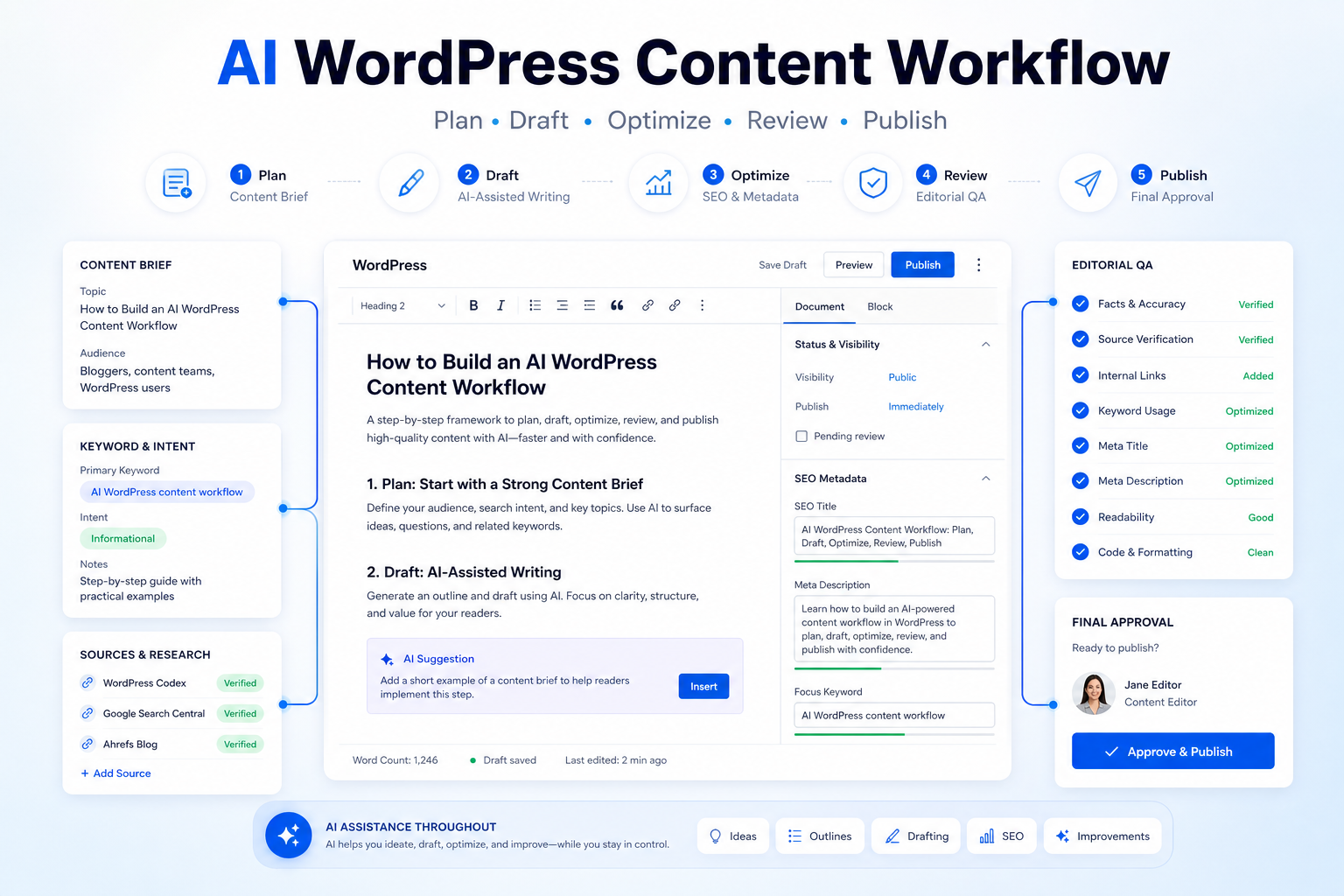
    An AI WordPress content workflow works best when it improves the parts of publishing that are repetitive, not the parts that require judgment. The goal is not to press one button and hope an article is ready. The goal is to move faster from idea to publishable draft while keeping topic selection, sources, brand voice, SEO intent, and final approval under human control.

    WordPress site owners now have several native or near-native AI options. Jetpack AI Assistant focuses on generating and improving content inside WordPress. Yoast AI features help with SEO titles and meta descriptions. Rank Math Content AI supports content research and optimization tasks. Elementor AI helps with page copy, layout ideas, and site-building content.

    The Short Workflow

    Stage AI role Human role
    Topic brief Cluster ideas and draft outlines Pick the real angle and reject duplicates
    First draft Turn notes into a structured article Check facts, examples, and usefulness
    SEO pass Suggest titles, headings, and metadata Choose the version that matches intent
    WordPress build Format blocks, page sections, and summaries Review layout and internal links
    Publish QA Surface weak sections and missing answers Approve or send back for edits

    Start With A Real Publishing Goal

    Before opening an AI panel, define the purpose of the post. A review article, a comparison, a workflow guide, and a tutorial should not share the same structure. For WordPress content, the most useful brief includes the primary keyword, reader skill level, desired action, tools mentioned, internal links, source requirements, and the one decision the article should help the reader make.

    For example, a workflow article should answer what the reader should do first, what they should automate, where they should slow down, and what they should avoid. That brief gives AI useful boundaries. Without it, AI tends to produce broad introductions, predictable headings, and advice that sounds correct but does not help a site owner publish better.

    If you already use a content planning process, keep it. AI should enhance the brief, not replace it. Pull topic gaps from Search Console, customer questions, sales objections, support tickets, or old posts that need refreshing. Then ask AI to help turn that evidence into a focused outline.

    Assign Each AI Tool A Narrow Job

    A common mistake is asking one AI tool to do everything. WordPress publishing has different jobs, and each job needs a different level of review.

    Use Jetpack AI Assistant for drafting, rewriting, tone shifts, summaries, and quick alternatives inside the editor. Use Yoast AI features when the draft is already clear and you need stronger SEO titles or meta descriptions. Use Rank Math Content AI when you want optimization prompts, content ideas, or keyword-aware suggestions. Use Elementor AI when the content lives inside a page or landing-page layout rather than a plain post.

    That division keeps the workflow cleaner. It also makes QA easier because you can trace where a claim, heading, or meta field came from. If the article discusses a tool, product, or factual process, keep official links in the draft notes and make the editor verify them before publishing.

    Build The Article In Four Passes

    The first pass is the brief. Write a short paragraph describing the audience, intent, article type, and required sources. Add internal link candidates such as AI SEO content brief workflow or best AI writing tools for marketing teams when they genuinely support the reader.

    The second pass is the draft. Ask AI for a structured article, but keep the instruction specific: no invented experience, no unsupported claims, no pricing claims unless official pricing is being checked, no generic advice, and no conclusion that simply repeats the introduction.

    The third pass is the editorial review. A human editor should check every claim about WordPress features, SEO behavior, integrations, and limitations. This is where you remove fake testing language, padded FAQs, and weak examples.

    The fourth pass is the WordPress build. Add the post title, slug, excerpt, category, tags, internal links, external sources, and metadata. Preview the post in WordPress before publishing. AI can suggest improvements, but it should not be the final approver.

    Where AI Helps Most

    AI is especially useful for turning rough notes into a complete outline, creating alternate headlines, compressing long source notes, spotting unanswered questions, and generating first-draft FAQs. It is less reliable for product limitations, exact feature availability, pricing, and anything that depends on a current official page.

    For a small WordPress team, the biggest win is consistency. A repeatable AI content workflow means every article gets a brief, source check, SEO pass, metadata, internal links, and final QA. That is more valuable than saving a few minutes on drafting.

    Common Mistakes To Avoid

    Do not let AI choose the topic only because it sounds popular. Do not publish AI-generated descriptions of plugins or SaaS products without checking official pages. Do not add a pricing table unless the numbers have been verified from an official pricing page. Do not use AI to create fake screenshots, fake logos, or fake hands-on testing claims.

    Also avoid over-optimizing the article until it becomes hard to read. Search intent matters, but useful explanation matters more. Readers want a workflow they can follow, not a stack of keywords.

    FAQ

    What is an AI WordPress content workflow?

    An AI WordPress content workflow is a repeatable process for using AI to plan, draft, optimize, review, and publish WordPress content while keeping human approval in charge.

    Should AI write the full WordPress article?

    AI can create a first draft, but a human editor should verify facts, improve examples, add sources, and approve the final version.

    Which WordPress AI tool should I start with?

    Start with the tool already closest to your workflow. Jetpack helps inside WordPress editing, Yoast and Rank Math help with SEO tasks, and Elementor helps with page-building content.

    Can AI handle SEO metadata?

    AI can suggest SEO titles and descriptions, but the editor should choose the version that matches search intent and avoids exaggeration.

    Should I include pricing in AI-assisted articles?

    Only include pricing when it has been verified from official sources. If pricing is not central to the article, it is safer to leave it out.

    How do I prevent duplicate topics?

    Keep a content database with titles, slugs, primary keywords, categories, and published URLs. Check it before assigning a new brief.

    Can AI create internal links?

    AI can suggest them, but a human should confirm the links are final URLs and genuinely helpful to the reader.

    What should the editor check before publishing?

    The editor should check facts, links, metadata, headings, source support, formatting, reader value, and whether the article gives clear next steps.

    Is this workflow useful for small blogs?

    Yes. Small blogs benefit because AI can reduce drafting time while a simple checklist keeps quality consistent.

    What is the biggest limitation?

    AI can sound confident when it is wrong or outdated. Treat it as a drafting assistant, not an authority.

    Final Decision

    Use this workflow if your team already has the core business process in place and wants AI to remove drafting, summarizing, sorting, and follow-up friction. Do not use it as a substitute for human review, legal approval, customer-sensitive judgment, or final publishing decisions. The best setup is simple: one source of truth, one review owner, a short list of approved prompts, and a weekly check of what the AI helped create.
  • How to Build an AI SEO Content Brief Workflow

    How to Build an AI SEO Content Brief Workflow

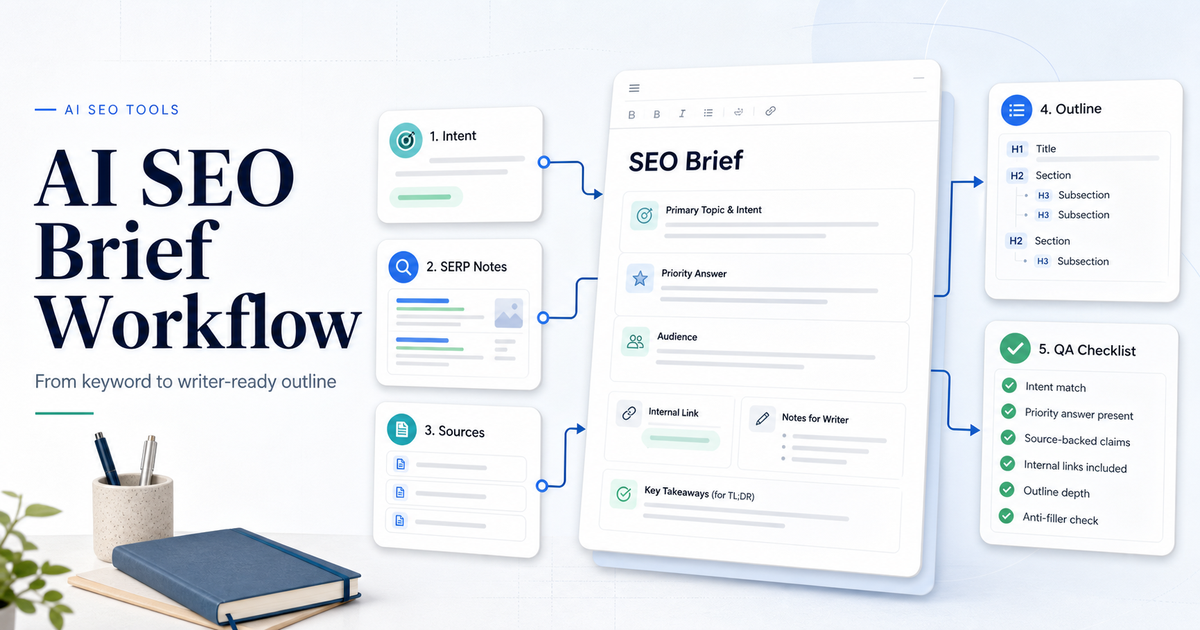
    An AI SEO content brief workflow helps a team move from keyword idea to writer-ready brief without turning SEO into a checklist of random keywords. The goal is to define search intent, gather source-backed requirements, outline the answer the article must provide, check competitor patterns, add internal-link opportunities, and give the writer enough direction to create a useful article.

    The best workflow uses AI to speed up research and structure, but it keeps editorial judgment in the loop. AI can suggest headings, questions, entities, and draft outlines. It should not decide the final angle alone. A strong SEO brief still needs a human to check intent, verify facts, remove filler, and decide what the reader needs first.

    If your team is comparing SEO tools first, our Surfer SEO vs Frase comparison is the right next read. If the brief is part of a larger research process, see our AI research workflow for teams.

    Quick Workflow Summary

    Step Purpose Output
    1. Confirm the keyword Make sure the topic is worth briefing Primary keyword and search intent
    2. Read the SERP Understand what Google is rewarding Content pattern notes
    3. Define the reader task Clarify what the article must answer Priority answer
    4. Collect source facts Avoid unsupported claims Source-backed notes
    5. Build the outline Give the writer a useful path H2 and H3 structure
    6. Add internal links Connect related site content naturally Link suggestions
    7. Create quality checks Prevent generic AI content Editorial checklist
    8. Review after draft Improve the brief based on output Updated process

    1. Confirm The Keyword And Intent

    Start by confirming the keyword, not by writing headings. A keyword such as “AI SEO content brief workflow” implies a process-led article. The reader wants to know how to build the workflow, what steps belong in it, which tools help, and how to avoid weak AI-generated briefs.

    Classify the intent before opening an AI tool:

    • Tutorial or workflow
    • Comparison
    • Review
    • Buyer guide
    • Pricing
    • Alternatives
    • Troubleshooting

    This matters because a workflow article should start with process and outcome. A comparison should start with verdict and tradeoffs. A buyer guide should start with recommendations. If the brief format does not match intent, the article feels wrong even if the keywords are present.

    2. Read The SERP Without Copying It

    An SEO brief should learn from top-ranking pages without copying their structure blindly. Look for repeated patterns:

    • What problem does each page solve?
    • What sections appear near the top?
    • What questions are repeated?
    • What examples or tables help the reader?
    • What information is missing?
    • Where do pages become thin or generic?

    Google’s SEO Starter Guide emphasizes making content easier for search engines to crawl, index, and understand. A content brief should support that goal by making the article clear, structured, and useful for the reader.

    Do not treat the SERP as a template library. The job is to understand expectations and find a better angle.

    3. Define The Priority Answer

    Every SEO brief should tell the writer what answer belongs near the top. This is where many AI-generated briefs fail. They list headings before defining the reader’s main job.

    For a workflow article, the priority answer might be:

    “An AI SEO content brief workflow should confirm search intent, analyze the SERP, collect source-backed facts, create a writer-ready outline, add internal links, and include quality checks before drafting begins.”

    That answer should appear early in the article. The rest of the brief supports it.

    4. Use SEO Tools For Research And Structure

    Surfer’s Content Editor is designed to help with content research, outline creation, recommended entities and facts, and optimization progress. Surfer’s documentation also describes a Content Editor workflow that includes competitor exploration, questions, notes, outline work, and writing/optimization.

    Frase positions itself as an SEO and GEO platform that researches markets, creates optimized content, tracks visibility across Google and AI search engines, and supports competitive research and content creation.

    Semrush Content Toolkit combines AI writing capabilities with Semrush SEO data for content work. Semrush’s knowledge base also describes content workflows that move from idea to publication.

    Use these tools to speed up research, but do not let any tool decide the article without review. SEO tools can reveal patterns. Editors decide what belongs in the final brief.

    5. Build The Writer-Ready Outline

    A writer-ready outline should include more than headings. Each section should explain what the writer must accomplish.

    Good brief format:

    • H2 title
    • Purpose of the section
    • Key points to cover
    • Source notes
    • Internal link opportunity
    • Example or table idea
    • What to avoid

    For example:

    Section Purpose Writer Notes
    Quick Workflow Summary Answer the intent early Include the full process in a table
    Confirm Keyword And Intent Prevent wrong article format Explain intent types and priority answer
    SERP Review Use competitors responsibly Learn patterns without copying
    Source Facts Keep claims safe Use official sources for tools and SEO guidance
    Quality Checks Prevent generic AI output Include human review and anti-filler checks

    This gives the writer direction without forcing a rigid template.

    6. Add Source Requirements

    AI can produce confident but unsupported claims. The brief should name which claims need sources before writing begins.

    Source requirements may include:

    • Official tool pages for features
    • Official pricing pages if pricing is discussed
    • Official documentation for platform limits
    • Google Search Central for SEO principles
    • Company help centers for product workflows
    • Existing internal articles for related context

    Do not ask writers to “add sources later.” The brief should identify source needs early so unsupported claims do not enter the draft.

    7. Add Internal Link Opportunities

    Internal links should be chosen before drafting, then inserted naturally where they help the reader. Do not add random internal links just to increase link count. A good internal link gives the reader a useful next step. It should fit the paragraph naturally, use a clean slug URL, and avoid repeated anchors.

    8. Include An Anti-Filler Checklist

    AI SEO briefs often become bloated. Add checks that prevent weak content:

    • Does the article answer intent in the first 150 to 250 words?
    • Does each section have a job?
    • Are there unsupported tool claims?
    • Are pricing claims verified or omitted?
    • Are examples realistic without fake statistics?
    • Are FAQs distinct?
    • Is the conclusion specific?
    • Are internal links natural?
    • Are external links official where needed?

    This checklist protects article quality before the draft reaches QA.

    9. Draft, Review, And Improve The Brief

    The brief should improve after the first draft. If the writer gets stuck, the brief may be too vague. If the draft repeats generic sections, the brief may need stronger section purposes. If the article misses the priority answer, the brief did not make the answer clear enough.

    Review the draft against the brief:

    • Did the writer answer the main intent early?
    • Did the article use source-backed claims?
    • Did the outline fit the topic?
    • Did the article avoid generic AI phrasing?
    • Did internal links fit naturally?
    • Did the conclusion give a clear recommendation?

    Then update the brief template so the next article is easier to write.

    AI SEO Content Brief Template

    Use this template:

    1. Topic title 2. Primary keyword 3. Search intent 4. Priority answer 5. Target reader 6. Required sources 7. Tools mentioned 8. Suggested internal links 9. Recommended structure 10. Section-by-section notes 11. Examples or tables needed 12. Claims to avoid 13. FAQ candidates 14. Final recommendation angle 15. QA checklist

    This is enough structure to guide the writer without turning every article into the same template.

    Final Recommendation

    Use AI and SEO tools to speed up content brief research, but keep the final brief editorial. The strongest AI SEO content brief workflow confirms intent, studies the SERP, defines the priority answer, gathers sources, creates a section-by-section outline, adds natural internal links, and includes quality checks before drafting begins.

    If your team only does one thing, make the priority answer mandatory. It keeps the article useful from the beginning and prevents generic introductions.

    FAQs

    What is an AI SEO content brief?

    An AI SEO content brief is a writer-ready plan that uses AI and SEO research to define search intent, outline structure, source needs, internal links, examples, FAQs, and quality checks before drafting.

    Which tools can help create SEO content briefs?

    Surfer, Frase, Semrush Content Toolkit, and general AI assistants can help with research, outlines, questions, entities, and draft structure. A human editor should still approve the final brief.

    Should AI write the whole SEO brief?

    AI can draft a brief, but it should not be the only reviewer. Editors need to check intent, source quality, internal links, section usefulness, and unsupported claims.

    What should every SEO brief include?

    Every SEO brief should include a primary keyword, search intent, priority answer, target reader, outline, source requirements, internal link opportunities, FAQ candidates, and quality checklist.

    How long should an SEO content brief be?

    The brief should be long enough to guide the writer but not so long that it becomes harder than the article. A practical brief usually fits into a few structured pages or a concise project document.

    How do internal links fit into a content brief?

    Internal links should be planned before drafting and inserted only where they help the reader. Use clean final URLs and natural anchor text.

    Can SEO tools replace human keyword judgment?

    No. SEO tools can surface patterns, questions, entities, and optimization suggestions, but humans still need to judge intent, usefulness, and brand fit.

    What is the biggest mistake in AI SEO briefs?

    The biggest mistake is generating a long outline without defining the priority answer. The writer needs to know what the article must answer first.

    Should pricing be included in an SEO brief?

    Only include pricing when official pricing sources are available and pricing matters to search intent. Otherwise, do not force pricing into the article.

    How do you prevent generic AI SEO content?

    Use specific search intent, source requirements, practical examples, internal links, clear section purposes, and a human review checklist before publishing.