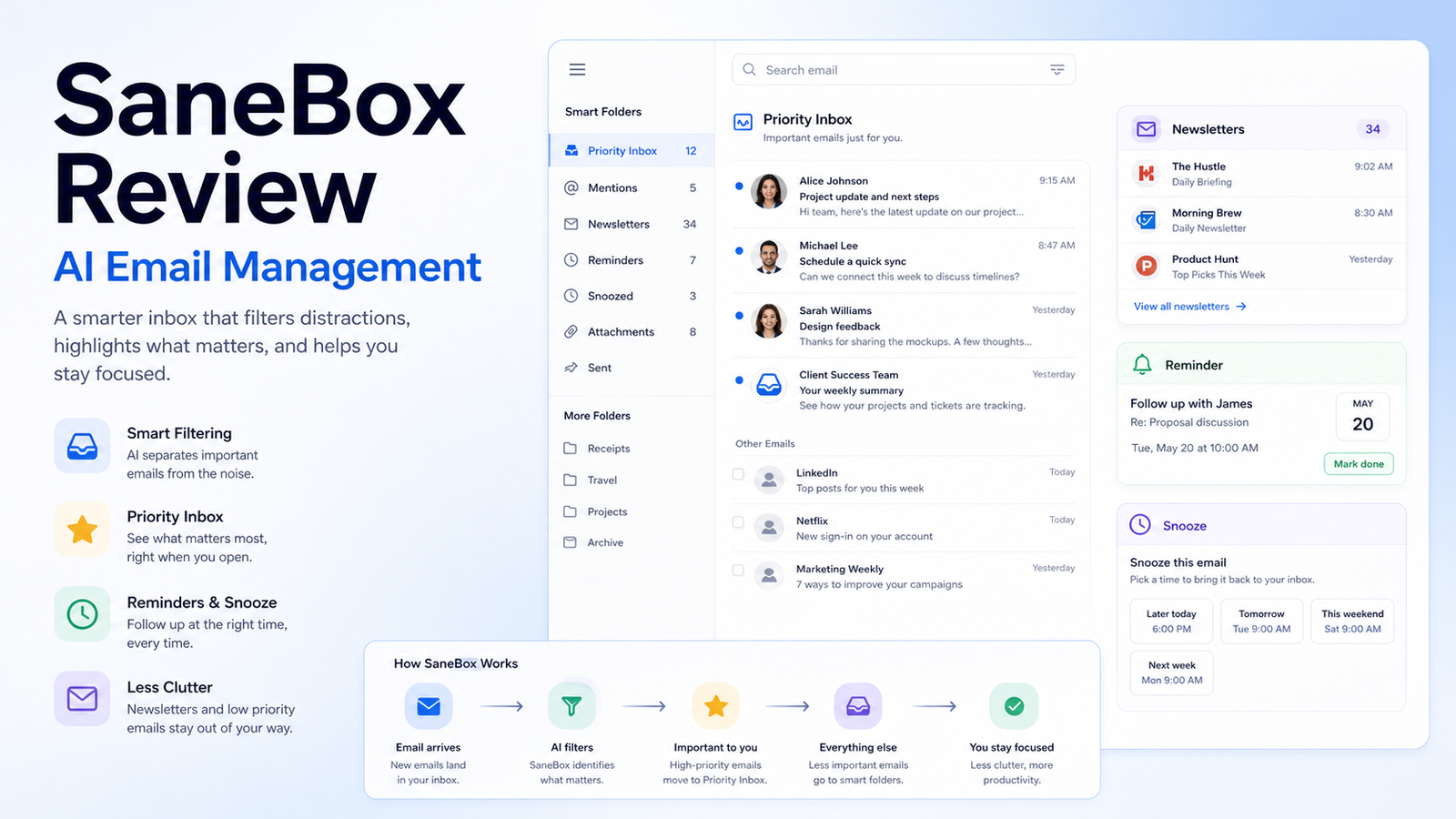
SaneBox is an email management service that helps reduce inbox overload by sorting less important messages, surfacing follow-up reminders, and giving users a more focused inbox. It is not a replacement for a help desk, CRM, or project management system. Its value is strongest when one person or a small team has too much email noise and needs a cleaner way to notice important messages.
Quick Verdict
SaneBox is worth considering if your inbox is full of newsletters, automated notifications, receipts, promotions, and low-priority threads that bury real customer, sales, vendor, or operational messages. It is less useful if your problem is team ownership, support routing, missing CRM updates, or a lack of process. In those cases, a shared inbox, CRM, or help desk may solve the real problem better.
Best For
- Founders and operators who manage a busy personal business inbox.
- Consultants, salespeople, and freelancers who need better follow-up discipline.
- Small teams that want inbox cleanup without changing email clients.
- Users who are willing to review sorted folders and train the system.
Not Best For
- Teams that need shared support ownership, SLA tracking, or ticket routing.
- Users who will never review filtered folders.
- Businesses that cannot approve third-party mailbox access.
- Anyone expecting AI to decide which emails matter without supervision.
Our Evaluation Criteria
Inbox triage
An email management tool should reduce noise without hiding messages that require attention. The first test is whether the product can separate newsletters, low-priority messages, receipts, and follow-up items in a way the user can understand and correct.
Training and control
The product should let users train folders, restore mistakes, and change rules. Email automation is risky when the user cannot see why messages moved or how to reverse a decision.
Compatibility
Small businesses should confirm support for their mail provider, mobile workflow, desktop client, shared inbox habits, and any compliance requirements before relying on the tool.
Reminder workflow
Snooze, follow-up, and reminder features are useful only when they fit the way the team actually handles sales, invoices, support, and admin messages.
Privacy and security
Email contains customer, billing, legal, employee, and vendor information. Review account access, retention, deletion, security documentation, and business approval before connecting a mailbox.
Pricing clarity
Compare official SaneBox plan limits, billing period, folders, reminders, account coverage, and trial terms before buying. Do not judge only by the entry price.
Key Features And Capabilities
Smart folders
SaneBox sorts less important messages into folders such as newsletter, low-priority, and waiting areas so the main inbox can stay focused on items that likely need attention.
Training by movement
Users can move messages to train how SaneBox should treat similar future emails. This is useful because no automated inbox decision should be treated as final without user correction.
SaneReminders
Reminder features can bring messages back when a reply or follow-up is needed, which is practical for sales follow-up, vendor coordination, and personal task management.
Newsletter and low-priority cleanup
The product can help keep newsletters, promotions, receipts, and lower-value messages from crowding the primary inbox.
Cross-device workflow
Because SaneBox works with the mailbox rather than only one local app, users can benefit across common email clients when the provider setup is supported.
Real Use Cases
Small business owner inbox
A founder who handles sales, vendor emails, customer questions, and admin notices can use SaneBox to reduce inbox noise while keeping a daily review habit for sorted folders.
Sales follow-up
A salesperson can use reminder features for unanswered proposals, renewal conversations, and meeting follow-ups. The tool can help surface the thread, but the salesperson still owns the context and commitment.
Customer support handoff
A small team can keep newsletters and automated notices out of the main inbox so actual customer issues are easier to see. Support requests still need clear ownership and response expectations.
Finance and vendor communication
Receipts, low-priority vendor updates, and recurring notices can be separated from urgent billing questions. Anything involving payment, tax, legal, or contract changes should be reviewed manually.
Newsletter management
A marketer or founder can keep useful newsletters available without letting them interrupt active work. Periodic cleanup is still necessary so folders do not become another unread archive.
Comparison Table
| Option | Best For | Main Strength | Important Limitation |
|---|---|---|---|
| SaneBox | Personal and small-business inbox triage | Mailbox-level sorting and reminders | Requires trust and review of sorted folders |
| Superhuman | Power users who want a fast email client | Speed, shortcuts, and focused client workflow | Different approach and higher learning curve |
| Gmail filters and labels | Google users with simple rules | Built-in and low cost | Manual rule setup and maintenance |
| Outlook rules and focused inbox | Microsoft-centered teams | Native Microsoft workflow | Limited compared with dedicated triage tools |
| Help desk software | Shared customer support inboxes | Ownership, SLA, and team routing | More setup than personal email cleanup |
Pricing
SaneBox publishes plan and trial details on its official pricing page. The right plan depends on the number of email accounts, available features, reminders, folder options, and billing period. Because email productivity tools can change packaging, use the official pricing page for the current purchase decision.
Pricing last checked on June 28, 2026. Pricing may vary by region, billing period, account count, features, trial terms, or promotions. Use the linked official pricing page for the current purchase decision.
Pros
- Can reduce daily inbox noise without forcing a new email client.
- Reminder features can help with sales and vendor follow-up.
- Sorting can be trained by moving messages.
- Useful for individuals and small-business owners who still live in email.
Cons And Limitations
- It does not replace a CRM, shared inbox, or help desk.
- Incorrect sorting can hide important messages if folders are ignored.
- Email access requires privacy and security review.
- It cannot fix unclear ownership, poor customer support process, or missing documentation.
Alternatives
Superhuman is better when the user wants a premium email client built around speed and shortcuts. Gmail labels and filters are enough for simple sorting needs. Outlook rules and Focused Inbox can work for Microsoft-centered users. A help desk such as Help Scout, Zendesk, Freshdesk, Tidio, or Intercom is a better fit when multiple people own customer conversations and need routing, reporting, and escalation.
A Practical 30-Day Evaluation Plan
Week 1: Clean The Baseline
Before connecting a tool, count the types of messages that create noise. Separate newsletters, receipts, automated notifications, customer questions, sales replies, internal messages, vendor emails, and urgent account notices. This reveals whether inbox triage is the real problem or whether the business needs a CRM, support desk, or project workflow.
Review mailbox access rules. Email often contains customer details, invoices, contracts, employee information, password reset notices, and private business context. Confirm that the account owner understands what access is being granted and how the tool handles data, retention, and deletion.
Week 2: Run SaneBox In Review Mode
Use SaneBox while reviewing sorted folders daily. Do not assume sorting is correct. Move messages when the system makes the wrong decision, and track which categories improve. The goal is not an empty inbox at any cost. The goal is to make important work easier to notice.
Test normal and difficult messages. Include customer complaints, invoices, proposal replies, newsletters from important partners, automated platform alerts, and old threads that become active again. These edge cases reveal whether the workflow is safe enough for daily use.
Week 3: Improve Follow-Up
Use reminders for active sales conversations, vendor replies, and operational follow-ups. Write down which reminders actually prevent missed work. If reminders become another noisy folder, reduce their use and create clearer rules.
Decide which emails should move out of the personal inbox entirely. Customer support may belong in a help desk. Sales conversations may belong in a CRM. Project requests may belong in a task system. SaneBox can reduce noise, but it should not become a hidden business process.
Week 4: Measure And Decide
Compare daily email review time, missed follow-ups, folder review time, and the number of important messages found outside the inbox. If the tool saves time after review and does not hide important work, keep it. If it mainly creates another place to check, simplify the email rules or switch to a more appropriate system.
Security, Governance, And Quality Control
Use least-privilege access where available, review connected accounts, and remove accounts that no longer need the service. Do not connect mailboxes containing highly sensitive information unless the business has approved the risk. For shared work, avoid using a personal inbox as the only business record.
Keep human control over commitments. Email tools can organize messages, but they should not approve refunds, promise delivery dates, make legal statements, or change customer terms. Those decisions need the right owner and system of record.
How To Measure Value
Track whether important emails are found faster, whether follow-ups are missed less often, and whether the user spends less time scanning low-value messages. Measure folder review time too. A tool that cleans the inbox but creates several unread folders may only move the problem.
Also compare the cost against simpler alternatives. Built-in filters may be enough for a light inbox. A help desk may be better for customer support. A CRM may be better for sales follow-up. The right choice is the one that reduces real operational risk, not only unread count.
Detailed Decision Checklist
Start with the inbox problem in one sentence. For example: "Important proposal replies and customer questions are getting buried under newsletters and automated notices." That is a good SaneBox use case. "No one knows who owns support replies" is not an inbox filtering problem.
Check the email provider, devices, and clients used every day. Confirm that the workflow works on mobile and desktop. Confirm how messages are restored, how folders are reviewed, and how training is corrected. The workflow should remain understandable after the first week.
Review the exit path. Confirm what happens when the service is disconnected, whether folders remain, how rules are removed, and how messages can be restored. Email tools should make work easier without trapping the business in a confusing mailbox structure.
Questions To Ask Before Approval
- Which messages should stay in the main inbox?
- Which folders must be reviewed daily or weekly?
- Who owns customer, sales, billing, and vendor follow-ups?
- What email data does the tool access?
- How are incorrect sorting decisions corrected?
- What happens if the service is disconnected?
- Would a CRM, help desk, or built-in filter solve the problem better?
Common Buying Mistakes
- Treating inbox zero as the goal instead of reliable follow-up.
- Ignoring sorted folders until important messages are missed.
- Using personal inbox tools for team support ownership.
- Connecting sensitive mailboxes without reviewing access and data rules.
- Buying a paid tool when simple labels or rules would be enough.
Final Recommendation
SaneBox is a practical choice for individuals and small-business owners whose main problem is inbox noise and missed follow-up. It is not the right fix for team support routing, CRM hygiene, or unclear ownership. Use the trial on one mailbox, review sorted folders every day, and decide based on time saved after review.
Frequently Asked Questions
Is SaneBox an AI email assistant?
It is an email management service that uses automated sorting and training to organize messages. Treat it as inbox triage, not as an autonomous decision maker.
Does SaneBox replace Gmail filters?
Not always. Built-in filters may be enough for simple needs. SaneBox is more useful when the inbox requires ongoing prioritization and reminders.
Is SaneBox good for customer support?
It can help one person see important messages, but shared customer support usually needs a help desk with ownership and escalation.
Can SaneBox hide important emails?
Any filtering tool can sort incorrectly. Users should review folders and train the system, especially during the first few weeks.
How should I compare pricing?
Use the official pricing page and compare account count, features, reminders, folder options, billing period, and trial terms.
What is the best alternative?
For personal email speed, consider Superhuman. For simple rules, use Gmail or Outlook filters. For team support, use a help desk.
Related Dailytimespro Guides
See our AI email response workflow, best AI email marketing tools, and AI sales follow-up workflow.
Leave a Reply