Category: AI Productivity Tools

  • Notion Pricing Explained: Free, Plus, Business, Enterprise, and AI

    Notion Pricing Explained: Free, Plus, Business, Enterprise, and AI

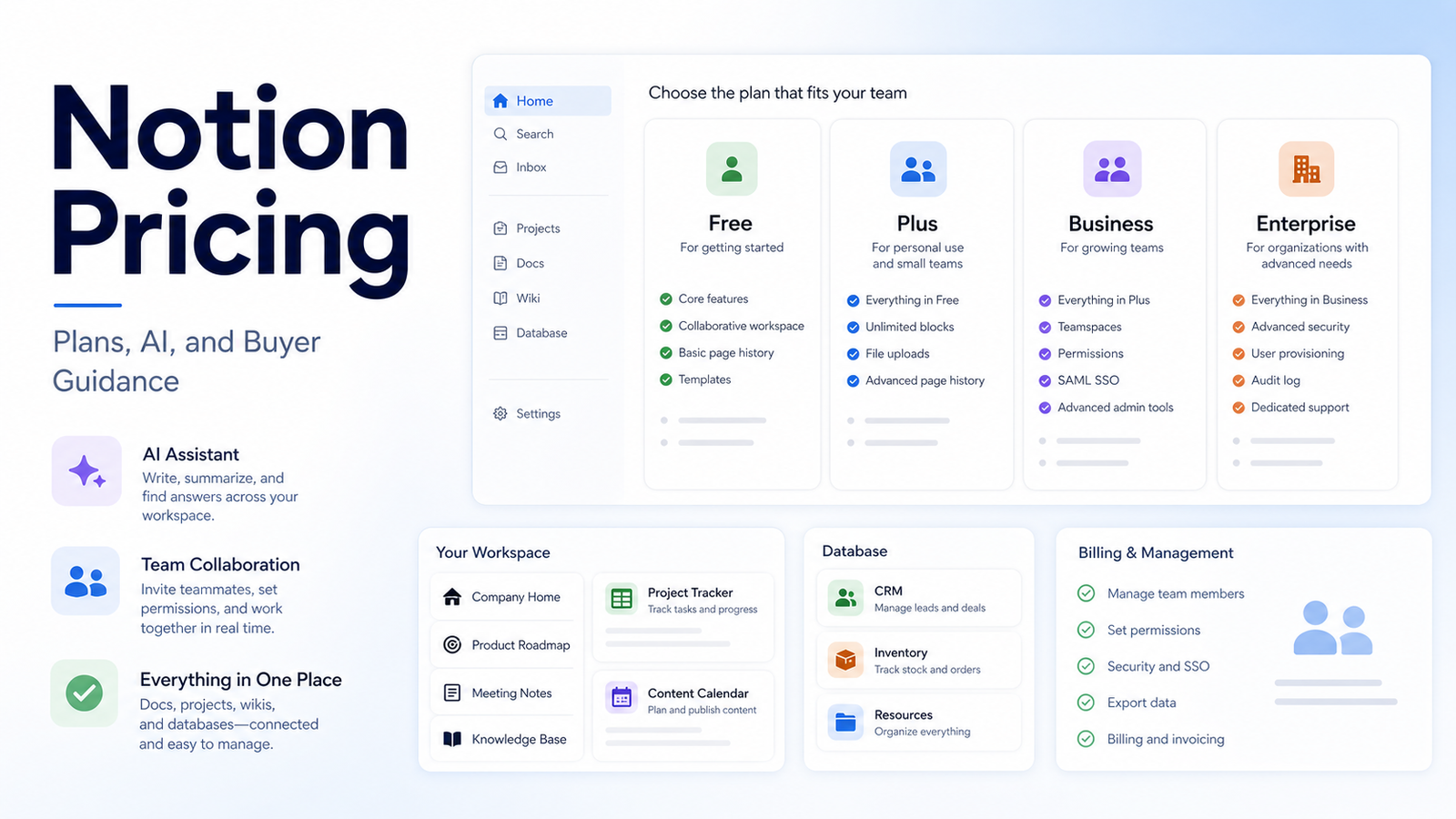
    Notion pricing is easy to underestimate because the buying decision includes more than the plan name. A team needs to consider members, guests, blocks or uploads, page history, permissions, admin controls, integrations, automations, and AI access before deciding whether Free, Plus, Business, or Enterprise is enough.

    Quick Verdict

    Notion Free can work for individuals and very small experiments. Plus is usually the first serious paid plan for small teams that need more collaboration and history. Business adds stronger team and admin features. Enterprise is for larger organizations with security, compliance, and procurement needs. Notion AI should be evaluated by actual writing, search, database, and knowledge workflows, not by novelty.

    Best For

    • Small teams choosing a wiki, docs, and project workspace.
    • Founders comparing Notion with ClickUp, Coda, or Confluence.
    • Managers deciding whether AI features justify cost.
    • Teams that will maintain information architecture and permissions.

    Not Best For

    • Teams with no owner for workspace organization.
    • Businesses needing a specialist transactional database.
    • Organizations with strict compliance needs but no Enterprise review.
    • Users expecting Notion AI to fix outdated or messy pages.

    Our Evaluation Criteria

    Workspace size

    Members, guests, contractors, and external collaborators affect cost and permissions.

    Information architecture

    Pages, databases, templates, and ownership determine whether Notion stays usable.

    History and admin controls

    Page history, permissions, analytics, and security features affect plan fit.

    AI usefulness

    Evaluate search, writing, summaries, and database help with real workspace content.

    Integrations

    Check whether Notion connects cleanly to tasks, docs, calendars, forms, and automation tools.

    Pricing clarity

    Use the official pricing page for current per-user amounts, annual billing, AI packaging, and Enterprise terms.

    Key Features And Capabilities

    Free

    Personal use, experiments, and small workspace validation.

    Plus

    Small-team collaboration with more practical workspace limits.

    Business

    Team administration, permissions, history, and collaboration features for growing companies.

    Enterprise

    Advanced security, compliance, admin, and procurement support.

    Notion AI

    AI search, writing, summarization, database help, and workspace assistance depending on plan packaging.

    Real Use Cases

    Company wiki

    A team can centralize policies and process notes, but each page needs a source owner.

    Project workspace

    A manager can link tasks, docs, and decisions while keeping status fields current.

    Content planning

    A marketing team can draft briefs and organize publishing calendars.

    Client portal

    Agencies can share scoped spaces with clients, but permissions need careful setup.

    AI search

    Notion AI can help find answers inside the workspace if the source pages are current.

    Comparison Table

    Option Best For Main Strength Important Limitation
    Free Individuals and experiments Low-risk workspace trial Not enough for many teams
    Plus Small teams Collaboration and practical limits Admin controls are lighter
    Business Growing teams Stronger workspace management Higher per-user cost
    Enterprise Large organizations Advanced security and support Sales-assisted terms
    Notion AI Workspace assistance Search, writing, summaries Depends on source quality

    Pricing

    Notion's official pricing page lists current Free, Plus, Business, and Enterprise options, with monthly and annual billing differences. It also explains current AI packaging and plan availability. Because pricing and AI access can change, use Notion's official pricing page before making a purchase.

    Pricing last checked on June 28, 2026. Pricing may vary by region, billing period, users, contacts, tasks, credits, storage, usage, or add-ons. Use the linked official pricing page for the current purchase decision.

    Pros

    • Helps reduce repetitive work when source material is reliable.
    • Supports faster drafting, organization, or handoff in a defined workflow.
    • Gives teams a clearer structure for evaluating software choices.
    • Can improve consistency when ownership, review, and templates are maintained.

    Cons And Limitations

    • Output quality depends on inputs, configuration, and review discipline.
    • Pricing models are not directly comparable across vendors.
    • Migration, administration, and training still require time.
    • Human review remains necessary for facts, commitments, and sensitive decisions.

    Alternatives

    Compare the listed products with systems the team already owns. A simpler document, shared inbox, CRM workflow, project tool, or manual process may be better when volume is low. Specialist software may be necessary when the workflow requires regulated records, advanced analytics, or deep transactional controls.

    A Practical 30-Day Evaluation Plan

    Week 1: Define The Workflow

    Choose one recurring workflow with a clear owner, approved inputs, a known output, and a human review step. Record how the work is completed today, how long it takes, where errors occur, and which systems are involved. This baseline is essential. Without it, a team can mistake novelty for improvement and buy a product that adds another interface without removing meaningful work.

    Document the data the workflow uses. Mark which information is public, internal, confidential, regulated, outdated, duplicated, or missing. Confirm which users should have access. AI features cannot repair contradictory records or unclear permission boundaries. In many projects, cleaning documentation, contact data, creative assets, deal records, or task ownership creates more value than adding another subscription.

    Week 2: Run In Parallel

    Use the new tool alongside the existing process. Review every output rather than allowing automatic publication or action. Label corrections as factual, contextual, formatting, tone, permission, missing information, incorrect action, or missing context. This creates a useful evidence set and reveals whether the product reduces work after review.

    Test normal and difficult cases. Include incomplete inputs, ambiguous instructions, changed requirements, unsupported file types, poor audio, unusual customer requests, unusual sales cycles, or edge cases relevant to the category. A polished demo often hides the exact conditions that make daily work difficult.

    Week 3: Improve The System

    Update source documents, templates, prompts, routing rules, integrations, naming conventions, and permissions based on observed failures. Remove steps that do not improve the outcome. If users bypass the workflow, determine whether the cause is poor fit, missing training, slow performance, inadequate integration, or a review process heavier than the original task.

    Define escalation. State which actions the software may assist with, which actions require approval, and which requests must always go to a qualified person. Legal interpretations, employment decisions, financial commitments, security incidents, customer exceptions, and public claims should not be hidden behind a confident AI answer.

    Week 4: Measure And Decide

    Compare the pilot with the baseline. Review completion time, editing time, error rate, adoption, administrator workload, integration reliability, and expected annual cost. Include seats, contacts, tasks, credits, storage, implementation, training, and the cost of correcting mistakes. A low entry price can be misleading when the usable workflow requires higher tiers or extensive manual review.

    Decide whether to expand, keep the workflow limited, change configuration, evaluate an alternative, or stop. Write down the decision and assumptions. Revisit them when prices, product capabilities, data requirements, or business volume change.

    Security, Governance, And Quality Control

    Use least-privilege access and multifactor authentication. Assign an account owner, billing owner, workflow owner, and output reviewer. Confirm retention, export, deletion, model-training, integration, and administrator controls from current vendor documentation. Do not paste confidential customer, employee, financial, legal, security, or product information into an unapproved account.

    Keep a human in control of high-impact outputs. Verify names, dates, prices, links, calculations, commitments, claims, permissions, and citations. For automated actions, use bounded permissions, monitoring, logs, alerts, and a tested rollback or correction process. The team should know how to pause a workflow quickly.

    How To Measure Value

    Measure time saved after review, not before it. Track correction rates, handoff errors, turnaround time, user adoption, administrator work, and whether approved outputs reach the correct system of record. For customer-facing workflows, monitor complaints, escalations, missed requests, and quality sampling. For content, sales, or meeting work, measure revision time, consistency, and whether the final result serves the intended audience.

    Model twelve-month cost. Include subscription fees, users, contacts, tasks, credits, storage, integrations, implementation, training, and maintenance. Also confirm how data and configurations can be exported if the tool no longer fits. A responsible software decision includes a practical exit path.

    Detailed Decision Checklist

    Write down the exact problem in one sentence before comparing plans. A useful statement names the workflow, the current friction, the expected improvement, and the owner. "We need AI" is not a buying requirement. "Our sales lead needs a forecast view based on consistent CRM stages, close dates, deal notes, and human-reviewed risks" is specific enough to test.

    List required integrations and decide which system remains authoritative. A design assistant may create drafts, but approved brand assets still need an owner. A presentation tool may produce slides, but sales and finance numbers need a verified source. A workspace tool may help people find answers, but source owners must update policy. An automation platform can move data, but it should not become the only place where business logic is understood.

    Review failure handling. Ask what happens when an integration disconnects, a credit limit is reached, an upload fails, a transcript is wrong, a source is outdated, or a user loses access. Define alerts, owners, correction steps, and acceptable downtime. A workflow that succeeds in ideal conditions but fails silently is not production-ready.

    Check administration from the perspective of the future owner. The person evaluating the product may not be the person maintaining it six months later. Require clear names, documentation, change history, permission review, billing visibility, and an onboarding process for new users. Test whether a second person can understand the setup without relying on the original builder.

    Finally, inspect the exit path. Confirm export formats, media or document ownership, API access where relevant, deletion procedures, and the effort required to move to another system. Record contract renewal dates and who receives billing notices. The ability to leave reduces operational risk and creates a more honest comparison of long-term cost.

    Questions To Ask Before Approval

    • Which approved sources or records does the workflow depend on?
    • Who reviews the output, and what must that reviewer check?
    • Which actions can occur automatically, and which require confirmation?
    • How are errors, outages, and exhausted limits reported?
    • What data is retained, where is it stored, and how is it deleted?
    • What will the workflow cost at expected twelve-month volume?
    • Can another employee maintain it from the documentation?
    • How will the team export its data and configuration if it leaves?

    Common Buying Mistakes

    • Selecting a product from a feature list without testing a real workflow.
    • Comparing entry prices without modeling users, volume, credits, storage, and add-ons.
    • Treating generated text, summaries, recommendations, or actions as verified facts.
    • Expanding before permissions, review, escalation, and ownership are documented.
    • Buying software to compensate for missing process, poor data, or unclear accountability.
    • Assuming every AI-labelled feature produces measurable business value.

    Final Recommendation

    Start on Free only to validate structure. Choose Plus when collaboration and history matter. Choose Business when admin controls and team scale matter. Evaluate Enterprise when security, compliance, and procurement requirements appear. Buy Notion AI only after testing it against real workspace content.

    Frequently Asked Questions

    What is the best option?

    The best option is the one that fits the real workflow, data, users, administration, and budget.

    Is there a free plan?

    Many products in this category offer a free path or trial, but current limits should be checked on the official pricing page.

    Can AI replace human review?

    No. Important facts, actions, claims, and decisions require accountable review.

    How should pricing be compared?

    Model the required plan, users, credits or volume, integrations, implementation, and maintenance.

    How long should a pilot run?

    A focused two-to-four-week pilot is usually enough to identify workflow fit and failure modes.

    What is the biggest risk?

    Poor source data, unclear permissions, and unreviewed outputs create more risk than the interface itself.

    Related Dailytimespro Guides

    See our Notion AI alternatives, Notion AI vs Coda AI, Notion AI vs ClickUp AI.
  • Gemini vs Claude: Which AI Assistant Should You Choose?

    Gemini vs Claude: Which AI Assistant Should You Choose?

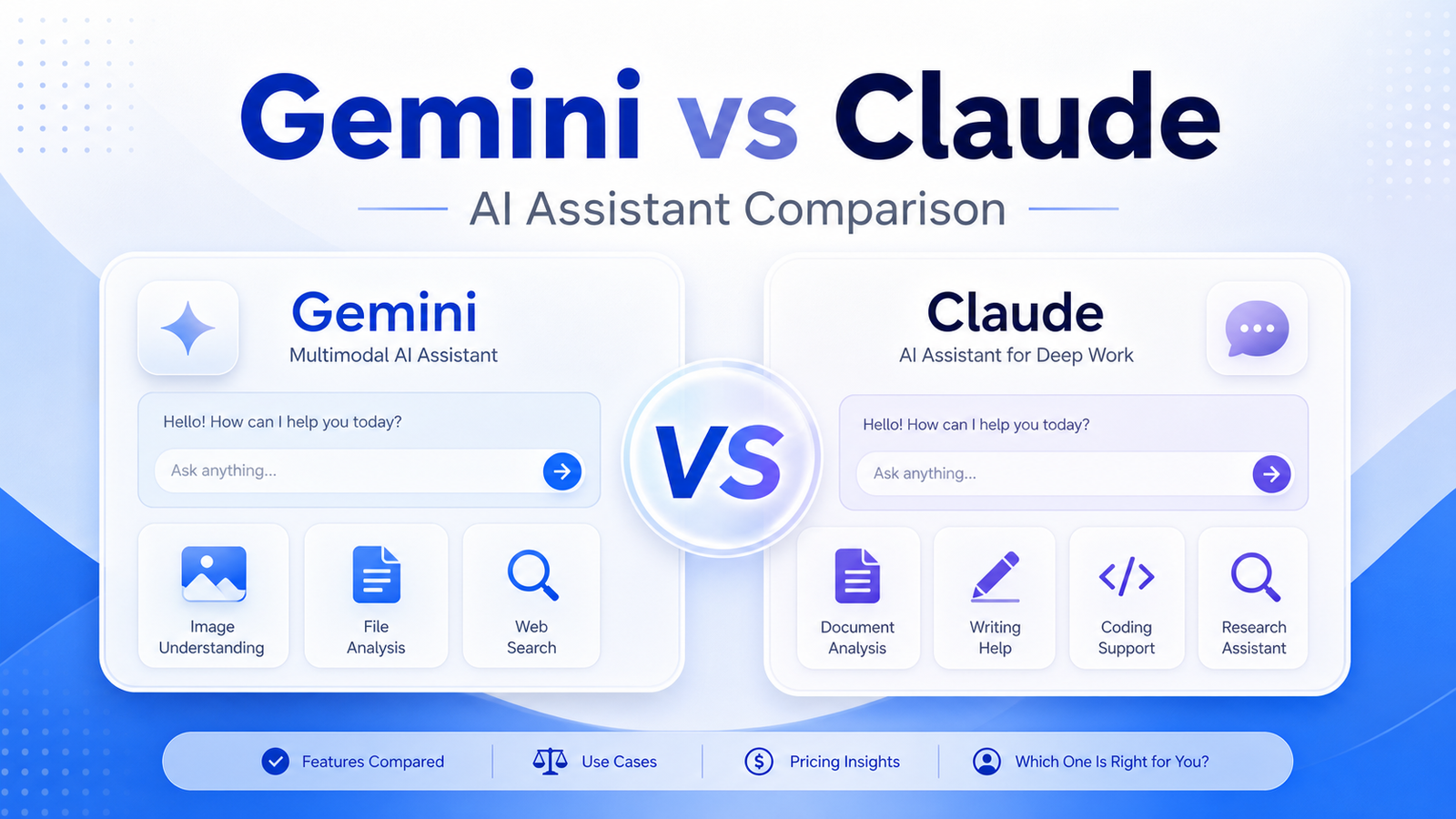
    Gemini and Claude are both capable AI assistants, but they fit different business workflows. Gemini is especially relevant for users invested in Google's ecosystem and multimodal work. Claude is often strong for long documents, careful writing, analysis, and structured reasoning. The right choice depends on the work, data policies, and team environment.

    Quick Verdict

    Choose Gemini when Google integration, multimodal work, and Workspace-centered productivity matter most. Choose Claude when long-form writing, document review, careful analysis, and structured reasoning are the priority. Teams doing serious business work should test both on approved real tasks rather than relying on model reputation alone.

    Best For

    • Teams comparing AI assistants for daily work.
    • Google Workspace users deciding whether Gemini fits their stack.
    • Writers, analysts, and researchers comparing Claude's document workflow.
    • Businesses that need clear usage, privacy, and plan review.

    Not Best For

    • Users expecting either assistant to be automatically accurate.
    • Teams without rules for sensitive data.
    • Businesses making legal, financial, medical, or security decisions without expert review.
    • Buyers choosing only from benchmark headlines.

    Our Evaluation Criteria

    Workspace fit

    Google-centered teams may value Gemini differently from teams using mixed tools.

    Document handling

    Long documents, summaries, and analysis should be tested with real files.

    Writing quality

    Compare clarity, tone, structure, and editing effort across typical work.

    Research support

    Check source handling, uncertainty, and whether claims can be verified.

    Administration

    Team plans, privacy terms, retention, and enterprise controls matter.

    Pricing

    Use official Gemini and Claude pricing pages for current plan and team options.

    Key Features And Capabilities

    Gemini

    Google-connected AI assistance, multimodal capabilities, and integration with Google's AI products and subscriptions.

    Claude

    Long-context writing, document analysis, coding support, and structured reasoning workflows.

    Workspace productivity

    Both can support summaries, drafts, plans, and analysis when users provide clear context.

    File analysis

    Business users should test real documents, spreadsheets, PDFs, and policies.

    Team governance

    Privacy, admin controls, and approved usage rules matter more than casual prompts.

    Real Use Cases

    Research briefs

    A team can compare summaries from official sources and verify claims before publishing.

    Document review

    Claude may be useful for long material, while Gemini may fit Google-centered files and workflows.

    Marketing writing

    Both tools can draft outlines and copy, but offers, claims, and pricing need source review.

    Internal planning

    Managers can draft plans and meeting follow-ups while keeping accountability visible.

    Customer support drafts

    Either assistant can help with draft replies, but only from approved support sources.

    Comparison Table

    Option Best For Main Strength Important Limitation
    Gemini Google-centered users Google ecosystem and multimodal work Best value depends on Google setup
    Claude Writing and document analysis Long-form reasoning and careful drafting Workspace integrations differ
    ChatGPT General-purpose teams Broad flexibility Needs governance
    Perplexity Research discovery Source-oriented exploration Not a full workspace assistant
    Copilot Microsoft 365 teams Office integration Requires Microsoft environment

    Pricing

    Google publishes Gemini subscription and Workspace-related plan information through official pages. Anthropic publishes Claude Free, Pro, Max, Team, Enterprise, and API pricing through official pricing pages. Compare individual use, team administration, context needs, file work, integrations, and enterprise controls before buying.

    Pricing last checked on June 28, 2026. Pricing may vary by region, billing period, users, contacts, tasks, credits, storage, usage, or add-ons. Use the linked official pricing page for the current purchase decision.

    Pros

    • Helps reduce repetitive work when source material is reliable.
    • Supports faster drafting, organization, or handoff in a defined workflow.
    • Gives teams a clearer structure for evaluating software choices.
    • Can improve consistency when ownership, review, and templates are maintained.

    Cons And Limitations

    • Output quality depends on inputs, configuration, and review discipline.
    • Pricing models are not directly comparable across vendors.
    • Migration, administration, and training still require time.
    • Human review remains necessary for facts, commitments, and sensitive decisions.

    Alternatives

    Compare the listed products with systems the team already owns. A simpler document, shared inbox, CRM workflow, project tool, or manual process may be better when volume is low. Specialist software may be necessary when the workflow requires regulated records, advanced analytics, or deep transactional controls.

    A Practical 30-Day Evaluation Plan

    Week 1: Define The Workflow

    Choose one recurring workflow with a clear owner, approved inputs, a known output, and a human review step. Record how the work is completed today, how long it takes, where errors occur, and which systems are involved. This baseline is essential. Without it, a team can mistake novelty for improvement and buy a product that adds another interface without removing meaningful work.

    Document the data the workflow uses. Mark which information is public, internal, confidential, regulated, outdated, duplicated, or missing. Confirm which users should have access. AI features cannot repair contradictory records or unclear permission boundaries. In many projects, cleaning documentation, contact data, creative assets, deal records, or task ownership creates more value than adding another subscription.

    Week 2: Run In Parallel

    Use the new tool alongside the existing process. Review every output rather than allowing automatic publication or action. Label corrections as factual, contextual, formatting, tone, permission, missing information, incorrect action, or missing context. This creates a useful evidence set and reveals whether the product reduces work after review.

    Test normal and difficult cases. Include incomplete inputs, ambiguous instructions, changed requirements, unsupported file types, poor audio, unusual customer requests, unusual sales cycles, or edge cases relevant to the category. A polished demo often hides the exact conditions that make daily work difficult.

    Week 3: Improve The System

    Update source documents, templates, prompts, routing rules, integrations, naming conventions, and permissions based on observed failures. Remove steps that do not improve the outcome. If users bypass the workflow, determine whether the cause is poor fit, missing training, slow performance, inadequate integration, or a review process heavier than the original task.

    Define escalation. State which actions the software may assist with, which actions require approval, and which requests must always go to a qualified person. Legal interpretations, employment decisions, financial commitments, security incidents, customer exceptions, and public claims should not be hidden behind a confident AI answer.

    Week 4: Measure And Decide

    Compare the pilot with the baseline. Review completion time, editing time, error rate, adoption, administrator workload, integration reliability, and expected annual cost. Include seats, contacts, tasks, credits, storage, implementation, training, and the cost of correcting mistakes. A low entry price can be misleading when the usable workflow requires higher tiers or extensive manual review.

    Decide whether to expand, keep the workflow limited, change configuration, evaluate an alternative, or stop. Write down the decision and assumptions. Revisit them when prices, product capabilities, data requirements, or business volume change.

    Security, Governance, And Quality Control

    Use least-privilege access and multifactor authentication. Assign an account owner, billing owner, workflow owner, and output reviewer. Confirm retention, export, deletion, model-training, integration, and administrator controls from current vendor documentation. Do not paste confidential customer, employee, financial, legal, security, or product information into an unapproved account.

    Keep a human in control of high-impact outputs. Verify names, dates, prices, links, calculations, commitments, claims, permissions, and citations. For automated actions, use bounded permissions, monitoring, logs, alerts, and a tested rollback or correction process. The team should know how to pause a workflow quickly.

    How To Measure Value

    Measure time saved after review, not before it. Track correction rates, handoff errors, turnaround time, user adoption, administrator work, and whether approved outputs reach the correct system of record. For customer-facing workflows, monitor complaints, escalations, missed requests, and quality sampling. For content, sales, or meeting work, measure revision time, consistency, and whether the final result serves the intended audience.

    Model twelve-month cost. Include subscription fees, users, contacts, tasks, credits, storage, integrations, implementation, training, and maintenance. Also confirm how data and configurations can be exported if the tool no longer fits. A responsible software decision includes a practical exit path.

    Detailed Decision Checklist

    Write down the exact problem in one sentence before comparing plans. A useful statement names the workflow, the current friction, the expected improvement, and the owner. "We need AI" is not a buying requirement. "Our sales lead needs a forecast view based on consistent CRM stages, close dates, deal notes, and human-reviewed risks" is specific enough to test.

    List required integrations and decide which system remains authoritative. A design assistant may create drafts, but approved brand assets still need an owner. A presentation tool may produce slides, but sales and finance numbers need a verified source. A workspace tool may help people find answers, but source owners must update policy. An automation platform can move data, but it should not become the only place where business logic is understood.

    Review failure handling. Ask what happens when an integration disconnects, a credit limit is reached, an upload fails, a transcript is wrong, a source is outdated, or a user loses access. Define alerts, owners, correction steps, and acceptable downtime. A workflow that succeeds in ideal conditions but fails silently is not production-ready.

    Check administration from the perspective of the future owner. The person evaluating the product may not be the person maintaining it six months later. Require clear names, documentation, change history, permission review, billing visibility, and an onboarding process for new users. Test whether a second person can understand the setup without relying on the original builder.

    Finally, inspect the exit path. Confirm export formats, media or document ownership, API access where relevant, deletion procedures, and the effort required to move to another system. Record contract renewal dates and who receives billing notices. The ability to leave reduces operational risk and creates a more honest comparison of long-term cost.

    Questions To Ask Before Approval

    • Which approved sources or records does the workflow depend on?
    • Who reviews the output, and what must that reviewer check?
    • Which actions can occur automatically, and which require confirmation?
    • How are errors, outages, and exhausted limits reported?
    • What data is retained, where is it stored, and how is it deleted?
    • What will the workflow cost at expected twelve-month volume?
    • Can another employee maintain it from the documentation?
    • How will the team export its data and configuration if it leaves?

    Common Buying Mistakes

    • Selecting a product from a feature list without testing a real workflow.
    • Comparing entry prices without modeling users, volume, credits, storage, and add-ons.
    • Treating generated text, summaries, recommendations, or actions as verified facts.
    • Expanding before permissions, review, escalation, and ownership are documented.
    • Buying software to compensate for missing process, poor data, or unclear accountability.
    • Assuming every AI-labelled feature produces measurable business value.

    Final Recommendation

    Choose Gemini for Google-centered productivity and multimodal workflows. Choose Claude for long documents, writing, and careful analysis. For business use, run a two-week test with the same approved tasks, then compare accuracy, editing time, privacy requirements, and cost.

    Frequently Asked Questions

    What is the best option?

    The best option is the one that fits the real workflow, data, users, administration, and budget.

    Is there a free plan?

    Many products in this category offer a free path or trial, but current limits should be checked on the official pricing page.

    Can AI replace human review?

    No. Important facts, actions, claims, and decisions require accountable review.

    How should pricing be compared?

    Model the required plan, users, credits or volume, integrations, implementation, and maintenance.

    How long should a pilot run?

    A focused two-to-four-week pilot is usually enough to identify workflow fit and failure modes.

    What is the biggest risk?

    Poor source data, unclear permissions, and unreviewed outputs create more risk than the interface itself.

    Related Dailytimespro Guides

    See our Gemini vs ChatGPT, Claude vs ChatGPT, Claude alternatives.

  • How to Use AI for Sales Forecasting

    How to Use AI for Sales Forecasting

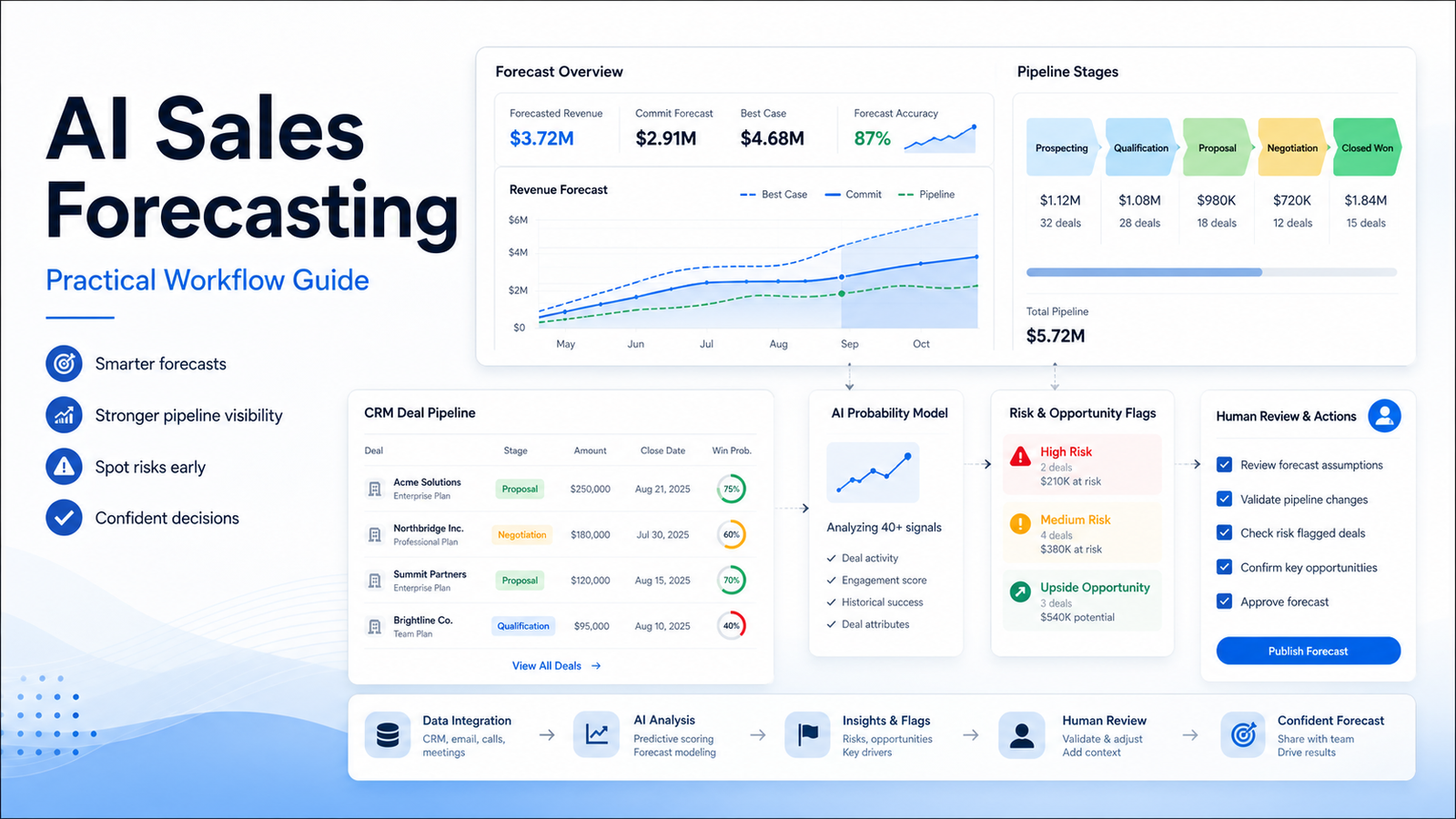
    AI can support sales forecasting by organizing CRM data, surfacing deal risks, summarizing call notes, and helping managers ask better pipeline questions. It should not be used as a black box that replaces sales judgment or turns incomplete CRM data into confident revenue predictions.

    Quick Verdict

    Use AI for sales forecasting as an assistant to improve pipeline hygiene, deal review, and scenario planning. Start with clean stages, close dates, deal owners, historical conversion rates, and reviewed notes. Keep the forecast owner accountable for final numbers.

    Best For

    • Small B2B teams with a CRM and recurring pipeline review.
    • Sales managers who need better deal-risk visibility.
    • Founders comparing manual spreadsheet forecasting with CRM workflows.
    • Teams willing to clean data before relying on analysis.

    Not Best For

    • Teams with inconsistent stages and missing close dates.
    • Businesses expecting AI to create reliable forecasts from poor data.
    • High-stakes financial planning without human review.
    • Organizations that do not track lost deals, slipped dates, or deal source.

    Our Evaluation Criteria

    CRM data quality

    Forecasting starts with consistent stages, owners, amounts, close dates, and status changes.

    Deal evidence

    Call notes, emails, next steps, stakeholders, and objections should support forecast assumptions.

    Model transparency

    Managers need to understand why a deal is marked risky or likely.

    Human review

    Sales judgment, customer context, and finance expectations must remain visible.

    Scenario planning

    The workflow should compare base, upside, and conservative cases.

    Pricing

    Cost depends on CRM plans, AI add-ons, analytics tools, and implementation effort.

    Key Features And Capabilities

    Pipeline hygiene

    Identifies missing next steps, stale close dates, weak notes, and inconsistent stages.

    Risk signals

    Highlights deals with no activity, unclear buyer, pricing objections, or repeated slips.

    Forecast summaries

    Summarizes likely revenue by stage, owner, period, and confidence band.

    Manager coaching

    Prepares questions for deal reviews rather than silently changing the forecast.

    Scenario planning

    Creates base, upside, and downside views from reviewed assumptions.

    Real Use Cases

    Weekly pipeline review

    A sales manager can ask AI to flag stale opportunities and prepare review questions.

    Forecast rollup

    A founder can summarize by rep, stage, and close month, then check source deals.

    Deal risk review

    AI can list missing decision makers, unclear timing, and unresolved objections from notes.

    Board update

    Leadership can draft a forecast narrative while finance verifies the numbers.

    CRM cleanup

    Teams can identify missing fields and outdated stages before trusting any forecast.

    Comparison Table

    Option Best For Main Strength Important Limitation
    CRM AI Teams with CRM data Works near source of record Depends on clean CRM setup
    Spreadsheet plus AI Early-stage teams Flexible and inexpensive Manual data risk
    Sales analytics tools Growing sales teams Forecast and pipeline reporting Implementation required
    Manual forecast Low-volume sales Maximum context Hard to scale
    BI tools Data-driven organizations Custom reporting Requires data expertise

    Pricing

    Pricing depends on the CRM or analytics stack. Salesforce, HubSpot, Pipedrive, Zoho, Microsoft, and dedicated revenue platforms package AI and forecasting differently. Use official pricing pages and model seats, CRM tiers, forecasting features, automation, integrations, and implementation before buying.

    Pricing last checked on June 28, 2026. Pricing may vary by region, billing period, users, contacts, tasks, credits, storage, usage, or add-ons. Use the linked official pricing page for the current purchase decision.

    Pros

    • Helps reduce repetitive work when source material is reliable.
    • Supports faster drafting, organization, or handoff in a defined workflow.
    • Gives teams a clearer structure for evaluating software choices.
    • Can improve consistency when ownership, review, and templates are maintained.

    Cons And Limitations

    • Output quality depends on inputs, configuration, and review discipline.
    • Pricing models are not directly comparable across vendors.
    • Migration, administration, and training still require time.
    • Human review remains necessary for facts, commitments, and sensitive decisions.

    Alternatives

    Compare the listed products with systems the team already owns. A simpler document, shared inbox, CRM workflow, project tool, or manual process may be better when volume is low. Specialist software may be necessary when the workflow requires regulated records, advanced analytics, or deep transactional controls.

    A Practical 30-Day Evaluation Plan

    Week 1: Define The Workflow

    Choose one recurring workflow with a clear owner, approved inputs, a known output, and a human review step. Record how the work is completed today, how long it takes, where errors occur, and which systems are involved. This baseline is essential. Without it, a team can mistake novelty for improvement and buy a product that adds another interface without removing meaningful work.

    Document the data the workflow uses. Mark which information is public, internal, confidential, regulated, outdated, duplicated, or missing. Confirm which users should have access. AI features cannot repair contradictory records or unclear permission boundaries. In many projects, cleaning documentation, contact data, creative assets, deal records, or task ownership creates more value than adding another subscription.

    Week 2: Run In Parallel

    Use the new tool alongside the existing process. Review every output rather than allowing automatic publication or action. Label corrections as factual, contextual, formatting, tone, permission, missing information, incorrect action, or missing context. This creates a useful evidence set and reveals whether the product reduces work after review.

    Test normal and difficult cases. Include incomplete inputs, ambiguous instructions, changed requirements, unsupported file types, poor audio, unusual customer requests, unusual sales cycles, or edge cases relevant to the category. A polished demo often hides the exact conditions that make daily work difficult.

    Week 3: Improve The System

    Update source documents, templates, prompts, routing rules, integrations, naming conventions, and permissions based on observed failures. Remove steps that do not improve the outcome. If users bypass the workflow, determine whether the cause is poor fit, missing training, slow performance, inadequate integration, or a review process heavier than the original task.

    Define escalation. State which actions the software may assist with, which actions require approval, and which requests must always go to a qualified person. Legal interpretations, employment decisions, financial commitments, security incidents, customer exceptions, and public claims should not be hidden behind a confident AI answer.

    Week 4: Measure And Decide

    Compare the pilot with the baseline. Review completion time, editing time, error rate, adoption, administrator workload, integration reliability, and expected annual cost. Include seats, contacts, tasks, credits, storage, implementation, training, and the cost of correcting mistakes. A low entry price can be misleading when the usable workflow requires higher tiers or extensive manual review.

    Decide whether to expand, keep the workflow limited, change configuration, evaluate an alternative, or stop. Write down the decision and assumptions. Revisit them when prices, product capabilities, data requirements, or business volume change.

    Security, Governance, And Quality Control

    Use least-privilege access and multifactor authentication. Assign an account owner, billing owner, workflow owner, and output reviewer. Confirm retention, export, deletion, model-training, integration, and administrator controls from current vendor documentation. Do not paste confidential customer, employee, financial, legal, security, or product information into an unapproved account.

    Keep a human in control of high-impact outputs. Verify names, dates, prices, links, calculations, commitments, claims, permissions, and citations. For automated actions, use bounded permissions, monitoring, logs, alerts, and a tested rollback or correction process. The team should know how to pause a workflow quickly.

    How To Measure Value

    Measure time saved after review, not before it. Track correction rates, handoff errors, turnaround time, user adoption, administrator work, and whether approved outputs reach the correct system of record. For customer-facing workflows, monitor complaints, escalations, missed requests, and quality sampling. For content, sales, or meeting work, measure revision time, consistency, and whether the final result serves the intended audience.

    Model twelve-month cost. Include subscription fees, users, contacts, tasks, credits, storage, integrations, implementation, training, and maintenance. Also confirm how data and configurations can be exported if the tool no longer fits. A responsible software decision includes a practical exit path.

    Detailed Decision Checklist

    Write down the exact problem in one sentence before comparing plans. A useful statement names the workflow, the current friction, the expected improvement, and the owner. "We need AI" is not a buying requirement. "Our sales lead needs a forecast view based on consistent CRM stages, close dates, deal notes, and human-reviewed risks" is specific enough to test.

    List required integrations and decide which system remains authoritative. A design assistant may create drafts, but approved brand assets still need an owner. A presentation tool may produce slides, but sales and finance numbers need a verified source. A workspace tool may help people find answers, but source owners must update policy. An automation platform can move data, but it should not become the only place where business logic is understood.

    Review failure handling. Ask what happens when an integration disconnects, a credit limit is reached, an upload fails, a transcript is wrong, a source is outdated, or a user loses access. Define alerts, owners, correction steps, and acceptable downtime. A workflow that succeeds in ideal conditions but fails silently is not production-ready.

    Check administration from the perspective of the future owner. The person evaluating the product may not be the person maintaining it six months later. Require clear names, documentation, change history, permission review, billing visibility, and an onboarding process for new users. Test whether a second person can understand the setup without relying on the original builder.

    Finally, inspect the exit path. Confirm export formats, media or document ownership, API access where relevant, deletion procedures, and the effort required to move to another system. Record contract renewal dates and who receives billing notices. The ability to leave reduces operational risk and creates a more honest comparison of long-term cost.

    Questions To Ask Before Approval

    • Which approved sources or records does the workflow depend on?
    • Who reviews the output, and what must that reviewer check?
    • Which actions can occur automatically, and which require confirmation?
    • How are errors, outages, and exhausted limits reported?
    • What data is retained, where is it stored, and how is it deleted?
    • What will the workflow cost at expected twelve-month volume?
    • Can another employee maintain it from the documentation?
    • How will the team export its data and configuration if it leaves?

    Common Buying Mistakes

    • Selecting a product from a feature list without testing a real workflow.
    • Comparing entry prices without modeling users, volume, credits, storage, and add-ons.
    • Treating generated text, summaries, recommendations, or actions as verified facts.
    • Expanding before permissions, review, escalation, and ownership are documented.
    • Buying software to compensate for missing process, poor data, or unclear accountability.
    • Assuming every AI-labelled feature produces measurable business value.

    Final Recommendation

    Start with pipeline hygiene and deal-risk summaries before buying a separate forecasting platform. AI is useful when it improves review quality and exposes weak assumptions. It is dangerous when it makes poor CRM data look precise.

    Frequently Asked Questions

    What is the best option?

    The best option is the one that fits the real workflow, data, users, administration, and budget.

    Is there a free plan?

    Many products in this category offer a free path or trial, but current limits should be checked on the official pricing page.

    Can AI replace human review?

    No. Important facts, actions, claims, and decisions require accountable review.

    How should pricing be compared?

    Model the required plan, users, credits or volume, integrations, implementation, and maintenance.

    How long should a pilot run?

    A focused two-to-four-week pilot is usually enough to identify workflow fit and failure modes.

    What is the biggest risk?

    Poor source data, unclear permissions, and unreviewed outputs create more risk than the interface itself.

    Related Dailytimespro Guides

    See our AI sales follow-up workflow, Best AI CRM tools small business, HubSpot Breeze vs Salesforce Agentforce.

  • SaneBox Review: Is It Worth It for Email Management?

    SaneBox Review: Is It Worth It for Email Management?

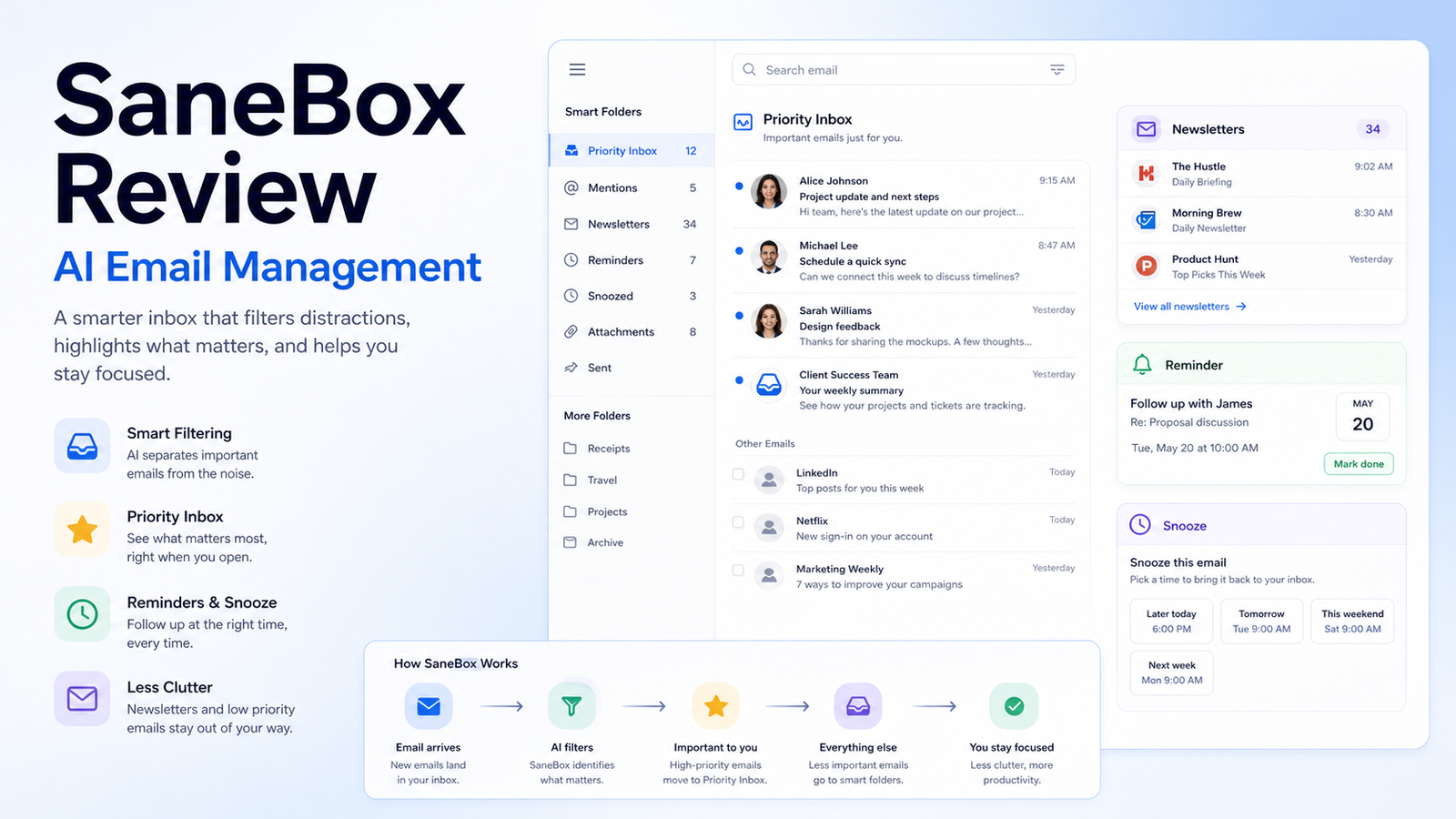
    SaneBox is an email management service that helps reduce inbox overload by sorting less important messages, surfacing follow-up reminders, and giving users a more focused inbox. It is not a replacement for a help desk, CRM, or project management system. Its value is strongest when one person or a small team has too much email noise and needs a cleaner way to notice important messages.

    Quick Verdict

    SaneBox is worth considering if your inbox is full of newsletters, automated notifications, receipts, promotions, and low-priority threads that bury real customer, sales, vendor, or operational messages. It is less useful if your problem is team ownership, support routing, missing CRM updates, or a lack of process. In those cases, a shared inbox, CRM, or help desk may solve the real problem better.

    Best For

    • Founders and operators who manage a busy personal business inbox.
    • Consultants, salespeople, and freelancers who need better follow-up discipline.
    • Small teams that want inbox cleanup without changing email clients.
    • Users who are willing to review sorted folders and train the system.

    Not Best For

    • Teams that need shared support ownership, SLA tracking, or ticket routing.
    • Users who will never review filtered folders.
    • Businesses that cannot approve third-party mailbox access.
    • Anyone expecting AI to decide which emails matter without supervision.

    Our Evaluation Criteria

    Inbox triage

    An email management tool should reduce noise without hiding messages that require attention. The first test is whether the product can separate newsletters, low-priority messages, receipts, and follow-up items in a way the user can understand and correct.

    Training and control

    The product should let users train folders, restore mistakes, and change rules. Email automation is risky when the user cannot see why messages moved or how to reverse a decision.

    Compatibility

    Small businesses should confirm support for their mail provider, mobile workflow, desktop client, shared inbox habits, and any compliance requirements before relying on the tool.

    Reminder workflow

    Snooze, follow-up, and reminder features are useful only when they fit the way the team actually handles sales, invoices, support, and admin messages.

    Privacy and security

    Email contains customer, billing, legal, employee, and vendor information. Review account access, retention, deletion, security documentation, and business approval before connecting a mailbox.

    Pricing clarity

    Compare official SaneBox plan limits, billing period, folders, reminders, account coverage, and trial terms before buying. Do not judge only by the entry price.

    Key Features And Capabilities

    Smart folders

    SaneBox sorts less important messages into folders such as newsletter, low-priority, and waiting areas so the main inbox can stay focused on items that likely need attention.

    Training by movement

    Users can move messages to train how SaneBox should treat similar future emails. This is useful because no automated inbox decision should be treated as final without user correction.

    SaneReminders

    Reminder features can bring messages back when a reply or follow-up is needed, which is practical for sales follow-up, vendor coordination, and personal task management.

    Newsletter and low-priority cleanup

    The product can help keep newsletters, promotions, receipts, and lower-value messages from crowding the primary inbox.

    Cross-device workflow

    Because SaneBox works with the mailbox rather than only one local app, users can benefit across common email clients when the provider setup is supported.

    Real Use Cases

    Small business owner inbox

    A founder who handles sales, vendor emails, customer questions, and admin notices can use SaneBox to reduce inbox noise while keeping a daily review habit for sorted folders.

    Sales follow-up

    A salesperson can use reminder features for unanswered proposals, renewal conversations, and meeting follow-ups. The tool can help surface the thread, but the salesperson still owns the context and commitment.

    Customer support handoff

    A small team can keep newsletters and automated notices out of the main inbox so actual customer issues are easier to see. Support requests still need clear ownership and response expectations.

    Finance and vendor communication

    Receipts, low-priority vendor updates, and recurring notices can be separated from urgent billing questions. Anything involving payment, tax, legal, or contract changes should be reviewed manually.

    Newsletter management

    A marketer or founder can keep useful newsletters available without letting them interrupt active work. Periodic cleanup is still necessary so folders do not become another unread archive.

    Comparison Table

    Option Best For Main Strength Important Limitation
    SaneBox Personal and small-business inbox triage Mailbox-level sorting and reminders Requires trust and review of sorted folders
    Superhuman Power users who want a fast email client Speed, shortcuts, and focused client workflow Different approach and higher learning curve
    Gmail filters and labels Google users with simple rules Built-in and low cost Manual rule setup and maintenance
    Outlook rules and focused inbox Microsoft-centered teams Native Microsoft workflow Limited compared with dedicated triage tools
    Help desk software Shared customer support inboxes Ownership, SLA, and team routing More setup than personal email cleanup

    Pricing

    SaneBox publishes plan and trial details on its official pricing page. The right plan depends on the number of email accounts, available features, reminders, folder options, and billing period. Because email productivity tools can change packaging, use the official pricing page for the current purchase decision.

    Pricing last checked on June 28, 2026. Pricing may vary by region, billing period, account count, features, trial terms, or promotions. Use the linked official pricing page for the current purchase decision.

    Pros

    • Can reduce daily inbox noise without forcing a new email client.
    • Reminder features can help with sales and vendor follow-up.
    • Sorting can be trained by moving messages.
    • Useful for individuals and small-business owners who still live in email.

    Cons And Limitations

    • It does not replace a CRM, shared inbox, or help desk.
    • Incorrect sorting can hide important messages if folders are ignored.
    • Email access requires privacy and security review.
    • It cannot fix unclear ownership, poor customer support process, or missing documentation.

    Alternatives

    Superhuman is better when the user wants a premium email client built around speed and shortcuts. Gmail labels and filters are enough for simple sorting needs. Outlook rules and Focused Inbox can work for Microsoft-centered users. A help desk such as Help Scout, Zendesk, Freshdesk, Tidio, or Intercom is a better fit when multiple people own customer conversations and need routing, reporting, and escalation.

    A Practical 30-Day Evaluation Plan

    Week 1: Clean The Baseline

    Before connecting a tool, count the types of messages that create noise. Separate newsletters, receipts, automated notifications, customer questions, sales replies, internal messages, vendor emails, and urgent account notices. This reveals whether inbox triage is the real problem or whether the business needs a CRM, support desk, or project workflow.

    Review mailbox access rules. Email often contains customer details, invoices, contracts, employee information, password reset notices, and private business context. Confirm that the account owner understands what access is being granted and how the tool handles data, retention, and deletion.

    Week 2: Run SaneBox In Review Mode

    Use SaneBox while reviewing sorted folders daily. Do not assume sorting is correct. Move messages when the system makes the wrong decision, and track which categories improve. The goal is not an empty inbox at any cost. The goal is to make important work easier to notice.

    Test normal and difficult messages. Include customer complaints, invoices, proposal replies, newsletters from important partners, automated platform alerts, and old threads that become active again. These edge cases reveal whether the workflow is safe enough for daily use.

    Week 3: Improve Follow-Up

    Use reminders for active sales conversations, vendor replies, and operational follow-ups. Write down which reminders actually prevent missed work. If reminders become another noisy folder, reduce their use and create clearer rules.

    Decide which emails should move out of the personal inbox entirely. Customer support may belong in a help desk. Sales conversations may belong in a CRM. Project requests may belong in a task system. SaneBox can reduce noise, but it should not become a hidden business process.

    Week 4: Measure And Decide

    Compare daily email review time, missed follow-ups, folder review time, and the number of important messages found outside the inbox. If the tool saves time after review and does not hide important work, keep it. If it mainly creates another place to check, simplify the email rules or switch to a more appropriate system.

    Security, Governance, And Quality Control

    Use least-privilege access where available, review connected accounts, and remove accounts that no longer need the service. Do not connect mailboxes containing highly sensitive information unless the business has approved the risk. For shared work, avoid using a personal inbox as the only business record.

    Keep human control over commitments. Email tools can organize messages, but they should not approve refunds, promise delivery dates, make legal statements, or change customer terms. Those decisions need the right owner and system of record.

    How To Measure Value

    Track whether important emails are found faster, whether follow-ups are missed less often, and whether the user spends less time scanning low-value messages. Measure folder review time too. A tool that cleans the inbox but creates several unread folders may only move the problem.

    Also compare the cost against simpler alternatives. Built-in filters may be enough for a light inbox. A help desk may be better for customer support. A CRM may be better for sales follow-up. The right choice is the one that reduces real operational risk, not only unread count.

    Detailed Decision Checklist

    Start with the inbox problem in one sentence. For example: "Important proposal replies and customer questions are getting buried under newsletters and automated notices." That is a good SaneBox use case. "No one knows who owns support replies" is not an inbox filtering problem.

    Check the email provider, devices, and clients used every day. Confirm that the workflow works on mobile and desktop. Confirm how messages are restored, how folders are reviewed, and how training is corrected. The workflow should remain understandable after the first week.

    Review the exit path. Confirm what happens when the service is disconnected, whether folders remain, how rules are removed, and how messages can be restored. Email tools should make work easier without trapping the business in a confusing mailbox structure.

    Questions To Ask Before Approval

    • Which messages should stay in the main inbox?
    • Which folders must be reviewed daily or weekly?
    • Who owns customer, sales, billing, and vendor follow-ups?
    • What email data does the tool access?
    • How are incorrect sorting decisions corrected?
    • What happens if the service is disconnected?
    • Would a CRM, help desk, or built-in filter solve the problem better?

    Common Buying Mistakes

    • Treating inbox zero as the goal instead of reliable follow-up.
    • Ignoring sorted folders until important messages are missed.
    • Using personal inbox tools for team support ownership.
    • Connecting sensitive mailboxes without reviewing access and data rules.
    • Buying a paid tool when simple labels or rules would be enough.

    Final Recommendation

    SaneBox is a practical choice for individuals and small-business owners whose main problem is inbox noise and missed follow-up. It is not the right fix for team support routing, CRM hygiene, or unclear ownership. Use the trial on one mailbox, review sorted folders every day, and decide based on time saved after review.

    Frequently Asked Questions

    Is SaneBox an AI email assistant?

    It is an email management service that uses automated sorting and training to organize messages. Treat it as inbox triage, not as an autonomous decision maker.

    Does SaneBox replace Gmail filters?

    Not always. Built-in filters may be enough for simple needs. SaneBox is more useful when the inbox requires ongoing prioritization and reminders.

    Is SaneBox good for customer support?

    It can help one person see important messages, but shared customer support usually needs a help desk with ownership and escalation.

    Can SaneBox hide important emails?

    Any filtering tool can sort incorrectly. Users should review folders and train the system, especially during the first few weeks.

    How should I compare pricing?

    Use the official pricing page and compare account count, features, reminders, folder options, billing period, and trial terms.

    What is the best alternative?

    For personal email speed, consider Superhuman. For simple rules, use Gmail or Outlook filters. For team support, use a help desk.

    Related Dailytimespro Guides

    See our AI email response workflow, best AI email marketing tools, and AI sales follow-up workflow.

  • Canva AI Review: Is It Worth It for Small Business Design?

    Canva AI Review: Is It Worth It for Small Business Design?

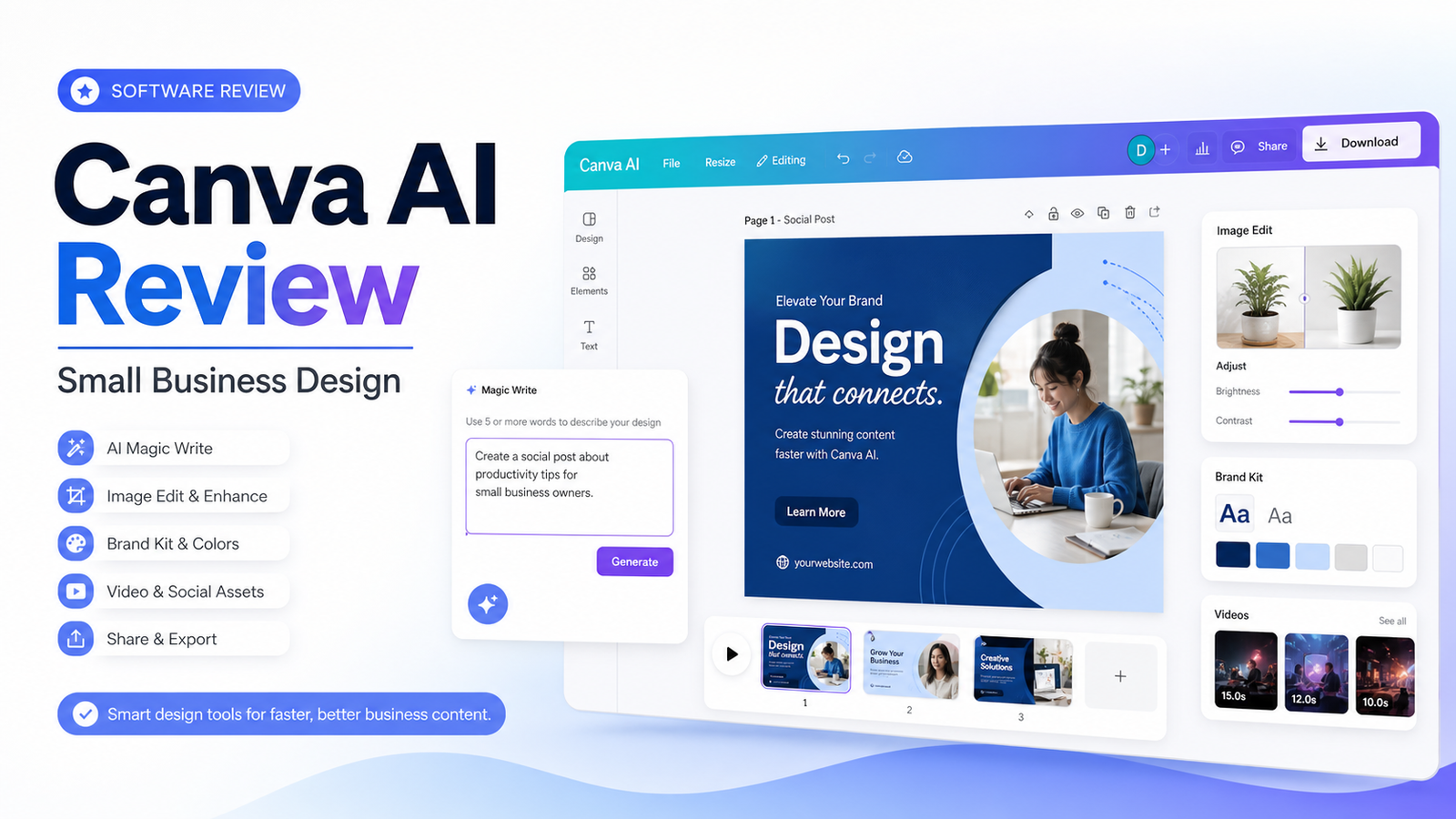
    Canva AI is part of Canva's broader design workspace, so it should be reviewed as a practical design assistant rather than a standalone image generator. For small businesses, the real value is creating on-brand social graphics, presentations, simple videos, ads, flyers, and content drafts faster while keeping human review in place.

    Quick Verdict

    Canva AI is worth considering for small businesses that already use Canva or need one accessible workspace for branded design, social content, presentations, and light marketing assets. It is less suitable when the team needs advanced professional design control, complex image editing, or guaranteed brand-safe output without review.

    Best For

    • Small businesses creating frequent social and marketing assets.
    • Teams that need brand kits, templates, presentations, and quick exports.
    • Non-designers who need an approachable design workflow.
    • Marketers who will review AI text, layouts, and images before publishing.

    Not Best For

    • Professional design teams needing advanced layout or image control.
    • Brands with strict compliance workflows but no approval process.
    • Users expecting perfect AI-generated designs without editing.
    • Businesses that need verified logos, claims, or product shots generated from scratch.

    Our Evaluation Criteria

    Ease of use

    The tool should let non-designers create useful drafts without breaking brand consistency.

    Brand control

    Brand kits, templates, and asset libraries matter more than one-off AI effects.

    AI feature usefulness

    Text, image, layout, and video tools should reduce real work after review.

    Collaboration

    Comments, approvals, folders, and team permissions matter for repeatable production.

    Export quality

    Check the formats, dimensions, and compression required for each channel.

    Pricing

    Compare Free, Pro, Teams, Enterprise, AI credits, brand features, and storage from official sources.

    Key Features And Capabilities

    Magic Studio

    A set of AI-assisted tools for writing, design, image editing, and creative production.

    Brand Kit

    Centralizes brand colors, fonts, logos, and templates for more consistent assets.

    Templates

    Provides a large template library for social, presentation, video, print, and marketing uses.

    Collaboration

    Teams can comment, share designs, and organize work when folder structure is maintained.

    Exports

    Canva supports common export formats for social, web, video, and print-oriented workflows.

    Real Use Cases

    Social content

    A small business can draft posts, resize formats, and keep brand colors consistent.

    Presentations

    A founder can build a simple pitch or webinar deck and verify every claim before sharing.

    Ad creative

    A marketer can produce ad variations, then check offer accuracy and platform requirements.

    Email graphics

    Teams can create campaign headers and product visuals from approved assets.

    Local marketing

    A service business can create flyers, menus, posters, or event assets using templates and review.

    Comparison Table

    Option Best For Main Strength Important Limitation
    Canva AI Small-business design Accessible templates and AI tools Not full professional design software
    Adobe Express Quick branded content Adobe ecosystem and templates Different asset workflow
    Adobe Firefly Generative image creation Creative generation and Adobe integration Less all-in-one template workflow
    Figma Product and interface design Collaboration and design systems Higher design skill requirement
    VistaCreate Template-based marketing assets Simple social design Different AI depth

    Pricing

    Canva publishes Free, Pro, Teams, Enterprise, and education/nonprofit paths on its official pricing page. Current plan value depends on users, brand kits, premium assets, AI tools, storage, collaboration, and billing period. Use the official pricing page before purchasing.

    Pricing last checked on June 28, 2026. Pricing may vary by region, billing period, users, contacts, tasks, credits, storage, usage, or add-ons. Use the linked official pricing page for the current purchase decision.

    Pros

    • Helps reduce repetitive work when source material is reliable.
    • Supports faster drafting, organization, or handoff in a defined workflow.
    • Gives teams a clearer structure for evaluating software choices.
    • Can improve consistency when ownership, review, and templates are maintained.

    Cons And Limitations

    • Output quality depends on inputs, configuration, and review discipline.
    • Pricing models are not directly comparable across vendors.
    • Migration, administration, and training still require time.
    • Human review remains necessary for facts, commitments, and sensitive decisions.

    Alternatives

    Compare the listed products with systems the team already owns. A simpler document, shared inbox, CRM workflow, project tool, or manual process may be better when volume is low. Specialist software may be necessary when the workflow requires regulated records, advanced analytics, or deep transactional controls.

    A Practical 30-Day Evaluation Plan

    Week 1: Define The Workflow

    Choose one recurring workflow with a clear owner, approved inputs, a known output, and a human review step. Record how the work is completed today, how long it takes, where errors occur, and which systems are involved. This baseline is essential. Without it, a team can mistake novelty for improvement and buy a product that adds another interface without removing meaningful work.

    Document the data the workflow uses. Mark which information is public, internal, confidential, regulated, outdated, duplicated, or missing. Confirm which users should have access. AI features cannot repair contradictory records or unclear permission boundaries. In many projects, cleaning documentation, contact data, creative assets, deal records, or task ownership creates more value than adding another subscription.

    Week 2: Run In Parallel

    Use the new tool alongside the existing process. Review every output rather than allowing automatic publication or action. Label corrections as factual, contextual, formatting, tone, permission, missing information, incorrect action, or missing context. This creates a useful evidence set and reveals whether the product reduces work after review.

    Test normal and difficult cases. Include incomplete inputs, ambiguous instructions, changed requirements, unsupported file types, poor audio, unusual customer requests, unusual sales cycles, or edge cases relevant to the category. A polished demo often hides the exact conditions that make daily work difficult.

    Week 3: Improve The System

    Update source documents, templates, prompts, routing rules, integrations, naming conventions, and permissions based on observed failures. Remove steps that do not improve the outcome. If users bypass the workflow, determine whether the cause is poor fit, missing training, slow performance, inadequate integration, or a review process heavier than the original task.

    Define escalation. State which actions the software may assist with, which actions require approval, and which requests must always go to a qualified person. Legal interpretations, employment decisions, financial commitments, security incidents, customer exceptions, and public claims should not be hidden behind a confident AI answer.

    Week 4: Measure And Decide

    Compare the pilot with the baseline. Review completion time, editing time, error rate, adoption, administrator workload, integration reliability, and expected annual cost. Include seats, contacts, tasks, credits, storage, implementation, training, and the cost of correcting mistakes. A low entry price can be misleading when the usable workflow requires higher tiers or extensive manual review.

    Decide whether to expand, keep the workflow limited, change configuration, evaluate an alternative, or stop. Write down the decision and assumptions. Revisit them when prices, product capabilities, data requirements, or business volume change.

    Security, Governance, And Quality Control

    Use least-privilege access and multifactor authentication. Assign an account owner, billing owner, workflow owner, and output reviewer. Confirm retention, export, deletion, model-training, integration, and administrator controls from current vendor documentation. Do not paste confidential customer, employee, financial, legal, security, or product information into an unapproved account.

    Keep a human in control of high-impact outputs. Verify names, dates, prices, links, calculations, commitments, claims, permissions, and citations. For automated actions, use bounded permissions, monitoring, logs, alerts, and a tested rollback or correction process. The team should know how to pause a workflow quickly.

    How To Measure Value

    Measure time saved after review, not before it. Track correction rates, handoff errors, turnaround time, user adoption, administrator work, and whether approved outputs reach the correct system of record. For customer-facing workflows, monitor complaints, escalations, missed requests, and quality sampling. For content, sales, or meeting work, measure revision time, consistency, and whether the final result serves the intended audience.

    Model twelve-month cost. Include subscription fees, users, contacts, tasks, credits, storage, integrations, implementation, training, and maintenance. Also confirm how data and configurations can be exported if the tool no longer fits. A responsible software decision includes a practical exit path.

    Detailed Decision Checklist

    Write down the exact problem in one sentence before comparing plans. A useful statement names the workflow, the current friction, the expected improvement, and the owner. "We need AI" is not a buying requirement. "Our sales lead needs a forecast view based on consistent CRM stages, close dates, deal notes, and human-reviewed risks" is specific enough to test.

    List required integrations and decide which system remains authoritative. A design assistant may create drafts, but approved brand assets still need an owner. A presentation tool may produce slides, but sales and finance numbers need a verified source. A workspace tool may help people find answers, but source owners must update policy. An automation platform can move data, but it should not become the only place where business logic is understood.

    Review failure handling. Ask what happens when an integration disconnects, a credit limit is reached, an upload fails, a transcript is wrong, a source is outdated, or a user loses access. Define alerts, owners, correction steps, and acceptable downtime. A workflow that succeeds in ideal conditions but fails silently is not production-ready.

    Check administration from the perspective of the future owner. The person evaluating the product may not be the person maintaining it six months later. Require clear names, documentation, change history, permission review, billing visibility, and an onboarding process for new users. Test whether a second person can understand the setup without relying on the original builder.

    Finally, inspect the exit path. Confirm export formats, media or document ownership, API access where relevant, deletion procedures, and the effort required to move to another system. Record contract renewal dates and who receives billing notices. The ability to leave reduces operational risk and creates a more honest comparison of long-term cost.

    Questions To Ask Before Approval

    • Which approved sources or records does the workflow depend on?
    • Who reviews the output, and what must that reviewer check?
    • Which actions can occur automatically, and which require confirmation?
    • How are errors, outages, and exhausted limits reported?
    • What data is retained, where is it stored, and how is it deleted?
    • What will the workflow cost at expected twelve-month volume?
    • Can another employee maintain it from the documentation?
    • How will the team export its data and configuration if it leaves?

    Common Buying Mistakes

    • Selecting a product from a feature list without testing a real workflow.
    • Comparing entry prices without modeling users, volume, credits, storage, and add-ons.
    • Treating generated text, summaries, recommendations, or actions as verified facts.
    • Expanding before permissions, review, escalation, and ownership are documented.
    • Buying software to compensate for missing process, poor data, or unclear accountability.
    • Assuming every AI-labelled feature produces measurable business value.

    Final Recommendation

    Use Canva AI when the business needs an accessible design workspace with templates, brand controls, and practical AI assistance. Keep a review step for facts, offers, brand usage, image rights, and final dimensions. Designers may still prefer specialist tools for complex work.

    Frequently Asked Questions

    What is the best option?

    The best option is the one that fits the real workflow, data, users, administration, and budget.

    Is there a free plan?

    Many products in this category offer a free path or trial, but current limits should be checked on the official pricing page.

    Can AI replace human review?

    No. Important facts, actions, claims, and decisions require accountable review.

    How should pricing be compared?

    Model the required plan, users, credits or volume, integrations, implementation, and maintenance.

    How long should a pilot run?

    A focused two-to-four-week pilot is usually enough to identify workflow fit and failure modes.

    What is the biggest risk?

    Poor source data, unclear permissions, and unreviewed outputs create more risk than the interface itself.

    Related Dailytimespro Guides

    See our Canva AI pricing, Canva AI vs Adobe Firefly, Gamma vs Canva AI.

  • Best AI Presentation Tools for Small Business

    Best AI Presentation Tools for Small Business

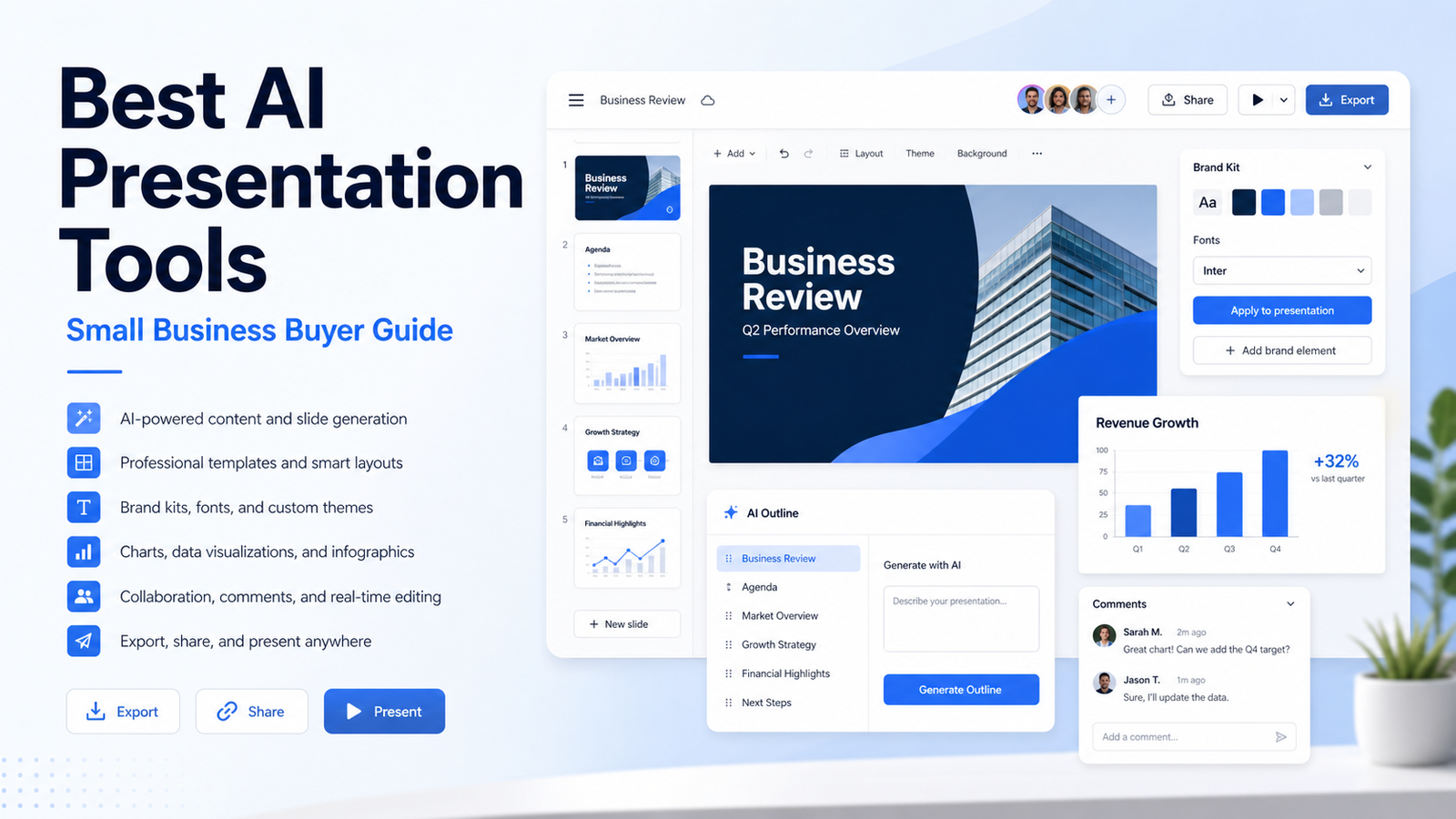
    AI presentation tools help small teams turn outlines, meeting notes, product ideas, and campaign plans into slide drafts faster. The best tools do not remove the need for strategy, proof, or design review. They reduce first-draft friction and make it easier to turn a clear message into a usable deck.

    Quick Verdict

    Gamma is strong for fast narrative decks and shareable pages. Canva is useful for teams that already need social, brand, and presentation assets in one design workspace. Beautiful.ai fits structured decks that need consistent formatting. Plus AI is practical for Google Slides or PowerPoint-centered teams. Tome may suit storytelling and lightweight pitch-style work, depending on current product fit.

    Best For

    • Founders creating investor or sales decks.
    • Marketing teams turning briefs into client-ready drafts.
    • Small businesses that need reusable branded presentation workflows.
    • Teams that review claims, charts, and sources before presenting.

    Not Best For

    • Teams without a message, audience, or approved data.
    • Highly regulated presentations without legal or compliance review.
    • Design teams needing full professional layout control.
    • Users expecting AI to invent evidence, customer proof, or financial numbers.

    Our Evaluation Criteria

    Draft quality

    The tool should turn a clear outline into a coherent first draft without creating unsupported claims.

    Design consistency

    Brand fonts, colors, spacing, and slide structure should stay controlled.

    Editing workflow

    A useful product lets the team revise content and visuals without rebuilding the deck.

    Export and sharing

    Check PowerPoint, Google Slides, PDF, web sharing, and collaboration requirements.

    Data accuracy

    Charts, numbers, screenshots, and customer claims must come from verified sources.

    Pricing clarity

    Compare seats, exports, AI credits, brand assets, storage, and collaboration features from official pricing pages.

    Key Features And Capabilities

    Gamma

    Fast AI-assisted decks, documents, and shareable pages from prompts or outlines.

    Canva

    Presentation creation inside a broader design workspace with brand kits and AI design features.

    Beautiful.ai

    Structured slide design with smart templates and layout consistency.

    Plus AI

    AI presentation generation and editing for teams that use Google Slides or PowerPoint.

    Tome

    Narrative-style AI presentation and storytelling workflows where current product packaging fits.

    Real Use Cases

    Sales decks

    A founder can draft a pitch from approved positioning, then verify proof, pricing, and customer claims.

    Webinar slides

    A marketing team can turn an outline into visual sections, speaker notes, and follow-up assets.

    Internal updates

    Managers can convert project notes into concise update decks while checking dates and metrics.

    Client proposals

    An agency can prepare a branded concept deck, then replace placeholder ideas with real scope and evidence.

    Training material

    Teams can draft onboarding slides from approved documentation and review them for process accuracy.

    Comparison Table

    Option Best For Main Strength Important Limitation
    Gamma Fast narrative decks Prompt-to-deck speed Needs review for claims and data
    Canva Design-heavy small teams Brand assets and multi-format design Can become broad and distracting
    Beautiful.ai Consistent formatted decks Smart slide layout Less freeform design control
    Plus AI Google Slides and PowerPoint users Fits existing slide workflow Depends on host tools
    Tome Storytelling decks Narrative presentation flow Product fit should be checked

    Pricing

    Gamma, Canva, Beautiful.ai, Tome, and Plus AI publish pricing or plan pages, but the right comparison depends on seats, export formats, AI usage, brand controls, storage, and collaboration. Use the official pricing pages before buying because plan packaging changes frequently.

    Pricing last checked on June 28, 2026. Pricing may vary by region, billing period, users, contacts, tasks, credits, storage, usage, or add-ons. Use the linked official pricing page for the current purchase decision.

    Pros

    • Helps reduce repetitive work when source material is reliable.
    • Supports faster drafting, organization, or handoff in a defined workflow.
    • Gives teams a clearer structure for evaluating software choices.
    • Can improve consistency when ownership, review, and templates are maintained.

    Cons And Limitations

    • Output quality depends on inputs, configuration, and review discipline.
    • Pricing models are not directly comparable across vendors.
    • Migration, administration, and training still require time.
    • Human review remains necessary for facts, commitments, and sensitive decisions.

    Alternatives

    Compare the listed products with systems the team already owns. A simpler document, shared inbox, CRM workflow, project tool, or manual process may be better when volume is low. Specialist software may be necessary when the workflow requires regulated records, advanced analytics, or deep transactional controls.

    A Practical 30-Day Evaluation Plan

    Week 1: Define The Workflow

    Choose one recurring workflow with a clear owner, approved inputs, a known output, and a human review step. Record how the work is completed today, how long it takes, where errors occur, and which systems are involved. This baseline is essential. Without it, a team can mistake novelty for improvement and buy a product that adds another interface without removing meaningful work.

    Document the data the workflow uses. Mark which information is public, internal, confidential, regulated, outdated, duplicated, or missing. Confirm which users should have access. AI features cannot repair contradictory records or unclear permission boundaries. In many projects, cleaning documentation, contact data, creative assets, deal records, or task ownership creates more value than adding another subscription.

    Week 2: Run In Parallel

    Use the new tool alongside the existing process. Review every output rather than allowing automatic publication or action. Label corrections as factual, contextual, formatting, tone, permission, missing information, incorrect action, or missing context. This creates a useful evidence set and reveals whether the product reduces work after review.

    Test normal and difficult cases. Include incomplete inputs, ambiguous instructions, changed requirements, unsupported file types, poor audio, unusual customer requests, unusual sales cycles, or edge cases relevant to the category. A polished demo often hides the exact conditions that make daily work difficult.

    Week 3: Improve The System

    Update source documents, templates, prompts, routing rules, integrations, naming conventions, and permissions based on observed failures. Remove steps that do not improve the outcome. If users bypass the workflow, determine whether the cause is poor fit, missing training, slow performance, inadequate integration, or a review process heavier than the original task.

    Define escalation. State which actions the software may assist with, which actions require approval, and which requests must always go to a qualified person. Legal interpretations, employment decisions, financial commitments, security incidents, customer exceptions, and public claims should not be hidden behind a confident AI answer.

    Week 4: Measure And Decide

    Compare the pilot with the baseline. Review completion time, editing time, error rate, adoption, administrator workload, integration reliability, and expected annual cost. Include seats, contacts, tasks, credits, storage, implementation, training, and the cost of correcting mistakes. A low entry price can be misleading when the usable workflow requires higher tiers or extensive manual review.

    Decide whether to expand, keep the workflow limited, change configuration, evaluate an alternative, or stop. Write down the decision and assumptions. Revisit them when prices, product capabilities, data requirements, or business volume change.

    Security, Governance, And Quality Control

    Use least-privilege access and multifactor authentication. Assign an account owner, billing owner, workflow owner, and output reviewer. Confirm retention, export, deletion, model-training, integration, and administrator controls from current vendor documentation. Do not paste confidential customer, employee, financial, legal, security, or product information into an unapproved account.

    Keep a human in control of high-impact outputs. Verify names, dates, prices, links, calculations, commitments, claims, permissions, and citations. For automated actions, use bounded permissions, monitoring, logs, alerts, and a tested rollback or correction process. The team should know how to pause a workflow quickly.

    How To Measure Value

    Measure time saved after review, not before it. Track correction rates, handoff errors, turnaround time, user adoption, administrator work, and whether approved outputs reach the correct system of record. For customer-facing workflows, monitor complaints, escalations, missed requests, and quality sampling. For content, sales, or meeting work, measure revision time, consistency, and whether the final result serves the intended audience.

    Model twelve-month cost. Include subscription fees, users, contacts, tasks, credits, storage, integrations, implementation, training, and maintenance. Also confirm how data and configurations can be exported if the tool no longer fits. A responsible software decision includes a practical exit path.

    Detailed Decision Checklist

    Write down the exact problem in one sentence before comparing plans. A useful statement names the workflow, the current friction, the expected improvement, and the owner. "We need AI" is not a buying requirement. "Our sales lead needs a forecast view based on consistent CRM stages, close dates, deal notes, and human-reviewed risks" is specific enough to test.

    List required integrations and decide which system remains authoritative. A design assistant may create drafts, but approved brand assets still need an owner. A presentation tool may produce slides, but sales and finance numbers need a verified source. A workspace tool may help people find answers, but source owners must update policy. An automation platform can move data, but it should not become the only place where business logic is understood.

    Review failure handling. Ask what happens when an integration disconnects, a credit limit is reached, an upload fails, a transcript is wrong, a source is outdated, or a user loses access. Define alerts, owners, correction steps, and acceptable downtime. A workflow that succeeds in ideal conditions but fails silently is not production-ready.

    Check administration from the perspective of the future owner. The person evaluating the product may not be the person maintaining it six months later. Require clear names, documentation, change history, permission review, billing visibility, and an onboarding process for new users. Test whether a second person can understand the setup without relying on the original builder.

    Finally, inspect the exit path. Confirm export formats, media or document ownership, API access where relevant, deletion procedures, and the effort required to move to another system. Record contract renewal dates and who receives billing notices. The ability to leave reduces operational risk and creates a more honest comparison of long-term cost.

    Questions To Ask Before Approval

    • Which approved sources or records does the workflow depend on?
    • Who reviews the output, and what must that reviewer check?
    • Which actions can occur automatically, and which require confirmation?
    • How are errors, outages, and exhausted limits reported?
    • What data is retained, where is it stored, and how is it deleted?
    • What will the workflow cost at expected twelve-month volume?
    • Can another employee maintain it from the documentation?
    • How will the team export its data and configuration if it leaves?

    Common Buying Mistakes

    • Selecting a product from a feature list without testing a real workflow.
    • Comparing entry prices without modeling users, volume, credits, storage, and add-ons.
    • Treating generated text, summaries, recommendations, or actions as verified facts.
    • Expanding before permissions, review, escalation, and ownership are documented.
    • Buying software to compensate for missing process, poor data, or unclear accountability.
    • Assuming every AI-labelled feature produces measurable business value.

    Final Recommendation

    Choose Gamma for fast narrative decks, Canva for design and brand workflows, Beautiful.ai for structured presentation consistency, and Plus AI for teams already working in Google Slides or PowerPoint. Pilot one sales or marketing deck from outline to final export before standardizing.

    Frequently Asked Questions

    What is the best option?

    The best option is the one that fits the real workflow, data, users, administration, and budget.

    Is there a free plan?

    Many products in this category offer a free path or trial, but current limits should be checked on the official pricing page.

    Can AI replace human review?

    No. Important facts, actions, claims, and decisions require accountable review.

    How should pricing be compared?

    Model the required plan, users, credits or volume, integrations, implementation, and maintenance.

    How long should a pilot run?

    A focused two-to-four-week pilot is usually enough to identify workflow fit and failure modes.

    What is the biggest risk?

    Poor source data, unclear permissions, and unreviewed outputs create more risk than the interface itself.

    Related Dailytimespro Guides

    See our Gamma review, Gamma vs Canva AI, Canva AI pricing.

  • Tidio vs Intercom: Which Customer Support Platform Should You Choose?

    Tidio vs Intercom: Which Customer Support Platform Should You Choose?

    Tidio and Intercom both help businesses handle customer conversations, but they usually fit different buying situations. Tidio is often attractive for small businesses that need website chat, support automation, and an accessible AI agent path. Intercom is broader and stronger for companies that want a full customer service platform with help desk, messenger, knowledge base, automation, reporting, and Fin AI Agent.

    Quick Verdict

    Choose Tidio when you need a simpler chat and AI support setup for a small business or ecommerce-style support workflow. Choose Intercom when customer support is a core operation and the team needs a deeper platform for tickets, help center, automation, customer context, reporting, and AI resolution workflows.

    Best For

    • Small businesses comparing AI chat support tools.
    • Ecommerce and service teams handling repeated website questions.
    • SaaS teams deciding between a lightweight chat stack and a full support platform.
    • Buyers who need clear human handoff and support quality control.

    Not Best For

    • Businesses without a maintained FAQ or help center.
    • Teams expecting AI to resolve every support case safely.
    • Companies that cannot monitor conversation quality.
    • Buyers comparing only entry prices without conversation volume.

    Our Evaluation Criteria

    Support workflow depth

    Compare inbox, ticketing, help center, routing, ownership, and reporting.

    AI agent setup

    AI support depends on knowledge quality, conversation limits, handoff rules, and testing.

    Human handoff

    The platform should make escalation clear when the AI cannot safely answer.

    Ecommerce and app fit

    Website, Shopify, CRM, product, and billing integrations change the choice.

    Administration

    Roles, permissions, reporting, and quality review matter as volume grows.

    Pricing

    Compare seats, conversations, AI resolutions or quotas, automation, add-ons, and billing period.

    Key Features And Capabilities

    Tidio

    Live chat, flows, Lyro AI Agent, FAQ sources, visitor engagement, and small-business support workflows.

    Intercom

    Messenger, help desk, help center, automation, reporting, customer data, and Fin AI Agent.

    Lyro AI Agent

    AI support for common customer questions based on provided sources and conversation quotas.

    Fin AI Agent

    Intercom's AI agent for resolving support conversations inside the Intercom platform.

    Human support operations

    Both tools still require escalation, quality sampling, source maintenance, and ownership.

    Real Use Cases

    FAQ handling

    A small business can answer shipping, product, and onboarding questions from approved help content.

    Billing questions

    Teams can draft or route billing answers, but account-specific changes need human review.

    Onboarding support

    A SaaS company can guide new users through setup steps and escalate blocked accounts.

    Ticket deflection

    AI can handle repetitive questions when source documents are current and scope is narrow.

    Human handoff

    Complex, angry, legal, security, or exception requests should move quickly to a person.

    Comparison Table

    Option Best For Main Strength Important Limitation
    Tidio Small businesses and ecommerce chat Accessible chat and Lyro AI setup May be lighter for complex support ops
    Intercom Scaling support teams Full customer service platform and Fin Can be more expensive and complex
    Zendesk Traditional ticketing teams Large support-suite ecosystem Setup and pricing complexity
    Freshdesk Cost-conscious help desk teams Broad support workflow AI packaging varies
    Help Scout Human support teams Simple shared inbox experience Different AI depth

    Pricing

    Tidio's official pricing page describes Lyro AI Agent conversation quotas and paid quota options, plus live chat and flow-related limits. Intercom publishes plan and Fin pricing information through its official pricing pages, but exact cost depends on seats, usage, AI resolutions, help center, support volume, and contract terms. Pricing last checked on June 27, 2026.

    Pricing last checked on June 27, 2026. Pricing may vary by region, billing period, users, contacts, tasks, credits, storage, usage, or add-ons. Use the linked official pricing page for the current purchase decision.

    Pros

    • Helps reduce repetitive work when source material is reliable.
    • Supports faster drafting, organization, or handoff in a defined workflow.
    • Gives teams a clearer structure for evaluating software choices.
    • Can improve consistency when ownership, review, and templates are maintained.

    Cons And Limitations

    • Output quality depends on inputs, configuration, and review discipline.
    • Pricing models are not directly comparable across vendors.
    • Migration, administration, and training still require time.
    • Human review remains necessary for facts, commitments, and sensitive decisions.

    Alternatives

    Compare the listed products with systems the team already owns. A simpler document, shared inbox, CRM workflow, project tool, or manual process may be better when volume is low. Specialist software may be necessary when the workflow requires regulated records, advanced analytics, or deep transactional controls.

    A Practical 30-Day Evaluation Plan

    Week 1: Define The Workflow

    Choose one recurring workflow with a clear owner, approved inputs, a known output, and a human review step. Record how the work is completed today, how long it takes, where errors occur, and which systems are involved. This baseline is essential. Without it, a team can mistake novelty for improvement and buy a product that adds another interface without removing meaningful work.

    Document the data the workflow uses. Mark which information is public, internal, confidential, regulated, outdated, duplicated, or missing. Confirm which users should have access. AI features cannot repair contradictory records or unclear permission boundaries. In many projects, cleaning documentation, contact data, media files, or task ownership creates more value than adding another subscription.

    Week 2: Run In Parallel

    Use the new tool alongside the existing process. Review every output rather than allowing automatic publication or action. Label corrections as factual, contextual, formatting, tone, permission, missing information, incorrect action, or missing context. This creates a useful evidence set and reveals whether the product reduces work after review.

    Test normal and difficult cases. Include incomplete inputs, ambiguous instructions, changed requirements, unsupported file types, poor audio, unusual customer requests, unusual sales cycles, or edge cases relevant to the category. A polished demo often hides the exact conditions that make daily work difficult.

    Week 3: Improve The System

    Update source documents, templates, prompts, routing rules, integrations, naming conventions, and permissions based on observed failures. Remove steps that do not improve the outcome. If users bypass the workflow, determine whether the cause is poor fit, missing training, slow performance, inadequate integration, or a review process heavier than the original task.

    Define escalation. State which actions the software may assist with, which actions require approval, and which requests must always go to a qualified person. Legal interpretations, employment decisions, financial commitments, security incidents, customer exceptions, and public claims should not be hidden behind a confident AI answer.

    Week 4: Measure And Decide

    Compare the pilot with the baseline. Review completion time, editing time, error rate, adoption, administrator workload, integration reliability, and expected annual cost. Include seats, contacts, tasks, credits, storage, implementation, training, and the cost of correcting mistakes. A low entry price can be misleading when the usable workflow requires higher tiers or extensive manual review.

    Decide whether to expand, keep the workflow limited, change configuration, evaluate an alternative, or stop. Write down the decision and assumptions. Revisit them when prices, product capabilities, data requirements, or business volume change.

    Security, Governance, And Quality Control

    Use least-privilege access and multifactor authentication. Assign an account owner, billing owner, workflow owner, and output reviewer. Confirm retention, export, deletion, model-training, integration, and administrator controls from current vendor documentation. Do not paste confidential customer, employee, financial, legal, security, or product information into an unapproved account.

    Keep a human in control of high-impact outputs. Verify names, dates, prices, links, calculations, commitments, claims, permissions, and citations. For automated actions, use bounded permissions, monitoring, logs, alerts, and a tested rollback or correction process. The team should know how to pause a workflow quickly.

    How To Measure Value

    Measure time saved after review, not before it. Track correction rates, handoff errors, turnaround time, user adoption, administrator work, and whether approved outputs reach the correct system of record. For customer-facing workflows, monitor complaints, escalations, missed requests, and quality sampling. For content, sales, or meeting work, measure revision time, consistency, and whether the final result serves the intended audience.

    Model twelve-month cost. Include subscription fees, users, contacts, tasks, credits, storage, integrations, implementation, training, and maintenance. Also confirm how data and configurations can be exported if the tool no longer fits. A responsible software decision includes a practical exit path.

    Detailed Decision Checklist

    Write down the exact problem in one sentence before comparing plans. A useful statement names the workflow, the current friction, the expected improvement, and the owner. "We need AI" is not a buying requirement. "Our support lead needs verified draft answers from approved documentation so agents can respond faster while preserving human escalation" is specific enough to test.

    List required integrations and decide which system remains authoritative. A meeting assistant may summarize calls, but the CRM or project tool may still be the record of action items. A proposal system may draft documents, but pricing and legal terms need approved sources. A knowledge workspace may help people find answers, but source owners must update policy. An automation platform can move data, but it should not become the only place where business logic is understood.

    Review failure handling. Ask what happens when an integration disconnects, a credit limit is reached, an upload fails, a transcript is wrong, a source is outdated, or a user loses access. Define alerts, owners, correction steps, and acceptable downtime. A workflow that succeeds in ideal conditions but fails silently is not production-ready.

    Check administration from the perspective of the future owner. The person evaluating the product may not be the person maintaining it six months later. Require clear names, documentation, change history, permission review, billing visibility, and an onboarding process for new users. Test whether a second person can understand the setup without relying on the original builder.

    Finally, inspect the exit path. Confirm export formats, media or document ownership, API access where relevant, deletion procedures, and the effort required to move to another system. Record contract renewal dates and who receives billing notices. The ability to leave reduces operational risk and creates a more honest comparison of long-term cost.

    Questions To Ask Before Approval

    • Which approved sources or records does the workflow depend on?
    • Who reviews the output, and what must that reviewer check?
    • Which actions can occur automatically, and which require confirmation?
    • How are errors, outages, and exhausted limits reported?
    • What data is retained, where is it stored, and how is it deleted?
    • What will the workflow cost at expected twelve-month volume?
    • Can another employee maintain it from the documentation?
    • How will the team export its data and configuration if it leaves?

    Common Buying Mistakes

    • Selecting a product from a feature list without testing a real workflow.
    • Comparing entry prices without modeling users, volume, credits, storage, and add-ons.
    • Treating generated text, summaries, recommendations, or actions as verified facts.
    • Expanding before permissions, review, escalation, and ownership are documented.
    • Buying software to compensate for missing process, poor data, or unclear accountability.
    • Assuming every AI-labelled feature produces measurable business value.

    Final Recommendation

    Choose Tidio for a simpler small-business chat and AI support starting point. Choose Intercom when support is strategic and the business needs a deeper platform with mature workflows, reporting, knowledge, and AI resolution. Test each with real FAQ, billing, onboarding, and handoff cases before committing.

    Frequently Asked Questions

    What is the best option?

    The best option is the one that fits the real workflow, data, users, administration, and budget.

    Is there a free plan?

    Many products in this category offer a free path or trial, but current limits should be checked on the official pricing page.

    Can AI replace human review?

    No. Important facts, actions, claims, and decisions require accountable review.

    How should pricing be compared?

    Model the required plan, users, credits or volume, integrations, implementation, and maintenance.

    How long should a pilot run?

    A focused two-to-four-week pilot is usually enough to identify workflow fit and failure modes.

    What is the biggest risk?

    Poor source data, unclear permissions, and unreviewed outputs create more risk than the interface itself.

    Related Dailytimespro Guides

    See our Best AI customer support tools, Intercom Fin review, AI customer support workflow.

  • Slack AI Pricing Explained: Plans, AI Features, and Buyer Guidance

    Slack AI Pricing Explained: Plans, AI Features, and Buyer Guidance

    Slack AI pricing needs to be evaluated inside Slack's overall plan structure. The real buying question is not only whether AI summaries and search are useful. It is whether the workspace plan, message history, app integrations, administration, security, and AI features justify the per-user cost for the team.

    Quick Verdict

    Slack Free is useful for small teams validating basic collaboration. Slack Pro adds unlimited message history and app integrations, with official pages showing Pro pricing at $7.25 per active user per month annually or $8.75 monthly. Business+ adds stronger administration and security, with official pages showing $15 annually or $18 monthly per active user. Enterprise terms require sales guidance. Check Slack's pricing page for current promotions and AI packaging.

    Best For

    • Teams already using Slack as the daily communication hub.
    • Managers who need searchable message history and summaries.
    • Organizations comparing collaboration cost against Microsoft Teams or Google Workspace.
    • Buyers who will use integrations and administration, not just chat.

    Not Best For

    • Teams that only need occasional chat.
    • Organizations without workspace hygiene or channel ownership.
    • Buyers who ignore per-user cost at scale.
    • Companies needing strict enterprise governance without reviewing Enterprise terms.

    Our Evaluation Criteria

    Message history

    Searchable history changes the value of AI search and summaries.

    AI usefulness

    Summaries, search, recaps, and file assistance matter only if teams keep work in Slack.

    Integrations

    Slack's value rises when apps and workflows reduce context switching.

    Administration

    SSO, provisioning, retention, and security controls drive business-plan decisions.

    Adoption

    A paid plan is wasted if important teams still work in email or private documents.

    Pricing

    Use Slack's official pricing pages for current plan costs, billing, and feature packaging.

    Key Features And Capabilities

    Free

    Basic collaboration and validation for small teams.

    Pro

    Unlimited history and app integrations for active teams.

    Business+

    Advanced administration, security, and AI-powered work features.

    Enterprise

    Large-organization governance, compliance, and sales-assisted terms.

    Slack AI features

    Search, summaries, recaps, file summaries, and workflow generation where plan packaging supports them.

    Real Use Cases

    Daily recaps

    A manager can catch up on busy channels, then verify decisions and action items.

    AI search

    A teammate can find old decisions when work is actually discussed in public channels.

    File summaries

    Teams can orient themselves faster, but source documents still need review.

    Workflow generation

    Operations teams can draft simple internal workflows while checking permissions and triggers.

    Onboarding

    New employees can search past channel context, but sensitive channels and access need governance.

    Comparison Table

    Option Best For Main Strength Important Limitation
    Free Small teams testing Slack Basic collaboration Limited history and controls
    Pro Active small teams Unlimited history and integrations Per-user cost grows
    Business+ Growing businesses Security, administration, AI-powered work Requires governance
    Enterprise Large organizations Advanced controls and procurement Sales-assisted pricing
    Alternatives Teams already in Microsoft or Google Bundled collaboration Different AI and integration model

    Pricing

    Slack's official pricing pages list Free at $0, Pro at $7.25 per active user per month billed annually or $8.75 monthly, and Business+ at $15 per active user per month billed annually or $18 monthly. Promotions and regional terms may change. Enterprise pricing is sales-assisted. Pricing last checked on June 27, 2026.

    Pricing last checked on June 27, 2026. Pricing may vary by region, billing period, users, contacts, tasks, credits, storage, usage, or add-ons. Use the linked official pricing page for the current purchase decision.

    Pros

    • Helps reduce repetitive work when source material is reliable.
    • Supports faster drafting, organization, or handoff in a defined workflow.
    • Gives teams a clearer structure for evaluating software choices.
    • Can improve consistency when ownership, review, and templates are maintained.

    Cons And Limitations

    • Output quality depends on inputs, configuration, and review discipline.
    • Pricing models are not directly comparable across vendors.
    • Migration, administration, and training still require time.
    • Human review remains necessary for facts, commitments, and sensitive decisions.

    Alternatives

    Compare the listed products with systems the team already owns. A simpler document, shared inbox, CRM workflow, project tool, or manual process may be better when volume is low. Specialist software may be necessary when the workflow requires regulated records, advanced analytics, or deep transactional controls.

    A Practical 30-Day Evaluation Plan

    Week 1: Define The Workflow

    Choose one recurring workflow with a clear owner, approved inputs, a known output, and a human review step. Record how the work is completed today, how long it takes, where errors occur, and which systems are involved. This baseline is essential. Without it, a team can mistake novelty for improvement and buy a product that adds another interface without removing meaningful work.

    Document the data the workflow uses. Mark which information is public, internal, confidential, regulated, outdated, duplicated, or missing. Confirm which users should have access. AI features cannot repair contradictory records or unclear permission boundaries. In many projects, cleaning documentation, contact data, media files, or task ownership creates more value than adding another subscription.

    Week 2: Run In Parallel

    Use the new tool alongside the existing process. Review every output rather than allowing automatic publication or action. Label corrections as factual, contextual, formatting, tone, permission, missing information, incorrect action, or missing context. This creates a useful evidence set and reveals whether the product reduces work after review.

    Test normal and difficult cases. Include incomplete inputs, ambiguous instructions, changed requirements, unsupported file types, poor audio, unusual customer requests, unusual sales cycles, or edge cases relevant to the category. A polished demo often hides the exact conditions that make daily work difficult.

    Week 3: Improve The System

    Update source documents, templates, prompts, routing rules, integrations, naming conventions, and permissions based on observed failures. Remove steps that do not improve the outcome. If users bypass the workflow, determine whether the cause is poor fit, missing training, slow performance, inadequate integration, or a review process heavier than the original task.

    Define escalation. State which actions the software may assist with, which actions require approval, and which requests must always go to a qualified person. Legal interpretations, employment decisions, financial commitments, security incidents, customer exceptions, and public claims should not be hidden behind a confident AI answer.

    Week 4: Measure And Decide

    Compare the pilot with the baseline. Review completion time, editing time, error rate, adoption, administrator workload, integration reliability, and expected annual cost. Include seats, contacts, tasks, credits, storage, implementation, training, and the cost of correcting mistakes. A low entry price can be misleading when the usable workflow requires higher tiers or extensive manual review.

    Decide whether to expand, keep the workflow limited, change configuration, evaluate an alternative, or stop. Write down the decision and assumptions. Revisit them when prices, product capabilities, data requirements, or business volume change.

    Security, Governance, And Quality Control

    Use least-privilege access and multifactor authentication. Assign an account owner, billing owner, workflow owner, and output reviewer. Confirm retention, export, deletion, model-training, integration, and administrator controls from current vendor documentation. Do not paste confidential customer, employee, financial, legal, security, or product information into an unapproved account.

    Keep a human in control of high-impact outputs. Verify names, dates, prices, links, calculations, commitments, claims, permissions, and citations. For automated actions, use bounded permissions, monitoring, logs, alerts, and a tested rollback or correction process. The team should know how to pause a workflow quickly.

    How To Measure Value

    Measure time saved after review, not before it. Track correction rates, handoff errors, turnaround time, user adoption, administrator work, and whether approved outputs reach the correct system of record. For customer-facing workflows, monitor complaints, escalations, missed requests, and quality sampling. For content, sales, or meeting work, measure revision time, consistency, and whether the final result serves the intended audience.

    Model twelve-month cost. Include subscription fees, users, contacts, tasks, credits, storage, integrations, implementation, training, and maintenance. Also confirm how data and configurations can be exported if the tool no longer fits. A responsible software decision includes a practical exit path.

    Detailed Decision Checklist

    Write down the exact problem in one sentence before comparing plans. A useful statement names the workflow, the current friction, the expected improvement, and the owner. "We need AI" is not a buying requirement. "Our support lead needs verified draft answers from approved documentation so agents can respond faster while preserving human escalation" is specific enough to test.

    List required integrations and decide which system remains authoritative. A meeting assistant may summarize calls, but the CRM or project tool may still be the record of action items. A proposal system may draft documents, but pricing and legal terms need approved sources. A knowledge workspace may help people find answers, but source owners must update policy. An automation platform can move data, but it should not become the only place where business logic is understood.

    Review failure handling. Ask what happens when an integration disconnects, a credit limit is reached, an upload fails, a transcript is wrong, a source is outdated, or a user loses access. Define alerts, owners, correction steps, and acceptable downtime. A workflow that succeeds in ideal conditions but fails silently is not production-ready.

    Check administration from the perspective of the future owner. The person evaluating the product may not be the person maintaining it six months later. Require clear names, documentation, change history, permission review, billing visibility, and an onboarding process for new users. Test whether a second person can understand the setup without relying on the original builder.

    Finally, inspect the exit path. Confirm export formats, media or document ownership, API access where relevant, deletion procedures, and the effort required to move to another system. Record contract renewal dates and who receives billing notices. The ability to leave reduces operational risk and creates a more honest comparison of long-term cost.

    Questions To Ask Before Approval

    • Which approved sources or records does the workflow depend on?
    • Who reviews the output, and what must that reviewer check?
    • Which actions can occur automatically, and which require confirmation?
    • How are errors, outages, and exhausted limits reported?
    • What data is retained, where is it stored, and how is it deleted?
    • What will the workflow cost at expected twelve-month volume?
    • Can another employee maintain it from the documentation?
    • How will the team export its data and configuration if it leaves?

    Common Buying Mistakes

    • Selecting a product from a feature list without testing a real workflow.
    • Comparing entry prices without modeling users, volume, credits, storage, and add-ons.
    • Treating generated text, summaries, recommendations, or actions as verified facts.
    • Expanding before permissions, review, escalation, and ownership are documented.
    • Buying software to compensate for missing process, poor data, or unclear accountability.
    • Assuming every AI-labelled feature produces measurable business value.

    Final Recommendation

    Upgrade from Free only when searchable history, integrations, AI summaries, administration, and daily adoption create measurable value. Pro fits active small teams. Business+ fits teams that need stronger administration and security. Enterprise should be evaluated with procurement, compliance, and IT owners.

    Frequently Asked Questions

    What is the best option?

    The best option is the one that fits the real workflow, data, users, administration, and budget.

    Is there a free plan?

    Many products in this category offer a free path or trial, but current limits should be checked on the official pricing page.

    Can AI replace human review?

    No. Important facts, actions, claims, and decisions require accountable review.

    How should pricing be compared?

    Model the required plan, users, credits or volume, integrations, implementation, and maintenance.

    How long should a pilot run?

    A focused two-to-four-week pilot is usually enough to identify workflow fit and failure modes.

    What is the biggest risk?

    Poor source data, unclear permissions, and unreviewed outputs create more risk than the interface itself.

    Related Dailytimespro Guides

    See our ChatGPT Business vs Microsoft Copilot, AI knowledge base workflow, AI project management workflow.

  • How to Use ChatGPT for Customer Support

    How to Use ChatGPT for Customer Support

    ChatGPT can help customer support teams draft replies, summarize tickets, organize knowledge-base gaps, and prepare escalation notes. It should not be treated as an unsupervised support agent unless the business has verified sources, approved boundaries, human handoff, and monitoring.

    Quick Verdict

    Use ChatGPT for support as a controlled assistant. Start with FAQs, billing explanations, onboarding guidance, ticket summaries, and internal answer drafts. Keep human review for refunds, account exceptions, legal language, security issues, angry customers, and any promise that changes the customer's rights or cost.

    Best For

    • Small support teams with a maintained knowledge base.
    • Businesses that need faster draft replies and ticket summaries.
    • SaaS teams handling onboarding and troubleshooting questions.
    • Managers identifying repeated support themes.

    Not Best For

    • Teams without approved support policies.
    • Businesses that cannot protect customer data.
    • Support desks seeking unsupported autonomous decisions.
    • Regulated or high-risk support without strict review.

    Our Evaluation Criteria

    Knowledge source quality

    Answers should come from current approved policies, documentation, and product information.

    Human handoff

    The workflow must identify sensitive, angry, ambiguous, or high-impact requests.

    Data protection

    Customer details, payment data, credentials, health, legal, and security information require controls.

    Answer consistency

    Prompts and templates should guide tone, escalation, and prohibited claims.

    System integration

    Drafts and summaries should fit the help desk, CRM, and knowledge base.

    Pricing

    Compare ChatGPT plans or API use against volume, review time, and support tooling.

    Key Features And Capabilities

    Draft replies

    Create first drafts from approved help content and ticket context.

    Ticket summaries

    Condense long threads into status, customer problem, attempted fixes, and next step.

    FAQ support

    Prepare answers for common questions while preserving links to official docs.

    Handoff notes

    Write concise internal notes for billing, engineering, or account managers.

    Knowledge gaps

    Group repeated unanswered questions so the team can improve documentation.

    Real Use Cases

    FAQ handling

    A support agent can ask ChatGPT to draft answers from approved help articles, then verify links and wording.

    Billing questions

    The tool can summarize the customer's issue and draft a cautious answer, but refunds and plan changes need policy review.

    Onboarding support

    A SaaS team can generate step-by-step onboarding guidance from official docs.

    Ticket deflection

    A chatbot can suggest documentation only when it clearly knows the source and offers human handoff.

    Human escalation

    ChatGPT can prepare a handoff summary with customer context, attempted steps, and open question.

    Comparison Table

    Option Best For Main Strength Important Limitation
    ChatGPT Drafting and support assistance Flexible reasoning and summaries Needs controls and review
    Intercom Fin AI support inside Intercom Help-desk-native AI agent Best if Intercom is already the system
    Tidio Lyro Small-business chat support Website chat and AI support Usage limits and setup matter
    Zendesk AI Zendesk support teams Support-suite integration Suite complexity and pricing
    Manual macros Low-volume support Maximum control Less adaptive

    Pricing

    ChatGPT pricing depends on whether the team uses ChatGPT plans or API-based workflows. OpenAI publishes current ChatGPT and API pricing separately. Customer support platforms such as Intercom, Tidio, Zendesk, and others price AI support by seats, conversations, resolutions, or add-ons, so compare the whole support workflow rather than one AI line item.

    Pricing last checked on June 27, 2026. Pricing may vary by region, billing period, users, contacts, tasks, credits, storage, usage, or add-ons. Use the linked official pricing page for the current purchase decision.

    Pros

    • Helps reduce repetitive work when source material is reliable.
    • Supports faster drafting, organization, or handoff in a defined workflow.
    • Gives teams a clearer structure for evaluating software choices.
    • Can improve consistency when ownership, review, and templates are maintained.

    Cons And Limitations

    • Output quality depends on inputs, configuration, and review discipline.
    • Pricing models are not directly comparable across vendors.
    • Migration, administration, and training still require time.
    • Human review remains necessary for facts, commitments, and sensitive decisions.

    Alternatives

    Compare the listed products with systems the team already owns. A simpler document, shared inbox, CRM workflow, project tool, or manual process may be better when volume is low. Specialist software may be necessary when the workflow requires regulated records, advanced analytics, or deep transactional controls.

    A Practical 30-Day Evaluation Plan

    Week 1: Define The Workflow

    Choose one recurring workflow with a clear owner, approved inputs, a known output, and a human review step. Record how the work is completed today, how long it takes, where errors occur, and which systems are involved. This baseline is essential. Without it, a team can mistake novelty for improvement and buy a product that adds another interface without removing meaningful work.

    Document the data the workflow uses. Mark which information is public, internal, confidential, regulated, outdated, duplicated, or missing. Confirm which users should have access. AI features cannot repair contradictory records or unclear permission boundaries. In many projects, cleaning documentation, contact data, media files, or task ownership creates more value than adding another subscription.

    Week 2: Run In Parallel

    Use the new tool alongside the existing process. Review every output rather than allowing automatic publication or action. Label corrections as factual, contextual, formatting, tone, permission, missing information, incorrect action, or missing context. This creates a useful evidence set and reveals whether the product reduces work after review.

    Test normal and difficult cases. Include incomplete inputs, ambiguous instructions, changed requirements, unsupported file types, poor audio, unusual customer requests, unusual sales cycles, or edge cases relevant to the category. A polished demo often hides the exact conditions that make daily work difficult.

    Week 3: Improve The System

    Update source documents, templates, prompts, routing rules, integrations, naming conventions, and permissions based on observed failures. Remove steps that do not improve the outcome. If users bypass the workflow, determine whether the cause is poor fit, missing training, slow performance, inadequate integration, or a review process heavier than the original task.

    Define escalation. State which actions the software may assist with, which actions require approval, and which requests must always go to a qualified person. Legal interpretations, employment decisions, financial commitments, security incidents, customer exceptions, and public claims should not be hidden behind a confident AI answer.

    Week 4: Measure And Decide

    Compare the pilot with the baseline. Review completion time, editing time, error rate, adoption, administrator workload, integration reliability, and expected annual cost. Include seats, contacts, tasks, credits, storage, implementation, training, and the cost of correcting mistakes. A low entry price can be misleading when the usable workflow requires higher tiers or extensive manual review.

    Decide whether to expand, keep the workflow limited, change configuration, evaluate an alternative, or stop. Write down the decision and assumptions. Revisit them when prices, product capabilities, data requirements, or business volume change.

    Security, Governance, And Quality Control

    Use least-privilege access and multifactor authentication. Assign an account owner, billing owner, workflow owner, and output reviewer. Confirm retention, export, deletion, model-training, integration, and administrator controls from current vendor documentation. Do not paste confidential customer, employee, financial, legal, security, or product information into an unapproved account.

    Keep a human in control of high-impact outputs. Verify names, dates, prices, links, calculations, commitments, claims, permissions, and citations. For automated actions, use bounded permissions, monitoring, logs, alerts, and a tested rollback or correction process. The team should know how to pause a workflow quickly.

    How To Measure Value

    Measure time saved after review, not before it. Track correction rates, handoff errors, turnaround time, user adoption, administrator work, and whether approved outputs reach the correct system of record. For customer-facing workflows, monitor complaints, escalations, missed requests, and quality sampling. For content, sales, or meeting work, measure revision time, consistency, and whether the final result serves the intended audience.

    Model twelve-month cost. Include subscription fees, users, contacts, tasks, credits, storage, integrations, implementation, training, and maintenance. Also confirm how data and configurations can be exported if the tool no longer fits. A responsible software decision includes a practical exit path.

    Detailed Decision Checklist

    Write down the exact problem in one sentence before comparing plans. A useful statement names the workflow, the current friction, the expected improvement, and the owner. "We need AI" is not a buying requirement. "Our support lead needs verified draft answers from approved documentation so agents can respond faster while preserving human escalation" is specific enough to test.

    List required integrations and decide which system remains authoritative. A meeting assistant may summarize calls, but the CRM or project tool may still be the record of action items. A proposal system may draft documents, but pricing and legal terms need approved sources. A knowledge workspace may help people find answers, but source owners must update policy. An automation platform can move data, but it should not become the only place where business logic is understood.

    Review failure handling. Ask what happens when an integration disconnects, a credit limit is reached, an upload fails, a transcript is wrong, a source is outdated, or a user loses access. Define alerts, owners, correction steps, and acceptable downtime. A workflow that succeeds in ideal conditions but fails silently is not production-ready.

    Check administration from the perspective of the future owner. The person evaluating the product may not be the person maintaining it six months later. Require clear names, documentation, change history, permission review, billing visibility, and an onboarding process for new users. Test whether a second person can understand the setup without relying on the original builder.

    Finally, inspect the exit path. Confirm export formats, media or document ownership, API access where relevant, deletion procedures, and the effort required to move to another system. Record contract renewal dates and who receives billing notices. The ability to leave reduces operational risk and creates a more honest comparison of long-term cost.

    Questions To Ask Before Approval

    • Which approved sources or records does the workflow depend on?
    • Who reviews the output, and what must that reviewer check?
    • Which actions can occur automatically, and which require confirmation?
    • How are errors, outages, and exhausted limits reported?
    • What data is retained, where is it stored, and how is it deleted?
    • What will the workflow cost at expected twelve-month volume?
    • Can another employee maintain it from the documentation?
    • How will the team export its data and configuration if it leaves?

    Common Buying Mistakes

    • Selecting a product from a feature list without testing a real workflow.
    • Comparing entry prices without modeling users, volume, credits, storage, and add-ons.
    • Treating generated text, summaries, recommendations, or actions as verified facts.
    • Expanding before permissions, review, escalation, and ownership are documented.
    • Buying software to compensate for missing process, poor data, or unclear accountability.
    • Assuming every AI-labelled feature produces measurable business value.

    Final Recommendation

    Start with agent-assist workflows before customer-facing automation. Build a prompt library around approved help content, require citation to internal sources, define escalation rules, and monitor quality samples weekly.

    Frequently Asked Questions

    What is the best option?

    The best option is the one that fits the real workflow, data, users, administration, and budget.

    Is there a free plan?

    Many products in this category offer a free path or trial, but current limits should be checked on the official pricing page.

    Can AI replace human review?

    No. Important facts, actions, claims, and decisions require accountable review.

    How should pricing be compared?

    Model the required plan, users, credits or volume, integrations, implementation, and maintenance.

    How long should a pilot run?

    A focused two-to-four-week pilot is usually enough to identify workflow fit and failure modes.

    What is the biggest risk?

    Poor source data, unclear permissions, and unreviewed outputs create more risk than the interface itself.

    Related Dailytimespro Guides

    See our AI customer support workflow, Best AI customer support tools, Intercom Fin review.

  • Best Jasper AI Alternatives for Marketing Teams

    Best Jasper AI Alternatives for Marketing Teams

    Jasper is a marketing-focused AI writing platform, but it is not the only option for teams creating campaigns, blog briefs, ad copy, email sequences, social posts, and brand-controlled content. The best alternative depends on whether the team needs campaign workflows, brand governance, general AI assistance, SEO content planning, or sales and GTM automation.

    Quick Verdict

    Copy.ai is strong for GTM and campaign workflows, Writer fits organizations that care about brand governance and enterprise controls, Anyword emphasizes performance-oriented marketing copy, ChatGPT is flexible for drafting and ideation, and Surfer or Frase may be better when SEO briefs and content optimization are the primary need.

    Best For

    • Marketing teams comparing AI writing tools.
    • Small businesses that need campaign drafts and content briefs.
    • Teams that want brand voice and approval control.
    • Buyers deciding whether Jasper is too broad, too narrow, or too expensive.

    Not Best For

    • Teams expecting AI to create verified research without sources.
    • Businesses without a brand voice, offer, or editorial process.
    • Regulated teams that cannot review claims and compliance.
    • Users wanting fake performance statistics or customer proof.

    Our Evaluation Criteria

    Brand control

    The tool should help maintain tone, terminology, claims, and approved messaging.

    Campaign workflow

    Marketing teams need briefs, drafts, approvals, and reuse across channels.

    SEO support

    Some tools are writing assistants, while others focus on search briefs and optimization.

    Collaboration

    Roles, comments, assets, and approval history matter for team use.

    Fact handling

    Outputs must be checked against official product, pricing, and customer sources.

    Pricing

    Compare seats, credits, brand assets, workflows, integrations, and enterprise controls.

    Key Features And Capabilities

    Copy.ai

    GTM workflows and marketing content generation.

    Writer

    Enterprise writing governance, style, terminology, and compliance support.

    Anyword

    Marketing copy generation and performance-oriented messaging workflows.

    ChatGPT

    Flexible drafting, ideation, summarization, and content planning when users provide context.

    Surfer or Frase

    SEO briefs and content optimization rather than general campaign production.

    Real Use Cases

    Blog production

    A marketer can draft outlines, briefs, intros, and FAQs from verified sources, then edit for expertise.

    Email campaigns

    A team can create subject lines and body variants while checking offer accuracy.

    Ad copy

    AI can generate message options, but performance claims and compliance language need review.

    Brand voice

    Governed tools can help maintain terminology across teams, but brand strategy still needs a human owner.

    SEO briefs

    SEO-focused alternatives can structure search intent and headings, but facts still require source verification.

    Comparison Table

    Option Best For Main Strength Important Limitation
    Copy.ai GTM workflows Campaign and sales content workflows Needs process design
    Writer Brand-governed teams Enterprise style and controls May be more than small teams need
    Anyword Performance copy Ad and campaign variations Claims require review
    ChatGPT Flexible drafting General-purpose assistance Governance depends on setup
    Surfer or Frase SEO content Briefs and optimization Less campaign workflow depth

    Pricing

    Use each vendor's official pricing page for the current plan names, user limits, credits, workflows, brand controls, and enterprise requirements. Marketing AI vendors frequently adjust packaging, so avoid relying on old plan screenshots or third-party summaries.

    Pricing last checked on June 27, 2026. Pricing may vary by region, billing period, users, contacts, tasks, credits, storage, usage, or add-ons. Use the linked official pricing page for the current purchase decision.

    Pros

    • Helps reduce repetitive work when source material is reliable.
    • Supports faster drafting, organization, or handoff in a defined workflow.
    • Gives teams a clearer structure for evaluating software choices.
    • Can improve consistency when ownership, review, and templates are maintained.

    Cons And Limitations

    • Output quality depends on inputs, configuration, and review discipline.
    • Pricing models are not directly comparable across vendors.
    • Migration, administration, and training still require time.
    • Human review remains necessary for facts, commitments, and sensitive decisions.

    Alternatives

    Compare the listed products with systems the team already owns. A simpler document, shared inbox, CRM workflow, project tool, or manual process may be better when volume is low. Specialist software may be necessary when the workflow requires regulated records, advanced analytics, or deep transactional controls.

    A Practical 30-Day Evaluation Plan

    Week 1: Define The Workflow

    Choose one recurring workflow with a clear owner, approved inputs, a known output, and a human review step. Record how the work is completed today, how long it takes, where errors occur, and which systems are involved. This baseline is essential. Without it, a team can mistake novelty for improvement and buy a product that adds another interface without removing meaningful work.

    Document the data the workflow uses. Mark which information is public, internal, confidential, regulated, outdated, duplicated, or missing. Confirm which users should have access. AI features cannot repair contradictory records or unclear permission boundaries. In many projects, cleaning documentation, contact data, media files, or task ownership creates more value than adding another subscription.

    Week 2: Run In Parallel

    Use the new tool alongside the existing process. Review every output rather than allowing automatic publication or action. Label corrections as factual, contextual, formatting, tone, permission, missing information, incorrect action, or missing context. This creates a useful evidence set and reveals whether the product reduces work after review.

    Test normal and difficult cases. Include incomplete inputs, ambiguous instructions, changed requirements, unsupported file types, poor audio, unusual customer requests, unusual sales cycles, or edge cases relevant to the category. A polished demo often hides the exact conditions that make daily work difficult.

    Week 3: Improve The System

    Update source documents, templates, prompts, routing rules, integrations, naming conventions, and permissions based on observed failures. Remove steps that do not improve the outcome. If users bypass the workflow, determine whether the cause is poor fit, missing training, slow performance, inadequate integration, or a review process heavier than the original task.

    Define escalation. State which actions the software may assist with, which actions require approval, and which requests must always go to a qualified person. Legal interpretations, employment decisions, financial commitments, security incidents, customer exceptions, and public claims should not be hidden behind a confident AI answer.

    Week 4: Measure And Decide

    Compare the pilot with the baseline. Review completion time, editing time, error rate, adoption, administrator workload, integration reliability, and expected annual cost. Include seats, contacts, tasks, credits, storage, implementation, training, and the cost of correcting mistakes. A low entry price can be misleading when the usable workflow requires higher tiers or extensive manual review.

    Decide whether to expand, keep the workflow limited, change configuration, evaluate an alternative, or stop. Write down the decision and assumptions. Revisit them when prices, product capabilities, data requirements, or business volume change.

    Security, Governance, And Quality Control

    Use least-privilege access and multifactor authentication. Assign an account owner, billing owner, workflow owner, and output reviewer. Confirm retention, export, deletion, model-training, integration, and administrator controls from current vendor documentation. Do not paste confidential customer, employee, financial, legal, security, or product information into an unapproved account.

    Keep a human in control of high-impact outputs. Verify names, dates, prices, links, calculations, commitments, claims, permissions, and citations. For automated actions, use bounded permissions, monitoring, logs, alerts, and a tested rollback or correction process. The team should know how to pause a workflow quickly.

    How To Measure Value

    Measure time saved after review, not before it. Track correction rates, handoff errors, turnaround time, user adoption, administrator work, and whether approved outputs reach the correct system of record. For customer-facing workflows, monitor complaints, escalations, missed requests, and quality sampling. For content, sales, or meeting work, measure revision time, consistency, and whether the final result serves the intended audience.

    Model twelve-month cost. Include subscription fees, users, contacts, tasks, credits, storage, integrations, implementation, training, and maintenance. Also confirm how data and configurations can be exported if the tool no longer fits. A responsible software decision includes a practical exit path.

    Detailed Decision Checklist

    Write down the exact problem in one sentence before comparing plans. A useful statement names the workflow, the current friction, the expected improvement, and the owner. "We need AI" is not a buying requirement. "Our support lead needs verified draft answers from approved documentation so agents can respond faster while preserving human escalation" is specific enough to test.

    List required integrations and decide which system remains authoritative. A meeting assistant may summarize calls, but the CRM or project tool may still be the record of action items. A proposal system may draft documents, but pricing and legal terms need approved sources. A knowledge workspace may help people find answers, but source owners must update policy. An automation platform can move data, but it should not become the only place where business logic is understood.

    Review failure handling. Ask what happens when an integration disconnects, a credit limit is reached, an upload fails, a transcript is wrong, a source is outdated, or a user loses access. Define alerts, owners, correction steps, and acceptable downtime. A workflow that succeeds in ideal conditions but fails silently is not production-ready.

    Check administration from the perspective of the future owner. The person evaluating the product may not be the person maintaining it six months later. Require clear names, documentation, change history, permission review, billing visibility, and an onboarding process for new users. Test whether a second person can understand the setup without relying on the original builder.

    Finally, inspect the exit path. Confirm export formats, media or document ownership, API access where relevant, deletion procedures, and the effort required to move to another system. Record contract renewal dates and who receives billing notices. The ability to leave reduces operational risk and creates a more honest comparison of long-term cost.

    Questions To Ask Before Approval

    • Which approved sources or records does the workflow depend on?
    • Who reviews the output, and what must that reviewer check?
    • Which actions can occur automatically, and which require confirmation?
    • How are errors, outages, and exhausted limits reported?
    • What data is retained, where is it stored, and how is it deleted?
    • What will the workflow cost at expected twelve-month volume?
    • Can another employee maintain it from the documentation?
    • How will the team export its data and configuration if it leaves?

    Common Buying Mistakes

    • Selecting a product from a feature list without testing a real workflow.
    • Comparing entry prices without modeling users, volume, credits, storage, and add-ons.
    • Treating generated text, summaries, recommendations, or actions as verified facts.
    • Expanding before permissions, review, escalation, and ownership are documented.
    • Buying software to compensate for missing process, poor data, or unclear accountability.
    • Assuming every AI-labelled feature produces measurable business value.

    Final Recommendation

    Choose a Jasper alternative by workflow, not by the longest feature list. Copy.ai is practical for GTM workflows, Writer for brand governance, Anyword for campaign copy, ChatGPT for flexible drafting, and Surfer or Frase for SEO-focused planning.

    Frequently Asked Questions

    What is the best option?

    The best option is the one that fits the real workflow, data, users, administration, and budget.

    Is there a free plan?

    Many products in this category offer a free path or trial, but current limits should be checked on the official pricing page.

    Can AI replace human review?

    No. Important facts, actions, claims, and decisions require accountable review.

    How should pricing be compared?

    Model the required plan, users, credits or volume, integrations, implementation, and maintenance.

    How long should a pilot run?

    A focused two-to-four-week pilot is usually enough to identify workflow fit and failure modes.

    What is the biggest risk?

    Poor source data, unclear permissions, and unreviewed outputs create more risk than the interface itself.

    Related Dailytimespro Guides

    See our Jasper AI review, Best AI writing tools for marketing teams, Copy AI vs Jasper AI.