Category: AI Productivity Tools

  • Fathom Review: Is It Worth It for Meeting Notes?

    Fathom Review: Is It Worth It for Meeting Notes?

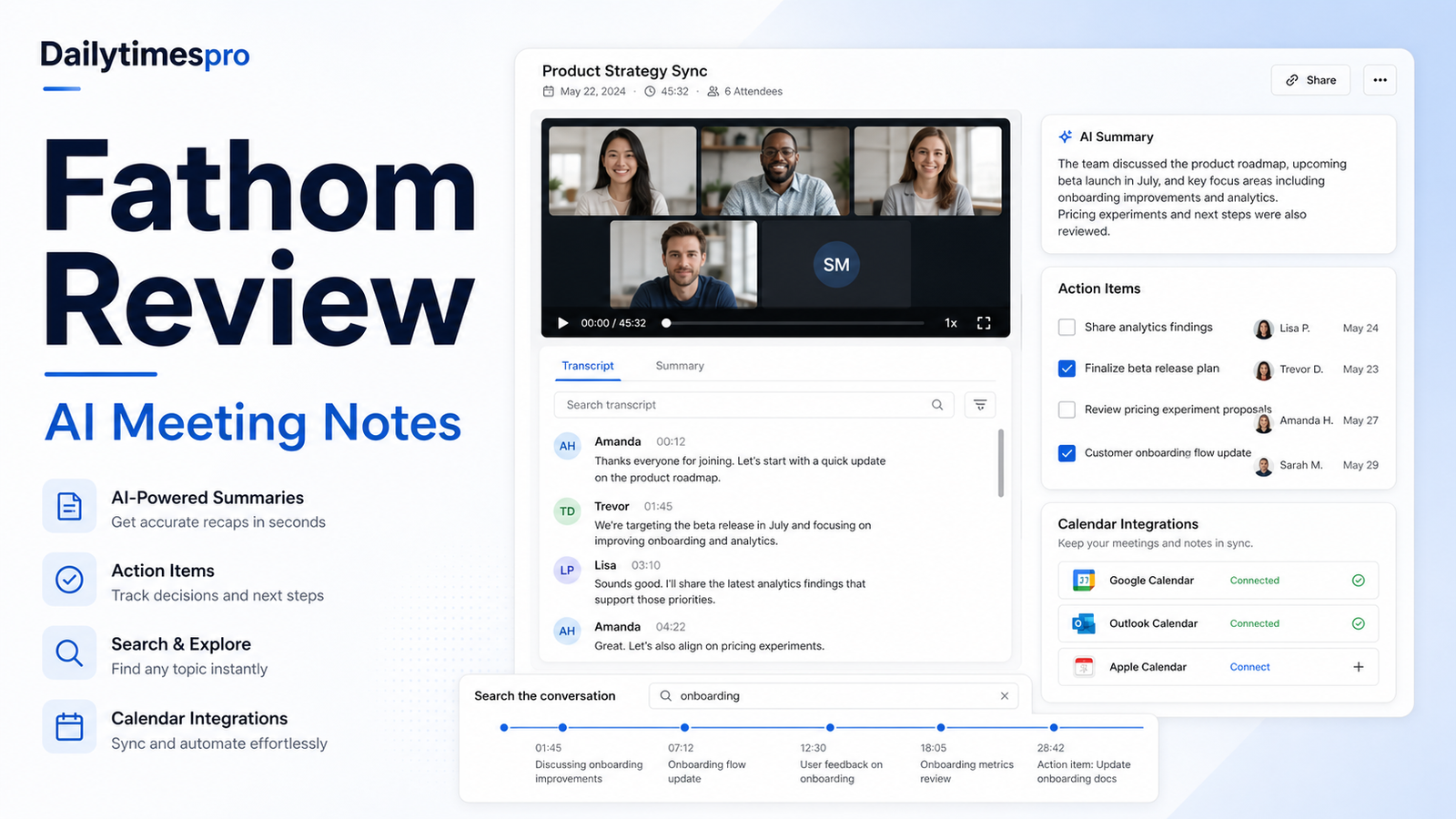
    Fathom is an AI meeting assistant focused on recording meetings, producing summaries, generating action items, and helping teams search conversations after the call. It is most useful when a team already has clear meeting habits and wants less manual note-taking, not when it expects software to fix unclear ownership.

    Quick Verdict

    Fathom is worth considering for customer calls, sales meetings, internal project syncs, interviews, and recurring meetings where summaries and action items are reviewed after the call. It is not a substitute for consent practices, account notes, project ownership, or human judgment about what the meeting actually means.

    Best For

    • Teams with frequent Zoom, Google Meet, or Microsoft Teams calls.
    • Sales and customer success teams that need searchable call context.
    • Managers who want action items and meeting follow-up support.
    • Small teams that need a generous individual meeting-note workflow.

    Not Best For

    • Confidential meetings without consent and retention controls.
    • Teams that never review summaries or action items.
    • Organizations needing a full call-center intelligence suite.
    • Users expecting perfect transcription across every accent, audio setup, or meeting style.

    Our Evaluation Criteria

    Capture reliability

    A meeting assistant is only useful if recording and transcript capture fit the platforms and consent practices.

    Summary usefulness

    The summary should highlight decisions, objections, next steps, and context without inventing commitments.

    Search and retrieval

    Teams need to find conversations later without exposing sensitive information too broadly.

    CRM and workflow integration

    Sales and success teams should test whether updates reach the correct system of record.

    Administration

    Retention, access, SSO, SCIM, and team controls matter as meeting data accumulates.

    Pricing

    Compare individual, team, business, and enterprise plans using the official pricing page.

    Key Features And Capabilities

    Meeting recording

    Captures meetings and preserves context for review.

    AI summaries

    Produces concise meeting summaries that should be checked before being shared as record.

    Action items

    Extracts follow-up tasks, owners, and next steps when stated clearly in the meeting.

    Search and highlights

    Helps teams revisit important conversation moments.

    Team controls

    Higher tiers add collaboration, security, CRM, and administrative controls.

    Real Use Cases

    Sales discovery

    A sales rep can review objections, requirements, and next steps before updating the CRM.

    Customer success calls

    A CSM can capture risks and expansion signals while checking the account record before action.

    Internal project syncs

    A manager can pull decisions and action items into a project tool after reviewing accuracy.

    User interviews

    A researcher can use summaries for orientation, but should verify quotes against the recording.

    Hiring debriefs

    Teams should be cautious with candidate data and avoid unsupported automated evaluations.

    Comparison Table

    Option Best For Main Strength Important Limitation
    Fathom Meeting notes and follow-up Generous capture and summaries Requires consent and review
    Fireflies.ai Meeting transcription and search Team knowledge across meetings Plan fit depends on admin needs
    Otter.ai Transcription and collaboration Live notes and summaries Accuracy varies by audio
    Avoma Revenue meeting intelligence Sales coaching and CRM context Broader sales use case
    Manual notes Sensitive or low-volume meetings Highest control Time-consuming

    Pricing

    Fathom's official pricing page lists an individual Free plan, Premium, Team, Business, and Enterprise paths. Search results from the official page show Free for individuals, Premium, Team, Business, and Enterprise structures, with team plans priced per user and sales-assisted enterprise terms. Use the official page for current limits, billing period, and included features.

    Pricing last checked on June 27, 2026. Pricing may vary by region, billing period, users, contacts, tasks, credits, storage, usage, or add-ons. Use the linked official pricing page for the current purchase decision.

    Pros

    • Helps reduce repetitive work when source material is reliable.
    • Supports faster drafting, organization, or handoff in a defined workflow.
    • Gives teams a clearer structure for evaluating software choices.
    • Can improve consistency when ownership, review, and templates are maintained.

    Cons And Limitations

    • Output quality depends on inputs, configuration, and review discipline.
    • Pricing models are not directly comparable across vendors.
    • Migration, administration, and training still require time.
    • Human review remains necessary for facts, commitments, and sensitive decisions.

    Alternatives

    Compare the listed products with systems the team already owns. A simpler document, shared inbox, CRM workflow, project tool, or manual process may be better when volume is low. Specialist software may be necessary when the workflow requires regulated records, advanced analytics, or deep transactional controls.

    A Practical 30-Day Evaluation Plan

    Week 1: Define The Workflow

    Choose one recurring workflow with a clear owner, approved inputs, a known output, and a human review step. Record how the work is completed today, how long it takes, where errors occur, and which systems are involved. This baseline is essential. Without it, a team can mistake novelty for improvement and buy a product that adds another interface without removing meaningful work.

    Document the data the workflow uses. Mark which information is public, internal, confidential, regulated, outdated, duplicated, or missing. Confirm which users should have access. AI features cannot repair contradictory records or unclear permission boundaries. In many projects, cleaning documentation, contact data, media files, or task ownership creates more value than adding another subscription.

    Week 2: Run In Parallel

    Use the new tool alongside the existing process. Review every output rather than allowing automatic publication or action. Label corrections as factual, contextual, formatting, tone, permission, missing information, incorrect action, or missing context. This creates a useful evidence set and reveals whether the product reduces work after review.

    Test normal and difficult cases. Include incomplete inputs, ambiguous instructions, changed requirements, unsupported file types, poor audio, unusual customer requests, unusual sales cycles, or edge cases relevant to the category. A polished demo often hides the exact conditions that make daily work difficult.

    Week 3: Improve The System

    Update source documents, templates, prompts, routing rules, integrations, naming conventions, and permissions based on observed failures. Remove steps that do not improve the outcome. If users bypass the workflow, determine whether the cause is poor fit, missing training, slow performance, inadequate integration, or a review process heavier than the original task.

    Define escalation. State which actions the software may assist with, which actions require approval, and which requests must always go to a qualified person. Legal interpretations, employment decisions, financial commitments, security incidents, customer exceptions, and public claims should not be hidden behind a confident AI answer.

    Week 4: Measure And Decide

    Compare the pilot with the baseline. Review completion time, editing time, error rate, adoption, administrator workload, integration reliability, and expected annual cost. Include seats, contacts, tasks, credits, storage, implementation, training, and the cost of correcting mistakes. A low entry price can be misleading when the usable workflow requires higher tiers or extensive manual review.

    Decide whether to expand, keep the workflow limited, change configuration, evaluate an alternative, or stop. Write down the decision and assumptions. Revisit them when prices, product capabilities, data requirements, or business volume change.

    Security, Governance, And Quality Control

    Use least-privilege access and multifactor authentication. Assign an account owner, billing owner, workflow owner, and output reviewer. Confirm retention, export, deletion, model-training, integration, and administrator controls from current vendor documentation. Do not paste confidential customer, employee, financial, legal, security, or product information into an unapproved account.

    Keep a human in control of high-impact outputs. Verify names, dates, prices, links, calculations, commitments, claims, permissions, and citations. For automated actions, use bounded permissions, monitoring, logs, alerts, and a tested rollback or correction process. The team should know how to pause a workflow quickly.

    How To Measure Value

    Measure time saved after review, not before it. Track correction rates, handoff errors, turnaround time, user adoption, administrator work, and whether approved outputs reach the correct system of record. For customer-facing workflows, monitor complaints, escalations, missed requests, and quality sampling. For content, sales, or meeting work, measure revision time, consistency, and whether the final result serves the intended audience.

    Model twelve-month cost. Include subscription fees, users, contacts, tasks, credits, storage, integrations, implementation, training, and maintenance. Also confirm how data and configurations can be exported if the tool no longer fits. A responsible software decision includes a practical exit path.

    Detailed Decision Checklist

    Write down the exact problem in one sentence before comparing plans. A useful statement names the workflow, the current friction, the expected improvement, and the owner. "We need AI" is not a buying requirement. "Our support lead needs verified draft answers from approved documentation so agents can respond faster while preserving human escalation" is specific enough to test.

    List required integrations and decide which system remains authoritative. A meeting assistant may summarize calls, but the CRM or project tool may still be the record of action items. A proposal system may draft documents, but pricing and legal terms need approved sources. A knowledge workspace may help people find answers, but source owners must update policy. An automation platform can move data, but it should not become the only place where business logic is understood.

    Review failure handling. Ask what happens when an integration disconnects, a credit limit is reached, an upload fails, a transcript is wrong, a source is outdated, or a user loses access. Define alerts, owners, correction steps, and acceptable downtime. A workflow that succeeds in ideal conditions but fails silently is not production-ready.

    Check administration from the perspective of the future owner. The person evaluating the product may not be the person maintaining it six months later. Require clear names, documentation, change history, permission review, billing visibility, and an onboarding process for new users. Test whether a second person can understand the setup without relying on the original builder.

    Finally, inspect the exit path. Confirm export formats, media or document ownership, API access where relevant, deletion procedures, and the effort required to move to another system. Record contract renewal dates and who receives billing notices. The ability to leave reduces operational risk and creates a more honest comparison of long-term cost.

    Questions To Ask Before Approval

    • Which approved sources or records does the workflow depend on?
    • Who reviews the output, and what must that reviewer check?
    • Which actions can occur automatically, and which require confirmation?
    • How are errors, outages, and exhausted limits reported?
    • What data is retained, where is it stored, and how is it deleted?
    • What will the workflow cost at expected twelve-month volume?
    • Can another employee maintain it from the documentation?
    • How will the team export its data and configuration if it leaves?

    Common Buying Mistakes

    • Selecting a product from a feature list without testing a real workflow.
    • Comparing entry prices without modeling users, volume, credits, storage, and add-ons.
    • Treating generated text, summaries, recommendations, or actions as verified facts.
    • Expanding before permissions, review, escalation, and ownership are documented.
    • Buying software to compensate for missing process, poor data, or unclear accountability.
    • Assuming every AI-labelled feature produces measurable business value.

    Final Recommendation

    Use Fathom if your meetings create follow-up work and people will actually review the notes. Test it on sales, customer, and internal meetings, then compare summary accuracy, CRM usefulness, retention controls, and team adoption before buying a paid plan.

    Frequently Asked Questions

    What is the best option?

    The best option is the one that fits the real workflow, data, users, administration, and budget.

    Is there a free plan?

    Many products in this category offer a free path or trial, but current limits should be checked on the official pricing page.

    Can AI replace human review?

    No. Important facts, actions, claims, and decisions require accountable review.

    How should pricing be compared?

    Model the required plan, users, credits or volume, integrations, implementation, and maintenance.

    How long should a pilot run?

    A focused two-to-four-week pilot is usually enough to identify workflow fit and failure modes.

    What is the biggest risk?

    Poor source data, unclear permissions, and unreviewed outputs create more risk than the interface itself.

    Related Dailytimespro Guides

    See our Fireflies.ai review, Fireflies.ai alternatives, AI meeting notes workflow.
  • Best AI Proposal Software for Small Business

    Best AI Proposal Software for Small Business

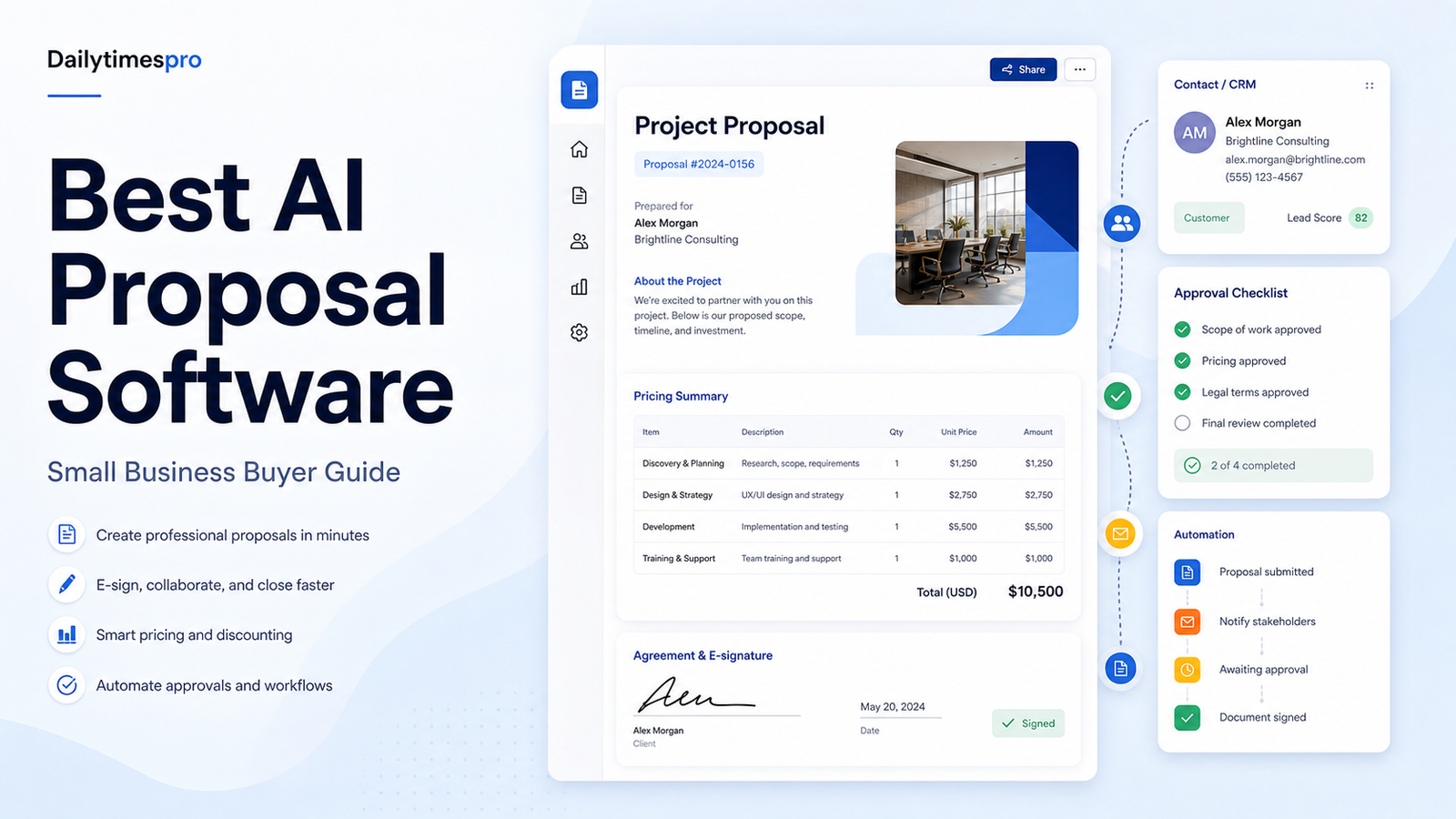
    AI proposal software can help small businesses turn approved pricing, service descriptions, case assets, and sales notes into clearer proposals. The value is not magic writing. The value is reducing repetitive document assembly while keeping pricing, scope, approvals, and e-signature steps controlled.

    Quick Verdict

    PandaDoc is a broad proposal and document platform for teams that need templates, approvals, quotes, and e-signature. Proposify fits teams that want proposal control and sales content management. Qwilr is strong for interactive web-style proposals. Better Proposals is a practical option for smaller service businesses. A CRM-native quote tool may be better when pricing logic already lives in the CRM.

    Best For

    • Small agencies, consultants, and B2B service teams.
    • Sales teams that repeatedly build similar proposals.
    • Businesses that need approval, e-signature, and document tracking.
    • Teams with approved pricing and service language ready to reuse.

    Not Best For

    • Teams without approved pricing or legal terms.
    • Businesses that need complex contract lifecycle management.
    • Users expecting AI to invent scope, guarantees, or customer claims.
    • Organizations without a review process for commercial commitments.

    Our Evaluation Criteria

    Template control

    Reusable templates should protect approved pricing, scope, terms, and brand language.

    Quote and pricing workflow

    Proposal software should reduce manual math while making approval and discounting rules visible.

    AI drafting quality

    AI can draft from approved notes, but claims, pricing, scope, and deliverables require human review.

    E-signature and tracking

    Signature, status, reminders, and audit trails matter when proposals become commitments.

    CRM and payment integrations

    The best fit depends on where contacts, deals, products, and invoices already live.

    Pricing clarity

    Compare seats, documents, e-signature, content library, quote tools, automation, CRM integrations, and add-ons.

    Key Features And Capabilities

    PandaDoc

    Broad document creation, templates, quotes, approvals, e-signature, payments, and CRM integrations.

    Proposify

    Proposal templates, content libraries, approvals, tracking, and sales document control.

    Qwilr

    Interactive web proposals, quotes, reusable blocks, analytics, and buyer-friendly presentation.

    Better Proposals

    Simple proposal creation, templates, payments, signatures, and small-business workflow.

    CRM quote tools

    Useful when product catalog, discounts, approvals, and deal records already live in the CRM.

    Real Use Cases

    Agency proposals

    A marketing agency can reuse approved service packages, update scope from discovery notes, route discounts for approval, and collect e-signatures.

    Consulting statements of work

    A consultant can draft a project plan from a call summary, then verify timeline, fees, assumptions, and exclusions before sending.

    Software implementation quotes

    A SaaS partner can assemble onboarding, training, and migration line items while keeping optional add-ons visible.

    Renewal proposals

    A customer success team can prepare renewal documents from account notes, but pricing changes and commitments need approval.

    Small-business sales follow-up

    A founder can quickly turn meeting notes into a clean proposal, while avoiding unsupported claims or fake proof.

    Comparison Table

    Option Best For Main Strength Important Limitation
    PandaDoc Document and proposal operations Templates, quotes, e-signature May be broader than a very small team needs
    Proposify Sales proposal control Content library and approvals Requires disciplined setup
    Qwilr Interactive sales proposals Modern web-style buyer experience Not every buyer wants a web proposal
    Better Proposals Small service businesses Simple proposal workflow Advanced enterprise controls may be limited
    CRM quote tools CRM-centered sales teams Pricing and deal record alignment Less editorial proposal flexibility

    Pricing

    PandaDoc, Proposify, Qwilr, and Better Proposals publish plan pages, but the usable cost depends on seats, documents, e-signature, quote tables, content libraries, CRM integrations, payments, approvals, and billing period. Use the official pricing pages before buying.

    Pricing last checked on June 27, 2026. Pricing may vary by region, billing period, users, contacts, tasks, credits, storage, usage, or add-ons. Use the linked official pricing page for the current purchase decision.

    Pros

    • Helps reduce repetitive work when source material is reliable.
    • Supports faster drafting, organization, or handoff in a defined workflow.
    • Gives teams a clearer structure for evaluating software choices.
    • Can improve consistency when ownership, review, and templates are maintained.

    Cons And Limitations

    • Output quality depends on inputs, configuration, and review discipline.
    • Pricing models are not directly comparable across vendors.
    • Migration, administration, and training still require time.
    • Human review remains necessary for facts, commitments, and sensitive decisions.

    Alternatives

    Compare the listed products with systems the team already owns. A simpler document, shared inbox, CRM workflow, project tool, or manual process may be better when volume is low. Specialist software may be necessary when the workflow requires regulated records, advanced analytics, or deep transactional controls.

    A Practical 30-Day Evaluation Plan

    Week 1: Define The Workflow

    Choose one recurring workflow with a clear owner, approved inputs, a known output, and a human review step. Record how the work is completed today, how long it takes, where errors occur, and which systems are involved. This baseline is essential. Without it, a team can mistake novelty for improvement and buy a product that adds another interface without removing meaningful work.

    Document the data the workflow uses. Mark which information is public, internal, confidential, regulated, outdated, duplicated, or missing. Confirm which users should have access. AI features cannot repair contradictory records or unclear permission boundaries. In many projects, cleaning documentation, contact data, media files, or task ownership creates more value than adding another subscription.

    Week 2: Run In Parallel

    Use the new tool alongside the existing process. Review every output rather than allowing automatic publication or action. Label corrections as factual, contextual, formatting, tone, permission, missing information, incorrect action, or missing context. This creates a useful evidence set and reveals whether the product reduces work after review.

    Test normal and difficult cases. Include incomplete inputs, ambiguous instructions, changed requirements, unsupported file types, poor audio, unusual customer requests, unusual sales cycles, or edge cases relevant to the category. A polished demo often hides the exact conditions that make daily work difficult.

    Week 3: Improve The System

    Update source documents, templates, prompts, routing rules, integrations, naming conventions, and permissions based on observed failures. Remove steps that do not improve the outcome. If users bypass the workflow, determine whether the cause is poor fit, missing training, slow performance, inadequate integration, or a review process heavier than the original task.

    Define escalation. State which actions the software may assist with, which actions require approval, and which requests must always go to a qualified person. Legal interpretations, employment decisions, financial commitments, security incidents, customer exceptions, and public claims should not be hidden behind a confident AI answer.

    Week 4: Measure And Decide

    Compare the pilot with the baseline. Review completion time, editing time, error rate, adoption, administrator workload, integration reliability, and expected annual cost. Include seats, contacts, tasks, credits, storage, implementation, training, and the cost of correcting mistakes. A low entry price can be misleading when the usable workflow requires higher tiers or extensive manual review.

    Decide whether to expand, keep the workflow limited, change configuration, evaluate an alternative, or stop. Write down the decision and assumptions. Revisit them when prices, product capabilities, data requirements, or business volume change.

    Security, Governance, And Quality Control

    Use least-privilege access and multifactor authentication. Assign an account owner, billing owner, workflow owner, and output reviewer. Confirm retention, export, deletion, model-training, integration, and administrator controls from current vendor documentation. Do not paste confidential customer, employee, financial, legal, security, or product information into an unapproved account.

    Keep a human in control of high-impact outputs. Verify names, dates, prices, links, calculations, commitments, claims, permissions, and citations. For automated actions, use bounded permissions, monitoring, logs, alerts, and a tested rollback or correction process. The team should know how to pause a workflow quickly.

    How To Measure Value

    Measure time saved after review, not before it. Track correction rates, handoff errors, turnaround time, user adoption, administrator work, and whether approved outputs reach the correct system of record. For customer-facing workflows, monitor complaints, escalations, missed requests, and quality sampling. For content, sales, or meeting work, measure revision time, consistency, and whether the final result serves the intended audience.

    Model twelve-month cost. Include subscription fees, users, contacts, tasks, credits, storage, integrations, implementation, training, and maintenance. Also confirm how data and configurations can be exported if the tool no longer fits. A responsible software decision includes a practical exit path.

    Detailed Decision Checklist

    Write down the exact problem in one sentence before comparing plans. A useful statement names the workflow, the current friction, the expected improvement, and the owner. "We need AI" is not a buying requirement. "Our support lead needs verified draft answers from approved documentation so agents can respond faster while preserving human escalation" is specific enough to test.

    List required integrations and decide which system remains authoritative. A meeting assistant may summarize calls, but the CRM or project tool may still be the record of action items. A proposal system may draft documents, but pricing and legal terms need approved sources. A knowledge workspace may help people find answers, but source owners must update policy. An automation platform can move data, but it should not become the only place where business logic is understood.

    Review failure handling. Ask what happens when an integration disconnects, a credit limit is reached, an upload fails, a transcript is wrong, a source is outdated, or a user loses access. Define alerts, owners, correction steps, and acceptable downtime. A workflow that succeeds in ideal conditions but fails silently is not production-ready.

    Check administration from the perspective of the future owner. The person evaluating the product may not be the person maintaining it six months later. Require clear names, documentation, change history, permission review, billing visibility, and an onboarding process for new users. Test whether a second person can understand the setup without relying on the original builder.

    Finally, inspect the exit path. Confirm export formats, media or document ownership, API access where relevant, deletion procedures, and the effort required to move to another system. Record contract renewal dates and who receives billing notices. The ability to leave reduces operational risk and creates a more honest comparison of long-term cost.

    Questions To Ask Before Approval

    • Which approved sources or records does the workflow depend on?
    • Who reviews the output, and what must that reviewer check?
    • Which actions can occur automatically, and which require confirmation?
    • How are errors, outages, and exhausted limits reported?
    • What data is retained, where is it stored, and how is it deleted?
    • What will the workflow cost at expected twelve-month volume?
    • Can another employee maintain it from the documentation?
    • How will the team export its data and configuration if it leaves?

    Common Buying Mistakes

    • Selecting a product from a feature list without testing a real workflow.
    • Comparing entry prices without modeling users, volume, credits, storage, and add-ons.
    • Treating generated text, summaries, recommendations, or actions as verified facts.
    • Expanding before permissions, review, escalation, and ownership are documented.
    • Buying software to compensate for missing process, poor data, or unclear accountability.
    • Assuming every AI-labelled feature produces measurable business value.

    Final Recommendation

    Choose PandaDoc for a broad proposal and document workflow, Proposify for structured sales proposal control, Qwilr for interactive buyer-facing proposals, and Better Proposals for a lighter small-business process. Pilot one real proposal from discovery notes to signed agreement before standardizing.

    Frequently Asked Questions

    What is the best option?

    The best option is the one that fits the real workflow, data, users, administration, and budget.

    Is there a free plan?

    Many products in this category offer a free path or trial, but current limits should be checked on the official pricing page.

    Can AI replace human review?

    No. Important facts, actions, claims, and decisions require accountable review.

    How should pricing be compared?

    Model the required plan, users, credits or volume, integrations, implementation, and maintenance.

    How long should a pilot run?

    A focused two-to-four-week pilot is usually enough to identify workflow fit and failure modes.

    What is the biggest risk?

    Poor source data, unclear permissions, and unreviewed outputs create more risk than the interface itself.

    Related Dailytimespro Guides

    See our AI sales follow-up workflow, AI customer support workflow, Zapier pricing.

  • Notion AI vs Coda AI: Which Workspace Should Your Team Choose?

    Notion AI vs Coda AI: Which Workspace Should Your Team Choose?

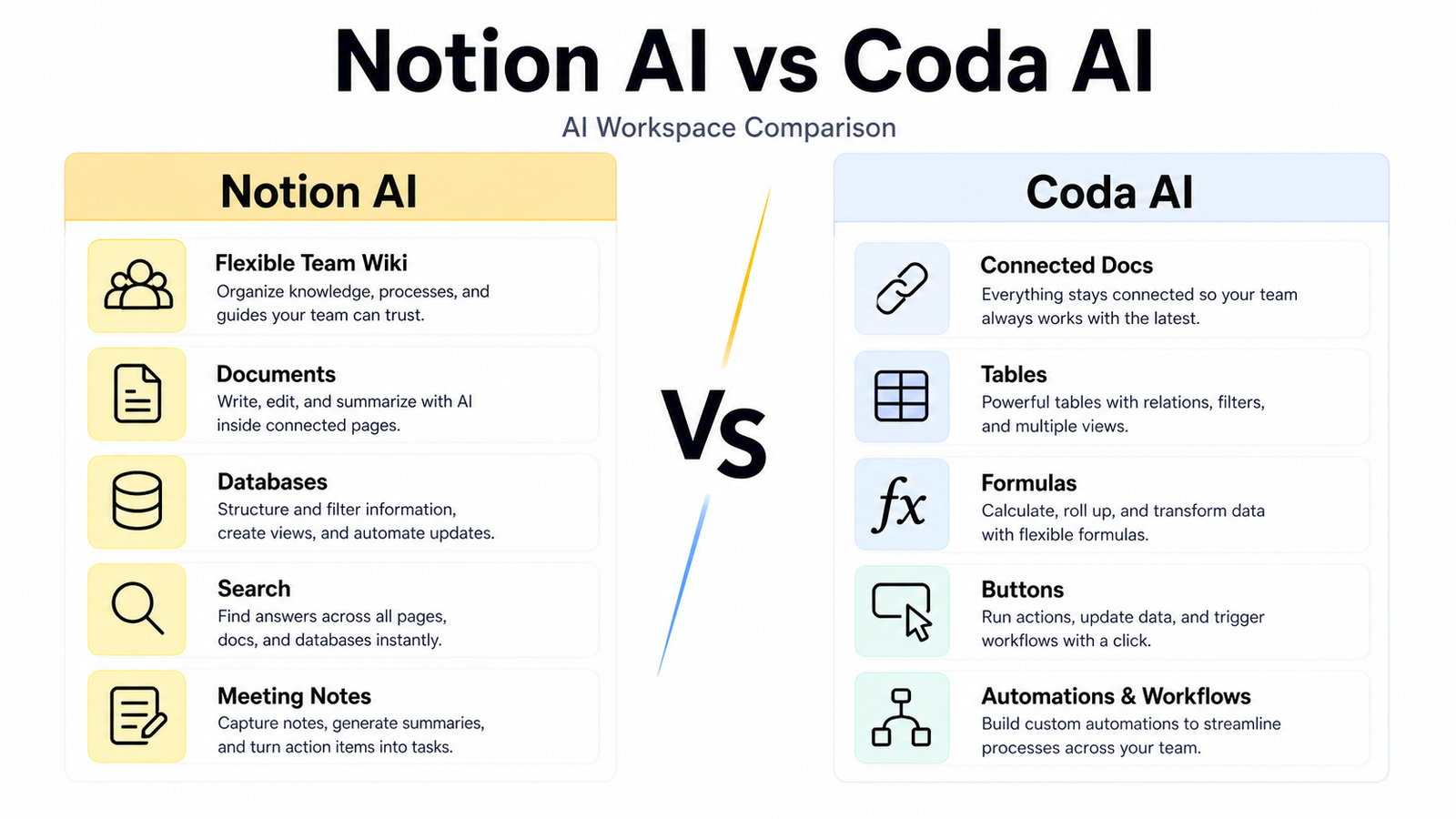
    Notion and Coda both combine documents, structured data, collaboration, and AI assistance, but their design philosophies differ. Notion is a flexible workspace for pages, databases, knowledge, projects, and search. Coda treats documents as interactive workspaces with tables, formulas, buttons, automations, and connected packs.

    Quick Verdict

    Choose Notion AI when the team wants an approachable all-purpose workspace for documents, wiki content, databases, projects, and search. Choose Coda AI when the team wants to build connected operational documents with stronger table logic, formulas, buttons, and automations. The best choice depends on who will design and maintain the workspace.

    Best For

    • Teams choosing a shared workspace and knowledge system.
    • Operations groups building lightweight internal workflows.
    • Project teams combining documents and structured data.
    • Buyers comparing AI in the context of actual work.

    Not Best For

    • Teams without ownership or information architecture.
    • Organizations needing a specialist transactional system.
    • Buyers choosing from AI output alone.
    • Teams unwilling to plan migration and permissions.

    Our Evaluation Criteria

    Workflow fit

    Evaluate the product inside the recurring work the team actually owns.

    Source and data quality

    AI output depends on current, relevant, approved inputs.

    Ease of use

    The future owner must be able to maintain the system after setup.

    AI quality

    Generated work needs evidence, uncertainty, and human review.

    Integrations

    Connections should remove real re-entry work without creating fragile dependencies.

    Pricing clarity

    Model users, credits, tasks, storage, and required tiers from official sources.

    Key Features And Capabilities

    Notion AI

    Notion AI is best considered for flexible docs, wiki, and projects. Its main strength is approachable all-purpose workspace, while buyers should account for this limitation: complex workspaces can become inconsistent.

    Coda AI

    Coda AI is best considered for operational docs and connected tables. Its main strength is formulas, buttons, and workflow design, while buyers should account for this limitation: builders need stronger design discipline.

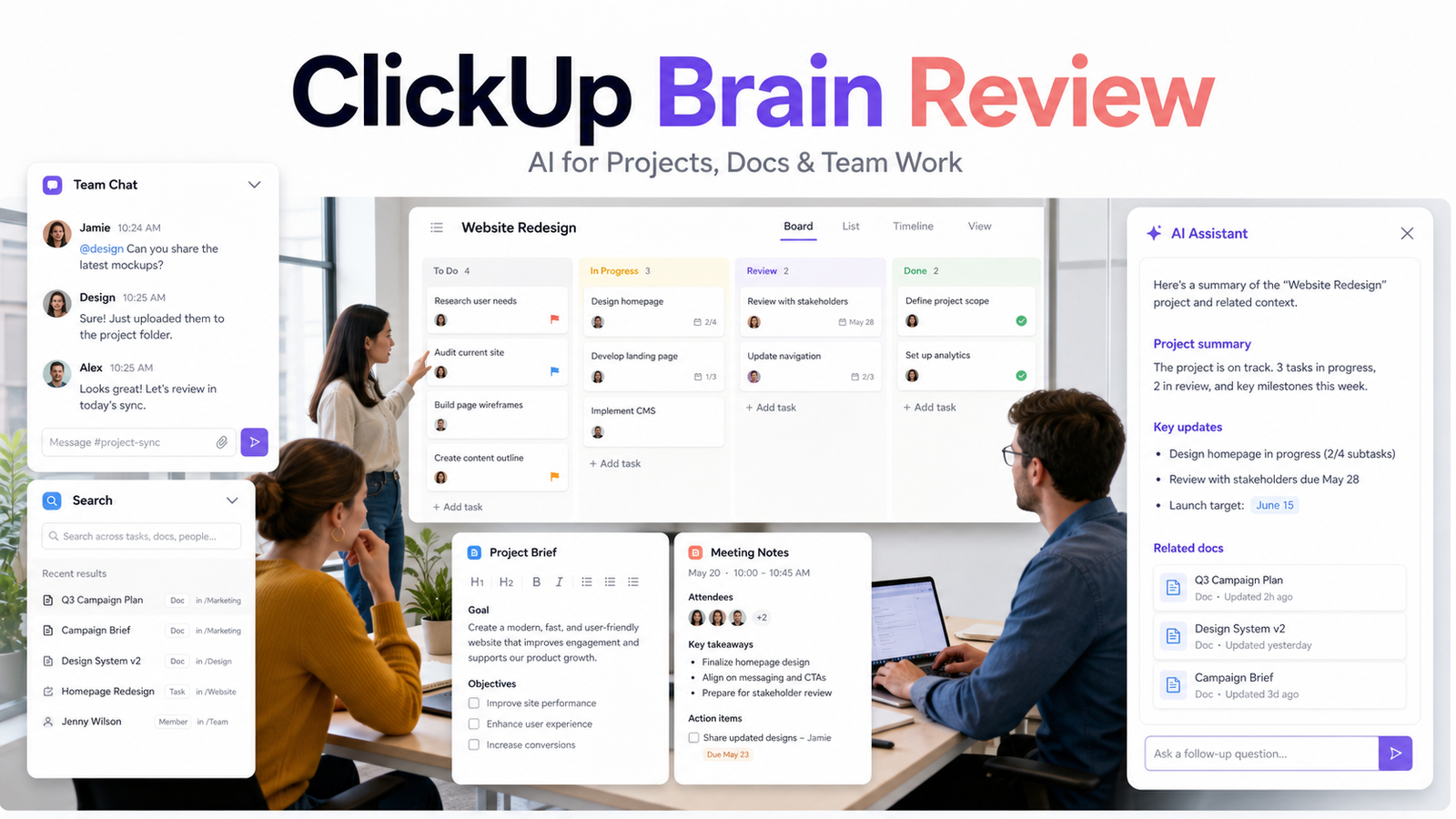
    ClickUp Brain

    ClickUp Brain is best considered for project execution. Its main strength is tasks and project context, while buyers should account for this limitation: less neutral as a wiki.

    Confluence AI

    Confluence AI is best considered for enterprise knowledge. Its main strength is jira and atlassian integration, while buyers should account for this limitation: ecosystem complexity.

    Real Use Cases

    Small-team workflow

    A small team can apply the product to one documented process, assign an owner, and review outputs before action.

    Knowledge and handoff

    The tool can organize information and prepare a handoff when source ownership and permissions are clear.

    Content and communication

    It can produce drafts and summaries that a responsible person checks for facts, tone, and context.

    Operations

    Teams can reduce repetitive re-entry while monitoring failures and maintaining a system of record.

    Decision support

    The product can structure evidence and alternatives, but a human remains accountable for the decision.

    Comparison Table

    Option Best For Main Strength Important Limitation
    Notion AI Flexible docs, wiki, and projects Approachable all-purpose workspace Complex workspaces can become inconsistent
    Coda AI Operational docs and connected tables Formulas, buttons, and workflow design Builders need stronger design discipline
    ClickUp Brain Project execution Tasks and project context Less neutral as a wiki
    Confluence AI Enterprise knowledge Jira and Atlassian integration Ecosystem complexity

    Pricing

    Notion and Coda publish official plan pages with free, paid, business, and enterprise paths. Compare member and maker models, guests, doc limits, history, AI access or credits, automations, packs or integrations, administration, and enterprise controls. The apparent seat price may not reflect the same user roles or feature scope.

    Pricing last checked on June 26, 2026. Pricing may vary by region, billing period, users, contacts, tasks, credits, storage, usage, or add-ons. Use the linked official pricing page for the current purchase decision.

    Pros

    • Can reduce repetitive knowledge or workflow work.
    • Supports collaboration when ownership is clear.
    • AI assistance can accelerate drafts and organization.
    • Official plans provide paths for different team sizes.

    Cons And Limitations

    • Output quality depends on inputs and configuration.
    • Pricing models are not directly comparable.
    • Migration and maintenance require work.
    • Human review remains necessary.

    Alternatives

    Compare the listed products with the systems the team already owns. A simpler document, project, automation, or manual process may be better when volume is low. Specialist software may be necessary when the workflow requires regulated records, advanced analytics, or deep transactional controls.

    A Practical 30-Day Evaluation Plan

    Week 1: Define The Workflow

    Choose one recurring workflow with a clear owner, approved inputs, a known output, and a human review step. Record how the work is completed today, how long it takes, where errors occur, and which systems are involved. This baseline is essential. Without it, a team can mistake novelty for improvement and buy a product that adds another interface without removing meaningful work.

    Document the data the workflow uses. Mark which information is public, internal, confidential, regulated, outdated, duplicated, or missing. Confirm which users should have access. AI features cannot repair contradictory records or unclear permission boundaries. In many projects, cleaning documentation, contact data, media files, or task ownership creates more value than adding another subscription.

    Week 2: Run In Parallel

    Use the new tool alongside the existing process. Review every output rather than allowing automatic publication or action. Label corrections as factual, contextual, formatting, tone, permission, missing information, or incorrect action. This creates a useful evidence set and reveals whether the product reduces work after review.

    Test normal and difficult cases. Include incomplete inputs, ambiguous instructions, changed requirements, unsupported file types, poor audio, unusual customer requests, or edge cases relevant to the category. A polished demo often hides the exact conditions that make daily work difficult.

    Week 3: Improve The System

    Update source documents, templates, prompts, routing rules, integrations, naming conventions, and permissions based on observed failures. Remove steps that do not improve the outcome. If users bypass the workflow, determine whether the cause is poor fit, missing training, slow performance, inadequate integration, or a review process heavier than the original task.

    Define escalation. State which actions the software may assist with, which actions require approval, and which requests must always go to a qualified person. Legal interpretations, employment decisions, financial commitments, security incidents, customer exceptions, and public claims should not be hidden behind a confident AI answer.

    Week 4: Measure And Decide

    Compare the pilot with the baseline. Review completion time, editing time, error rate, adoption, administrator workload, integration reliability, and expected annual cost. Include seats, contacts, tasks, credits, storage, implementation, training, and the cost of correcting mistakes. A low entry price can be misleading when the usable workflow requires higher tiers or extensive manual review.

    Decide whether to expand, keep the workflow limited, change configuration, evaluate an alternative, or stop. Write down the decision and assumptions. Revisit them when prices, product capabilities, data requirements, or business volume change.

    Security, Governance, And Quality Control

    Use least-privilege access and multifactor authentication. Assign an account owner, billing owner, workflow owner, and content or output reviewer. Confirm retention, export, deletion, model-training, integration, and administrator controls from current vendor documentation. Do not paste confidential customer, employee, financial, legal, security, or product information into an unapproved account.

    Keep a human in control of high-impact outputs. Verify names, dates, prices, links, calculations, commitments, claims, permissions, and citations. For automated actions, use bounded permissions, monitoring, logs, alerts, and a tested rollback or correction process. The team should know how to pause a workflow quickly.

    How To Measure Value

    Measure time saved after review, not before it. Track correction rates, handoff errors, turnaround time, user adoption, administrator work, and whether approved outputs reach the correct system of record. For customer-facing workflows, monitor complaints, escalations, missed requests, and quality sampling. For content or media work, measure revision time, consistency, and whether the final result serves the intended audience.

    Model twelve-month cost. Include subscription fees, users, contacts, tasks, credits, storage, integrations, implementation, training, and maintenance. Also confirm how data and configurations can be exported if the tool no longer fits. A responsible software decision includes a practical exit path.

    Detailed Decision Checklist

    Write down the exact problem in one sentence before comparing plans. A useful statement names the workflow, the current friction, the expected improvement, and the owner. “We need AI” is not a buying requirement. “Our support lead needs verified draft answers from approved documentation so agents can respond faster while preserving human escalation” is specific enough to test.

    List required integrations and decide which system remains authoritative. A recruiting platform may organize candidates, but the organization still needs a record-retention policy. A media editor may produce final files, but originals and approvals need a durable home. A knowledge workspace may help people find answers, but source owners must update policy. An automation platform can move data, but it should not become the only place where business logic is understood.

    Review failure handling. Ask what happens when an integration disconnects, a credit limit is reached, an upload fails, a transcript is wrong, a source is outdated, or a user loses access. Define alerts, owners, correction steps, and acceptable downtime. A workflow that succeeds in ideal conditions but fails silently is not production-ready.

    Check administration from the perspective of the future owner. The person evaluating the product may not be the person maintaining it six months later. Require clear names, documentation, change history, permission review, billing visibility, and an onboarding process for new users. Test whether a second person can understand the setup without relying on the original builder.

    Finally, inspect the exit path. Confirm export formats, media or document ownership, API access where relevant, deletion procedures, and the effort required to move to another system. Record contract renewal dates and who receives billing notices. The ability to leave reduces operational risk and creates a more honest comparison of long-term cost.

    Questions To Ask Before Approval

    • Which approved sources or records does the workflow depend on?
    • Who reviews the output, and what must that reviewer check?
    • Which actions can occur automatically, and which require confirmation?
    • How are errors, outages, and exhausted limits reported?
    • What data is retained, where is it stored, and how is it deleted?
    • What will the workflow cost at expected twelve-month volume?
    • Can another employee maintain it from the documentation?
    • How will the team export its data and configuration if it leaves?

    Common Buying Mistakes

    • Selecting a product from a feature list without testing a real workflow.
    • Comparing entry prices without modeling users, volume, credits, storage, and add-ons.
    • Treating generated text, summaries, recommendations, or actions as verified facts.
    • Expanding before permissions, review, escalation, and ownership are documented.
    • Buying software to compensate for missing process, poor data, or unclear accountability.
    • Assuming every AI-labelled feature produces measurable business value.

    Final Recommendation

    Choose Notion AI for broad team knowledge and a familiar flexible workspace. Choose Coda AI for teams willing to design operational docs with connected tables and actions. Build the same real workflow in both products, then have the future editor maintain it. Maintenance experience is more important than a polished initial demo.

    Frequently Asked Questions

    What is the best option?

    The best option is the one that fits the real workflow, data, users, administration, and budget.

    Is there a free plan?

    Most products in this category offer a free path or trial, but current limits should be checked officially.

    Can AI replace human review?

    No. Important facts, actions, claims, and decisions require accountable review.

    How should pricing be compared?

    Model the required plan, users, credits or volume, integrations, implementation, and maintenance.

    How long should a pilot run?

    A focused two-to-four-week pilot is usually enough to identify workflow fit and failure modes.

    What is the biggest risk?

    Poor source data, unclear permissions, and unreviewed outputs create more risk than the interface itself.

    Related Dailytimespro Guides

    See our Notion AI vs ClickUp AI comparison, AI knowledge base workflow, and best AI research workflow.

  • Zapier Pricing Explained: Free vs Professional vs Team vs Enterprise

    Zapier Pricing Explained: Free vs Professional vs Team vs Enterprise

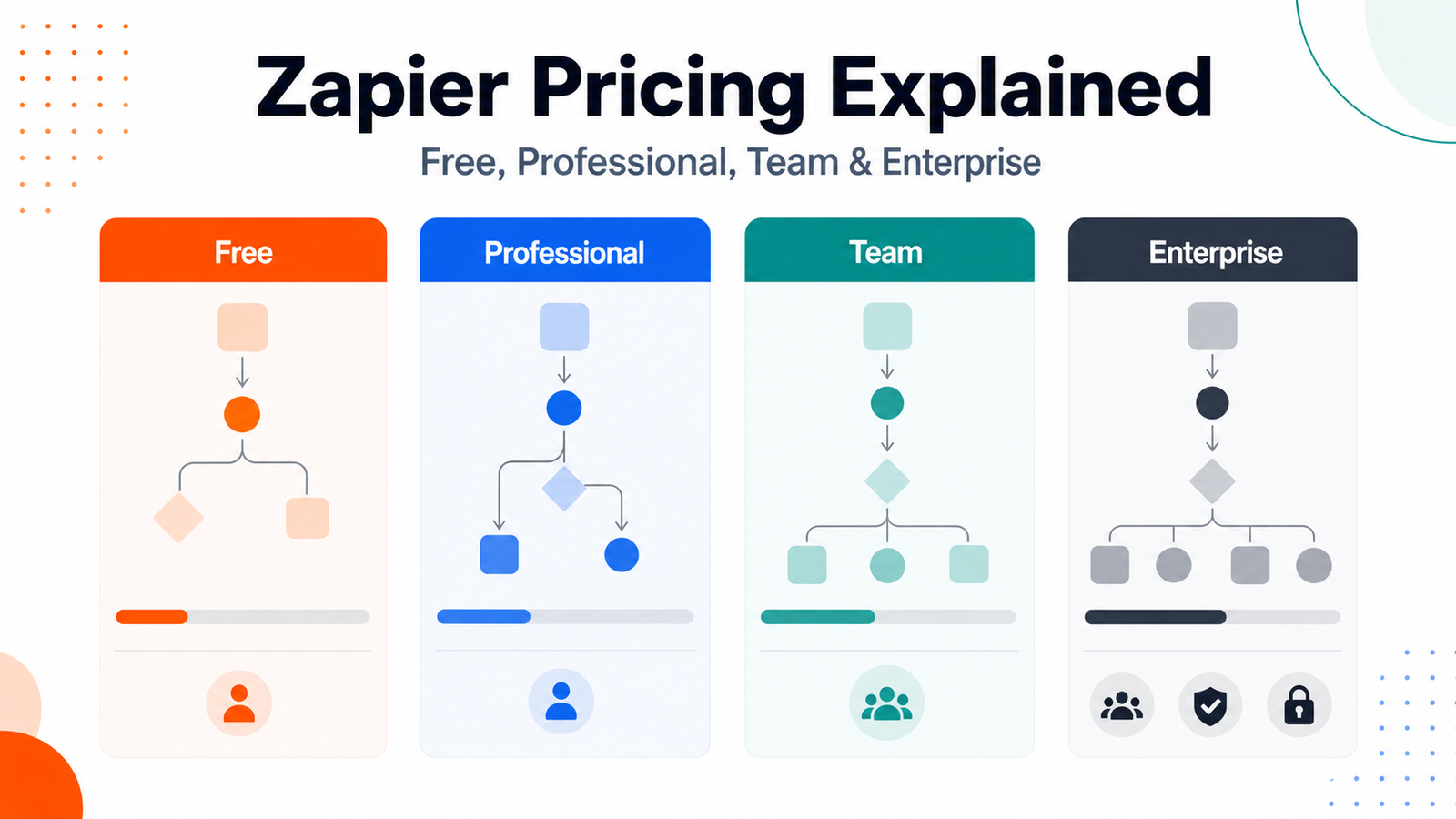
    Zapier pricing is driven by more than a plan name. Buyers need to understand tasks, multi-step workflows, premium apps, users, administration, and the volume created by each automation. A simple workflow can be inexpensive, while a poorly designed high-volume workflow can consume tasks quickly.

    Quick Verdict

    Free is for basic validation. Professional is the main individual or small-business automation tier. Team adds shared work and administration for multiple builders. Enterprise is for larger organizations that need advanced governance and sales-assisted terms. Use Zapier's calculator with real workflow volumes before purchasing.

    Best For

    • Small businesses automating repeatable app-to-app work.
    • Teams comparing task volume and collaboration needs.
    • Operations owners planning alerts, records, and handoffs.
    • Buyers willing to monitor failures and usage.

    Not Best For

    • Teams without stable processes or data ownership.
    • Automations that require unsupported judgment.
    • Buyers estimating cost from the entry price alone.
    • Organizations unable to monitor credentials and failures.

    Our Evaluation Criteria

    Workflow fit

    Evaluate the product inside the recurring work the team actually owns.

    Source and data quality

    AI output depends on current, relevant, approved inputs.

    Ease of use

    The future owner must be able to maintain the system after setup.

    AI quality

    Generated work needs evidence, uncertainty, and human review.

    Integrations

    Connections should remove real re-entry work without creating fragile dependencies.

    Pricing clarity

    Model users, credits, tasks, storage, and required tiers from official sources.

    Key Features And Capabilities

    Free

    Free is best considered for basic automation testing. Its main strength is low-risk validation, while buyers should account for this limitation: limited capability and volume.

    Professional

    Professional is best considered for individual and small-business automation. Its main strength is multi-step production workflows, while buyers should account for this limitation: task usage can grow.

    Team

    Team is best considered for multiple automation builders. Its main strength is shared workspace and administration, while buyers should account for this limitation: higher cost and governance work.

    Enterprise

    Enterprise is best considered for large governed organizations. Its main strength is advanced controls and support, while buyers should account for this limitation: sales-assisted terms.

    Alternative platforms

    Alternative platforms is best considered for different technical or pricing needs. Its main strength is broader implementation choices, while buyers should account for this limitation: migration effort.

    Real Use Cases

    Small-team workflow

    A small team can apply the product to one documented process, assign an owner, and review outputs before action.

    Knowledge and handoff

    The tool can organize information and prepare a handoff when source ownership and permissions are clear.

    Content and communication

    It can produce drafts and summaries that a responsible person checks for facts, tone, and context.

    Operations

    Teams can reduce repetitive re-entry while monitoring failures and maintaining a system of record.

    Decision support

    The product can structure evidence and alternatives, but a human remains accountable for the decision.

    Comparison Table

    Option Best For Main Strength Important Limitation
    Free Basic automation testing Low-risk validation Limited capability and volume
    Professional Individual and small-business automation Multi-step production workflows Task usage can grow
    Team Multiple automation builders Shared workspace and administration Higher cost and governance work
    Enterprise Large governed organizations Advanced controls and support Sales-assisted terms
    Alternative platforms Different technical or pricing needs Broader implementation choices Migration effort

    Pricing

    Zapier's official pricing page provides current plan prices and a task-based calculator. Compare monthly or annual billing, included tasks, overage or upgrade behavior, premium apps, paths, users, and administrative controls. Count every action a workflow performs at expected volume rather than counting only the number of Zaps.

    Pricing last checked on June 26, 2026. Pricing may vary by region, billing period, users, contacts, tasks, credits, storage, usage, or add-ons. Use the linked official pricing page for the current purchase decision.

    Pros

    • Can reduce repetitive knowledge or workflow work.
    • Supports collaboration when ownership is clear.
    • AI assistance can accelerate drafts and organization.
    • Official plans provide paths for different team sizes.

    Cons And Limitations

    • Output quality depends on inputs and configuration.
    • Pricing models are not directly comparable.
    • Migration and maintenance require work.
    • Human review remains necessary.

    Alternatives

    Compare the listed products with the systems the team already owns. A simpler document, project, automation, or manual process may be better when volume is low. Specialist software may be necessary when the workflow requires regulated records, advanced analytics, or deep transactional controls.

    A Practical 30-Day Evaluation Plan

    Week 1: Define The Workflow

    Choose one recurring workflow with a clear owner, approved inputs, a known output, and a human review step. Record how the work is completed today, how long it takes, where errors occur, and which systems are involved. This baseline is essential. Without it, a team can mistake novelty for improvement and buy a product that adds another interface without removing meaningful work.

    Document the data the workflow uses. Mark which information is public, internal, confidential, regulated, outdated, duplicated, or missing. Confirm which users should have access. AI features cannot repair contradictory records or unclear permission boundaries. In many projects, cleaning documentation, contact data, media files, or task ownership creates more value than adding another subscription.

    Week 2: Run In Parallel

    Use the new tool alongside the existing process. Review every output rather than allowing automatic publication or action. Label corrections as factual, contextual, formatting, tone, permission, missing information, or incorrect action. This creates a useful evidence set and reveals whether the product reduces work after review.

    Test normal and difficult cases. Include incomplete inputs, ambiguous instructions, changed requirements, unsupported file types, poor audio, unusual customer requests, or edge cases relevant to the category. A polished demo often hides the exact conditions that make daily work difficult.

    Week 3: Improve The System

    Update source documents, templates, prompts, routing rules, integrations, naming conventions, and permissions based on observed failures. Remove steps that do not improve the outcome. If users bypass the workflow, determine whether the cause is poor fit, missing training, slow performance, inadequate integration, or a review process heavier than the original task.

    Define escalation. State which actions the software may assist with, which actions require approval, and which requests must always go to a qualified person. Legal interpretations, employment decisions, financial commitments, security incidents, customer exceptions, and public claims should not be hidden behind a confident AI answer.

    Week 4: Measure And Decide

    Compare the pilot with the baseline. Review completion time, editing time, error rate, adoption, administrator workload, integration reliability, and expected annual cost. Include seats, contacts, tasks, credits, storage, implementation, training, and the cost of correcting mistakes. A low entry price can be misleading when the usable workflow requires higher tiers or extensive manual review.

    Decide whether to expand, keep the workflow limited, change configuration, evaluate an alternative, or stop. Write down the decision and assumptions. Revisit them when prices, product capabilities, data requirements, or business volume change.

    Security, Governance, And Quality Control

    Use least-privilege access and multifactor authentication. Assign an account owner, billing owner, workflow owner, and content or output reviewer. Confirm retention, export, deletion, model-training, integration, and administrator controls from current vendor documentation. Do not paste confidential customer, employee, financial, legal, security, or product information into an unapproved account.

    Keep a human in control of high-impact outputs. Verify names, dates, prices, links, calculations, commitments, claims, permissions, and citations. For automated actions, use bounded permissions, monitoring, logs, alerts, and a tested rollback or correction process. The team should know how to pause a workflow quickly.

    How To Measure Value

    Measure time saved after review, not before it. Track correction rates, handoff errors, turnaround time, user adoption, administrator work, and whether approved outputs reach the correct system of record. For customer-facing workflows, monitor complaints, escalations, missed requests, and quality sampling. For content or media work, measure revision time, consistency, and whether the final result serves the intended audience.

    Model twelve-month cost. Include subscription fees, users, contacts, tasks, credits, storage, integrations, implementation, training, and maintenance. Also confirm how data and configurations can be exported if the tool no longer fits. A responsible software decision includes a practical exit path.

    Detailed Decision Checklist

    Write down the exact problem in one sentence before comparing plans. A useful statement names the workflow, the current friction, the expected improvement, and the owner. “We need AI” is not a buying requirement. “Our support lead needs verified draft answers from approved documentation so agents can respond faster while preserving human escalation” is specific enough to test.

    List required integrations and decide which system remains authoritative. A recruiting platform may organize candidates, but the organization still needs a record-retention policy. A media editor may produce final files, but originals and approvals need a durable home. A knowledge workspace may help people find answers, but source owners must update policy. An automation platform can move data, but it should not become the only place where business logic is understood.

    Review failure handling. Ask what happens when an integration disconnects, a credit limit is reached, an upload fails, a transcript is wrong, a source is outdated, or a user loses access. Define alerts, owners, correction steps, and acceptable downtime. A workflow that succeeds in ideal conditions but fails silently is not production-ready.

    Check administration from the perspective of the future owner. The person evaluating the product may not be the person maintaining it six months later. Require clear names, documentation, change history, permission review, billing visibility, and an onboarding process for new users. Test whether a second person can understand the setup without relying on the original builder.

    Finally, inspect the exit path. Confirm export formats, media or document ownership, API access where relevant, deletion procedures, and the effort required to move to another system. Record contract renewal dates and who receives billing notices. The ability to leave reduces operational risk and creates a more honest comparison of long-term cost.

    Questions To Ask Before Approval

    • Which approved sources or records does the workflow depend on?
    • Who reviews the output, and what must that reviewer check?
    • Which actions can occur automatically, and which require confirmation?
    • How are errors, outages, and exhausted limits reported?
    • What data is retained, where is it stored, and how is it deleted?
    • What will the workflow cost at expected twelve-month volume?
    • Can another employee maintain it from the documentation?
    • How will the team export its data and configuration if it leaves?

    Common Buying Mistakes

    • Selecting a product from a feature list without testing a real workflow.
    • Comparing entry prices without modeling users, volume, credits, storage, and add-ons.
    • Treating generated text, summaries, recommendations, or actions as verified facts.
    • Expanding before permissions, review, escalation, and ownership are documented.
    • Buying software to compensate for missing process, poor data, or unclear accountability.
    • Assuming every AI-labelled feature produces measurable business value.

    Final Recommendation

    Start with Free for a low-volume proof. Move to Professional when a maintained production workflow needs multi-step capability. Choose Team when several builders need shared ownership and controls. Use Enterprise when security, administration, support, and procurement justify it. Monitor task usage and failure alerts from the first month.

    Frequently Asked Questions

    What is the best option?

    The best option is the one that fits the real workflow, data, users, administration, and budget.

    Is there a free plan?

    Most products in this category offer a free path or trial, but current limits should be checked officially.

    Can AI replace human review?

    No. Important facts, actions, claims, and decisions require accountable review.

    How should pricing be compared?

    Model the required plan, users, credits or volume, integrations, implementation, and maintenance.

    How long should a pilot run?

    A focused two-to-four-week pilot is usually enough to identify workflow fit and failure modes.

    What is the biggest risk?

    Poor source data, unclear permissions, and unreviewed outputs create more risk than the interface itself.

    Related Dailytimespro Guides

    See our Notion AI vs ClickUp AI comparison, AI knowledge base workflow, and best AI research workflow.

  • How to Use Claude for Customer Research

    How to Use Claude for Customer Research

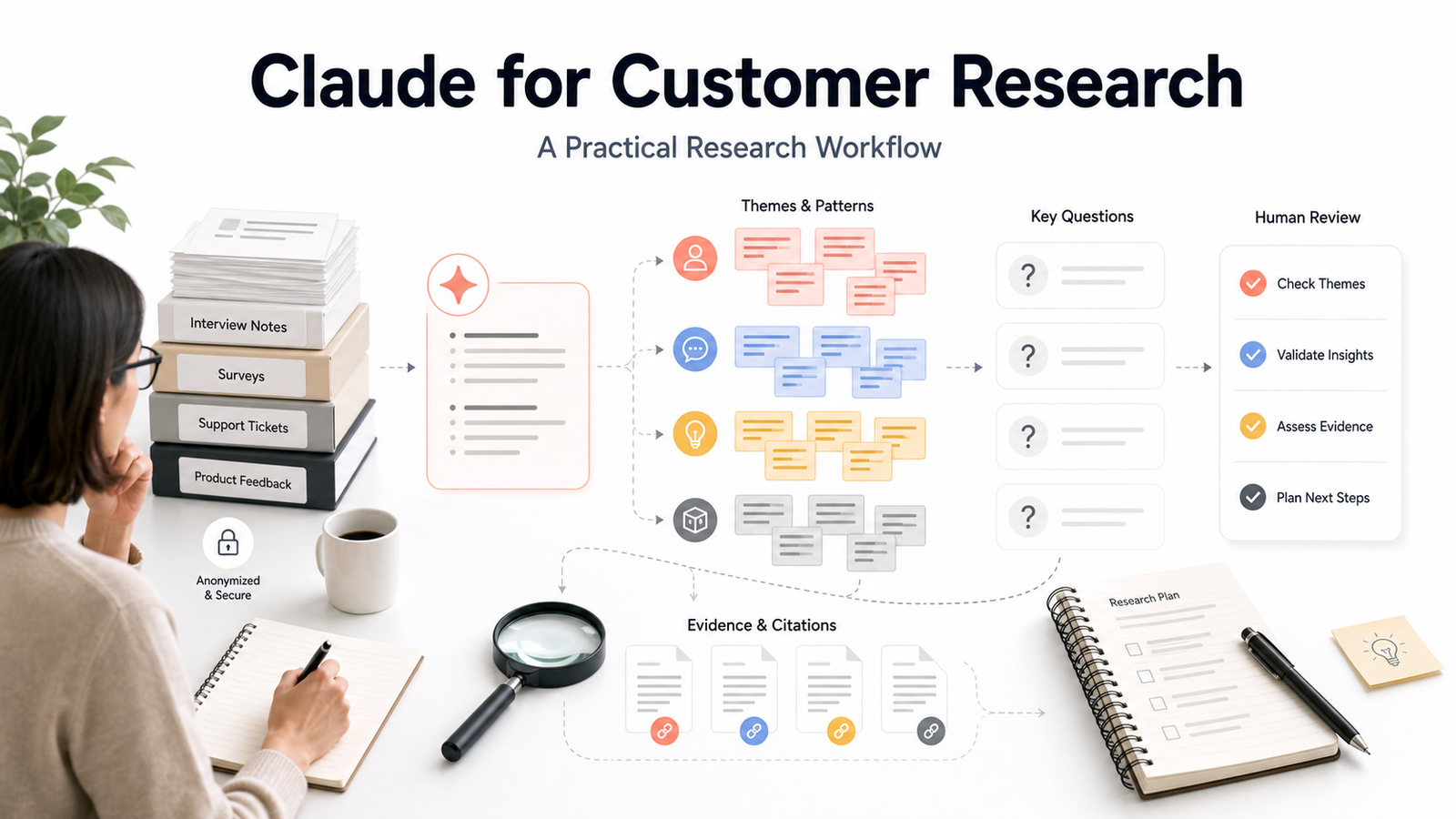
    Claude can help organize approved customer interviews, survey responses, support themes, and research documents. It should be used as an analysis assistant that helps researchers inspect material and formulate questions, not as a source of invented customers, quotations, market facts, or certainty.

    Quick Verdict

    Use Claude to structure research questions, summarize provided material, compare themes, identify contradictions, and draft evidence-linked working notes. Always return to the source before quoting or making a product decision. Do not ask it to manufacture personas or findings that are not supported by the research set.

    Best For

    • Researchers working with approved interview or survey material.
    • Product teams organizing qualitative themes.
    • Marketing teams preparing evidence-based messaging questions.
    • Small businesses that need a repeatable research workflow.

    Not Best For

    • Teams without consent or source governance.
    • Projects requiring statistical conclusions from inadequate data.
    • Anyone seeking invented quotes, personas, or market evidence.
    • High-impact decisions without researcher review.

    Our Evaluation Criteria

    Workflow fit

    Evaluate the product inside the recurring work the team actually owns.

    Source and data quality

    AI output depends on current, relevant, approved inputs.

    Ease of use

    The future owner must be able to maintain the system after setup.

    AI quality

    Generated work needs evidence, uncertainty, and human review.

    Integrations

    Connections should remove real re-entry work without creating fragile dependencies.

    Pricing clarity

    Model users, credits, tasks, storage, and required tiers from official sources.

    Key Features And Capabilities

    Research framing

    Research framing is best considered for clarify questions before analysis. Its main strength is keeps synthesis tied to decisions, while buyers should account for this limitation: cannot repair a weak study.

    Source preparation

    Source preparation is best considered for approved research material. Its main strength is organizes context, while buyers should account for this limitation: sensitive data needs controls.

    Theme analysis

    Theme analysis is best considered for qualitative synthesis. Its main strength is finds patterns and contradictions, while buyers should account for this limitation: may overgeneralize.

    Evidence review

    Evidence review is best considered for decision support. Its main strength is links notes to supplied material, while buyers should account for this limitation: human verification required.

    Research handoff

    Research handoff is best considered for product and marketing teams. Its main strength is creates structured briefs, while buyers should account for this limitation: nuance can be lost.

    Real Use Cases

    Small-team workflow

    A small team can apply the product to one documented process, assign an owner, and review outputs before action.

    Knowledge and handoff

    The tool can organize information and prepare a handoff when source ownership and permissions are clear.

    Content and communication

    It can produce drafts and summaries that a responsible person checks for facts, tone, and context.

    Operations

    Teams can reduce repetitive re-entry while monitoring failures and maintaining a system of record.

    Decision support

    The product can structure evidence and alternatives, but a human remains accountable for the decision.

    Comparison Table

    Option Best For Main Strength Important Limitation
    Research framing Clarify questions before analysis Keeps synthesis tied to decisions Cannot repair a weak study
    Source preparation Approved research material Organizes context Sensitive data needs controls
    Theme analysis Qualitative synthesis Finds patterns and contradictions May overgeneralize
    Evidence review Decision support Links notes to supplied material Human verification required
    Research handoff Product and marketing teams Creates structured briefs Nuance can be lost

    Pricing

    Claude offers Free, Pro, Max, Team, Enterprise, and API paths according to Anthropic's official pricing pages. The right plan depends on individual or team use, message and context needs, administration, and API volume. Do not select a plan solely from a research demo.

    Pricing last checked on June 26, 2026. Pricing may vary by region, billing period, users, contacts, tasks, credits, storage, usage, or add-ons. Use the linked official pricing page for the current purchase decision.

    Pros

    • Can reduce repetitive knowledge or workflow work.
    • Supports collaboration when ownership is clear.
    • AI assistance can accelerate drafts and organization.
    • Official plans provide paths for different team sizes.

    Cons And Limitations

    • Output quality depends on inputs and configuration.
    • Pricing models are not directly comparable.
    • Migration and maintenance require work.
    • Human review remains necessary.

    Alternatives

    Compare the listed products with the systems the team already owns. A simpler document, project, automation, or manual process may be better when volume is low. Specialist software may be necessary when the workflow requires regulated records, advanced analytics, or deep transactional controls.

    A Practical 30-Day Evaluation Plan

    Week 1: Define The Workflow

    Choose one recurring workflow with a clear owner, approved inputs, a known output, and a human review step. Record how the work is completed today, how long it takes, where errors occur, and which systems are involved. This baseline is essential. Without it, a team can mistake novelty for improvement and buy a product that adds another interface without removing meaningful work.

    Document the data the workflow uses. Mark which information is public, internal, confidential, regulated, outdated, duplicated, or missing. Confirm which users should have access. AI features cannot repair contradictory records or unclear permission boundaries. In many projects, cleaning documentation, contact data, media files, or task ownership creates more value than adding another subscription.

    Week 2: Run In Parallel

    Use the new tool alongside the existing process. Review every output rather than allowing automatic publication or action. Label corrections as factual, contextual, formatting, tone, permission, missing information, or incorrect action. This creates a useful evidence set and reveals whether the product reduces work after review.

    Test normal and difficult cases. Include incomplete inputs, ambiguous instructions, changed requirements, unsupported file types, poor audio, unusual customer requests, or edge cases relevant to the category. A polished demo often hides the exact conditions that make daily work difficult.

    Week 3: Improve The System

    Update source documents, templates, prompts, routing rules, integrations, naming conventions, and permissions based on observed failures. Remove steps that do not improve the outcome. If users bypass the workflow, determine whether the cause is poor fit, missing training, slow performance, inadequate integration, or a review process heavier than the original task.

    Define escalation. State which actions the software may assist with, which actions require approval, and which requests must always go to a qualified person. Legal interpretations, employment decisions, financial commitments, security incidents, customer exceptions, and public claims should not be hidden behind a confident AI answer.

    Week 4: Measure And Decide

    Compare the pilot with the baseline. Review completion time, editing time, error rate, adoption, administrator workload, integration reliability, and expected annual cost. Include seats, contacts, tasks, credits, storage, implementation, training, and the cost of correcting mistakes. A low entry price can be misleading when the usable workflow requires higher tiers or extensive manual review.

    Decide whether to expand, keep the workflow limited, change configuration, evaluate an alternative, or stop. Write down the decision and assumptions. Revisit them when prices, product capabilities, data requirements, or business volume change.

    Security, Governance, And Quality Control

    Use least-privilege access and multifactor authentication. Assign an account owner, billing owner, workflow owner, and content or output reviewer. Confirm retention, export, deletion, model-training, integration, and administrator controls from current vendor documentation. Do not paste confidential customer, employee, financial, legal, security, or product information into an unapproved account.

    Keep a human in control of high-impact outputs. Verify names, dates, prices, links, calculations, commitments, claims, permissions, and citations. For automated actions, use bounded permissions, monitoring, logs, alerts, and a tested rollback or correction process. The team should know how to pause a workflow quickly.

    How To Measure Value

    Measure time saved after review, not before it. Track correction rates, handoff errors, turnaround time, user adoption, administrator work, and whether approved outputs reach the correct system of record. For customer-facing workflows, monitor complaints, escalations, missed requests, and quality sampling. For content or media work, measure revision time, consistency, and whether the final result serves the intended audience.

    Model twelve-month cost. Include subscription fees, users, contacts, tasks, credits, storage, integrations, implementation, training, and maintenance. Also confirm how data and configurations can be exported if the tool no longer fits. A responsible software decision includes a practical exit path.

    Detailed Decision Checklist

    Write down the exact problem in one sentence before comparing plans. A useful statement names the workflow, the current friction, the expected improvement, and the owner. “We need AI” is not a buying requirement. “Our support lead needs verified draft answers from approved documentation so agents can respond faster while preserving human escalation” is specific enough to test.

    List required integrations and decide which system remains authoritative. A recruiting platform may organize candidates, but the organization still needs a record-retention policy. A media editor may produce final files, but originals and approvals need a durable home. A knowledge workspace may help people find answers, but source owners must update policy. An automation platform can move data, but it should not become the only place where business logic is understood.

    Review failure handling. Ask what happens when an integration disconnects, a credit limit is reached, an upload fails, a transcript is wrong, a source is outdated, or a user loses access. Define alerts, owners, correction steps, and acceptable downtime. A workflow that succeeds in ideal conditions but fails silently is not production-ready.

    Check administration from the perspective of the future owner. The person evaluating the product may not be the person maintaining it six months later. Require clear names, documentation, change history, permission review, billing visibility, and an onboarding process for new users. Test whether a second person can understand the setup without relying on the original builder.

    Finally, inspect the exit path. Confirm export formats, media or document ownership, API access where relevant, deletion procedures, and the effort required to move to another system. Record contract renewal dates and who receives billing notices. The ability to leave reduces operational risk and creates a more honest comparison of long-term cost.

    Questions To Ask Before Approval

    • Which approved sources or records does the workflow depend on?
    • Who reviews the output, and what must that reviewer check?
    • Which actions can occur automatically, and which require confirmation?
    • How are errors, outages, and exhausted limits reported?
    • What data is retained, where is it stored, and how is it deleted?
    • What will the workflow cost at expected twelve-month volume?
    • Can another employee maintain it from the documentation?
    • How will the team export its data and configuration if it leaves?

    Common Buying Mistakes

    • Selecting a product from a feature list without testing a real workflow.
    • Comparing entry prices without modeling users, volume, credits, storage, and add-ons.
    • Treating generated text, summaries, recommendations, or actions as verified facts.
    • Expanding before permissions, review, escalation, and ownership are documented.
    • Buying software to compensate for missing process, poor data, or unclear accountability.
    • Assuming every AI-labelled feature produces measurable business value.

    Final Recommendation

    Use Claude for bounded, source-grounded research assistance. Create a research question, prepare approved material, ask for themes and counterevidence, verify every important statement, and record uncertainty. A qualified researcher or product owner should approve the final interpretation.

    Frequently Asked Questions

    What is the best option?

    The best option is the one that fits the real workflow, data, users, administration, and budget.

    Is there a free plan?

    Most products in this category offer a free path or trial, but current limits should be checked officially.

    Can AI replace human review?

    No. Important facts, actions, claims, and decisions require accountable review.

    How should pricing be compared?

    Model the required plan, users, credits or volume, integrations, implementation, and maintenance.

    How long should a pilot run?

    A focused two-to-four-week pilot is usually enough to identify workflow fit and failure modes.

    What is the biggest risk?

    Poor source data, unclear permissions, and unreviewed outputs create more risk than the interface itself.

    Related Dailytimespro Guides

    See our Notion AI vs ClickUp AI comparison, AI knowledge base workflow, and best AI research workflow.

  • Best Notion AI Alternatives for Team Knowledge

    Best Notion AI Alternatives for Team Knowledge

    Notion AI combines documents, databases, search, and assistance inside a flexible workspace. The best alternative depends on whether a team needs connected tables and automations, project execution, enterprise knowledge, focused documentation, or a simpler collaborative wiki.

    Quick Verdict

    Coda is strong for connected docs, tables, formulas, buttons, and workflows. ClickUp Brain fits project teams already operating in ClickUp. Atlassian Intelligence suits organizations using Confluence and Jira. Slite focuses on team knowledge and documentation. Nuclino offers a lighter collaborative workspace.

    Best For

    • Teams replacing or comparing Notion AI.
    • Organizations choosing a knowledge system of record.
    • Buyers that need documents plus workflow or project context.
    • Teams prepared to govern access and source quality.

    Not Best For

    • Teams expecting migration to solve poor documentation.
    • Buyers without a defined knowledge owner.
    • Organizations choosing only from AI demos.
    • Teams needing a specialist records-management system.

    Our Evaluation Criteria

    Workflow fit

    Evaluate the product inside the recurring work the team actually owns.

    Source and data quality

    AI output depends on current, relevant, approved inputs.

    Ease of use

    The future owner must be able to maintain the system after setup.

    AI quality

    Generated work needs evidence, uncertainty, and human review.

    Integrations

    Connections should remove real re-entry work without creating fragile dependencies.

    Pricing clarity

    Model users, credits, tasks, storage, and required tiers from official sources.

    Key Features And Capabilities

    Coda AI

    Coda AI is best considered for connected docs and workflows. Its main strength is tables, formulas, buttons, integrations, while buyers should account for this limitation: can require design discipline.

    ClickUp Brain

    ClickUp Brain is best considered for project-centered teams. Its main strength is tasks, docs, and project context, while buyers should account for this limitation: depends on clickup adoption.

    Atlassian Intelligence

    Atlassian Intelligence is best considered for jira and confluence organizations. Its main strength is enterprise work and knowledge context, while buyers should account for this limitation: ecosystem and licensing complexity.

    Slite

    Slite is best considered for focused team knowledge. Its main strength is documentation and search, while buyers should account for this limitation: less broad workflow modeling.

    Nuclino

    Nuclino is best considered for simple collaborative wiki. Its main strength is low-friction organization, while buyers should account for this limitation: fewer advanced capabilities.

    Real Use Cases

    Small-team workflow

    A small team can apply the product to one documented process, assign an owner, and review outputs before action.

    Knowledge and handoff

    The tool can organize information and prepare a handoff when source ownership and permissions are clear.

    Content and communication

    It can produce drafts and summaries that a responsible person checks for facts, tone, and context.

    Operations

    Teams can reduce repetitive re-entry while monitoring failures and maintaining a system of record.

    Decision support

    The product can structure evidence and alternatives, but a human remains accountable for the decision.

    Comparison Table

    Option Best For Main Strength Important Limitation
    Coda AI Connected docs and workflows Tables, formulas, buttons, integrations Can require design discipline
    ClickUp Brain Project-centered teams Tasks, docs, and project context Depends on ClickUp adoption
    Atlassian Intelligence Jira and Confluence organizations Enterprise work and knowledge context Ecosystem and licensing complexity
    Slite Focused team knowledge Documentation and search Less broad workflow modeling
    Nuclino Simple collaborative wiki Low-friction organization Fewer advanced capabilities

    Pricing

    Use official pricing pages for Notion, Coda, ClickUp, Atlassian, Slite, and Nuclino. Compare members, guests, storage, history, AI access, automation, integrations, administration, and enterprise controls. AI may be included, limited, credited, or separately packaged depending on plan.

    Pricing last checked on June 26, 2026. Pricing may vary by region, billing period, users, contacts, tasks, credits, storage, usage, or add-ons. Use the linked official pricing page for the current purchase decision.

    Pros

    • Can reduce repetitive knowledge or workflow work.
    • Supports collaboration when ownership is clear.
    • AI assistance can accelerate drafts and organization.
    • Official plans provide paths for different team sizes.

    Cons And Limitations

    • Output quality depends on inputs and configuration.
    • Pricing models are not directly comparable.
    • Migration and maintenance require work.
    • Human review remains necessary.

    Alternatives

    Compare the listed products with the systems the team already owns. A simpler document, project, automation, or manual process may be better when volume is low. Specialist software may be necessary when the workflow requires regulated records, advanced analytics, or deep transactional controls.

    A Practical 30-Day Evaluation Plan

    Week 1: Define The Workflow

    Choose one recurring workflow with a clear owner, approved inputs, a known output, and a human review step. Record how the work is completed today, how long it takes, where errors occur, and which systems are involved. This baseline is essential. Without it, a team can mistake novelty for improvement and buy a product that adds another interface without removing meaningful work.

    Document the data the workflow uses. Mark which information is public, internal, confidential, regulated, outdated, duplicated, or missing. Confirm which users should have access. AI features cannot repair contradictory records or unclear permission boundaries. In many projects, cleaning documentation, contact data, media files, or task ownership creates more value than adding another subscription.

    Week 2: Run In Parallel

    Use the new tool alongside the existing process. Review every output rather than allowing automatic publication or action. Label corrections as factual, contextual, formatting, tone, permission, missing information, or incorrect action. This creates a useful evidence set and reveals whether the product reduces work after review.

    Test normal and difficult cases. Include incomplete inputs, ambiguous instructions, changed requirements, unsupported file types, poor audio, unusual customer requests, or edge cases relevant to the category. A polished demo often hides the exact conditions that make daily work difficult.

    Week 3: Improve The System

    Update source documents, templates, prompts, routing rules, integrations, naming conventions, and permissions based on observed failures. Remove steps that do not improve the outcome. If users bypass the workflow, determine whether the cause is poor fit, missing training, slow performance, inadequate integration, or a review process heavier than the original task.

    Define escalation. State which actions the software may assist with, which actions require approval, and which requests must always go to a qualified person. Legal interpretations, employment decisions, financial commitments, security incidents, customer exceptions, and public claims should not be hidden behind a confident AI answer.

    Week 4: Measure And Decide

    Compare the pilot with the baseline. Review completion time, editing time, error rate, adoption, administrator workload, integration reliability, and expected annual cost. Include seats, contacts, tasks, credits, storage, implementation, training, and the cost of correcting mistakes. A low entry price can be misleading when the usable workflow requires higher tiers or extensive manual review.

    Decide whether to expand, keep the workflow limited, change configuration, evaluate an alternative, or stop. Write down the decision and assumptions. Revisit them when prices, product capabilities, data requirements, or business volume change.

    Security, Governance, And Quality Control

    Use least-privilege access and multifactor authentication. Assign an account owner, billing owner, workflow owner, and content or output reviewer. Confirm retention, export, deletion, model-training, integration, and administrator controls from current vendor documentation. Do not paste confidential customer, employee, financial, legal, security, or product information into an unapproved account.

    Keep a human in control of high-impact outputs. Verify names, dates, prices, links, calculations, commitments, claims, permissions, and citations. For automated actions, use bounded permissions, monitoring, logs, alerts, and a tested rollback or correction process. The team should know how to pause a workflow quickly.

    How To Measure Value

    Measure time saved after review, not before it. Track correction rates, handoff errors, turnaround time, user adoption, administrator work, and whether approved outputs reach the correct system of record. For customer-facing workflows, monitor complaints, escalations, missed requests, and quality sampling. For content or media work, measure revision time, consistency, and whether the final result serves the intended audience.

    Model twelve-month cost. Include subscription fees, users, contacts, tasks, credits, storage, integrations, implementation, training, and maintenance. Also confirm how data and configurations can be exported if the tool no longer fits. A responsible software decision includes a practical exit path.

    Detailed Decision Checklist

    Write down the exact problem in one sentence before comparing plans. A useful statement names the workflow, the current friction, the expected improvement, and the owner. “We need AI” is not a buying requirement. “Our support lead needs verified draft answers from approved documentation so agents can respond faster while preserving human escalation” is specific enough to test.

    List required integrations and decide which system remains authoritative. A recruiting platform may organize candidates, but the organization still needs a record-retention policy. A media editor may produce final files, but originals and approvals need a durable home. A knowledge workspace may help people find answers, but source owners must update policy. An automation platform can move data, but it should not become the only place where business logic is understood.

    Review failure handling. Ask what happens when an integration disconnects, a credit limit is reached, an upload fails, a transcript is wrong, a source is outdated, or a user loses access. Define alerts, owners, correction steps, and acceptable downtime. A workflow that succeeds in ideal conditions but fails silently is not production-ready.

    Check administration from the perspective of the future owner. The person evaluating the product may not be the person maintaining it six months later. Require clear names, documentation, change history, permission review, billing visibility, and an onboarding process for new users. Test whether a second person can understand the setup without relying on the original builder.

    Finally, inspect the exit path. Confirm export formats, media or document ownership, API access where relevant, deletion procedures, and the effort required to move to another system. Record contract renewal dates and who receives billing notices. The ability to leave reduces operational risk and creates a more honest comparison of long-term cost.

    Questions To Ask Before Approval

    • Which approved sources or records does the workflow depend on?
    • Who reviews the output, and what must that reviewer check?
    • Which actions can occur automatically, and which require confirmation?
    • How are errors, outages, and exhausted limits reported?
    • What data is retained, where is it stored, and how is it deleted?
    • What will the workflow cost at expected twelve-month volume?
    • Can another employee maintain it from the documentation?
    • How will the team export its data and configuration if it leaves?

    Common Buying Mistakes

    • Selecting a product from a feature list without testing a real workflow.
    • Comparing entry prices without modeling users, volume, credits, storage, and add-ons.
    • Treating generated text, summaries, recommendations, or actions as verified facts.
    • Expanding before permissions, review, escalation, and ownership are documented.
    • Buying software to compensate for missing process, poor data, or unclear accountability.
    • Assuming every AI-labelled feature produces measurable business value.

    Final Recommendation

    Choose Coda for doc-based applications and workflows, ClickUp Brain for project execution, Atlassian Intelligence for Jira and Confluence environments, Slite for focused knowledge, or Nuclino for simplicity. Pilot one knowledge domain and test authoring, search, permissions, maintenance, and export.

    Frequently Asked Questions

    What is the best option?

    The best option is the one that fits the real workflow, data, users, administration, and budget.

    Is there a free plan?

    Most products in this category offer a free path or trial, but current limits should be checked officially.

    Can AI replace human review?

    No. Important facts, actions, claims, and decisions require accountable review.

    How should pricing be compared?

    Model the required plan, users, credits or volume, integrations, implementation, and maintenance.

    How long should a pilot run?

    A focused two-to-four-week pilot is usually enough to identify workflow fit and failure modes.

    What is the biggest risk?

    Poor source data, unclear permissions, and unreviewed outputs create more risk than the interface itself.

    Related Dailytimespro Guides

    See our Notion AI vs ClickUp AI comparison, AI knowledge base workflow, and best AI research workflow.

  • How to Use NotebookLM for Employee Onboarding

    How to Use NotebookLM for Employee Onboarding

    Employee onboarding often fails because information is scattered across policy files, role documents, chat threads, presentations, and unwritten team knowledge. NotebookLM can help a new employee ask questions against a curated set of approved sources. It should be treated as a navigation and learning layer, not as the authority that creates policy.

    Quick Verdict

    Use NotebookLM for onboarding when the company can provide current, approved, role-relevant sources and assign owners to maintain them. It can help new hires find cited answers, summarize material, and prepare questions. Do not use it to invent HR policy, make employment decisions, or replace a manager, HR contact, security training, or required legal guidance.

    Best For

    • Source-grounded questions from approved onboarding material.
    • Role guides, process documentation, FAQs, and training notes.
    • Small teams that need a consistent starting point.
    • Managers who want to see where documentation is unclear.

    Not Best For

    • Creating policy that has not been approved.
    • Handling confidential records without confirmed controls.
    • Automating employment, performance, or legal decisions.
    • Replacing human welcome, coaching, and escalation.

    What This Article Evaluates

    This guide covers source preparation, notebook design, question patterns, verification, role-based onboarding, maintenance, and limitations. It does not claim that NotebookLM guarantees complete or legally sufficient answers.

    Our Evaluation Criteria

    Source quality

    Answers can only be as reliable as the approved material supplied to the notebook.

    Citations

    New hires should be able to open the cited source and read the authoritative wording in context.

    Role relevance

    A notebook should contain what the employee needs without exposing unrelated or sensitive material.

    Maintenance

    Every policy and process source needs an owner, review date, and replacement process.

    Human support

    The workflow must show when to ask a manager, HR, IT, security, legal, or another responsible person.

    Learning value

    The system should help understanding and preparation, not encourage passive copying of answers.

    Key Features And Capabilities

    Curated sources

    Build from approved policy, handbook, process, product, role, and training materials rather than an uncontrolled document dump.

    Source-grounded questions

    Employees can ask focused questions and inspect citations before acting.

    Summaries and study aids

    The tool can help condense long material and prepare a learning plan, but required wording should still come from the source.

    Notebook separation

    Separate company-wide orientation from role, department, customer, or technical onboarding when access and relevance differ.

    Feedback signal

    Repeated unanswered questions reveal missing or unclear documentation that owners can improve.

    Real Use Cases

    First-week orientation

    A new hire can ask where approved policies, communication norms, systems, and support contacts are documented.

    Role onboarding

    A salesperson, support agent, marketer, or developer can work from a role-specific notebook with approved processes and examples.

    Process rehearsal

    The employee can explain a process in their own words and compare the explanation with cited documentation.

    Manager preparation

    Before a check-in, the employee can collect unresolved questions instead of using the notebook to guess.

    Documentation improvement

    The onboarding owner can review question patterns and update sources that are incomplete or contradictory.

    Comparison Table

    Option Best For Main Strength Important Limitation
    NotebookLM Cited source-grounded learning Answers tied to supplied sources Depends on source quality
    Company wiki Authoritative documentation Stable browsing and ownership Can be hard to search
    LMS Structured required training Tracking and assessments Less flexible question answering
    Manager coaching Context and judgment Human support and feedback Limited time and consistency

    Pricing

    NotebookLM access and organizational features depend on Google's current product and workspace offerings. This guide does not quote a price because availability can differ by account, edition, region, and administrator configuration. Confirm the official NotebookLM and Google Workspace documentation for the exact account used by the organization.

    Pricing last checked on June 25, 2026. Pricing may vary by billing period, region, usage, seat count, credits, or add-ons. The official pricing pages linked in this article are the authority for a purchase decision.

    Pros

    • Grounds answers in selected sources.
    • Citations encourage verification.
    • Can reduce repetitive navigation questions.
    • Reveals documentation gaps.

    Cons And Limitations

    • Outdated sources produce outdated guidance.
    • It cannot replace accountable policy owners.
    • Access design requires care.
    • New hires may over-trust concise answers.

    Alternatives

    A maintained wiki remains the source of truth. A learning management system is better for mandatory courses and completion tracking. A knowledge-base search tool may fit a large support organization. Human manager and HR support remain necessary for judgment, exceptions, culture, and sensitive questions.

    A Practical Evaluation Workflow

    Step 1: Choose one real workflow

    Do not evaluate software with a vague demo. Select one recurring workflow with a clear owner, real inputs, a defined output, and a known review step. A narrow pilot exposes whether the product fits daily work better than a long feature tour.

    Step 2: Record the current baseline

    Before introducing the tool, record how long the workflow takes, where handoffs fail, which work is repeated, and what quality checks already exist. The baseline prevents a team from confusing novelty with measurable improvement.

    Step 3: Use approved, low-risk data

    Start with public, synthetic, or appropriately approved information. Confirm data retention, access controls, and account permissions before using confidential customer, employee, financial, legal, or product information.

    Step 4: Review every output

    Assign a human reviewer. Check factual accuracy, tone, completeness, permissions, links, calculations, and whether the result actually satisfies the original task. AI assistance should shorten work without removing accountability.

    Step 5: Measure the full cost

    Include subscription fees, seats, credits, setup, training, integrations, review time, and the cost of correcting errors. A lower advertised price can be less economical when the workflow requires more manual cleanup.

    Step 6: Decide with written criteria

    At the end of the pilot, score workflow fit, output quality, ease of adoption, administration, pricing clarity, integration effort, and risk. Keep the decision record so the team can review it when plans or requirements change.

    Security, Governance, And Quality Control

    Start with least-privilege access, approved source data, named owners, and a written human-review rule. Confirm retention, training-data, export, deletion, and administrator controls from current vendor documentation. Never paste confidential data into a tool merely because the interface is convenient.

    How To Measure Value

    Measure completion time, editing time, handoff errors, adoption, administrator work, and the cost of corrections. Record the baseline before the pilot. A useful product should improve a real workflow without creating an unmanageable review or credit burden.

    Common Buying Mistakes

    • Choosing from a feature list without testing the real workflow.
    • Ignoring permissions, data quality, and human review.
    • Comparing prices without seats, credits, add-ons, and implementation.
    • Treating generated output as verified fact.
    • Rolling out to the whole company before a controlled pilot.

    Detailed Decision Checklist

    Before selecting How to Use NotebookLM for Employee Onboarding, write down the exact workflow that needs improvement. Name the person who starts the work, the information the tool receives, the output it should produce, the person who reviews that output, and the system where the approved result is stored. This prevents a purchase from becoming an open-ended experiment with no owner.

    Check data readiness next. List the documents, CRM records, meeting content, contact data, task history, writing samples, or knowledge sources the workflow depends on. Mark which information is public, internal, confidential, regulated, outdated, duplicated, or missing. AI features cannot compensate for contradictory records or unclear permission boundaries. Cleaning the source material may create more value than adding another subscription.

    Review the human handoff in detail. Define which actions the software may assist with, which actions need explicit approval, and which requests must always go to a qualified person. Customer complaints, employment matters, legal interpretations, financial commitments, security incidents, account exceptions, and public claims normally need a clear escalation route. A useful workflow makes that route visible instead of hiding uncertainty behind a confident answer.

    Model the full cost for twelve months. Include the base subscription, members, contact or usage growth, credits, recordings, storage, integrations, implementation, training, administrator time, and periodic quality review. Add a reasonable allowance for correcting mistakes and maintaining documentation. Compare that number with the value of time saved, errors avoided, faster response, or work that becomes possible. Do not assume every automated action creates equal value.

    Finally, confirm exit options. Determine how the team can export content, contacts, transcripts, tasks, documents, or configuration if the product no longer fits. Record who owns the account and billing relationship. A responsible software decision includes both adoption and a practical way to leave.

    30-Day Rollout Plan

    Week 1: Prepare

    Choose a bounded use case and collect the approved inputs. Document current steps, time, common errors, and escalation points. Configure the smallest necessary group of users. Review authentication, roles, integrations, retention, and billing controls. Create a short acceptance checklist that defines what a usable output looks like.

    Week 2: Run In Parallel

    Use the new workflow alongside the existing process. Do not remove the old control before the team understands failure modes. Review every output and label the type of correction required: factual, contextual, formatting, tone, permission, missing information, or incorrect action. This produces evidence that is more useful than a general opinion about whether the AI feels impressive.

    Week 3: Improve The System

    Update source documents, templates, prompts, routing rules, naming conventions, or permissions based on observed problems. Remove steps that add no value. If users are bypassing the workflow, ask why before adding enforcement. The cause may be poor fit, unclear training, slow performance, missing integration, or a review process that is heavier than the original task.

    Week 4: Decide

    Compare the pilot with the baseline. Review time saved, correction rate, adoption, user confidence, administrator workload, and expected annual cost. Decide whether to expand, keep the workflow limited, change configuration, test an alternative, or stop. Write down the decision and assumptions. Revisit it when pricing, product capabilities, data requirements, or business volume changes.

    Quality Review Questions

    Use these questions during the pilot:

    • Does the output answer the real task, or only produce plausible language?
    • Can a reviewer trace important claims to an approved source?
    • Are names, dates, prices, links, assignments, and calculations correct?
    • Does the workflow expose uncertainty and provide a human escalation path?
    • Can administrators see who has access and what the tool is doing?
    • Are users saving time after review, or only moving work to a different step?
    • Does the pricing model remain predictable at the expected volume?
    • Can the result be exported and used in the team's system of record?

    If the team cannot answer these questions, it is too early for a broad rollout. A smaller scope with clearer controls is usually more productive than adding more features.

    Final Recommendation

    Create one small onboarding notebook for a single role. Use current approved sources, add a clear escalation page, test common questions, and ask a manager and recent hire to review citations. Expand only after the source-maintenance process works.

    Frequently Asked Questions

    Can NotebookLM replace an onboarding manager?

    No. It can help employees navigate approved sources, but managers provide context, feedback, judgment, and support.

    What sources should I add?

    Use current approved policies, role guides, process documents, FAQs, training material, and support contacts.

    Should I upload employee records?

    Do not upload sensitive records unless the organization has confirmed access, retention, legal, and security requirements.

    How often should sources be reviewed?

    Use a named owner and review schedule, and update immediately when a policy or process changes.

    Can it answer HR questions?

    It can point to approved material, but sensitive, legal, benefits, performance, or exception questions should go to HR.

    How do I measure success?

    Measure time to find information, repeated questions, source gaps, onboarding completion, and manager review effort.

    Related Dailytimespro Guides

    See our NotebookLM review, AI knowledge base workflow, and best AI research workflow for teams.

  • ClickUp Brain Review: Is It Worth It for Project Teams?

    ClickUp Brain Review: Is It Worth It for Project Teams?

    ClickUp Brain is most useful when a team already keeps tasks, documents, comments, goals, and project history in ClickUp. Its value comes from workspace context, not from being another general chatbot. A disorganized workspace will still produce weak answers, while a maintained workspace can make search, summaries, drafting, and project updates faster.

    Quick Verdict

    ClickUp Brain is worth piloting for teams committed to ClickUp that spend time searching work, summarizing updates, drafting project content, or turning meetings into actions. It is less compelling for teams with fragmented systems, weak task hygiene, strict requirements not confirmed by ClickUp documentation, or a preference for specialized AI tools.

    Best For

    • Established ClickUp workspaces with reliable tasks and docs.
    • Project managers summarizing status and blockers.
    • Teams that want AI close to work context.
    • Organizations willing to govern credits and permissions.

    Not Best For

    • Teams that do not use ClickUp as a system of record.
    • Projects with poor naming, ownership, or documentation.
    • Buyers expecting autonomous, error-free project management.
    • Teams unwilling to review generated tasks and summaries.

    What This Article Evaluates

    This review evaluates context access, search, drafting, task support, meeting-related features, pricing clarity, governance, and alternatives. It does not claim hands-on benchmark results. ClickUp states that access and limits can change, so current help and billing pages should be reviewed.

    Our Evaluation Criteria

    Workspace context

    The central question is whether Brain can use the tasks, docs, comments, and other work a user is permitted to access.

    Output usefulness

    Summaries and drafts should reduce editing rather than produce polished-looking but inaccurate project statements.

    Setup and adoption

    AI does not repair unclear ownership, stale tasks, missing decisions, or inconsistent project structure.

    Pricing clarity

    ClickUp uses workspace billing plus optional AI-related add-ons and credits, so the full cost must be modeled.

    Governance

    Administrators need clear rules for permissions, sensitive data, agent actions, meeting content, and approval.

    Value for money

    The tool should save enough search, reporting, drafting, or meeting follow-up time to justify cost and review effort.

    Key Features And Capabilities

    Context-aware assistance

    ClickUp describes Brain as available across the workspace and constrained by the items a user can access. That can help answer project questions when the underlying records are current.

    Search and summaries

    Teams can use AI to condense long task threads, documents, or updates. Review remains necessary because missing context can change the meaning of a summary.

    Writing support

    Brain can help draft project briefs, updates, comments, and structured content. Templates and examples improve consistency.

    Meeting workflow

    ClickUp offers an AI Notetaker add-on for recording, transcripts, summaries, and action items. Meeting consent and action-item verification remain operational responsibilities.

    Agents and credits

    ClickUp's Brain pricing page describes optional capabilities and Super Credits. Credit-based features should be monitored with real usage rather than assumed from a demo.

    Real Use Cases

    Weekly status reporting

    A project manager can gather task changes, blockers, decisions, and upcoming work, then verify the draft against owners before sharing it.

    Finding decisions

    A team member can search workspace context for the latest approved requirement or decision instead of reading every thread.

    Project kickoff

    Brain can help turn an approved brief into a draft task structure, but owners, dates, dependencies, and acceptance criteria need review.

    Meeting follow-up

    A team can draft notes and action items, then require participants to confirm assignments and deadlines.

    Internal documentation

    Operations teams can turn repeated answers into maintained docs, provided the source process is stable and an owner updates it.

    Comparison Table

    Option Best For Main Strength Important Limitation
    ClickUp Brain Teams centered on ClickUp Workspace-connected assistance Depends on workspace quality
    Notion AI Docs and knowledge work Writing and workspace knowledge Project operations differ
    Microsoft Copilot Microsoft 365 organizations Office and enterprise context Licensing and setup complexity
    ChatGPT Business General team assistance Flexible cross-functional use Less native ClickUp context

    Pricing

    ClickUp's official help center says Brain AI is purchased per workspace, the fee applies to workspace members, and current pricing is shown on the billing page and Brain pricing page. The public Brain pricing page lists optional items including AI Super Credits at $10 for 10,000 credits, Talk to Text at $9 per user per month, and AI Notetaker starting at $12 for 60 hours per month. These are add-on examples, not a complete workspace quote.

    Pricing last checked on June 25, 2026. Pricing may vary by billing period, region, usage, seat count, credits, or add-ons. The official pricing pages linked in this article are the authority for a purchase decision.

    Pros

    • AI is close to project context.
    • Can reduce search and reporting work.
    • Supports writing and meeting-related workflows.
    • Useful when ClickUp is already the team system.

    Cons And Limitations

    • Weak workspace hygiene limits answer quality.
    • Add-ons and credits complicate cost comparison.
    • Summaries and agent actions require review.
    • It is not a substitute for project ownership.

    Alternatives

    Notion AI is a strong comparison for document-centered teams. Microsoft Copilot fits Microsoft 365 environments. ChatGPT Business offers broader general assistance. A specialized meeting assistant may be preferable if transcription and follow-up are the only requirements. Compare the workflow, not just the AI model.

    A Practical Evaluation Workflow

    Step 1: Choose one real workflow

    Do not evaluate software with a vague demo. Select one recurring workflow with a clear owner, real inputs, a defined output, and a known review step. A narrow pilot exposes whether the product fits daily work better than a long feature tour.

    Step 2: Record the current baseline

    Before introducing the tool, record how long the workflow takes, where handoffs fail, which work is repeated, and what quality checks already exist. The baseline prevents a team from confusing novelty with measurable improvement.

    Step 3: Use approved, low-risk data

    Start with public, synthetic, or appropriately approved information. Confirm data retention, access controls, and account permissions before using confidential customer, employee, financial, legal, or product information.

    Step 4: Review every output

    Assign a human reviewer. Check factual accuracy, tone, completeness, permissions, links, calculations, and whether the result actually satisfies the original task. AI assistance should shorten work without removing accountability.

    Step 5: Measure the full cost

    Include subscription fees, seats, credits, setup, training, integrations, review time, and the cost of correcting errors. A lower advertised price can be less economical when the workflow requires more manual cleanup.

    Step 6: Decide with written criteria

    At the end of the pilot, score workflow fit, output quality, ease of adoption, administration, pricing clarity, integration effort, and risk. Keep the decision record so the team can review it when plans or requirements change.

    Security, Governance, And Quality Control

    Start with least-privilege access, approved source data, named owners, and a written human-review rule. Confirm retention, training-data, export, deletion, and administrator controls from current vendor documentation. Never paste confidential data into a tool merely because the interface is convenient.

    How To Measure Value

    Measure completion time, editing time, handoff errors, adoption, administrator work, and the cost of corrections. Record the baseline before the pilot. A useful product should improve a real workflow without creating an unmanageable review or credit burden.

    Common Buying Mistakes

    • Choosing from a feature list without testing the real workflow.
    • Ignoring permissions, data quality, and human review.
    • Comparing prices without seats, credits, add-ons, and implementation.
    • Treating generated output as verified fact.
    • Rolling out to the whole company before a controlled pilot.

    Detailed Decision Checklist

    Before selecting ClickUp Brain Review: Is It Worth It for Project Teams?, write down the exact workflow that needs improvement. Name the person who starts the work, the information the tool receives, the output it should produce, the person who reviews that output, and the system where the approved result is stored. This prevents a purchase from becoming an open-ended experiment with no owner.

    Check data readiness next. List the documents, CRM records, meeting content, contact data, task history, writing samples, or knowledge sources the workflow depends on. Mark which information is public, internal, confidential, regulated, outdated, duplicated, or missing. AI features cannot compensate for contradictory records or unclear permission boundaries. Cleaning the source material may create more value than adding another subscription.

    Review the human handoff in detail. Define which actions the software may assist with, which actions need explicit approval, and which requests must always go to a qualified person. Customer complaints, employment matters, legal interpretations, financial commitments, security incidents, account exceptions, and public claims normally need a clear escalation route. A useful workflow makes that route visible instead of hiding uncertainty behind a confident answer.

    Model the full cost for twelve months. Include the base subscription, members, contact or usage growth, credits, recordings, storage, integrations, implementation, training, administrator time, and periodic quality review. Add a reasonable allowance for correcting mistakes and maintaining documentation. Compare that number with the value of time saved, errors avoided, faster response, or work that becomes possible. Do not assume every automated action creates equal value.

    Finally, confirm exit options. Determine how the team can export content, contacts, transcripts, tasks, documents, or configuration if the product no longer fits. Record who owns the account and billing relationship. A responsible software decision includes both adoption and a practical way to leave.

    30-Day Rollout Plan

    Week 1: Prepare

    Choose a bounded use case and collect the approved inputs. Document current steps, time, common errors, and escalation points. Configure the smallest necessary group of users. Review authentication, roles, integrations, retention, and billing controls. Create a short acceptance checklist that defines what a usable output looks like.

    Week 2: Run In Parallel

    Use the new workflow alongside the existing process. Do not remove the old control before the team understands failure modes. Review every output and label the type of correction required: factual, contextual, formatting, tone, permission, missing information, or incorrect action. This produces evidence that is more useful than a general opinion about whether the AI feels impressive.

    Week 3: Improve The System

    Update source documents, templates, prompts, routing rules, naming conventions, or permissions based on observed problems. Remove steps that add no value. If users are bypassing the workflow, ask why before adding enforcement. The cause may be poor fit, unclear training, slow performance, missing integration, or a review process that is heavier than the original task.

    Week 4: Decide

    Compare the pilot with the baseline. Review time saved, correction rate, adoption, user confidence, administrator workload, and expected annual cost. Decide whether to expand, keep the workflow limited, change configuration, test an alternative, or stop. Write down the decision and assumptions. Revisit it when pricing, product capabilities, data requirements, or business volume changes.

    Quality Review Questions

    Use these questions during the pilot:

    • Does the output answer the real task, or only produce plausible language?
    • Can a reviewer trace important claims to an approved source?
    • Are names, dates, prices, links, assignments, and calculations correct?
    • Does the workflow expose uncertainty and provide a human escalation path?
    • Can administrators see who has access and what the tool is doing?
    • Are users saving time after review, or only moving work to a different step?
    • Does the pricing model remain predictable at the expected volume?
    • Can the result be exported and used in the team's system of record?

    If the team cannot answer these questions, it is too early for a broad rollout. A smaller scope with clearer controls is usually more productive than adding more features.

    Final Recommendation

    Pilot ClickUp Brain if ClickUp already contains trustworthy work context. Use one project with defined documents, tasks, owners, and reporting. Do not buy it to solve poor project discipline. The strongest case is time saved finding, summarizing, and drafting from maintained workspace data.

    Frequently Asked Questions

    Is ClickUp Brain free?

    ClickUp provides trials of select features. Official help says paid plans can purchase Brain AI add-ons after the trial.

    How is ClickUp Brain priced?

    Pricing can include workspace-level access, add-ons, and credits. Review the official Brain page and your billing page.

    Can it manage projects automatically?

    It can assist with project work, but humans should approve scope, ownership, dates, dependencies, and changes.

    Does it respect permissions?

    ClickUp says users can use Brain in locations and items they can access. Administrators should still test roles and sensitive workflows.

    Is it better than ChatGPT?

    It can be better for ClickUp context. ChatGPT Business may be more flexible for general work outside ClickUp.

    Who should avoid it?

    Teams without maintained ClickUp data or a clear AI use case should avoid adding cost until the workflow is ready.

    Related Dailytimespro Guides

    Compare our Notion AI vs ClickUp AI guide, AI project management workflow, and ChatGPT Business vs Microsoft Copilot.

  • How to Use Perplexity for Research

    How to Use Perplexity for Research

    Perplexity can be useful for research when you treat it as a source-finding and answer-checking workflow, not as a final authority. The best results come from clear questions, follow-up prompts, source review, and a habit of turning answers into structured notes.

    Quick Answer

    Use Perplexity by starting with a specific research question, reading the cited sources, asking follow-up questions, comparing claims, saving useful notes, and turning the final answer into a brief. Do not copy the answer blindly. Check the underlying sources before using the research in business, SEO, academic, or customer-facing work.

    Best For

    • Small business research.
    • Content briefs and topic exploration.
    • Vendor comparison prep.
    • Market and competitor research.
    • Summarizing public-source information.
    • Learning a topic before deeper verification.

    Not Best For

    • Private or confidential data research without an approved policy.
    • Legal, medical, financial, or compliance decisions without expert review.
    • Publishing source-backed claims without opening the sources.
    • Replacing original expert judgment.

    Research Workflow

    1. Start With A Specific Question

    Ask a narrow question. Instead of asking, "Tell me about AI tools," ask, "What are the main differences between AI research assistants and AI writing assistants for a small marketing team?" A narrow question gives the answer engine a better target.

    2. Check The Sources

    Perplexity-style research is valuable only when the sources are reviewed. Open the source pages, check dates, confirm the source is relevant, and look for official pages when the claim involves pricing, features, product limits, or company facts.

    3. Ask Follow-Up Questions

    Good research is iterative. Ask what changed recently, what limitations matter, what the strongest counterargument is, and which sources disagree. Follow-up questions are often where the useful insight appears.

    4. Turn Answers Into Notes

    Do not leave research as a chat thread. Convert it into a brief with sections for summary, verified facts, open questions, sources, decisions, and next actions.

    5. Verify High-Risk Claims

    Pricing, plan limits, integrations, security features, legal requirements, and product availability should be checked from official sources. If a claim matters to a buying decision, verify it directly.

    Practical Use Cases

    Content Research

    A content team could use Perplexity to collect background sources, compare competing definitions, find official product pages, and shape an outline. The writer should still verify facts before publishing.

    Vendor Research

    A founder comparing software vendors could ask for differences, pricing pages, common use cases, and questions to ask sales. The final vendor decision should come from official pages and the team's requirements.

    Competitor Research

    Marketing teams can use Perplexity to gather public competitor positioning, product pages, pricing pages, help docs, and launch posts. Avoid turning weak snippets into claims.

    Internal Briefs

    An operations lead could use Perplexity to prepare a short brief for a team meeting. The brief should separate verified facts from assumptions and open questions.

    Prompt Examples

    Use prompts like these:

    • "Find official sources that explain the difference between [tool A] and [tool B]."
    • "Summarize this topic for a small business owner and list the claims I should verify."
    • "What are the strongest reasons not to choose this tool?"
    • "Create a research brief with source links, open questions, and decision criteria."
    • "Compare these three sources and tell me where they disagree."

    These prompts are examples of workflow style, not proof of testing results.

    Common Mistakes

    The first mistake is trusting a polished answer without reading the source. The second is using old or third-party pages for current pricing. The third is asking broad questions and expecting expert output. The fourth is publishing claims without checking whether the source actually supports them.

    How To Use Perplexity With Other Tools

    Perplexity can support ChatGPT, Claude, Google Docs, Notion, spreadsheets, and SEO tools. A practical workflow is to research in Perplexity, organize notes in a document, draft with a writing assistant, then verify final claims against official sources.

    Privacy And Safety

    Do not paste private customer data, contracts, credentials, financial records, or confidential strategy into any AI research tool unless your company has approved that use. Use anonymized prompts and public-source research when possible.

    Final Recommendation

    Use Perplexity when source discovery and quick research matter. Do not use it as a final fact checker. The best workflow is question, answer, source review, follow-up, notes, verification, and decision.

    For related research coverage, see our NotebookLM review and ChatGPT vs Perplexity comparison.

    FAQs

    Is Perplexity good for research?

    Yes, it can be useful for research because it encourages source-backed answers. The user still needs to open and verify sources before relying on important claims.

    Can Perplexity replace Google Search?

    Not completely. It can speed up research, but traditional search is still useful for checking original pages, official sources, and alternate viewpoints.

    How should I start a Perplexity research session?

    Start with a narrow question, ask for source-backed information, then review the sources and ask follow-up questions.

    Can I use Perplexity for business research?

    Yes, for public-source research, vendor comparison, content briefs, and market exploration. Avoid sharing confidential information without an approved policy.

    Should I use Perplexity for pricing research?

    You can use it to find official pricing pages, but pricing facts should be taken from official pricing pages directly.

    How do I avoid bad research?

    Use specific questions, check source dates, prefer official sources, compare multiple sources, and separate verified facts from assumptions.

    Can Perplexity help with SEO content?

    It can help gather sources and understand a topic. SEO writing still needs keyword research, original structure, internal links, and editorial review.

    What should the final research output look like?

    A useful output should include summary, key facts, source links, open questions, risks, and next steps.

    Implementation Checklist

    Create a reusable research template with these sections: question, context, answer summary, official sources, supporting sources, conflicting claims, open questions, final decision, and next action. This keeps research from becoming a messy chat history.

    A Practical Research Template

    Use a repeatable template for every research session. Start with the research question. Add the business context. List the sources found. Separate confirmed facts from uncertain claims. Add conflicts between sources. End with a short recommendation and the next action.

    This template matters because AI research can feel complete even when it is only a starting point. A structured note forces the researcher to ask whether the evidence is strong enough for the decision. It also makes the work easier for a manager, editor, or client to review.

    Example Workflow For A Software Buying Decision

    A small business comparing help desk tools could start by asking Perplexity for official pages, pricing pages, and feature documentation. The team would then open those sources directly, list plan limits, identify missing information, and create a comparison table. After that, the team could ask follow-up questions about common limitations or alternatives, but the final pricing and feature claims should still come from official pages.

    This workflow avoids a common problem: treating an answer summary as proof. The summary is useful because it points the user toward sources and frames the question. The sources do the real verification work.

    Example Workflow For Content Research

    A content team could ask Perplexity to identify major subtopics, official sources, and common questions around a software category. The editor can then build an outline, decide which claims need verification, and add original decision guidance. The final article should not simply repeat a Perplexity answer. It should use research as input and add editorial judgment.

    How To Review Sources

    Open the cited pages. Check whether the source is official, recent, and relevant. For pricing, use official pricing pages. For features, use official product pages or documentation. For sentiment, use review platforms or communities only as labeled user sentiment, not as official fact.

    When To Stop Researching

    Stop when the decision has enough evidence, not when the chat has many answers. A good stopping point is when you have official sources for important facts, enough context for tradeoffs, a clear list of open questions, and a next step. More answers are not always better. Better evidence is better.

    Building Better Questions

    The quality of the question determines the quality of the research path. Good questions include context, audience, scope, and output format. A weak prompt asks for a broad answer. A stronger prompt says what decision needs to be made, what sources matter, what timeframe matters, and what format the answer should use.

    For example, a vague question is, "What are the best AI tools?" A better question is, "Compare official pricing and workflow fit for three AI research tools for a small content team preparing software review articles." The second question gives the research assistant a real task.

    Turning Research Into Decisions

    After collecting answers, convert them into a decision memo. Include the question, the top findings, the source list, risks, open questions, and a recommendation. This final step is where research becomes useful. Without it, the team may only have a long chat history.

    For business use, a decision memo should be short enough to read quickly. The goal is not to show every source. The goal is to present enough evidence for the next action.

    Quality Control Checklist

    Before using Perplexity research, ask five questions. Did I open the sources? Are the sources official or trustworthy? Are any claims outdated? Are pricing or product claims verified from official pages? Did I separate facts from assumptions? If the answer is no, the research is not ready.

    Common Team Workflow

    A good team workflow assigns roles. One person asks the research question. One person reviews sources. One person turns the notes into a brief. One person approves the final decision. Small teams can combine roles, but the responsibilities should still be clear.

    Final Practical Advice

    Use Perplexity to accelerate finding and organizing information. Use human review to decide what is true, relevant, and safe to publish or act on. That balance is what makes AI research useful instead of risky.

  • Best Claude Alternatives for Business Teams

    Best Claude Alternatives for Business Teams

    Claude is a strong AI assistant, but it is not the only reasonable choice for business teams. The best Claude alternative depends on whether your team needs writing, research, spreadsheet work, Microsoft 365 integration, Google Workspace support, web answers, coding, admin controls, or predictable team pricing.

    Quick Answer

    ChatGPT Business is the strongest all-purpose Claude alternative for many teams. Microsoft Copilot is best when the company already runs on Microsoft 365. Gemini is the natural fit for Google Workspace-heavy teams. Perplexity is strongest for research workflows. NotebookLM is useful for document-grounded research, while Replit or Cursor fit coding-focused teams better than general assistants.

    Best For

    • Teams comparing business AI assistants.
    • Small companies choosing between ChatGPT, Gemini, Copilot, Perplexity, and Claude.
    • Operators who need writing, research, and document workflows.
    • Managers looking for team controls and predictable collaboration.

    Not Best For

    • Users who only need a free casual chatbot.
    • Teams that have not defined approved AI use cases.
    • Companies that need legal, compliance, or security review before AI rollout.
    • Businesses expecting one assistant to solve every workflow.

    Evaluation Criteria

    The alternatives are evaluated by workflow fit, pricing clarity, business controls, research quality, document handling, workspace integration, ease of adoption, limitations, and value for money. This article is based on official product and pricing information, not hands-on testing.

    Alternatives Table

    Alternative Best For Main Strength Limitation
    ChatGPT Business Broad team AI workspace Writing, analysis, search, apps, admin controls Not always the most source-focused research tool
    Microsoft Copilot Microsoft 365 teams Works inside Microsoft ecosystem Best value depends on existing Microsoft setup
    Gemini Google Workspace teams Google ecosystem fit and Gemini app features Plan availability and features vary by account and region
    Perplexity Research and answer workflows Source-backed search style Less of a full internal workspace
    NotebookLM Document-grounded research Source-focused notebook workflows Narrower than general assistants
    Cursor or Replit Coding teams Developer workflow support Not a general business assistant

    Claude Pricing Context

    Claude lists individual, Team & Enterprise, and API pricing paths. Its official pricing page lists Team standard seats at $20 per seat/month billed annually and $25 billed monthly, premium seats at $100 per seat/month billed annually and $125 billed monthly, and Enterprise with seat price plus usage at API rates. Pricing last checked on June 24, 2026.

    This matters because some teams choose alternatives not because Claude is weak, but because their usage, admin, or workspace needs fit another ecosystem better.

    Alternative Overviews

    ChatGPT Business

    ChatGPT Business is a strong Claude alternative for teams that need one flexible workspace for writing, data analysis, images, search, projects, shared GPTs, admin controls, SAML SSO, domain verification, and workspace features. It is often the best first comparison point because it covers many business use cases.

    Microsoft Copilot

    Microsoft Copilot is most relevant when the team works in Word, Excel, PowerPoint, Outlook, Teams, SharePoint, and Microsoft security controls. The main value is integration with the Microsoft workspace, not only chatbot quality.

    Gemini

    Gemini is the obvious option for teams already using Google Workspace. Google's official subscription page describes Google AI Pro and Ultra benefits and mentions Gemini in Gmail and Google Docs, storage, Deep Research, and model access. Team buyers should check the plan available for their account type and region.

    Perplexity

    Perplexity is useful when the job is research. It is not just a writing assistant; it is better framed as a research and answer workflow where the user checks sources, compares answers, and turns findings into briefs.

    NotebookLM

    NotebookLM is helpful when the team needs to work from specific documents, notes, sources, or internal materials. It is less of a general business assistant and more of a source-grounded research workspace.

    Real Use Cases

    Marketing And Content

    A marketing team might use ChatGPT Business or Gemini for campaign drafts, summaries, internal briefs, and content repurposing. Human editors still need to check claims, positioning, and brand fit.

    Research And Strategy

    Perplexity and NotebookLM are better when research quality and source review matter. A strategy team could use them to compare vendor pages, summarize documents, or prepare a briefing note.

    Microsoft Or Google Workflows

    If the company already lives in Microsoft 365, Copilot may reduce context switching. If the company is Google Workspace-heavy, Gemini may be more natural. The best assistant is often the one closest to where the work already happens.

    Engineering Work

    Coding teams may be better served by Cursor, Replit, or GitHub Copilot than by Claude alternatives built for general business users.

    Pros And Cons Of Switching From Claude

    Pros

    • Better fit for specific ecosystems.
    • More source-focused options for research.
    • Dedicated coding tools for developer teams.
    • Different team pricing and admin models.
    • Broader choice for departments with different workflows.

    Cons

    • Switching tools can fragment knowledge and workflows.
    • Employees may need new training and policies.
    • Feature availability differs by plan, region, and account type.
    • One tool rarely wins every use case.

    Final Recommendation

    Choose ChatGPT Business if your team wants a broad AI workspace. Choose Microsoft Copilot if Microsoft 365 integration matters most. Choose Gemini if Google Workspace is central. Choose Perplexity or NotebookLM for research-heavy work. Choose Replit, Cursor, or Copilot-style developer tools for engineering. Do not replace Claude unless the alternative clearly fits a workflow Claude does not serve well enough.

    For related context, see our ChatGPT Business vs Claude Team comparison and Claude pricing guide.

    FAQs

    What is the best Claude alternative for business teams?

    ChatGPT Business is the strongest broad alternative for many teams. Microsoft Copilot, Gemini, Perplexity, and NotebookLM can be better depending on the workflow.

    Is ChatGPT Business better than Claude?

    It depends on the job. ChatGPT Business is broad and workspace-oriented. Claude remains strong for writing and analysis. Compare by use case, admin needs, and team workflow.

    Which Claude alternative is best for research?

    Perplexity and NotebookLM are strong research-focused options. Perplexity is useful for source-backed web research, while NotebookLM is useful for working from selected documents.

    Which alternative is best for Microsoft teams?

    Microsoft Copilot is the most natural fit for teams already using Microsoft 365 heavily.

    Which alternative is best for Google Workspace?

    Gemini is the natural fit for Google Workspace teams because it connects to Google's ecosystem and AI subscription path.

    Should a business use more than one AI assistant?

    Some teams should. A company may use one assistant for writing, another for research, and a different tool for coding. The key is governance and clear approved use cases.

    Is Claude still worth using?

    Yes. Claude can still be a strong choice for writing, analysis, and team work. Alternatives make sense when another product fits the team's ecosystem better.

    What should teams compare before switching?

    Compare pricing, admin controls, data policies, workspace integration, research quality, document workflow, and the departments that will actually use the tool.

    Implementation Notes

    Run a two-week pilot with two or three departments. Give each team the same approved tasks: summarize a document, draft an email, prepare a brief, analyze a spreadsheet, and research a vendor. Compare usefulness, review time, errors, and policy fit. Do not switch based on one impressive demo.

    How To Build An AI Assistant Stack

    Many business teams do not need one winner. They need a controlled assistant stack. A marketing team may use ChatGPT Business for drafting and campaign planning, Perplexity for research, NotebookLM for document review, and Microsoft Copilot or Gemini for work inside existing office suites. The important part is to define which tool is approved for which job.

    A useful policy can be simple. Define public research, internal writing, spreadsheet analysis, customer data, legal content, code, and confidential strategy as separate use cases. Then decide which assistants are approved for each category. This prevents employees from pasting sensitive material into whichever tool happens to be open.

    Evaluation Questions For Buyers

    Before switching from Claude, ask what problem the team is trying to solve. Is the issue pricing, admin control, research quality, document context, ecosystem integration, or user adoption? If the issue is unclear, switching tools may only create more confusion.

    For each candidate, evaluate data policy, admin controls, user management, file handling, source support, workspace integration, mobile access, and export workflow. Also ask whether the tool fits the department that will use it most. Finance, marketing, engineering, support, and sales often need different AI workflows.

    Common Mistakes

    The first mistake is choosing an assistant based on one impressive answer. A single demo does not prove workflow fit. The second mistake is ignoring where employees already work. If the company lives in Microsoft 365, Copilot deserves a serious look. If the company lives in Google Workspace, Gemini may be more convenient. If the work is source-backed research, Perplexity and NotebookLM may matter more than broad chatbot features.

    The third mistake is buying multiple tools without governance. More tools can mean more confusion unless the team has rules for data, review, and approved use cases.

    Final Selection Framework

    Choose by workflow first. For writing and general work, compare ChatGPT Business and Claude. For Microsoft documents and meetings, evaluate Copilot. For Google Workspace, evaluate Gemini. For research, evaluate Perplexity and NotebookLM. For coding, evaluate Replit, Cursor, and GitHub Copilot. The best Claude alternative is the tool that removes the most friction from a real business process while staying within your data and review rules.

    Department-Level Recommendations

    For marketing teams, compare ChatGPT Business, Claude, and Gemini with the same campaign brief. Ask each assistant to create an outline, email draft, landing page copy, and social post variations. Judge whether the output follows brand guidance and whether it reduces editing time.

    For operations teams, compare spreadsheet support, document summarization, meeting notes, workflow documentation, and internal policy drafting. Microsoft Copilot may be strongest when work happens in Microsoft 365. Gemini may be strongest when the company works in Google Workspace. Perplexity and NotebookLM may be better when source review matters more than document editing.

    For leadership teams, focus on governance. The best assistant is not only the one with the best answer quality. It is the one the company can manage responsibly. Review user permissions, data controls, admin settings, and whether employees understand what they can and cannot paste into the tool.

    Pricing Considerations

    Pricing should be compared from official sources because plan names, seat rules, usage, and enterprise terms can change. Claude's official pricing page lists team and enterprise paths. OpenAI, Google, Microsoft, and Perplexity each have their own plan logic. A side-by-side price is useful only when the plan capabilities match the same use case.

    For many teams, total cost also includes training, policy work, and workflow design. A cheaper tool can become expensive if employees do not use it well. A more expensive tool can be worth it if it reduces real work across a large team.

    Implementation Plan

    Start with three approved use cases. For example: internal writing, research briefs, and meeting summaries. Pick two or three tools and test them with the same prompts and source materials. Review output quality, privacy fit, admin experience, and how much human editing is required. Then standardize around the tool or combination that performs best.

    When To Keep Claude

    Do not replace Claude just because alternatives exist. Keep Claude if the team already gets strong writing, reasoning, and analysis results from it and the admin model fits. Alternatives should solve a specific pain: ecosystem fit, source research, coding, team controls, or pricing structure.